Skip to content

EDR and Endpoint Security

Endpoints are the primary target of cyberattacks. The most conservative estimates indicate that between 68% and 70% of data breaches begin on these devices. This is why implementing an EDR (Endpoint Detection and Response) solution is crucial to protect them in today’s cyber threat landscape.
An EDR is an advanced security tool installed on the end devices of the technological infrastructure (personal computers, servers, phones…) that monitors their activity in real-time, providing visibility into exactly what is happening on each of these endpoints.
This makes it possible to detect, analyze, and respond to security threats proactively and smartly. In case of an incident, it also allows the response team to have all the necessary information to dig into and solve the issue.
This goes beyond the capabilities of a traditional antivirus, which is normally used to protect some endpoints but falls short in the current security context faced by organizations.


How an EDR Works

The features of an EDR and the level of endpoint security they provide ultimately depend on each manufacturer, but they all rely on three fundamental pillars, which help to understand how they work and the protection they offer:

  • Activity monitoring on a steady basis: This includes everything from processes to device connections, collecting data and analyzing it intelligently.
  • Threat detection: When the monitoring system detects abnormal behavior, such as lateral movements, malware, phishing attempts, and other malicious actions.
  • Automated response to threats: This may involve isolating the compromised device from the rest of the network, blocking suspicious processes, or deleting harmful files.

EDRs differ from traditional antiviruses not only in their detection capabilities (being able to face unknown and sophisticated threats) but also in their response capabilities, such as isolating a device from the network. On the other hand, antivirus usually quarantines or deletes an infected file at best.
For instance, a malicious actor might create a new type of malware conceived to retrieve critical data from an organization, such as credentials or privileged information.
While an antivirus might not recognize malware and allow it to operate unchecked, an EDR can detect malicious file’s activity, such as data leaks. It can then stop the process if it detects an unknown connection and a massive flow of data going to it.
A similar situation could take place if data exfiltration is attempted by a disgruntled employee without any malware involved.
A certain user might try to copy information to an external device. While an antivirus wouldn’t react to this, an EDR could detect the connection of a USB drive or the unusual behavior of a large-volume data transfer, and then take the appropriate action against this suspicious activity.

Differences Between Security Management and Infrastructure Management

To ensure optimal endpoint protection and overall system security, it is key to understand the difference between these two concepts and ensure they are aligned.
Infrastructure management aims to ensure that the technological environment works properly and supports the organization’s goals. However, this objective is compromised if security is not also a key consideration.

On the other hand, security management involves implementing measures and policies to protect the infrastructure, such as integrating SIEM (Security Information and Event Management) and EDR (Endpoint Detection and Response) solutions. However, it is not the same to secure a straw building thrown together haphazardly as it is to protect a well-planned stone castle.
Likewise, an adequately managed technological infrastructure will make the following possible:

  • Security management.
  • Integrated operation of EDR and SIEM.
  • The effectiveness of the blue team, if present.
  • Incident response.

Let’s look at an example illustrating the difference between a well-managed infrastructure and an unprotected one.
Imagine an environment with proper network segmentation, strong device access controls, and a consistent patch management policy.
Even if an infrastructure element fails (for instance, a delayed firmware update on an IoT device due to a vulnerability), if that device has been configured with appropriate network and access policies, it will still contribute to overall security. This setup reduces the likelihood that a malicious actor who compromises that endpoint can move laterally to another, more critical part of the network.
Moreover, if this proper infrastructure management is combined with effective security management using an EDR integrated with a SIEM solution, any attempt at unusual lateral movement would be detected, alerted, and mitigated.
Conversely, if that IoT device still uses the default username and password (an all-too-common situation unfortunately) or has unrestricted network access, a malicious actor will have significant opportunities to move through the network to critical systems or compromise the device in other ways, such as spying through a webcam.

Infrastructure Management Approaches to Strengthen Security

Continuing with the previous analogy, how do we build our castle with robust stone and a resilient design?
An effective infrastructure management strategy would involve the following practical approaches:

  • Strict update and patching policies: To prevent malware or exploit techniques from taking advantage of vulnerabilities in outdated versions. This includes updating both software and firmware on endpoints.
  • Optimal network design: By properly segmenting networks and ensuring that each device has access only to what is strictly necessary for its function—both in terms of data and communication with other devices.
  • Implementation of SIEM solutions: To collect data on what is happening within our infrastructure, consolidate that information for the Network Operations Center (NOC) analyze it, and alert on any suspicious activity.
  • Log monitoring and analysis policies: To detect anomalies within those logs. Currently, security policies allow companies to meet the highest security standards and certifications, such as ISO 27001 as well as government regulations like the new NIS2, which is being implemented by lots of companies.

With these measures in place, our infrastructure becomes more resilient to attacks while continuing to fulfill its primary purpose: supporting organizational goals and workflows.
There is often talk of having to choose between security and convenience or security and performance, but this is a false dichotomy. Proper infrastructure management supports both security and operability—there is no need to choose between them. While system infrastructures and hybrid environments make it hard to get a unified overview, Pandora FMS unifies data sources and allows centralized management.

How Different EDRs and Antivirus (A/V) Solutions Approach Security

Although we often talk about EDRs and antivirus solutions as two general approaches to endpoint security, not all products are created equal.
Therefore, it is essential to understand the key features of each solution and how they may vary depending on the manufacturer.

EDRAntivirus
Constant activity monitoring on endpoints to detect suspicious behaviors.It scans files and applications looking for known malware brands.
It uses behavioral analysis to identify unknown threats.It uses file definition databases to identify known malware.
Some options use predictive AI, such as Pandora FMS, to detect and make decisions.Some manufacturers use heuristics (suspicious behavior predefined rules), an older technology that generates more false positives.
Sophisticated automated response: it may isolate devices, block suspicious processes and generate advanced alerts (the scope of said response will depend on the features of each manufacturer).Limited automated response to quarantine or infected file deletion.
Advanced forensics capabilities, logging everything that happened to make audits easier as well as the work of the incident response team.Forensics capabilities limited to logging basic detections.
Active and reactive protection.Reactive protection based on the definition file.
High integration capacity with SIEM and the infrastructure in general.Limited integration.

This last aspect of SIEM and EDR integration is critical today and the key to security in such a constantly evolving environment.

However, on the other side of the scale, the capabilities of antivirus solutions are much more limited, both in terms of the information they can send to a SIEM and their integration capacity with these systems. Additionally, some antivirus solutions are prone to compatibility issues with the rest of the technological or security infrastructure, leading to conflicts with firewalls or other protection tools.

Advantages and Disadvantages of an EDR Compared to a Traditional Antivirus

The above does not mean that everything is that positive in the case of EDRs, so an impartial analysis should put these advantages on the table, but also the disadvantages and challenges.

Advantages of an EDR Compared to an Antivirus

  • Advantages of an EDR Compared to an Antivirus against both known and unknown threats.
  • More advanced automated incident response capabilities.
  • Enhanced security management through detailed visibility into exactly what is happening on each endpoint.

Disadvantages of an EDR Compared to an Antivirus

  • More complex to implement and manage.
  • It requires skilled personnel to interpret and respond to incidents, as well as for installation and integration, especially in on-premise solutions.
  • Generally higher cost.

Advantages of an Antivirus Compared to an EDR

  • Easier and faster to implement.
  • Effective against known malware and common threats.
  • More affordable than EDRs, and sometimes even free.

Disadvantages of an Antivirus Compared to an EDR

  • Insufficient protection in the current cybersecurity landscape, especially for scenarios beyond low-risk individual users.
  • It may cause management issues, such as false positives or conflicts with other applications.
  • Very limited response capability to security incidents.

Practical Approaches for Endpoint Security in On-Premise Environments

Whether due to legal requirements, such as protecting and managing sensitive data, or due to a strategic technology approach, such as the need for greater control or equipment performance, on-premise solutions are gaining appeal compared to a 100% cloud-based approach.
Therefore, it is important to consider these fundamental strategies for successfully implementing EDR solutions in on-premise environments.

  • Analysis and Assessment of Infrastructure Needs. Every truly strategic action, of any kind, begins with this step. It is essential to have a thorough understanding of your network, its critical assets, and the primary threats you face, which will shape a significant part of your specific threat model, differing from that of other organizations.
  • Choosing the Right EDR Solution. Based on the conclusions from the previous point and your budget.
  • Initiating a Testing Phase. In a controlled environment that allows you to evaluate whether the chosen solution is appropriate.
  • Establishing a Gradual Deployment Strategy. Even if tests are successful, it is crucial to proceed gradually to identify and solve any issues and challenges that will inevitably arise.
  • Integration with Other Tools. Particularly with SIEM, configuring rules and verifying their effectiveness.
  • Setting Up a Robust Monitoring and Auditing Policy. The tool alone is ineffective without a solid process behind it, making it essential to systematize monitoring and control tasks.
  • Establishing Contingency Plans. What would happen if everything failed? Security must always consider this question, even when applying best practices, as the probability of unexpected black swan events is never zero. For such scenarios, it is necessary to have a “red button” plan that allows for operation continuation and the restoration of data and infrastructure as quickly as possible.

While the on-premise approach is gaining traction again, nothing is absolute, so a hybrid solution can also be considered.
Therefore, here are the differences between a 100% on-premise implementation, a hybrid one, and a 100% cloud-based solution.

  • 100% On-Premise: The security infrastructure is located within the organization’s premises. Its main benefit is complete control over data, devices, and security, as well as potentially better performance and lower latency. However, the challenge is that it is more expensive in terms of economic and human resources. These resources, besides being more numerous, also require higher qualifications and will perform more intensive management tasks. It is worth noting that, often due to ENS or NIS2 requirements, certain pieces of infrastructure must be on-premise.
  • Hybrid Implementation: It combines on-premise and cloud elements. The key is to leverage the best of both worlds, for example, by keeping sensitive data locally while managing threat analysis and response in the cloud. A well-planned hybrid approach allows cost reduction and increased flexibility. The biggest challenge is that we will not rely solely on ourselves, as there will be points of failure beyond our control.
  • 100% Cloud-Based: Its main benefit is reduced economic and human costs, as well as lower technological complexity, which rests with the cloud provider. The downside is that we place the most critical aspects in the hands of third parties, in whom we must trust. And in case of an incident, we also depend on their response capabilities.

This is no small matter, and the echoes of July 19, 2024, still resonate in every security manager’s mind. On that morning, millions of Windows systems displayed the infamous blue screen of catastrophic failure, caused by a faulty remote update from CrowdStrike, one of the most well-known EDRs.

How Pandora FMS Enhances Endpoint Security

Throughout this journey, we have emphasized that EDR solutions are more advanced but only as effective as the real-time monitoring and threat detection capabilities we have in place.
This is where the next link in the security chain connects: with a flexible monitoring system like Pandora FMS, which complements endpoint security.

How?

  • By integrating with Pandora SIEM, which collects and centralizes everything, providing a clear overview of what is happening at all times.
  • Through log analysis and audits, which further strengthen endpoint protection. Every company is unique, as are its specific threats. This means that we must have complete visibility into our infrastructure, its unique characteristics, and any suspicious deviations from the norm, which will differ from those of other organizations.
  • With advanced security event correlation, to effectively identify anomalies in our specific case and respond appropriately.
  • Through seamless integration with network devices and firewalls, ensuring that everything operates smoothly.
  • By collecting events from agents on multi-platform endpoints (Windows, macOS or Linux).

As we have seen, for any organization that takes security seriously, using EDR along with a SIEM strategy is essential.
The cyber threat landscape changes frequently and quickly. Attacks are becoming more frequent, and malicious actors are getting more sophisticated. Supported by the emergence of AI, even adversaries with limited technical knowledge can now modify malware to compromise defenses and evade traditional detection systems, such as antivirus solutions. They can even create new malicious programs from scratch.
Therefore, threats that were once exclusive to highly skilled and motivated actors are now within reach of many. This underscores the importance of designing our infrastructure with resilience in mind and integrating security measures capable of anticipating this ever-changing landscape.
Without this approach, we risk facing an increasingly hostile and complex environment unprotected every single day.


About Version 2 Limited
Version 2 Digital is one of the most dynamic IT companies in Asia. The company distributes a wide range of IT products across various areas including cyber security, cloud, data protection, end points, infrastructures, system monitoring, storage, networking, business productivity and communication products.

Through an extensive network of channels, point of sales, resellers, and partnership companies, Version 2 offers quality products and services which are highly acclaimed in the market. Its customers cover a wide spectrum which include Global 1000 enterprises, regional listed companies, different vertical industries, public utilities, Government, a vast number of successful SMEs, and consumers in various Asian cities.

About PandoraFMS
Pandora FMS is a flexible monitoring system, capable of monitoring devices, infrastructures, applications, services and business processes.
Of course, one of the things that Pandora FMS can control is the hard disks of your computers.

Pandora ITSM 105: New Tools for More Efficient IT Management

With the new Pandora ITSM version 105, you now have features designed to improve your workflow and optimize ticket and project management.


Key Enhancements in Pandora ITSM 105

New Filtering System

You can now filter and view results more efficiently in Tickets, Users, Project Board, Contracts, and Invoices. This system will expand to more sections in future versions, allowing for greater flexibility in daily management.

Enhanced Ticket View

The layout of fields in tickets has been reorganized to improve visibility and ease of use. Additionally, a new contracts section has been included to streamline access to relevant information, ensuring a better user experience.

Customizable Ticket Design

You can now rearrange, add, or remove fields in the ticket view according to your needs, with real-time editable settings through the new filters. This flexibility allows each team to tailor Pandora ITSM to their specific workflow.

Mobile Timetracker Optimization

The mobile version of the timetracker has been redesigned to be more intuitive and functional. All options available in the web console have been incorporated, ensuring that users can efficiently manage their time anytime and from any device.

ChatGPT Support in Chat

ChatGPT has been integrated into Pandora ITSM’s chat feature, providing quick and accurate responses to technical or support inquiries. This integration enhances user assistance and facilitates real-time issue resolution.

Tags in Tickets and Projects

It is now possible to add tags to tickets and projects, making it easier to categorize and search for relevant information. This feature allows for quicker access to work items and improves internal organization.

New Project Management View

With a visual interface similar to Trello, this new view simplifies task and project management with tags, custom statuses, and greater organizational flexibility. Additionally, it enables easy task movement between columns for more dynamic tracking.

New Workflow for Timetracker

The timetracker workflow has been optimized, allowing the configuration of alerts and automated reminders to improve workday tracking. It is now possible to schedule notifications that warn about work-hour limits or forgotten check-ins.

Improvements in Management and Security

New Licensing System

Starting with this version, clients who update will need to request a new license through the Warp Update > License menu. This change ensures greater security and control over active licenses on the platform.

Database Update

To optimize performance and compatibility, upgrading to Pandora ITSM 105 requires migrating from MySQL 5 to MySQL 8. This update ensures greater stability and performance in data management, improving the overall operation of the platform. Refer to the official documentation for more details.

Other Improvements and Fixes

  • A new notification section has been added for super administrators.
  • Enhancements in data export and report customization.
  • Optimized interface for work unit management.
  • Updated integration with third-party systems for better compatibility.

Explore all the new features of Pandora ITSM 105 and optimize your team’s management.

Visit our official Wiki or check the technical documentation for more details on this version.

About Version 2 Limited
Version 2 Digital is one of the most dynamic IT companies in Asia. The company distributes a wide range of IT products across various areas including cyber security, cloud, data protection, end points, infrastructures, system monitoring, storage, networking, business productivity and communication products.

Through an extensive network of channels, point of sales, resellers, and partnership companies, Version 2 offers quality products and services which are highly acclaimed in the market. Its customers cover a wide spectrum which include Global 1000 enterprises, regional listed companies, different vertical industries, public utilities, Government, a vast number of successful SMEs, and consumers in various Asian cities.

About PandoraFMS
Pandora FMS is a flexible monitoring system, capable of monitoring devices, infrastructures, applications, services and business processes.
Of course, one of the things that Pandora FMS can control is the hard disks of your computers.

On-premise vs SaaS 2025

In the world of infrastructure management and enterprise software, the choice between on-premise and SaaS (Software as a Service) solutions has become a strategic decision for every organization, influencing key areas such as security, flexibility and operational costs.
Both models offer different approaches to software implementation and usage. While SaaS stands out for its accessibility and ease of adoption, the on-premise model provides absolute control over data and infrastructure, making it particularly relevant in industries where security and regulatory compliance are top priorities.
In this article, we analyze the advantages and disadvantages of each model, discussing practical use cases and offering strategic advice to help organizations make informed decisions. Regardless of your needs, understanding these approaches will enable you to optimize your infrastructure management effectively.

What Is the On-Premise Model?

The term “on-premise” refers to a model in which software is installed and operated on an organization’s local servers. Instead of relying on an external provider for hosting and application management, the company purchases a perpetual license and maintains full control over its infrastructure and data. This means that all resources required to operate the system—hardware, storage, network, and IT staff—are under the direct control of the organization.
For example, a financial sector company may choose an on-premise model to ensure that its sensitive data remains entirely within its domain and complies with strict local regulations.
In the field of infrastructure management software, this model is common in tools such as:

  • ITIM (IT Infrastructure Management): Monitoring and optimizing critical infrastructures, such as servers and networks.
  • ITOM (IT Operations Management): Automating and managing operational tasks in complex IT environments.
  • SIEM (Security Information and Event Management): Enabling security monitoring and analysis.
  • ITSM (IT Service Management): Managing IT services.
  • CMDB (Configuration Management Database): Documenting assets and their relationships with services.

The on-premise model provides a custom and controlled experience, which many companies consider essential, especially in industries where security and regulatory compliance are critical.

What Is the SaaS Model?

The SaaS (Software as a Service) model is based on cloud-hosted applications provided as a service by external vendors. This approach is especially beneficial for companies with distributed teams or those needing to scale quickly, as it allows access to tools from anywhere with an internet connection and the ability to adjust capacity in real time according to needs.
Instead of installing the software locally, companies access it via the Internet through a monthly or annual subscription. This model is common in tools such as:

  • RMM (Remote Monitoring and Management): Remote management of devices.
  • APM (Application Performance Management): Optimizing application performance.
  • ESM (Enterprise Service Management): Extending ITSM capabilities across the organization.

SaaS has gained popularity due to advantages such as:

  • Ease of implementation: Enables quick deployment, eliminating the need for complex initial configurations.
  • Lower upfront costs: Offers a low initial investment compared to on-premise solutions, with predictable recurring fees.
  • Immediate and ubiquitous access: Users can access the software from any location and device with an Internet connection.

However, this model also has limitations that must be considered:

  • Vendor dependency: Service interruptions or unilateral changes to contract terms may impact business operations.
  • Data security risks: Sensitive information could be exposed due to security breaches or unauthorized access on the provider’s servers.

Despite its benefits, the SaaS model is not always the best choice for organizations that prioritize data sovereignty or require high levels of customization.

Criteria Comparison: On-Premise vs. SaaS

Criteria

On-Premise

SaaS

Initial Implementation

Requires time for local installation and configuration.

Quick implementation and immediate access via the cloud.

Costs

High initial investment but predictable in the long run.

Low initial costs, but recurring fees that may vary.

Security

Full control over infrastructure and data.

Risk of data exposure due to reliance on an external provider.

Flexibility

Complete customization and integration with legacy systems.

Limited to the provider’s standard capabilities.

Vendor Dependency

Low, as the organization has full control.

High, including support and service continuity.

Updates

The company decides when and how to apply updates.

Automatic, but they may be disruptive.

Scalability

Internal control over infrastructure, scaling as needed.

Immediate scalability, but subject to provider limitations.

Regulatory Compliance

Ensures data sovereignty and facilitates legal compliance.

May be challenging to meet local or industry-specific regulations.

Performance

Minimal latency impact when operating on internal networks.

Dependent on the quality of the internet connection.

Real Cases: The Hidden Risks of SaaS

Although the SaaS model offers significant benefits, it also presents risks that can severely impact an organization’s operations if proper precautions are not taken. Below are five real cases illustrating the most common challenges associated with this model:

  • Critical vendor dependency:
    A large retail company experienced a multi-day outage due to a massive failure in its SaaS provider’s servers. The lack of local data backups and an internal contingency system brought operations to a standstill, resulting in multimillion-dollar losses.
  • Unexpected pricing policy changes:
    A tech startup saw a sudden 40% increase in its SaaS provider’s fees without prior notice. Due to its deep integration with the tool, it was unable to migrate quickly, directly impacting its profit margins.
  • Data loss due to provider shutdown:
    A small business relying on a niche SaaS solution lost all its data when the provider abruptly ceased operations. Without an external backup plan, the losses were irreparable.
  • Exposure to security attacks:
    An educational institution suffered a cyberattack that compromised sensitive information stored on the SaaS provider’s servers. This incident led to legal and regulatory issues that damaged its reputation.
  • Integration limitations:
    A manufacturing company had to invest in costly adaptations to integrate its local ERP system with a SaaS tool that was not natively compatible with its legacy systems.

These examples highlight the importance of conducting a thorough analysis before adopting SaaS solutions. Evaluating factors such as vendor dependency, data security, and compatibility with existing infrastructure is crucial. Additionally, implementing mitigation strategies like local backups and risk assessments can significantly reduce the impact of these challenges.

Why the On-Premise Model Remains Relevant in the 21st Century

In an era dominated by cloud solutions, the on-premise model has evolved to remain a strategic option, particularly for organizations that value data sovereignty, security and complete control over their operations. Below is a detailed analysis of the key advantages of the on-premise model, supported by real-world cases that illustrate its relevance.

Full Control Over Data

With an on-premise model, organizations maintain absolute control over their information, preventing data from being transferred to third parties or stored in locations beyond their reach. This autonomy enhances security and ensures that, in the event of disruptions or disasters, local backups enable a complete and rapid recovery, minimizing any operational impact.
A notable example is Basecamp, which decided to return to local models after facing issues with SaaS solutions. Their decision was driven by concerns over data security and the need for total operational control.
Similarly, Dropbox migrated much of its infrastructure from the public cloud to its own data centers in 2016. This transition not only improved operational efficiency but also strengthened its technological sovereignty by managing critical resources internally. These strategies demonstrate how the on-premise model can be a vital tool for organizations that prioritize the protection of sensitive data.

Advanced Customization and Flexibility

The on-premise model offers a unique level of customization, allowing organizations to tailor their systems entirely to their specific needs. From technical configurations to deep integrations with legacy systems, this approach is ideal for companies with complex operational processes or unique requirements.
A relevant example is Airbus, which chose on-premise solutions to manage its critical IT infrastructure. This decision enabled the company to integrate its legacy aerospace production systems, ensuring operational continuity and optimizing processes without the constraints imposed by SaaS solutions. This level of customization makes on-premise a key tool for industries that require solutions tailored to their operational reality.

Technological Sovereignty

By operating with an on-premise model, companies eliminate dependence on external providers and gain the freedom to define their own technological strategies. This includes controlling update schedules, adjusting configurations according to their needs, and avoiding the risks associated with unilateral changes in policies or pricing.
For instance, in 2016, Dropbox launched the “Magic Pocket” project, migrating a significant portion of its infrastructure from the public cloud to its own data centers. This move not only reduced operational costs but also granted the company absolute control over its critical systems and data. This level of technological independence is essential for businesses that prioritize long-term stability and security.

Guaranteed Regulatory Compliance

In sectors such as banking, healthcare, and government, regulations often require that data remain within national borders or comply with specific security measures. The on-premise model provides a clear advantage by allowing organizations to manage their data within local infrastructures, ensuring complete control over storage, access, and protection.
For public administrations, regulatory compliance is not only a legal obligation but also a matter of trust and sovereignty. This model enables governments and public agencies to ensure that sensitive information, such as citizen data or tax records, is not transferred to third parties or hosted outside the country, minimizing legal and strategic risks.
As a result, many public institutions have chosen to implement on-premise solutions, prioritizing information security and rigorously complying with local and international regulations.

Predictable Long-Term Costs

The on-premise model requires a high initial investment in infrastructure and licenses, but it offers financial predictability that many businesses consider essential. Unlike the SaaS model, which relies on recurring payments and is subject to sudden price changes, the on-premise approach eliminates these variable costs and allows organizations to maintain direct control over operational expenses.
According to an article from Xataka, an increasing number of companies are repatriating their infrastructure from the cloud to on-premise environments due to unexpected and uncontrolled cloud service costs. This phenomenon, known as “cloud repatriation,” highlights the need for many organizations to regain financial and strategic control over their technology systems.
Additionally, a Forbes analysis explains that while cloud services may appear more cost-effective initially, operating expenses tend to increase over time, especially for organizations with intensive workloads. In contrast, the on-premise model enables businesses to plan their technology investments more precisely, without being influenced by external factors that may impact their budgets.
For example, industries such as banking and healthcare, which have stringent regulatory and operational requirements, have found the on-premise model to be a more sustainable solution. These sectors have migrated from the cloud to local infrastructures to avoid cost fluctuations and ensure regulatory compliance. A Leobit study supports this trend, emphasizing that many organizations find the return on investment (ROI) of on-premise solutions superior to cloud solutions when evaluated over a period of more than four years.
Finally, it’s crucial to note that the decision between SaaS and on-premise should not be based solely on annual or monthly cost comparisons. A medium- to long-term strategic analysis shows that on-premise solutions are often significantly more cost-effective for companies seeking financial stability and full control over their technology assets.

Higher Performance in Internal Networks

On-premise solutions, operating directly on a company’s local infrastructure, offer significant advantages in terms of performance, particularly in reducing latency and dependence on an Internet connection. By working on local networks, these solutions ensure faster response times and more consistent performance compared to cloud-based applications.
A notable example mentioned in Puppet is the case of companies like Basecamp, which decided to repatriate their infrastructure from the public cloud to on-premise data centers. This move allowed them to regain control over their infrastructure, enhance security, and reduce vulnerabilities while implementing customized measures to comply with local regulations.
Additionally, according to a report by EETimes, 83% of CIOs plan to repatriate workloads to local infrastructures in 2024. The main reasons for this trend include performance control, reduced operational costs, and improved security for critical data.
An analysis by The New Stack also highlights how companies in sectors such as finance and telecommunications are reevaluating exclusive cloud usage, favoring a hybrid or fully on-premise approach to optimize the performance of critical applications and reduce latency in their operations.
These examples reflect a growing trend toward workload repatriation, where companies seek to balance the advantages of the cloud with the need for total control and greater operational efficiency that on-premise solutions provide.

Compliance with Specific Regulations (Sovereignty and Local Regulations)

On-premise solutions offer significant advantages in terms of regulatory compliance, especially in industries where regulations require that data remain within national borders. This approach allows companies to ensure that sensitive information is not transferred to foreign servers, minimizing legal and strategic risks—an essential factor in sectors such as banking, healthcare and public administration.
A Capgemini analysis indicates that many organizations have chosen to repatriate their data from cloud environments to local infrastructures to comply with strict sovereignty regulations. This move has enabled them to implement more specific and customized measures that ensure the protection of sensitive data against vulnerabilities inherent in shared cloud environments.
In this context, the use of on-premise Security Information and Event Management (SIEM) systems has proven to be a crucial solution for meeting regulatory requirements and ensuring data sovereignty. For example, tools like Pandora SIEM not only offer a highly customizable and reliable platform but also allow data to remain within the company’s infrastructure, ensuring security and regulatory compliance.
Similarly, solutions such as OpenText ArcSight™ Enterprise Security Manager stand out for their ability to facilitate compliance with local regulations while maintaining absolute control over critical information.
These examples underscore how on-premise solutions are essential for companies operating in regulated sectors, providing them with the necessary tools to ensure strict regulatory compliance. Additionally, they reinforce the operational autonomy of organizations, ensuring that sensitive data remains under their direct control.

Custom Scalability

On-premise solutions allow companies to exercise complete control over their technological infrastructure, offering scalability tailored to their specific needs. This level of customization eliminates the limitations often imposed by SaaS providers, giving organizations the flexibility to adjust their resources as their operations evolve.
A well-known industry example is Spotify, which, after migrating to AWS in 2011, decided in 2018 to repatriate some of its streaming services to its own data centers. This move enabled them to regain greater control over the scalability of their systems, ensuring both service quality and operational cost optimization.

Security

On-premise solutions stand out by allowing companies to fully manage the security of their systems, providing absolute control over their technological infrastructure. This approach enables the implementation of customized security controls specifically designed to protect sensitive data, which is crucial in industries with strict security and privacy regulations, such as finance, healthcare, government, and defense.
In response to security incidents in cloud environments, many companies have chosen to migrate to on-premise solutions. This transition has allowed them to strengthen the protection of critical data, implementing tailored security measures that surpass the limitations of shared cloud environments.

Seamless Integration with Legacy Systems

On-premise solutions are particularly well-suited for companies that rely on legacy systems, as they allow for deeper and more controlled integration with existing technological infrastructures. This approach not only facilitates operational continuity but also optimizes the use of prior technology investments, ensuring that current systems can evolve without disruptions or incompatibilities.
By operating in an environment fully managed by the organization, the on-premise model provides the flexibility needed to adapt solutions to the specific requirements of legacy systems. This is essential for companies with critical processes that depend on established technologies and need to minimize risks associated with complex migrations or compatibility failures.

Final Reflections on Software Ownership

The on-premise model grants companies full ownership of software licenses, a crucial advantage for avoiding the risks associated with external control that characterizes SaaS models. This approach is especially valuable in environments where stability and long-term predictability are essential for business operations.

Full Control Over Licenses

Once acquired, an on-premise software license is not subject to unexpected price adjustments imposed by external providers. This control allows companies to plan their technology investments without surprises, ensuring greater financial and operational stability.

Unexpected Price Changes

SaaS models give providers the ability to unilaterally modify pricing, which can negatively impact a company’s operating costs. Additionally, these adjustments are often accompanied by mandatory updates that may not always be relevant or necessary for the customer.
A notable example occurred in 2020, when Adobe increased subscription prices for Creative Cloud, sparking complaints among business users who relied on these tools. Many companies, including small design firms, opted for perpetual software versions or alternative solutions that they could manage internally to avoid these additional costs.

Service Discontinuation

Another risk associated with the SaaS model is the potential discontinuation of service by the provider, which could disrupt critical operations. Companies that rely on these tools are subject to the strategic decisions of providers, putting the continuity of their processes at risk.
For example, in 2019, Google decided to discontinue Google Cloud Print, leaving many organizations without a suitable solution for printing in complex enterprise environments. In response, several of these companies migrated to on-premise solutions, ensuring continuity and full control over their operations.

(Supposed) Advantages of the SaaS Model Over On-Premise

Immediate Access and Global Availability

SaaS allows users to access the solution from anywhere at any time, requiring only an internet connection. This is ideal for organizations with distributed teams or mobility needs.
That is simply not true: While SaaS facilitates access, on-premise solutions can also provide remote access through configurations such as VPNs or secure portals. Moreover, these options are often more secure, as the traffic is controlled and protected by the company’s internal infrastructure, rather than relying on general security measures implemented by a third-party provider.

Low Initial Costs

SaaS does not require a large initial investment in hardware or perpetual licenses, as it is based on a recurring fee. This makes adoption easier for companies with limited budgets.
Caution! An on-premise model does not always mean high initial costs. Companies can reuse existing infrastructure and start with licenses scaled to their current needs. Additionally, trial periods and initial versions of on-premise solutions are often just as accessible as SaaS. In the long run, recurring SaaS costs can far exceed the initial investment in on-premise solutions.

Fast Implementation

SaaS solutions are ready to use almost immediately, without the need for lengthy installation or configuration processes on local servers.
Be careful! While SaaS implementations are often fast, they frequently require “onboarding” processes that involve external consulting and specific adjustments, adding hidden costs and extra time. On the other hand, well-planned on-premise systems can be configured quickly and offer the advantage of being fully adapted to local environments from the start.

Easy Scalability

SaaS makes it simple to increase or decrease capacity based on business needs, paying only for what is used. This allows companies to handle demand spikes without acquiring additional infrastructure.
Keep in mind that many SaaS systems are designed for a specific range of customers, primarily small and medium-sized businesses (SMBs), and may not scale effectively for large enterprises. In contrast, on-premise solutions enable controlled and optimized scalability, free from the technical or commercial limitations imposed by an external provider.

Automatic Updates

Software updates and enhancements are implemented automatically, ensuring that users always have access to the latest version without interruptions or additional costs.
While this is a relevant advantage, on-premise solutions can also include vendor-managed updates through comprehensive support contracts. The key difference is that with on-premise, the company decides when to implement updates, avoiding unwanted disruptions that often occur with automatic SaaS updates.

Reduced IT Workload

Infrastructure management, system maintenance, and technical issue resolution are the provider’s responsibility, freeing up internal IT resources.
Just like the previous point, an on-premise support contract can cover infrastructure management and maintenance, allowing the internal team to focus on other tasks. The key difference is autonomy: with on-premise, the company retains full control over its systems and decisions.

Easier Integration

Many SaaS solutions are designed to integrate quickly with other tools through APIs, simplifying interoperability in complex environments.
However, SaaS integrations are often limited to standard and widely used solutions, excluding proprietary systems or specific technologies that are not prioritized by SaaS developers. On-premise solutions, on the other hand, allow for deep and customized integrations with legacy systems, making them better suited to the unique needs of each company.

Built-in Backup and Disaster Recovery

Most SaaS providers include advanced backup and disaster recovery solutions as part of the service, eliminating the need for internal management of these tasks.
However, this depends entirely on the provider, as data security is fully in their hands. This can be problematic since the provider’s liability is usually limited to the subscription fee paid, which does not reflect the true value of a company’s data. Additionally, many SaaS providers restrict the ability to perform full data backups, effectively tying businesses to the provider’s ecosystem.

Cost Predictability

Subscription models allow for predictable operating expenses, with fixed monthly or annual fees that simplify financial planning.
However, perpetual on-premise licenses also offer cost predictability, as support costs remain stable and updates are optional. In contrast, SaaS providers can unilaterally change their pricing and policies, leaving businesses without viable alternatives.
When calculating costs over four years, it’s nearly impossible to do so accurately with SaaS solutions (as most providers will only offer projections for up to three years). Meanwhile, on-premise projects commonly establish financial plans spanning 10 years, ensuring long-term stability.

Access to Advanced Technologies

SaaS platforms often adopt emerging technologies quickly, such as artificial intelligence or advanced analytics, ensuring that businesses have access to innovations without making additional investments.
While emerging technologies are appealing, SaaS environments tend to focus on the latest trends, often neglecting more mature and well-established technologies that many businesses still rely on. This can lead to compatibility issues and a lack of support for existing systems.

Conclusion

The SaaS model offers clear advantages in terms of accessibility, low initial costs, and reduced maintenance, but these benefits often come with significant limitations. On-premise solutions provide greater control, security, and flexibility, which can outperform SaaS in many scenarios, especially when customization, deep integration, and data sovereignty are critical factors.
Fortunately, with Pandora FMS, you do not have to choose—we offer both SaaS and On-Premise models. Which one do you prefer?
Contact us to find out more.


About Version 2 Limited
Version 2 Digital is one of the most dynamic IT companies in Asia. The company distributes a wide range of IT products across various areas including cyber security, cloud, data protection, end points, infrastructures, system monitoring, storage, networking, business productivity and communication products.

Through an extensive network of channels, point of sales, resellers, and partnership companies, Version 2 offers quality products and services which are highly acclaimed in the market. Its customers cover a wide spectrum which include Global 1000 enterprises, regional listed companies, different vertical industries, public utilities, Government, a vast number of successful SMEs, and consumers in various Asian cities.

About PandoraFMS
Pandora FMS is a flexible monitoring system, capable of monitoring devices, infrastructures, applications, services and business processes.
Of course, one of the things that Pandora FMS can control is the hard disks of your computers.

GLPI: IT service management and its integration with Pandora FMS

GLPI is a free IT Service Management (ITSM) solution that allows you to manage assets, incidents and requests within an organization. It works as an incident tracking and service desk system, optimizing technical support and technological resources.

It also includes hardware and software inventory, contracts and licenses, offering a centralized view of the whole infrastructure. Its intuitive web interface and customization options ensure flexibility and scalability for businesses of any size.


What does it bring to your company?

  • IT asset management.
  • Follow-up and troubleshooting.
  • Technical support optimization.
  • Scalability: adaptable to companies of any size.

GLPI is ideal for organizations looking to improve the management of their technology resources, automate processes and optimize IT service management.


All the advantages of GLPI together with Pandora FMS

GLPI has an integration in Pandora FMS that some customers are already enjoying.

With it you may automate ticket creation, for which you may use a plugin that you may find in the library . This plugin allows integrating Pandora alerting of ticket creation in your GLPI environment through the rest API available to the service.

Each time an alert is executed and triggers the plugin, it opens a ticket in GLPI with information about the module that triggered the alert: agent, module data, IP address, timestamp and description of the module, with a title for the ticket, category, assignment group and priority, which may vary depending on the alert action.

Running the plugin with its parameters, in a configurable time interval, allows you to automate the whole process of creating a ticket that would normally be performed by a user. It is necessary to use credentials to authenticate with your environment (username and password or a token, which must be generated beforehand). The plugin configuration allows you to specify a title, description, priority, category, group, type of query. In addition, it will check whether there is already a ticket created with these features so that in case it is already created, it is only necessary to add its corresponding follow-up.

The plugin makes use of a parameter called “–recovery” that sets two different paths in its execution. If used, the plugin will check the status of the specified ticket and if it is not closed add a comment on it, if it is closed, it will not do anything else. If it is not used, the performance will be the same, but it will change if the ticket is closed or does not exist. If closed, it will create a new ticket. If it does not exist, it will create the ticket if there is a computer with the same name as the agent specified with the “–agent_name” parameter.

The plugin does not need additional dependencies for its use, since these are already incorporated. But it is necessary for in the GLPI environment to have rest api enabled, since the plugin makes use of it for ticket creation.

For that, access, in your GLPI environment, Setup → General

The “Enable Rest API” option must be enabled.
From that menu you may also enable whether you want to be able to authenticate with credentials, with tokens or both.

Once done, it will be possible to use the plugin, for that, it will be necessary to configure an alert command. By creating alert commands, you may specify and automate ticket creation.

This can be done from the alerts menu, in commands:

Enter a name, group, and the command, using as values for the parameters the macro _fieldx _, where x is the number of the parameter (they do not distinguish any order, each macro just needs to have a different number).

Once configured, you may configure the macro value below in the description fields.


About Version 2 Limited
Version 2 Digital is one of the most dynamic IT companies in Asia. The company distributes a wide range of IT products across various areas including cyber security, cloud, data protection, end points, infrastructures, system monitoring, storage, networking, business productivity and communication products.

Through an extensive network of channels, point of sales, resellers, and partnership companies, Version 2 offers quality products and services which are highly acclaimed in the market. Its customers cover a wide spectrum which include Global 1000 enterprises, regional listed companies, different vertical industries, public utilities, Government, a vast number of successful SMEs, and consumers in various Asian cities.

About PandoraFMS
Pandora FMS is a flexible monitoring system, capable of monitoring devices, infrastructures, applications, services and business processes.
Of course, one of the things that Pandora FMS can control is the hard disks of your computers.

What is Grafana?

Grafana is an open source platform for real-time data display and monitoring. One of its functions is the creation of interactive and customizable dashboards that make metric analysis from several sources, such as databases, monitoring systems and cloud platforms.

Its flexibility and compatibility with multiple data providers make it an essential tool for observability and decision making in IT environments.

What advantages does it offer for your infrastructure?

  • Real-time monitoring of metrics and logs.
  • Support for multiple data sources, such as Prometheus, InfluxDB, MySQL, AWS CloudWatch, and more.
  • Customizable alerts and notifications for a proactive response.
  • Intuitive and highly customizable interface for effective visual analysis.
  • Scalability and extensibility through custom plugins and boards.
Grafana is perfect for organizations looking to improve the visibility of their systems, optimize monitoring, and make data-driven decision making easier.

Grafana integration with Pandora FMS

Grafana has an integration in Pandora FMS, which allows to merge both monitoring platforms. In order to use this integration, only a few minimum prerequisites are necessary:
  • API extension loaded in Pandora.
  • Access from Grafana to Pandora machine from which you will receive the data and which has the API Extension loaded.
  • Enable the plugin ID in the Grafana configuration file.
These configurations can be done quickly by following the steps below:

1. Add Pandora FMS Extension

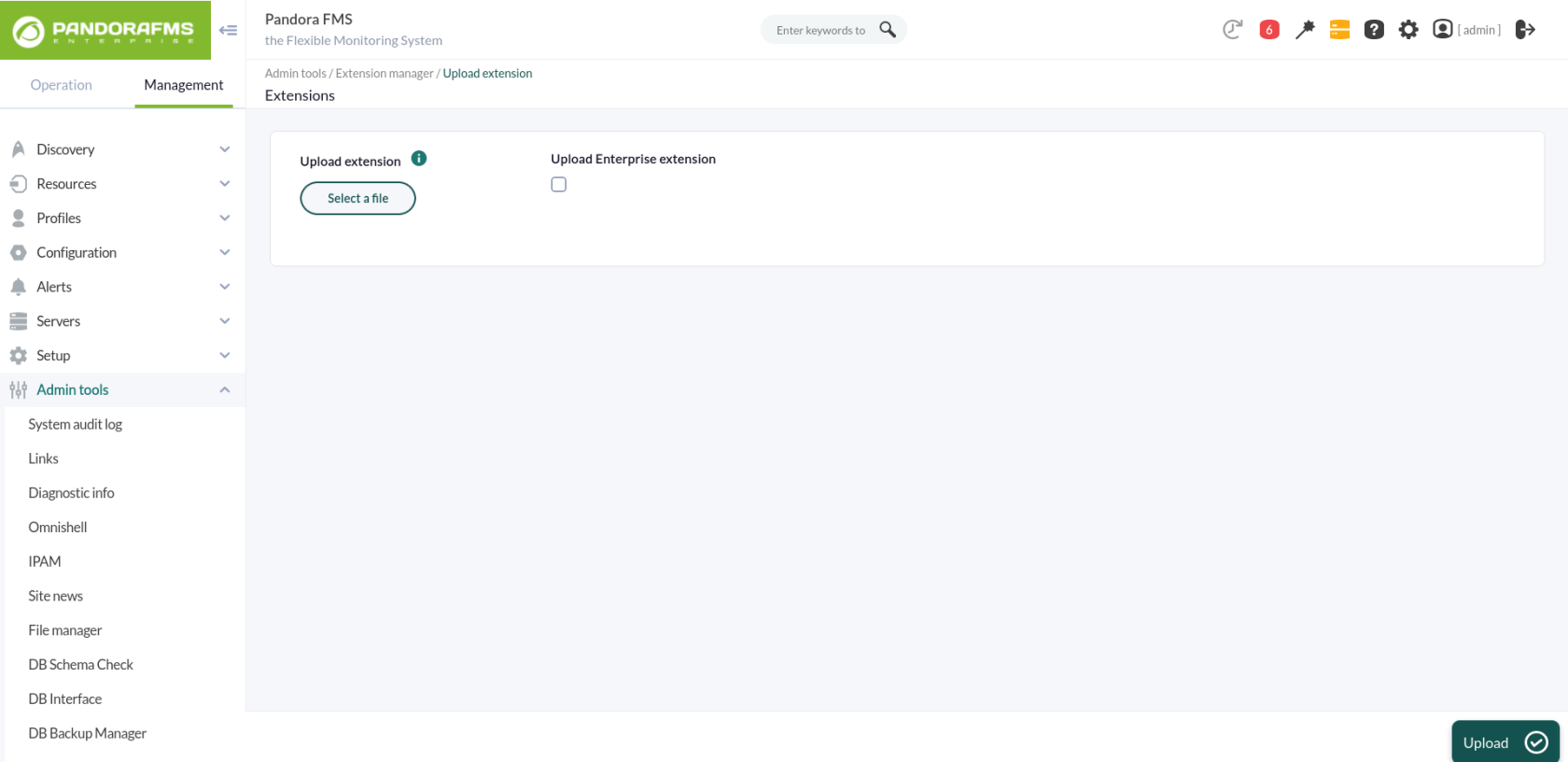
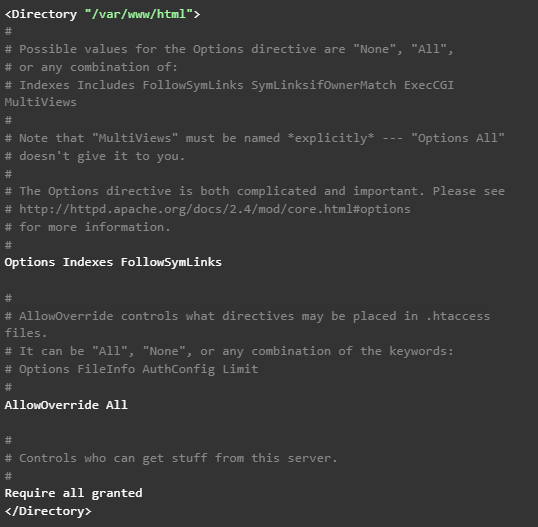
First of all, start in your Pandora FMS console the extension that will allow you to obtain the data to be represented in Grafana dashboards. To that end, just download the ZIP package that you may find in your library and upload it to Pandora FMS console from the menu: Admin tools > Extension manager > Extension uploader: It is important not to check the “Upload enterprise extension” option. In short, these steps basically locate the contents of the ZIP file in the extensions directory of Pandora FMS console, which will lead to the directory being created: /var/www/html/pandora_console/extensions/grafana If, as in this case, the installation is based on a Pandora FMS ISO, it will also be necessary to modify a configuration parameter of the Apache server. Just edit the file /etc/httpd/conf/httpd.conf, and set the parameter “AllowOverride none” as “AllowOverride All”, within the directives of the block ‘’ since that is where Pandora FMS console is located. Therefore, it should be this way: Also add a parameter in the PHP settings. Add the following line at the end of the file /etc/php.ini: serialize_precision = -1 And for these changes to go into effect, the Apache service must be restarted:
2. Loading Pandora FMS plugin for Grafana

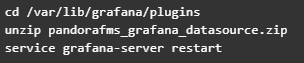
Upload the ZIP file to the Grafana server with all the plugin files and place it in the path “/var/lib/grafana/plugins”. Unzip the file on this path with the “unzip” command and restart the Grafana service to load it:

3. Configuring Pandora FMS as data source for Grafana dashboards

Add the following lines to the end of the Grafana configuration file (/etc/grafana/grafana.ini): After this change is applied, the Grafana service must be restarted using the following command: service grafana-server restart At this point, what you have to do is configure the plugin uploaded in Grafana so that it connects to the extension loaded in Pandora FMS and allows you to use its data in Grafana dashboards. Access the “Configuration > Datasources” menu in Grafana and click on the “Add datasource” button: You will see different plugins that you may configure, and at the bottom of the list, you will see the plugin that you just loaded for Pandora FMS. Click on it: This will take you to a form where you only need to fill out 3 fields for the connection with the Pandora FMS extension:

  • URL to the extension, which according to the suggestion we will see will be (by default) “http://x.x.x.x/pandora_console/extensions/grafana”, where “xxxx” is the IP address or DNS name to your Pandora FMS console.
  • Pandora FMS user, which will allow you to obtain data for Grafana dashboards. This user must have at least agent read permissions (AR) and can only obtain data from those agents on which it has permissions.
  • Pandora FMS user password.
With these fields completed, you may click on “Save & Test ” to verify the operation of your new data source:

What happens if it does not work properly?

In configuration you might see different errors, such as:
  • HTTP Error Bad Gateway → If Grafana could not connect to Pandora FMS or if the indicated IP address was incorrect.
  • HTTP Error Not Found → If the indicated URL was not correct, for example because Pandora FMS extension was not correctly loaded or just because of an error when typing in the URL in the form.
  • Datasource connection error: Unauthorized → If the user and/or password indicated were not correct or if the user did not have the minimum agent read permissions (AR).

Create your first Dashboard in Grafana

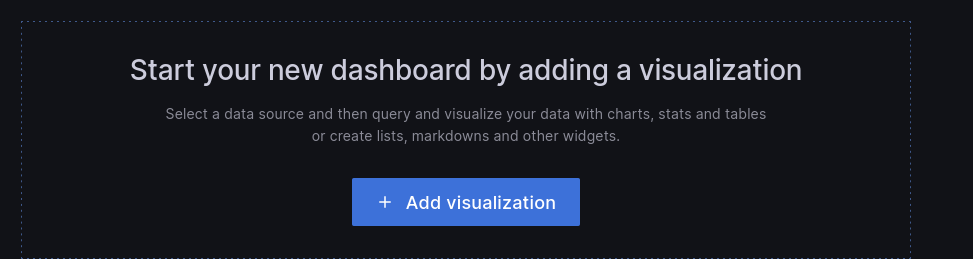
First, go to the “Create > Dashboard” menu, and in the board that will appear, click “Add query”: This will take you to a form where to choose your “Pandora FMS” data source in the “Query” drop-down. This will make the bottom of the form change and you will see a query to choose a module from which to display the data on the board:
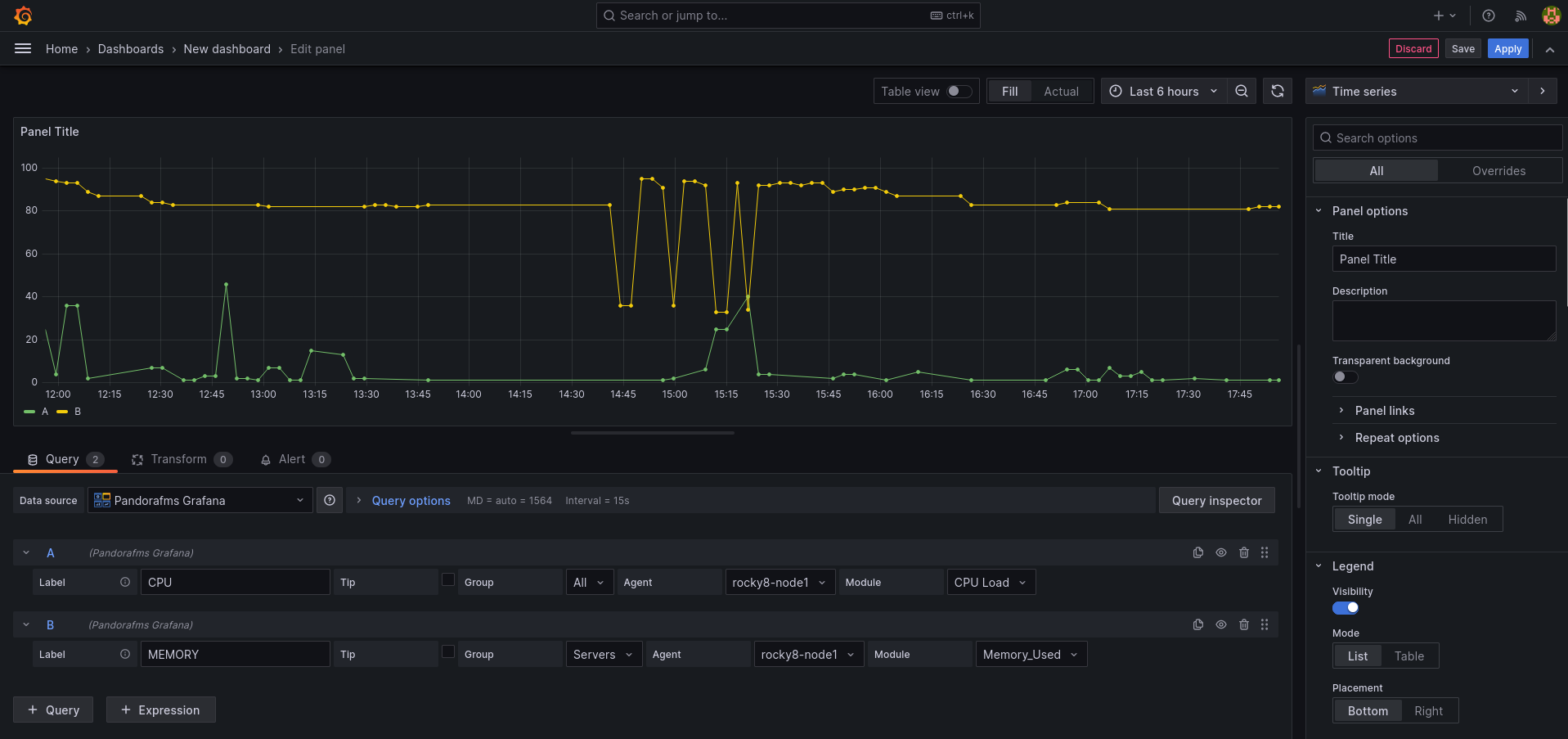
  • Label: It will allow you to specify the tag that you wish for the data represented for this query to have.
  • Group: It is used to filter the agent about which to represent data. A group must be chosen.
  • Agent: It is used to filter the module about which to represent data. Some agent must be indicated.
  • Module: It is used to specify exactly the module about which to represent data.
  • TIP: It is a field that will allow to indicate whether the data to be represented will be compacted or not. If unchecked, the data will be compacted, which will result in easier-to-interpret and faster-loading graphs, although the data sample will not be the actual one but rather an average.
And once done, there you have your Pandora FMS data in Grafana. You may include more than one query in the same board, which allows you to compare data from different modules: And you may also add more boards within the same Grafana dashboard, so that you have all the necessary information on the same screen.
Create your first alarm in Grafana

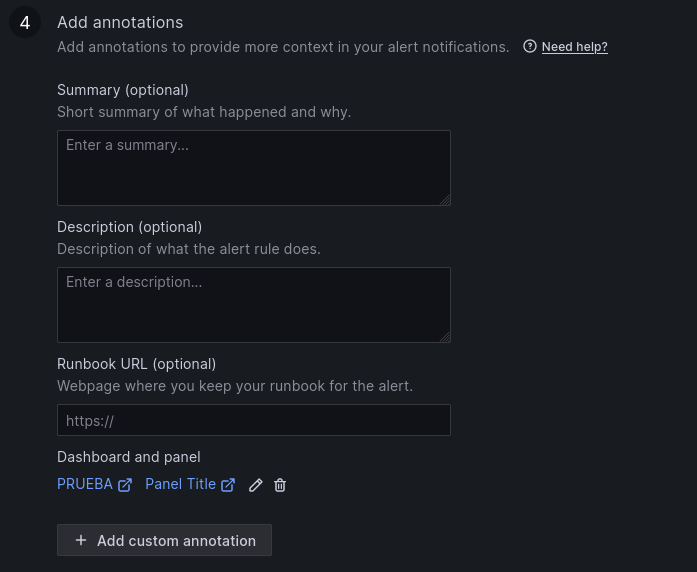
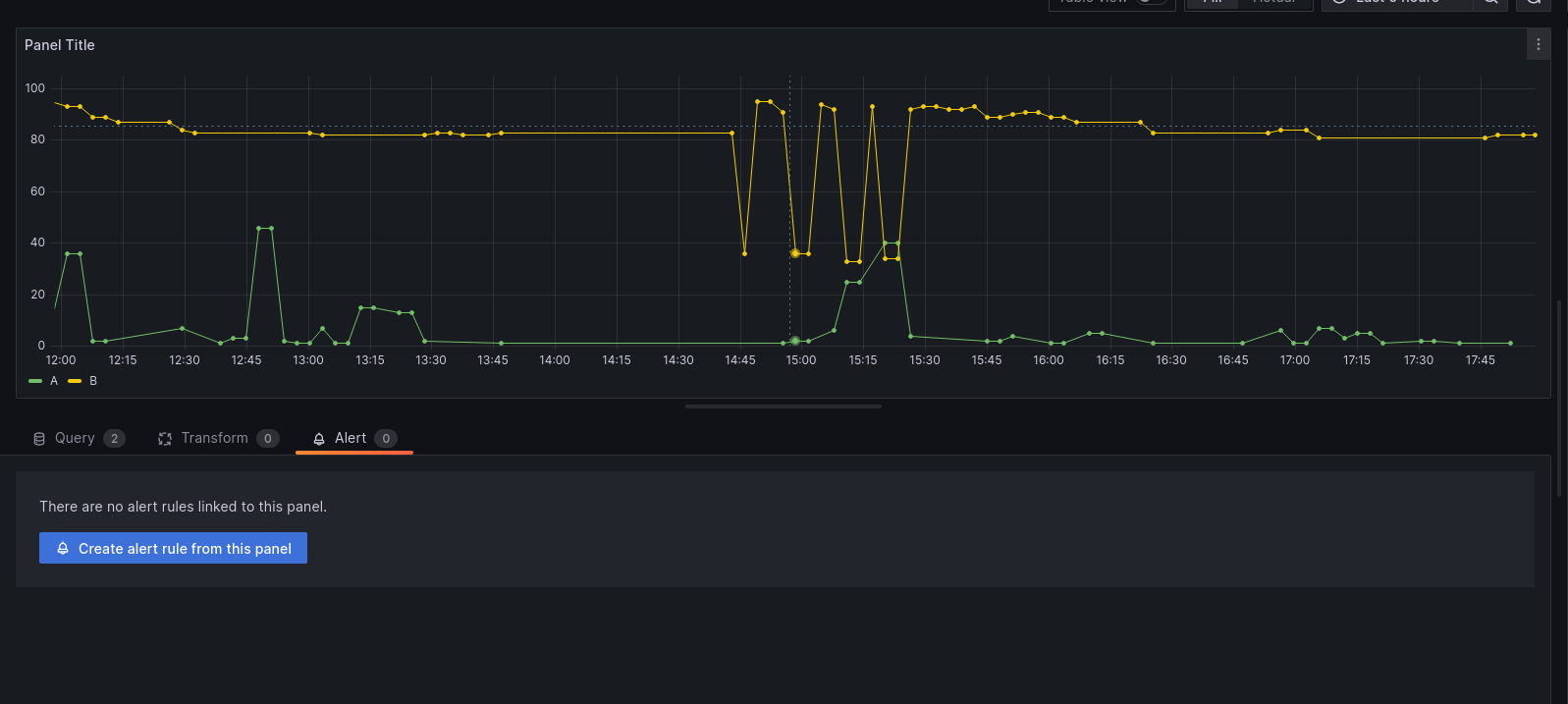
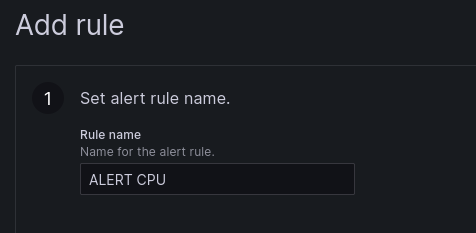
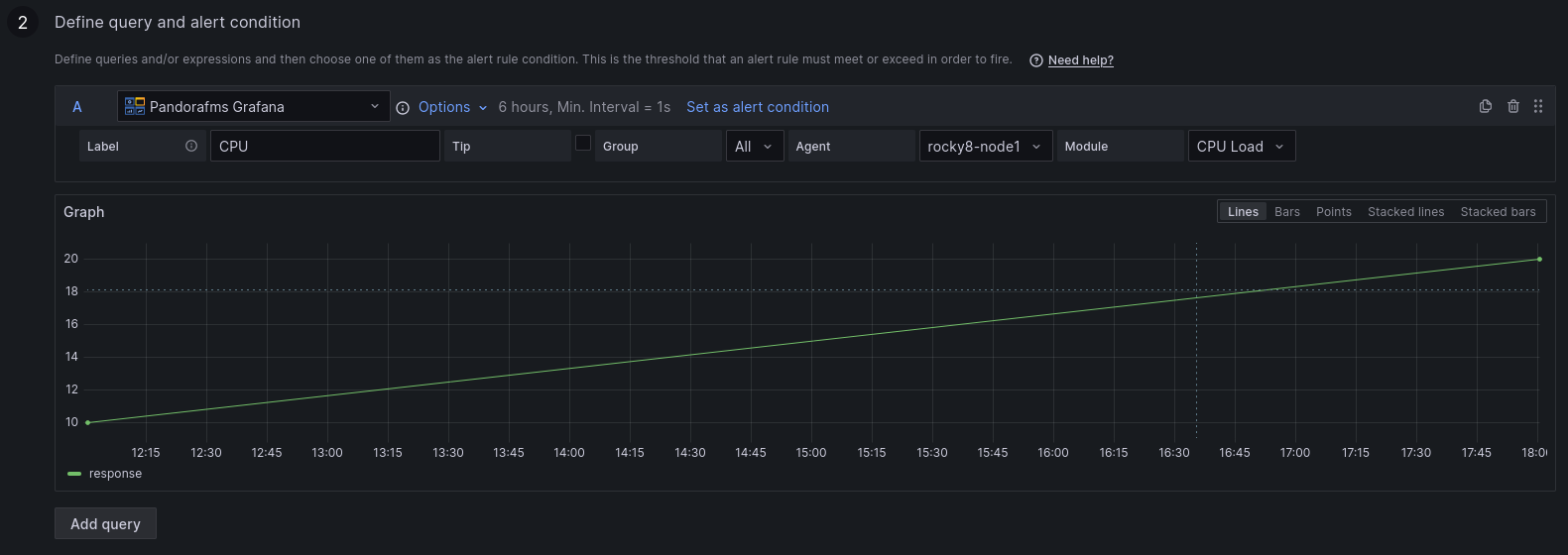
You may create an alert from the “Alert” menu, in the dashboard display (once the Dashboard is saved). In this menu, adjust a few rules to configure your alert: 1 . Set the name of the alert rule. 2. Define the query and the alert condition. 3. Establish alert evaluation behavior. 4. Add notes. 5. Set up notifications. Once the alert is configured and saved, you may see it in the dashboard:


About Version 2 Limited
Version 2 Digital is one of the most dynamic IT companies in Asia. The company distributes a wide range of IT products across various areas including cyber security, cloud, data protection, end points, infrastructures, system monitoring, storage, networking, business productivity and communication products.

Through an extensive network of channels, point of sales, resellers, and partnership companies, Version 2 offers quality products and services which are highly acclaimed in the market. Its customers cover a wide spectrum which include Global 1000 enterprises, regional listed companies, different vertical industries, public utilities, Government, a vast number of successful SMEs, and consumers in various Asian cities.

About PandoraFMS
Pandora FMS is a flexible monitoring system, capable of monitoring devices, infrastructures, applications, services and business processes.
Of course, one of the things that Pandora FMS can control is the hard disks of your computers.

What is GLPI?

GLPI is a free IT Service Management (ITSM) solution that allows you to manage assets, incidents and requests within an organization. It works as an incident tracking and service desk system, optimizing technical support and technological resources.

It also includes hardware and software inventory, contracts and licenses, offering a centralized view of the whole infrastructure. Its intuitive web interface and customization options ensure flexibility and scalability for businesses of any size.


What does it bring to your company?

  • IT asset management.
  • Follow-up and troubleshooting.
  • Technical support optimization.
  • Scalability: adaptable to companies of any size.

GLPI is ideal for organizations looking to improve the management of their technology resources, automate processes and optimize IT service management.


All the advantages of GLPI together with Pandora FMS

GLPI has an integration in Pandora FMS that some customers are already enjoying.

With it you may automate ticket creation, for which you may use a plugin that you may find in the library . This plugin allows integrating Pandora alerting of ticket creation in your GLPI environment through the rest API available to the service.

Each time an alert is executed and triggers the plugin, it opens a ticket in GLPI with information about the module that triggered the alert: agent, module data, IP address, timestamp and description of the module, with a title for the ticket, category, assignment group and priority, which may vary depending on the alert action.

Running the plugin with its parameters, in a configurable time interval, allows you to automate the whole process of creating a ticket that would normally be performed by a user. It is necessary to use credentials to authenticate with your environment (username and password or a token, which must be generated beforehand). The plugin configuration allows you to specify a title, description, priority, category, group, type of query. In addition, it will check whether there is already a ticket created with these features so that in case it is already created, it is only necessary to add its corresponding follow-up.

The plugin makes use of a parameter called “–recovery” that sets two different paths in its execution. If used, the plugin will check the status of the specified ticket and if it is not closed add a comment on it, if it is closed, it will not do anything else. If it is not used, the performance will be the same, but it will change if the ticket is closed or does not exist. If closed, it will create a new ticket. If it does not exist, it will create the ticket if there is a computer with the same name as the agent specified with the “–agent_name” parameter.

The plugin does not need additional dependencies for its use, since these are already incorporated. But it is necessary for in the GLPI environment to have rest api enabled, since the plugin makes use of it for ticket creation.

For that, access, in your GLPI environment, Setup → General

The “Enable Rest API” option must be enabled.
From that menu you may also enable whether you want to be able to authenticate with credentials, with tokens or both.

Once done, it will be possible to use the plugin, for that, it will be necessary to configure an alert command. By creating alert commands, you may specify and automate ticket creation.

This can be done from the alerts menu, in commands:

Enter a name, group, and the command, using as values for the parameters the macro _fieldx _, where x is the number of the parameter (they do not distinguish any order, each macro just needs to have a different number).

Once configured, you may configure the macro value below in the description fields.


About Version 2 Limited
Version 2 Digital is one of the most dynamic IT companies in Asia. The company distributes a wide range of IT products across various areas including cyber security, cloud, data protection, end points, infrastructures, system monitoring, storage, networking, business productivity and communication products.

Through an extensive network of channels, point of sales, resellers, and partnership companies, Version 2 offers quality products and services which are highly acclaimed in the market. Its customers cover a wide spectrum which include Global 1000 enterprises, regional listed companies, different vertical industries, public utilities, Government, a vast number of successful SMEs, and consumers in various Asian cities.

About PandoraFMS
Pandora FMS is a flexible monitoring system, capable of monitoring devices, infrastructures, applications, services and business processes.
Of course, one of the things that Pandora FMS can control is the hard disks of your computers.

How KPIs Help Us Monitor and Optimize Business Performance

Any IT strategist must keep in mind the business goal, so that their technology initiatives are aimed at delivering, rather than services and infrastructure, the added value of reliability and optimal performance that makes them achieve business goals and be more competitive. Read on to understand what KPIs are and how they help us with proper business management.


Definition of KPIs

According to Techopedia, un KPI (Key performance indicators) can be anything that an organization identifies as an important factor for the business. Under the principle that “if something is not measured, it is not improved”, a KPI measures results and, from there, if something deserves your attention, take actions to correct, improve and optimize. If your company is in retail, a KPI can be delivery times; in other companies, the sales close rate can be an extremely important KPI.
This means that even though KPI is a business-oriented term, IT strategists need to know what they are and what they are used for in business intelligence.

Examples of KPIs

Importance of KPIs in Business Management

KPIs help us measure progress, identify potential problems, and make decisions. To that end, KPIs must be defined according to a business management framework, with these features:

  • Be quantitatively and qualitatively measurable.
  • Have a goal related to the business.
  • Identify and solve variables in the organization.

To define IT KPIs, first you must understand business goals to align them with the business; then you may define business and type KPIs (financial, operational, sales, IT, etc.). With this, KPIs are written and monitored in real time and periodically.

How tools like Pandora FMS transform real-time KPI monitoring

Being able to measure the business with indicators ensures visibility on business performance, seeking to achieve objectives to be met and even exceeded. With Pandora FMS, it is possible to define custom dashboards with graphs and summaries, for monitoring KPIs in real time.

Example: User Experience (UX) Monitoring

Information centralization allows you to get the same display, streamlining communication and collaboration in your IT team. We invite you to learn about a success story in logistics by applying KPIs, by clicking on this link.

What are KPIs?

Understanding what KPIs are allows you to define them and know how to interpret them for the success of a functional area of the organization and their contribution to the overall success of the organization.

Concept of KPIs as measurable indicators

KPIs are the measures that have been selected to have visibility on organizational performance and are the basis for decision-making aimed at obtaining the expected results. KPIs are monitored and presented on dashboards to understand progress or alerts on an implemented strategy.

Difference between KPIs and general metrics

Even though KPIs and metrics measure performance, there are differences in their concept: KPIs are quantifiable measures to measure performance or progress on key goals for the organization and work as measurable benchmarks for long-term objectives. While metrics are quantifiable measures, they are used for specific business processes at operational level and in the short term.

Relationship between KPIs and the control panels offered by Pandora FMS

In Pandora FMS, from a single platform, you may have graphical interfaces that show KPIs in a visual, intuitive and organized way. You may display real-time data, analyze trends, make informed decisions, and take timely action. Each dashboard may be customized with charts, tables, and other visuals that represent KPIs. That allows KPIs to provide the essential metrics, while dashboards are an accessible and understandable way to visualize and analyze those metrics.

Pandora FMS Dashboard

Types of most common KPIs

One thing we recommend is to consider the best practices of each industry, as they help you identify the possible KPIs applicable to your organization, based on available data and constant monitoring. Some of the most common KPIs are:

  • Financial:
    • In sales, customer acquisition cost (CAC) measures the total cost of acquiring a new customer, including all expenses related to marketing and sales initiatives.
    • The profit margin is used to measure the amount of profit a company makes for each weight earned. This KPI reveals the amount of profit a business may retrieve from its total sales.
    • Cash flow evaluates the company’s ability to generate liquidity, which in turn reflects that it can pay the debts closest to expiration and also allows it to have a sufficient cash margin for possible defaults.
  • Operations:
    • The supply cycle time evaluates the average time from the generation of a purchase order to product reception.
    • Inventory turnover rate measures the number of times inventory is renewed in a defined period.
  • From IT:
    • Network uptime refers to the amount of time an IT infrastructure is operational and accessible. It is one of the most critical for IT management, as it has a direct impact on business productivity and efficiency.
    • Response time is what it takes for an IT team to respond to an incident, from the moment it is reported until it is identified and solved.

How Pandora FMS allows you to configure alerts and see these KPIs in a single dashboard

Pandora FMS platform is conceived to be able to configure alerts and display KPIs in the same dashboard efficiently and intuitively. To do so, the following steps should be followed:

    • alertswill be triggered. This may include incorrect values of a module, specific events, or

SNMP

    • .
    • Choose actions: Configures the actions that will be performed when an alert is triggered, such as sending an email, running a script, or logging an event.
    • Create commands: Defines the commands that will be run on Pandora FMS server when alerts are triggered. You may use macros to customize the parameters of these commands.
    • Assign groups: Define which commands are assigned to specific alert groups.


Once done, widgets (which are GUI elements, graphical user interface, or a small application that can display information and/or interact with the user) are added to the dashboard to display the KPIs you wish to monitor. You may include charts, tables, and other visuals. After adding them, widgets are customized to display the specific data you need, adjusting formatting, time intervals, and other parameters. Also, the dashboard is configured to be updated in real time, allowing KPI remote and continuous monitoring.

How to select the right KPIs

For KPIs to be effective, those that are truly aligned with the organization’s objectives must be appropriately selected. For that, implement KPIs that follow the same line as the company’s goals and strategic objectives.
As we said before, KPIs must add value to the organization, so it is important to know the strategic objectives and goals of your company (or the objectives of a strategic project) in order to define which KPIs make sense, since they must reflect progress towards that goal and its objectives. For example, if you have a manufacturing and distribution company, you should consider the KPIs we mentioned before, such as supply cycle time, inventory turnover rate, as well as production efficiency (percentage of productive time on the production line), total operating costs, delivery fulfillment, among others.

Practical example: selecting KPIs in a managed environment with Pandora FMS

The company Conferma, a provider of virtual payment technology in 193 countries, gives us an example of a selection of KPIs managed with Pandora FMS. For this company, the Confirmation Liquidation Platform (PLC) is fundamental, since it is the engine of reconciliation and liquidation. Monitoring was inefficient and time-consuming, considering multiple database servers, firewalls, load stabilizers, hardware security modules, virtual platforms, and web servers. Real-time display of data and processes was also required. By implementing Pandora FMS, it was possible to have tailor-made software and key database information to define the KPIs and dashboard to inform employees about the current performance metrics of the Conferma business platform, in addition to real-time automation of key performance statistics.

Tools to monitor and analyze KPIs

In management indicator monitoring, business intelligence and artificial intelligence turn out to be powerful tools to streamline the display and analysis of KPI performance, in addition to being able to automate corrective and even preventive tasks, which in sum makes the work of the IT team more efficient and quicker.

Importance of automation and display in KPI management

When leveraging automation for KPI management, data collection and analysis saves valuable time and avoids human error, and real-time insights are always critical in the up-to-date performance view. Automation also contributes to consistency through standardized and clear processes for everyone.
As for display, charts and dashboards are intuitive and clear knowledge material for everyone. Collaboration and communication are streamlined when we all have the same version of what is happening, allowing us to work in a more synchronized and effective way; and, of course, decision-making is done in a timely manner and is based on consistent and reliable information.

Pandora FMS-specific features

Pandora FMS has the capabilities to support your team in real-time display and monitoring of KPIs, such as:

  • Custom dashboard setup is a Pandora FMS feature that allows each user to build their own monitoring page. You may add more than one page, and in there you may add monitoring maps, graphs and status summaries, among other elements.
  • Remote and real-time monitoring, from the same platform, provides a detailed and updated real-time inventory of servers, network hardware, installed software packages, users, routers, etc. In addition, it offers real-time graphics for troubleshooting and performance monitoring. Also, APIs and remote monitoring are of great value for analyzing the state of the infrastructure and networks for a better response from your team.
  • Custom and detailed report generation to evaluate performance, and even from different areas, such as support, time management and projects. Custom reports can also be created with SQL queries. In addition, reports may be presented in different formats, such as HTML or PDF, and then automatically emailed to your customers.

Example of Pandora FMS report on SLA

Practical example of KPIs and their impact

To be clear about the impact of adopting KPIs, what better than a case study of implementing KPIs in a company that uses Pandora FMS:
At Salvesen Logística, logistics operator for food manufacturers and distributors. A tool was required that not only measured technical indicators such as performance, CPU, memory, etc., but also intelligence based on User Experience and business indicators. A probe programmed to simulate user behavior was implemented and every few minutes transactions are made on probes scheduled to emulate user behavior, at the same time transactions are made on the main global IT services for Salvesen customers. This comprehensive monitoring of key KPIs (such as order management, receptions, dispatches) allows you to maintain the expected service levels, in addition to being able to anticipate possible problems before they take place.

Obtained results: Reduced response times and improved SLAs. With Pandora FMS, transactional monitoring of the business has been implemented, reproducing the full cycle through which a message goes by, from when it leaves the customer, until it reaches our mailbox (Office 365, EDI, AS2, FTP, etc.). Pandora FMS has also been integrated with Salvesen’s WMS (Warehouse Management Service) and TMS (Transport Management System) platforms.

The main benefits have been:

  • Early alarms and proactivity management: detection of all service levels before it affects operations, allowing early reaction to tackle the issue, along with an automatic communication system with the employees or customers using template-based alarms (via email or SMS).
  • SLA management for comprehensive quality control of Salvesen Global IT Services. An executive report may be created for the management committee and senior management of the company. Also, SLA management allows you to have the information to be able to negotiate a contract renewal with a supplier.
  • Reduction of the operational load, saving 24% in the operational load of the IT area that previously had to do specific health checks, being able to focus on improvements in products and services for customers.

Conclusion

Business areas are clear about their initiatives and will be influencing decisions about IT initiatives that are aligned with the organization’s goal. You and your team must clearly define the IT KPIs that add value to the company, relying on tools with real-time information and in an intuitive way, in addition to taking advantage of business intelligence capabilities and automation that ensure the timely response of your team.
We invite you to rely on Pandora FMS to optimize monitoring, analysis and decision-making based on KPIs, by:

  • Automatic data collection from multiple sources, such as servers, applications and networks.
  • Alert and notification management, configuring automatic alerts to receive notifications in real time when problems or significant changes in KPIs are detected.
  • APIs to integrate business processes and automate configuration, notification and process management.

Reach out to our team of consultants to help you define KPIs and intuitive dashboard you and your team require.


About Version 2 Limited
Version 2 Digital is one of the most dynamic IT companies in Asia. The company distributes a wide range of IT products across various areas including cyber security, cloud, data protection, end points, infrastructures, system monitoring, storage, networking, business productivity and communication products.

Through an extensive network of channels, point of sales, resellers, and partnership companies, Version 2 offers quality products and services which are highly acclaimed in the market. Its customers cover a wide spectrum which include Global 1000 enterprises, regional listed companies, different vertical industries, public utilities, Government, a vast number of successful SMEs, and consumers in various Asian cities.

About PandoraFMS
Pandora FMS is a flexible monitoring system, capable of monitoring devices, infrastructures, applications, services and business processes.
Of course, one of the things that Pandora FMS can control is the hard disks of your computers.

Our “Wrapped-Up” 2024: Pandora FMS advances and accomplishments that marked the year

If Spotify can do its annual wrap-up, so can we! It is true that you will not discover your musical evolution this 2024, but you will be able to check all the advantages that one more year are added to the Pandora FMS portfolio and thereby improve your business operations.

2024 has been a transformational year for Pandora FMS, marked by significant advances and a clear focus on our customers’ global needs. We have strengthened our position as a leader in monitoring and observability, expanding our offering with key functionalities that integrate security into IT management.

One of the most important milestones this year was the launch of Pandora SIEM, a solution that enables organizations to integrate cybersecurity into their daily monitoring strategy, proactively detecting and mitigating threats. This development reinforces our commitment to providing tools that go beyond traditional monitoring, helping our customers manage complex environments with complete confidence.

Pandora SIEM allows you to centrally visualize threats, identify those that are most critical, and ensure they are addressed by the right people. This streamlined approach simplifies threat management and safeguards your infrastructure.

We have also continued to improve our remote management solution (RMM), which is key for distributed environments, optimizing the monitoring and control of critical infrastructures. This tool adopts a global infrastructure visibility approach and establishes a preventive instead of being merely a reactive maintenance model, for example by automating tasks, which ultimately contributes to greater security and SLA compliance. This effort is reflected in the four new versions of ITSM released this year, each designed to respond to the changing demands of our users and ensure maximum flexibility in managing their systems. In addition, the integration of Pandora ITSM with Pandora FMS allows our users to unify ticket management from the Pandora FMS console.

Our results speak for themselves: more than 2,000 tickets managed with a remarkably positive satisfaction rate, and a total of 1,700 tickets under development processed, reflecting the continuous work of our team to perfect our solutions. Each new release has been made possible by a fully optimized development process, which this year has been radically transformed to achieve even higher performance.

Throughout the year, we also strengthened our international presence, standing out as a leading solution in more than 30 key categories on platforms such as G2, where we obtained an average rating of 4.5/5. Our commitment to innovation and flexibility has been recognized by customers in markets around the world, from large corporations to medium-sized companies, who value our ability to adapt to multiple technology needs.

Looking ahead to 2025, we are poised to continue to innovate and expand our capabilities. Our goal is clear: to provide even more robust solutions and remain the trusted technology partner for organizations in any industry, anywhere in the world. To this end, we intend to continue adding functionalities to Pandora SIEM, such as filters or advanced reports; as well as internal auditing to Pandora RMM. We will also continue to explore the limits of monitoring, including user activity monitoring. 

About Version 2 Limited
Version 2 Digital is one of the most dynamic IT companies in Asia. The company distributes a wide range of IT products across various areas including cyber security, cloud, data protection, end points, infrastructures, system monitoring, storage, networking, business productivity and communication products.

Through an extensive network of channels, point of sales, resellers, and partnership companies, Version 2 offers quality products and services which are highly acclaimed in the market. Its customers cover a wide spectrum which include Global 1000 enterprises, regional listed companies, different vertical industries, public utilities, Government, a vast number of successful SMEs, and consumers in various Asian cities.

About PandoraFMS
Pandora FMS is a flexible monitoring system, capable of monitoring devices, infrastructures, applications, services and business processes.
Of course, one of the things that Pandora FMS can control is the hard disks of your computers.

SMART goals: What they are and how to apply them in IT projects

What are SMART goals and why are they important in IT?

Whether in personal or professional life, goals always set a direction for where you wish to go, in addition to defining the guidelines with which to reach that desired end. In addition, awareness and motivation are generated about the actions that are carried out, which allows us to focus our energies and efforts. It is also important to consider that, in order to achieve the goals, a clear path is needed on how to get there, since, without clear goals, it is like shooting into the air blindly and very likely to generate frustration. Hence, defining objectives is to improve the productivity of your IT team, with communication and motivation. To structure the objectives, the S.M.A.R.T. Methodology is recommended, which refers to the acronym of Specific (Specific), Measurable (Measurable), Achievable (Achievable), Relevant (Relevant) and Time-based (Time Defined or Temporary).

As we will see later, creating SMART objectives in IT involves defining five aspects that help to concentrate and re-evaluate initiatives as necessary. These consider that clear and measurable objectives will help you plan objectives and implement improvements in IT project management, promoting planned and predictive monitoring, IT management and the productivity of your employees to generate a resilient and reliable technology infrastructure and services, which guarantee a better experience for users and the organization as a whole.

Breakdown of SMART Goals into IT Projects

If you do not consider all the SMART aspects, you may be setting goals for monitoring and optimizing IT systems and resources, but not effectively defining them in a plan to achieve them. That is why you must be clear about each of these five aspects, which we summarize below:

  • Specific: Here we refer to the goal being clearly articulated, so that everyone on your team understands it and is in tune. You must define what will be achieved and what actions must be taken to achieve that goal. Objectives should be detailed to the extent necessary for key IT components, such as server and network availability percentages. You may ask yourself questions such as the following: for what purpose? and, what do you wish to achieve?
  • Measurable: Objectives must be quantifiable in order to track progress. You need to define what data will be used to measure the goal and establish a collection method. In this case, you must define the KPIs or metrics, such as those you defined in the management of SLA, SLI or SLO, in order to track progress towards the desired objectives. The questions you may ask yourself could be: what indicators or factors tell us if we are achieving it?
  • Achievable: Any goal must be realistic in order to maintain the enthusiasm to try to achieve it. You may need to set goals in stages, to go from step to step and not try to climb a one-jump ladder. Keep in mind that you should avoid overloading IT and human resources. If the goal is not feasible at the moment, you may need to increase resources first to have a chance to succeed. You may first need to set a SMART goal on obtaining the resources before defining another goal. Questions you might want to ask yourself include: What does it take to achieve this, and do you have the resources to do so?
  • Relevant: Objectives must be aligned with the strategic and operational needs of the company. What we mean is that you do nott set goals just as an exercise. One way to determine whether the goal is relevant is to define the key benefit to the organization, such as improving customer service, accelerating disaster recovery, etc. The corresponding questions are: does it contribute to the organization’s goal?, who does it impact?, why is it important?
  • Time-bound: Goals should have a deadline to maintain focus and productivity. That is because a goal without a deadline does not do much to identify whether the attempt was successful or failed. We also mean that, from success or lack of it, you may set new goals. That is why it is important to set deadlines on goals. The questions you can ask yourself are: what is the deadline to achieve it? Or are there dates for some stages of the project?

To be clearer about how to apply this methodology, we will see below some examples of SMART objectives, taking into account each of their elements.

Practical Examples of SMART Goals in IT

Here are some examples of SMART goals in IT management to know how to define and write them, considering their five elements in a table to make it clearer:

    • SMART goal to improve server response time.

      Specific

      Measurable

      Achievable

      Relevant

      Time-bound

      Reduce the response time of web servers

      Decrease the average response time from 500 ms to 200 ms.

      Improve server and content delivery network (CDN) configuration.

      Improve user experience and increase customer satisfaction.

      Achieve a reduction in server response time within 6 months.

      How to draft it:
      Reduce the response time of web servers from 500 ms to 200 ms, through improvements in server configuration and in the content distribution network, in order to create a better user and customer experience within 6 months.

    • SMART goal to reduce downtime of critical applications.

      Specific

      Measurable

      Achievable

      Relevant

      Time-bound

      Reduce downtime of critical applications.

      Reduce downtime from 5 hours per month to less than 1 hour per month.

      Implement a 24/7 monitoring system, perform regular preventive maintenance and set up a quick incident response protocol.

      Ensure continuous availability of critical applications to maintain productivity and customer satisfaction.

      Achieve reduced downtime of critical applications within 3 months.

      How to draft it:
      Reduce critical application downtime from 5 hours to less than 1 hour per month by implementing system and application monitoring on a 24/7 basis, regular preventive maintenance, and quick incident response protocols to ensure availability, productivity, and customer satisfaction within 3 months.

    • SMART goal for optimizing network capacity in distributed environments.

      Specific

      Measurable

      Achievable

      Relevant

      Time-bound

      Optimize network capacity in distributed environments.

      Increase network capacity by 30% and reduce latency by 20%.

      Implement load balancing technologies, improve network infrastructure and use advanced monitoring tools.

      Ensure optimal performance and high availability of services in distributed environments.

      Achieve network capacity improvements within 4 months.

      How to draft it:
      Optimize network capacity in distributed environments in 4 months, by increasing network capacity by 30% and reducing latency by 20%, implementing load balancing technologies (such as content distribution network, adoption of MPLS, traffic prioritization), improvements in the network infrastructure and the use of advanced monitoring tools, to ensure optimal performance and high availability of services in distributed environments.

Benefits of SMART Goals

When you have set SMART goals, you may get clear benefits for yourself and your IT management team:

      • Improvements in communication through clarity about what you wish to achieve and how to achieve it.
      • When measured, it can be improved, without subjectivity. Progress can be monitored, in addition to establishing accountability mechanisms and even incentives.
      • Increase in confidence and frustration prevention thanks to the achievable nature of the goals.
      • Commitment of the team to achieve goals within a defined time frame, generating a sense of prioritization and responsibility.

And something very important is the relevance of the objectives, seeking that they are always aligned with the goals of the organization, generating a positive and tangible impact for the business.

Disadvantages or, Rather, Considerations about SMART Goals

You always have to see the other side of the coin to avoid some frustration when implementing a methodology. Therefore, we recommend that you consider the following:

      • Avoid the lack of flexibility. There may be limitations for specific aspects that prevent you from exploring options outside the methodology. You must be able to adapt to changing conditions. It is perfectly fine to readjust goals.
      • Excessive focus on results. It is true that SMART goals focus on the final results. This may lead to frustration if immediate success is not achieved. Focus on learning along the way.
      • Not using intuition. Although SMART goals are written in order to maintain a plan, do not neglect intuition. Trust what your instincts and experience can complement what you have written down in your SMART goals.

And there are not only SMART goals but also SMARTER ones

Evaluation and Review have been added to the SMART elements, becoming S.M.A.R.T.E.R. goals , where E.R. refer to:

      • Evaluation: Goals must be periodically evaluated on their progress in order to be able to make the necessary adjustments.
      • Review: Goals need to be continually reviewed to ensure they remain relevant and achievable, especially when we know business conditions are changing and therefore IT initiatives need to be synchronized to those needs.

As you may see, by incorporating evaluation and review into SMART goals, we seek to ensure continuous evaluation and adaptation, while maintaining focus and long-term improvements.

Conclusion: How SMART goals improve IT projects

Adopting the SMART goals methodology helps optimize IT monitoring projects, as it allows IT staff to look towards the same objectives, improving communication about what and how they want to achieve in an objective, measurable and reliable way, in addition to establishing a joint commitment. The ultimate goal of this type of objective is to generate a relevant impact for the business and its customers.
Pandora FMS recommends approaching its consultants to find out how to carry out the SMART objectives based on a comprehensive and intuitive solution for system monitoring and observability, as well as those of each of their components and their services. For example, Pandora FMS has the capabilities to detect the factors that impact user experience.


About PandoraFMS
Pandora FMS is a flexible monitoring system, capable of monitoring devices, infrastructures, applications, services and business processes.
Of course, one of the things that Pandora FMS can control is the hard disks of your computers.

About Version 2 Limited
Version 2 Digital is one of the most dynamic IT companies in Asia. The company distributes a wide range of IT products across various areas including cyber security, cloud, data protection, end points, infrastructures, system monitoring, storage, networking, business productivity and communication products.

Through an extensive network of channels, point of sales, resellers, and partnership companies, Version 2 offers quality products and services which are highly acclaimed in the market. Its customers cover a wide spectrum which include Global 1000 enterprises, regional listed companies, different vertical industries, public utilities, Government, a vast number of successful SMEs, and consumers in various Asian cities.

How to Optimize MPLS Network Monitoring to Improve Performance and SLAs

Introduction to MPLS and its Relevance in Business Networks


What is MPLS? 

In the IT infrastructure serving increasingly digitized enterprises, the criticality of network quality of service is more than evident to ensure connectivity to everyone at any time. System and network administrators need to understand which technology enables efficient, reliable, and lowest latency data transmission between IT applications and services. That’s why we’re introducing the MPLS method (Multiprotocol Label Switching), which refers to “switching” or multiprotocol label switching (circuit-switched networks and packet-switched networks). That is because MPLS integrates network link information (bandwidth, latency, network usage) with IP (Internet ProtocolInternet Protocol) within a particular system (an ISP, Internet Service Provider) to simplify and improve IP packet exchange. Unlike traditional, IP-based networks, MPLS uses a tag system to manage traffic on the network more quickly and effectively.

Importance of MPLS in Network Infrastructures for Businesses Seeking to Reduce Latency and Improve Reliability

For a comprehensive resilient connectivity strategy, the value of MPLS lies in the ability to assist operators in the proper management of network resources, from tags, to divert and route traffic flexibly and according to business needs, achieving greater speed and reducing latency, while avoiding link failures, network congestion and bottleneck generation.

Advantages of MPLS for IT Infrastructures

As we have seen, the primary goal of MPLS is to significantly simplify routing and improve overall network performance.

Among its advantages, there are the following:

  • Improvement in Quality of Service (QoS)
    From a QoS perspective, ISPs help manage different types of data flows based on priority and service plan. For example, there are different needs for a business area with a premium service plan or that receives a large amount of streaming (or high-bandwidth) multimedia content, and may experience latency in the network service. When entering packets into an MPLS network, Label Edge Routers (LER) assign a label or identifier that contains information based on the routing table input (i.e. destination, bandwidth, latency, and other metrics) and references the IP header field (source IP address), the socket number information and the differentiated service. Each core router uses tags to determine the most efficient path to its destination. That is, switching is being performed based on labels and their priority, so that data packets move throughout the network accurately and quickly. It should be noted that QoS metrics include parameters such as bandwidth, delay, jitter, packet loss, availability, and reliability, which reflect network features and performance, as well as traffic. What’s relevant about this is that MPLS supports QoS mechanisms that prioritize critical traffic, ensuring that high-priority applications benefit from bandwidth optimization and low latency.
  • SLA Compliance in Distributed Networks
    In service management, compliance with the commitments set out in a Service Level Agreement (SLA) must be monitored. By using MPLS, it is possible to ensure network performance by enabling the creation of dedicated paths for data packets. This ensures that network performance metrics (latency, jitter, and packet loss) are implemented consistently. MPLS networks are also designed with redundancy and failover capabilities, which improve network reliability and uptime. The sum of this ensures that network operability remains operational and meets the availability targets specified in the SLAs.
  • Bandwidth Usage Efficiency and Traffic Prioritization
    MPLS networks provide strong tools for monitoring and managing network performance, as tags are used to route packets through the network. Each package is assigned a label that states its path and priority. Compared to traditional routing, MPLS is more efficient as it allows traffic engineering to be implemented, helping network operators optimize data flow through the network. By controlling the paths that data packets take, MPLS can avoid congestion and ensure that high-priority traffic is delivered efficiently. MPLS also allows adopting (CoS, Class of service), which is a parameter used in data and voice protocols, critical for many business applications. This is because MPLS helps to classify and manage traffic based on predefined classes of service, according to their criticality and the level of service required. For that reason, service providers may address issues more proactively with MPLS and even easily scale to accommodate growing network demands without compromising network performance.

MPLS vs. emerging technologies such as SD-WAN

When it comes to network management, as experts say, the choice between MPLS, SD-WAN, and emerging technologies should be based on the specific needs and context of the organization.

Comparison between MPLS and SD-WAN

To be able to compare these methods, we must first consider that software-defined wide area networks (SD-WAN) use virtualization technology to apply the advantages of software-defined networks, unlike traditional networks, which are hardware-based and router-centric to direct traffic across a wide area network (WAN). SD-WAN leverages network connectivity to improve application performance, accelerate productivity, and simplify network management. Typically, SD-WAN devices are usually connected to multiple network links to ensure resilience to a potential outage or degradation of service from a provider’s network. What you do have to keep in mind is that SD-WAN is not necessarily subject to compliance and service levels (SLAs).

On the other hand, MPLS, as we explained before, sends packets on predetermined network routes, avoiding connection to the public Internet and providing a greater guarantee of reliability and performance for the corporate WAN service. In addition, MPLS Service Level Agreements (SLAs) ensure a certain level of performance and uptime. Therefore, MPLS is a recommended method for organizations that need high reliability, low latency and Quality of Service (QoS) for critical applications, although its implementation cost is higher and less flexible than SD-WAN. This is because MPLS requires dedicated circuits between each location, which has its science and can take considerable time to add or remove locations from the network.

To clarify the differences, we added this table:

SD-WANMPLS

Offers a more predictable cost model with fixed pricing.

The cost is usually based on bandwidth usage.

It delivers good performance by leveraging multiple transport links and smart traffic management.

It offers increased reliability and performance, particularly for latency-sensitive applications such as VoIP and video conferencing.

It can be easily integrated with cloud-based applications and services, which can be ideal for quickly-expanding organizations or for those that have a distributed workforce.

Dedicated circuits are required between network destinations, so making changes is not as agile and can take your time and cost to make.

It offers advanced security features (example: encryption and micro-segmentation) that may enhance network security and protect against cyber threats.

It generally relies on physical security measures, such as private circuits and dedicated lines to protect network traffic.

Potentially lower reliability than MPLS, particularly for latency sensitive applications.

High reliability, especially for applications that are highly sensitive to latency and performance.

How SD-WAN and MPLS can complement each other

Now that we are clear about the difference between SD-WAN and MPLS, we must also consider that both methods do not compete with each other, but can be complemented by the following:

  • Profitability: SD-WAN can leverage lower-cost broadband Internet connections together with MPLS, reducing overall network costs while maintaining high network performance for critical applications.
  • Network Performance: MPLS provides reliable, low-latency connections for mission-critical applications, while SD-WAN can route less critical traffic over broadband or other available connections. Both methods together optimizes bandwidth usage.
  • Redundancy and reliability: Combining MPLS and SD-WAN offers greater redundancy. If an MPLS link fails, SD-WAN can automatically redirect traffic through alternate paths. This ensures steady connectivity.
  • Scalability: By means of SD-WAN, your team can simplify the onboarding of new sites and connections. With MPLS you may manage high priority traffic, leaving the rest to be managed with SD-WAN. With that, you will be implementing scalability and flexibility to adapt to business needs.
  • Security: Using SD-WAN, your IT and security employees can take advantage of the fact that it is common for it to include integrated security features (encryption and firewalls) that can complement the MPLS security strategy, as you would be adding an additional protection layer.

Also, MPLS combined with emerging technologies such as Artificial Intelligence, can offer significant improvements in network management and optimization by optimizing network traffic, detecting anomalies, automating tasks to manage networks, among others.

As you can see, your team can leverage the strengths of both methods and emerging technologies to achieve a more efficient, reliable, and cost-effective network.

How Pandora FMS monitors MPLS networks

Pandora FMS features to monitor MPLS network traffic

Pandora FMS is a flexible and scalable monitoring solution that offers multiple specific features to monitor MPLS (Multiprotocol Label Switching) networks. The main features that make this monitoring available are detailed below:

  • Bandwidth and Traffic Monitoring:
    • SNMP (Simple Network Management Protocol): Pandora FMS uses SNMP to collect real-time data on bandwidth usage and traffic from MPLS network interfaces.
    • NetFlow and sFlow: These technologies allow detailed analysis of traffic flow, identifying patterns and possible bottlenecks in the MPLS network.
  • Latency and Packet Loss Monitoring:
    • Ping and Traceroute Tests: Pandora FMS runs these tests periodically to measure latency and detect packet loss on MPLS paths.
    • Round-Trip Time Monitoring: Continuous evaluation of the time it takes for packages to travel from the source to the destination and vice versa.
  • Service Level Agreements (SLA) Management:
    • Custom Alerts: Alert configuration based on compliance with the SLAs defined for the MPLS network, ensuring that any deviation is detected and managed immediately.
    • Compliance Reports: Generation of detailed reports that show the degree of compliance with SLAs, rendering informed decision making easier.
  • Display and Dashboards:
    • Custom Dashboards: Pandora FMS allows you to create specific dashboards for MPLS networks, showing key metrics such as bandwidth usage, latency, and packet loss.
    • Interactive Network Maps: Graphic display of the MPLS network topology, facilitating quick identification of critical points and potential problems.
  • Integration with Network Management Tools:
    • APIs and Webhooks: Integration with other management and automation tools, allowing fast and coordinated responses to incidents in MPLS networks.
    • Compatibility with Security Protocols: It ensures that monitoring is performed securely, protecting sensitive data on the MPLS network.

Examples of how to ensure Quality of Service and SLA optimization

Ensuring Quality of Service (QoS) and optimizing SLAs is critical to maintain efficient and reliable MPLS networks. Pandora FMS offers several features that make this process easier:

  • Traffic Priority:
    • Traffic Classification: By using defined rules, Pandora FMS can identify and prioritize critical traffic types (such as VoIP or real-time applications) over less latency-sensitive ones.
    • Bandwidth Allocation: Dynamic adjustment of the bandwidth allocated to different types of traffic to ensure that priority applications always have the necessary resources.
  • Proactive SLA Monitoring:
    • Real-Time Alerts: Setting up alerts to notify the IT team when SLA indicators (such as availability or response time) fall below agreed levels.
    • Trend Analysis: Evaluation of history data to identify trends that may affect future SLAs, allowing for preventive adjustments in MPLS network configuration.
  • Path Optimization:
    • Traffic and Performance Analysis: By using data collected by Pandora FMS, sub-optimal paths may be identified and MPLS routing reconfigured to improve overall network performance.
    • Load Distribution: Equal distribution of traffic between different MPLS routes to avoid overloads and improve bandwidth usage efficiency.
  • SLA Detailed Reports:
    • Custom Reports: Creation of reports showing compliance with SLAs at specific intervals, providing a clear view of MPLS network performance.
    • Incident Analysis: Documentation of incidents that affected SLAs, making the identification of root causes and the implementation of corrective measures easier.

Use cases of MPLS featuring Pandora FMS

Pandora FMS (Flexible Monitoring System) can be effectively used with MPLS in multiple scenarios to improve network monitoring and management:

  • Centralized System Monitoring: Pandora FMS can monitor multiple sites connected through MPLS from a central location. That is because from devices, data can be collected automatically from remote sources (for example, Telemetry) and then transmitted to a central location (in Pandora FMS panel) where they are analyzed for system and network monitoring and control. In business ecosystems, telemetry is critical to managing and managing IT infrastructure. This configuration enables comprehensive monitoring of network performance, ensuring that all MPLS links work optimally.
  • Performance Tracking: By integrating with MPLS, Pandora FMS can track network performance metrics such as latency, jitter, and packet loss. This helps maintain Quality of Service (QoS) and ensure that critical applications receive the necessary bandwidth.
  • Fault detection and resolution: Pandora FMS detects faults in MPLS networks and generates alerts in real time. This allows your team to identify and solve issues quickly and efficiently, minimizing downtime and maintaining network reliability.
  • Traffic Analysis: With Pandora FMS, you may analyze patterns in MPLS link traffic. This helps analyze bandwidth usage, prevent bottlenecks, and optimize traffic flow.
  • Scalability: Pandora FMS, from a single console, offers the ability to monitor MPLS networks at large scale, especially for organizations with very extensive and complex network infrastructures.
  • Implementation of monitoring solutions and detection of security problems: Pandora FMS can monitor the security aspects of MPLS networks, ensuring that it remains safe and, in the event of a potential threat, issues are quickly identified and addressed.

Conclusion

Without a doubt, those in charge of networks must design a true management strategy, relying on emerging methodologies and technologies to meet the need for efficient, reliable data transmission with the lowest possible latency, while avoiding link failures, network congestion and bottleneck generation. MPLS is a methodology, that, when combined with Pandora FMS, can help your team implement mechanisms to prioritize critical traffic for high-priority applications, which demand optimal bandwidth and low latency. Additionally, the advantages of MPLS can be combined with those of SD-WAN to address potential issues more proactively and even scale flexibly to fit business needs.

That is, with Pandora FMS the three main advantages of MPLS in network monitoring are promoted:

  • Quality of Service Improvement. MPLS supports QoS mechanisms to prioritize critical traffic. Pandora FMS can identify and prioritize critical traffic types over less latency-sensitive ones. From a console, you may measure bandwidth and network consumption in real time to ensure Quality of Service.
  • SLA Compliance in Distributed Networks. Dedicated paths for data packets can be created using MPLS. This ensures that network performance metrics (latency, jitter, and packet loss) are implemented consistently. With Pandora FMS you may configure alerts to notify IT staff when any SLA indicator is below the agreed levels.
  • Bandwidth Usage Efficiency and Traffic Prioritization. Compared to traditional routing, MPLS is more efficient because it can control and prioritize routes for data packets. Pandora FMS can help you identify sub-optimal paths and reconfigure MPLS routing to improve overall network performance.

About PandoraFMS
Pandora FMS is a flexible monitoring system, capable of monitoring devices, infrastructures, applications, services and business processes.
Of course, one of the things that Pandora FMS can control is the hard disks of your computers.

About Version 2 Limited
Version 2 Digital is one of the most dynamic IT companies in Asia. The company distributes a wide range of IT products across various areas including cyber security, cloud, data protection, end points, infrastructures, system monitoring, storage, networking, business productivity and communication products.

Through an extensive network of channels, point of sales, resellers, and partnership companies, Version 2 offers quality products and services which are highly acclaimed in the market. Its customers cover a wide spectrum which include Global 1000 enterprises, regional listed companies, different vertical industries, public utilities, Government, a vast number of successful SMEs, and consumers in various Asian cities.