Skip to content

runZero’s week at RSA 2023: killer robots, time machines, and natural disasters

It might sound funny, but these were a few talking points that came up last week during runZero’s two hosted fireside chats, where CEO and Co-Founder Chris Kirsch sat down with Lares CEO Chris Nickerson on Tuesday and then Fortinet Systems Engineer Roger Rustad on Wednesday.

If you’ve had the pleasure of hearing Chris Nickerson tell his pentesting “war stories,” you might already know some of the references here. But for first-time listeners, these narratives cover the potential dangers of a red team member’s (mis)adventures, and the role of asset inventory from an attacker’s perspective. As for natural disasters and time machines, our talk with Roger elaborated on his work with the Information Technology Disaster Resource Center (ITDRC), as well as his view on how runZero’s solution has been helpful to the incident response and forensics teams at Fortinet.

Chris Nickerson Recap

The first fireside chat began over margaritas as Chris Nickerson (CN) joined Chris Kirsch (CK) on stage at our pop-up venue, the runZero Cafe, on Tuesday, April 25. Their chat covered:

  • Why the recon phase is an important stage in pentesting
  • The human element (and fallibility) of IT and security
  • What tools Chris Nickerson uses in his pentesting

And sprinkled humorously throughout the dialogue were moments from Nickerson’s past exploits, including welding people to cars with killer robots.

Specifically, CN talked about how recon (for attackers) and asset inventory (for defenders) are two sides of the same coin. In answer to why the recon phase is important, he noted,


Video transcription

CN: “First off, right, Karate Kid Rule. Man can’t see, man can’t fight. Same exact words for any attacker. I can see things that you can’t see. Good luck. And if that’s what I’m looking for, right, I’m trying to find those lapses in visibility.”

“So in general, right, when you’re thinking about making a process in testing, it’s not always like the voodoo magic and you just sprinkle your hacker dust and then magically like you win. It’s a bunch of really crappy work.”

“It takes a ton of time and you have to have a lot of process into it, it’s not just a hit a button, hope that it expands to find the things. You have to catalog every single thing that you see and be able to start to index and understand this information and what starts to emerge is patterns, right.”

“You start to see, oh, this is kind of where all the old stuff lives; this is where some cool, new stuff lives, this is where some I have no idea what this is. That might be interesting at some point. You might find names. You start to find, you know, indexed pieces of not only networking infrastructure, but I mean, engineers are good. They have naming conventions so that when somebody is like, hey, they want you to steal financial records, it’s like D-E-N, Denver, F-I-N, financial, and then like a bunch of numbers and you’re like, oh it’s probably this server you know, like.”

“So as you start to get yourself familiar, it’s more about situational awareness to figure out what you’re going to do in forward operation then it is go find a vulnerability, scan for something, exploit it, you know, move on to offense success, It’s really about that process of getting that total view of the landscape because you kind of can’t make plays on the field unless you know where the boundaries are.”

In answer to what tools he’s using:


Video transcription

CK: “So how do you, how do you go about that? When you go on a pentest, what are your tools to figure out what’s there, information for your pentest…”

CN: “So obviously lots of things, right? Because we have a great relationship being able to use runZero in that capacity, I think it’s great, especially in massive networks. Because what you find is, you know, in a smaller network I can get a relatively high degree of success, if I’m just using basic, you know, nmap engines and I’m going to be able to find, you know, the scripts that I’m using to to be able to pull information.”

“You don’t get that rich bit of information. right? I know that the host is up, I know that these ports are open. I can probably go grab banners, but now I have to like grep through a bunch of shitty text files. And it’s not super useful. Whereas if all those things are indexed, they are in a searchable database, you have ways to look at that information.”

“It’s now what’s there, what’s available, what’s running, what version is it running? What other things can I start to collect and find out about that box?”

When it comes to testing more fragile environments, CN delved into the problem of legacy technologies lacking resiliency, and the importance of not only understanding the environment as a pentester, but also ensuring companies know what’s on their networks, including “what’s old and going to misbehave.”

As an example of misbehaving machines, here’s CN’s killer robot story:


Video transcription

CN: “We were working on manufacturing facilities, right? And the robotic welding arm things, right? Cool robots are just tech world stuff. Their TCP/IP stack was awful. And it’s, like, I don’t know, somebody from the eighties built it. And it’s just half-open connections that make it harder for people. And I say that like in the most loving way, because like I portscanned it just started !@#$!@#, and just started shooting welds in the air going like this and I was like, ohhh shit, you know, like, I guess I didn’t know but like the…”

CK: “Just to be clear, this wasn’t with runZero?”

CN: “No, no, no, no. No, this is bad scripts that, Chris, again 24 times unsafe, 25th time unsafe. I was like try three and it was now trying to kill people. So again, you know, like those types of tools, whether it’s like the idiot guard for me, which, probably need it more often, especially now that I’m older, but but being able to understand and how you can interrogate a box safely is it’s the hardest thing of testing because if you’re wrong, you’re really wrong.”

“Like it’s a super super bad moment because the whole thing that you’re like, oh, I found the one box that I can compromise. Oh, yeah. Just turned it offline. That’s it, start over, like two weeks of work gone.”

While many companies understand how critical asset inventory is, they still face challenges when trying to implement it; they often lack the knowledge and resources to do it effectively. However, CN points out that if you have the proper tools, you can avoid making tragic mistakes:


Video transcription

CK: “Here’s the thing that kills me, you know like, for a lot of that infrastructure. OT and also like the ERP system and those kinds of things, it’s like it’s both, this is absolutely critical for the business to survive, and this is so fragile and you can’t touch it and never touch it. These two things don’t makes sense to me.”

CN: “But this this is but this is where I appreciate the approach that’s been taken with runZero because they think that not not only are we looking at this like central source of truth and system of record, but the idea that the logic is built in for the grouping and for some of those things starts to create that that map of of where severity could be without having to get into them, you know, robots killing people.”

Yes, getting those parameters is important, and luckily, runZero can give you that right out of the box.

As a final note on the importance of asset management, CN told us:


Video transcription

CN: “I’ve also worked in a lot of other enterprises and consulted all over the planet, and everybody’s trying to change stuff in their network. Well, if I can just come in and give you an inventory. But let’s say, I mean, even if I’m a tester or I just run the network or I’m part of ops in engineering, if if what I can do is come back because you hired this, like, whatever some $4 billion consulting company to come in and like, upgrade your SAP system, they’re going to be like, oh, give a map of everything and the people who run it will give them the maps of like a couple of interfaces and then everything else won’t be there.”

“But if you can add value to go back and go, oh, this is absolutely every single thing that we have that as a SAP vendors, be able to group them, be able to categorize them, be able to explain to them that like, well, this one was from the 90s, this one was from the 2000s, all of them don’t follow the naming conventions, half of these aren’t in DNS.”

“Like you’re now making a graceful transition, which is huge because being a consultant, like the worst problem is information right? And if you can do that, you can give them accurate inventory, like they might actually get the job done on time. Probably never on cost, but at least quickly.”

So happy hunting to you, Chris! And many thanks for your entertaining insights on asset inventory from an attacker’s perspective.

Roger Rustad Recap

During Roger and Chris’s fireside chat, we heard about Roger’s journey in finding an asset management solution both for Fortinet and the volunteer group the Information Technology Disaster Resource Center (ITDRC).


Video transcription

CK: “Now for asset inventory. I think you, well, you brought in runZero, that’s why you’re here. But can you tell us a little bit about how you were doing asset inventory before you brought in runZero?”

RR: “I think probably the easiest way to put it is very poorly. We leveraged a lot of open source tools, mainly the command line tools, you know, nmap and mass scan are kind of something we use regularly. And we went through a lot of logs manually, you know, to go back and try to find things. I think that became very laborious. And doing our threat hunting sessions one time we had to kick off an nmap scan that was going to take forever. One of us said there’s got to be a better way than this. and so we started Googling and found you guys and here we find ourselves today.”

Roger elaborated that other methods and solutions involved waiting for results, and interpreting the data – even though there was often consensus on his team, sometimes the interpretations got lost in translation when presented to other teams.

As Roger and his team looked to find different approaches to the problem, they looked at attack surface management solutions. Unfortunately, many of these tools require agents or APIs, and because Fortinet is more of a hacker culture internally, they preferred command line tools. They wanted to start there and wanted something that started there, too. He noted that runZero’s agentless solution made it very easy for his team to get a quick 30,000 ft view and then trim it appropriately.

As for first steps on how they began their runZero journey, Roger stated,


Video transcription

RR: “Literally, we just downloaded it and played with it. Each one of us ran it in our home network and we were just amazed at what it found. You know, we liked the fact that you can export everything straight into nmap format or XML format or interact with the API. I think that made it really easy. Then it was really just kind of figuring out how we were going to start implementing it internally.”

Once they had runZero up and running, Roger provided some insight into how the solution has been helpful in specific use cases:


Video transcription

RR: “Yes. So oftentimes we need to find an owner of an asset. I mean, everyone has the challenge of on certain networks finding owners is difficult. The extra information that we can look through or see who maybe was on that IP first. You know, I don’t think of runZero so much as an asset tool but sometimes as a time machine where we can go back and see who was on that network or on that device at a particular time. That’s been incredibly helpful for our incident response and our forensics team.”

CK: “How do you, give me an example of when you have an incident that you are investigating, how would you leverage runZero in that respect?”

RR: “So there could be a time in which we saw that a certain IP, let’s say, certificate on an IP, we could see what the certificate was. We could then pull that certificate and pivot across and see who else had that certificate.”

“I think when it comes to our FortiGates, we can tell by that type of certificate what version it is, what this may be running, and then that’s helped as we’ve gone through and patched certain things. Just seeing them, getting more details. But even the web page itself, being able to get a screenshot on that web page has been really helpful with runZero.”

We’re so glad we could help you at Fortinet, Roger, but we’re also happy to help with your work at ITDRC. This volunteer group is a nonprofit that builds IT solutions in areas affected by disasters, with no cost to the communities using these solutions. Roger explained that a lot of the work involves setting up simple connectivity, including setting up satellites and access points so first responders, shelters, kitchens, and churches can have access to their networks.

How does runZero help the ITDRC?


Video transcription

RR: “And runZero has been really good for helping us kind of figure out what’s on the network before we put stuff on, once we put stuff on. We often forget where we put stuff because as you can imagine, asset inventory is a bigger pain in the butt. Whenever you’re, you know, it’s a volunteer thing at the end of your day that you’re not keeping good tabs on.”

And for how the ITDRC plans to use runZero in the future:


Video transcription

CK: “When you think about how you want to mature and evolve that, looking to the future for disaster relief, etc., how are you planning to use runZero in the future?”

RR: “So I think, you know, one thing we’re starting to see is, as we start to partner with bigger companies like ZPE and other companies, we’re starting to leverage edge compute devices a lot more.”

“So the fact that runZero can run on such a tiny footprint becomes really helpful in figuring out what else has been added or taken off of the network. As we start to at some of these sites, do things like check the fuel levels of the generator or check the voltage level of the battery, we can do all that right off of runZero console access.”

“So as we start to do those things, it just makes sense to just throw a container on it, just see what else is on the network and it might be compromising. So I think when we talk about security for a lot of our other projects, you know, the CIA triad, the one we’re most concerned about is availability. The others don’t matter so much, and we kind of see runZero being really helpful for just making sure things are up and we know what else is running on the networks that we kind of throw out spontaneously.”

With all of the work that Roger does, we’re so happy that we can take off some of the strain in both his day-to-day job and volunteering. Thank you, Roger, for chatting with us during RSA!

RSA Venue Recap

In summary, the runZero team had a great time at our venue during the RSA conference, and we were grateful we could host these informative discussions with Roger Rustad and Chris Nickerson. We were also glad we could welcome many other cybersecurity professionals throughout the week to join us for drinks, tacos, digital caricatures, and faraday bag giveaways.

If we were lucky enough to see you at the venue, thank you for stopping by! We hope you had a wonderful time. And if we missed you during RSA week, we’d love to catch you at Black Hat in August. Feel free to shoot us a message if you’d like to coordinate a meeting at our Mandalay Bay suite!

Either way, if you are interested in learning more about how runZero can help your company with cyber asset management, please let us know by reaching out via our contact us form.

Build your asset inventory in minutes

Sign up for a free account to get started.

Try runZero now

Learn more about runZero

About Version 2 Limited
Version 2 Digital is one of the most dynamic IT companies in Asia. The company distributes a wide range of IT products across various areas including cyber security, cloud, data protection, end points, infrastructures, system monitoring, storage, networking, business productivity and communication products.

Through an extensive network of channels, point of sales, resellers, and partnership companies, Version 2 offers quality products and services which are highly acclaimed in the market. Its customers cover a wide spectrum which include Global 1000 enterprises, regional listed companies, different vertical industries, public utilities, Government, a vast number of successful SMEs, and consumers in various Asian cities.

About runZero
runZero, a network discovery and asset inventory solution, was founded in 2018 by HD Moore, the creator of Metasploit. HD envisioned a modern active discovery solution that could find and identify everything on a network–without credentials. As a security researcher and penetration tester, he often employed benign ways to get information leaks and piece them together to build device profiles. Eventually, this work led him to leverage applied research and the discovery techniques developed for security and penetration testing to create runZero.

runZero 3.8: Identify and triage your riskiest assets, track goals, identify even more things, and delete your password

What’s new with runZero 3.8?

Identify and triage risky assets

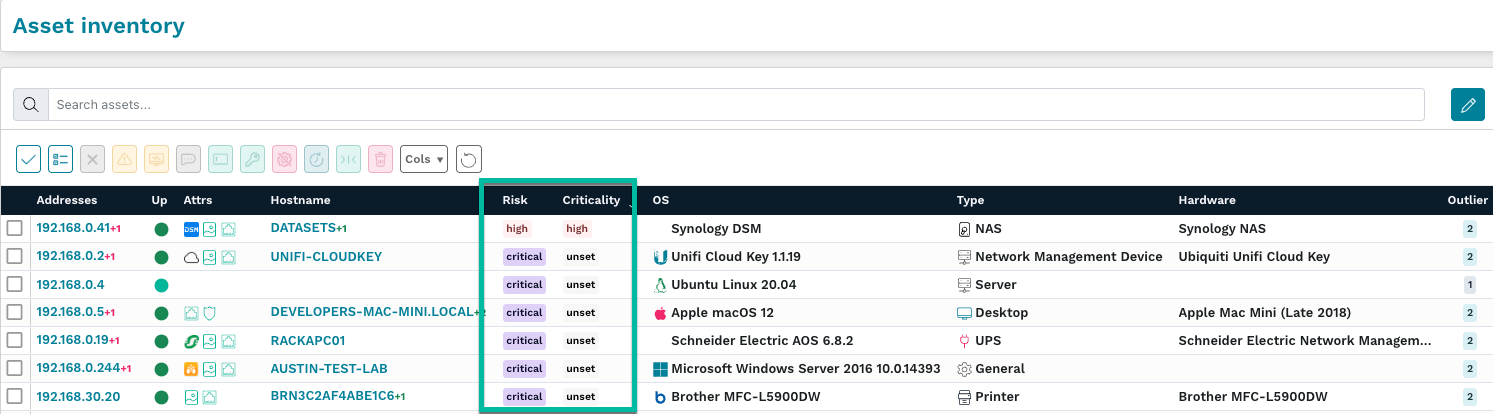
runZero customers can now identify risky assets across their environment and assign them to users for triage and remediation. Asset risk and criticality are presented as new fields in the inventory that can be used for both queries and alerts. The asset risk field is automatically set to the highest risk level of associated vulnerabilities; this data can be sourced from third-party vulnerability management imports as well as runZero queries. Asset risk can be overridden individually in the asset detail page or by applying a new risk level to assets matching a query. In addition to the changes above, a new Asset risk report is now available, which summarizes asset risk across each level of criticality.

The 3.8.0 release includes 34 new queries that automatically apply vulnerability records to matching assets. These queries are shown in the screenshot below and the full list can be found at the end of this post.

Although the new runZero queries are focused on unintended exposure, any query can be used to associate vulnerabilities to the corresponding asset, which also updates the asset risk level, and ties into the Security Ownership model for triage.

These queries can run against the assets, services, software, and vulnerability inventories. If you are importing software inventory through an integration, you can now create a query that automatically associates a vulnerability with assets with specific software installed.

As an example, if you would like to identify and remove all instances of Photoshop in your environment, create a new software query for name:photoshop, enable the new vulnerability association setting, and provide a unique vulnerability ID for the query. On the next update, a new vulnerability will be associated with every matching asset, and these vulnerabilities can be assigned through the console.

Queries can also be used to prioritize existing vulnerabilities. To add a critical finding when a low-risk vulnerability is reported on an asset with a public IP address, create a new vulnerability inventory query using the public:true asset filter, add additional conditions for the specific vulnerabilities that you would like to match, provide a unique vulnerability ID, and finally set the risk to Critical. On the next update, any assets with the specified vulnerabilities will have an additional critical risk finding attached if they also have a public IP address.

Users can find a list of assigned assets in the asset and vulnerability inventory pages by clicking their owner name in the inventory table or by viewing their user detail page under Your Team > Users.

Once a vulnerability has been remediated, the next update will remove the vulnerability from the asset and update the risk of the associated asset. Risky asset triage and query-based vulnerability associations are available to all runZero Professional and runZero Enterprise users.

Public preview of goal tracking

Measuring progress toward your security and organizational goals can be challenging and difficult to communicate to leadership. With the introduction of goals, runZero customers can set time-bound and query-driven goals that are customizable to what matters most to your team. Goals can be used with new features like asset risk as well as existing features like asset ownership. If you can query for it in runZero, it can now be a goal!

Some examples of goals could include:

  • Managing expiring TLS certificates
  • Remediating critical risk vulnerabilities on assets within a set timeframe
  • Keeping insecure management services off external networks

This feature is in a public preview and we would love your feedback via email or through the in-product support form.

Protocol improvements

The default TCP port list has grown to almost 600 ports (from ~500) for better coverage. Protocol support has been added for Brother’s proprietary scanner protocol, allowing us to identify Brother scanners or Brother multi-function devices that include a scanner. SNMP enumeration is more configurable through the disable-bulk-walk and max-repetitions settings in the advanced scan configuration. Protocol detection has also been improved for TNS Listener and Android Debug Bridge services.

New and improved fingerprints

New fingerprints were added for products by Advantech, Amazon, Apache, ASUSTeK, AV Costar, Avaya, AVM, Bosch, Canon, Canonical, Cisco, Citrix, Codonics, Cognosys, CostarHD, Cradlepoint, Cubic Transportation Systems, DataDirect Networks, Dahua, Daktronics, Datamax, Debian, Dell, DigitalOcean, Eaton, Econolite, EnGenius, Entrust, EVGA, ExaGrid, F5, Fortinet, Getinge, Glenayre, Grandstream, HP, HPE, Huawei, iCAD, Kali, LAVA, March Networks, Microsoft, Moen, MSI, MultiTech, Multitone, Netgear, Oce, Okidata, OpenLogic, The Ottawa Hospital Cancer Center, Palo Alto Networks, Panasonic, PaperCut, Proxim, Prusa, Qualys, Red Hat, RICOH, The Royal Marsden NHS Foundation Trust, Saulmatics, Schneider Electric, Somfy, Sonos, SUSE, Ubiquiti, VMware, and ZTE.

Other research improvements

We published a Rapid Response post and new query for finding servers running the PaperCut MF and ND software.

In addition to the above protocol and fingerprinting improvements, we improved our normalization of x509 certificate issuer and subject values, allowing us to more consistently apply fingerprints regardless of ordering/formatting variants found in the field or due to tech stacks.

Passwordless logins

We don’t want your password.

From the beginning, runZero has supported single sign (SSO) for all users, including the free Starter Edition. From this version (3.8.0) of runZero onward we now support using a one-time authentication link in addition to any configured MFA token.

This feature is no less secure than an email-based password reset and prevents runZero from storing even the hashed and encrypted passwords on our servers. If you are unable to set up SSO, using passwordless logins with a WebAuthn token is the next best thing.

See runZero 3.8 in action

Watch the video to see a demonstration of the newest features in runZero, including asset risk and criticality, goal tracking, and applying vulnerabilities from queries.

Release notes

The runZero 3.8 release includes a rollup of all the 3.7.x updates, which includes all of the following features, improvements, and updates.

New features

  • Risk and criticality levels can now be assigned to assets through third-party integrations, the asset inventory, and custom rules.
  • runZero Preview Program: Goal tracking helps users with Professional and Enterprise licenses track progress toward completing their security initiatives. Use built-in goals for asset ownership coverage or system queries, or create goals with custom queries to fit your needs.
  • runZero system and custom queries can now be used to create vulnerability records.
  • Passwordless authentication is now available, allowing users to request one-time authentication links via email rather than storing a password. This provides a secure authentication alternative when SSO cannot be configured.
  • Added support for Azure and Intune GCC, GCC High, and DoD environments.
  • Improved compatibility with WireGuard and Tailscale on macOS and *BSD.
  • Added support for searching software attributes.
  • Alert channels now support more than one email address.
  • Asset limit warnings have been updated to be more clear about whether or not scans will be affected.
  • A bug preventing explorer reassigned to a previous organization and picking up assigned tasks has been resolved.
  • A bug causing software search links to navigate to a 404 page has been resolved.
  • A bug causing task-failed events to ignore the site restriction has been resolved.
  • A bug causing the hostname override tag to not update the hostname displayed has been resolved.
  • A bug that prevented clearing Insights from the dashboard has been resolved.
  • A bug where the copy scan button was cut off in the recurring tasks tab has been resolved.

New vulnerability queries

  • Application: Apache HTTP Server versions vulnerable to CVE-2021-41773 or CVE-2021-42013
  • Application: HPE iLO 4 authentication bypass
  • Application: HPE iLO 5 firmware versions known to be vulnerable
  • Application: OMI WSMAN versions vulnerable to OMIGOD
  • Application: OpenSSH servers vulnerable to CVE-2023-25136
  • Application: SolarWinds Serv-U MFT
  • Application: VMware ESXi vulnerable to CVE-2021-21974 (OpenSLP)
  • Hardware: Accellion legacy file transfer appliances
  • Hardware: Cisco VPN routers vulnerable to CVE-2022-20825
  • Policy: Android debug bridge
  • Policy: Cassandra (unauthenticated)
  • Policy: CouchDB (unauthenticated)
  • Policy: Distributed Ruby service
  • Policy: Elastic Search (unauthenticated)
  • Policy: HTTP directory index
  • Policy: InfluxDB (unauthenticated)
  • Policy: IPMI cipher type zero authentication bypass
  • Policy: Java RMI service
  • Policy: Memcached (unauthenticated)
  • Policy: MongoDB (limited)
  • Policy: MongoDB (unauthenticated)
  • Policy: Neo4J (unauthenticated)
  • Policy: NFS world-readable exports
  • Policy: Redis (unauthenticated)
  • Policy: Remote desktop service on internet-facing host
  • Policy: Riak (unauthenticated)
  • Policy: SMB signing not required
  • Policy: SMB v1 enabled
  • Policy: SNMP default communities
  • Policy: SSH password authentication on internet-facing host
  • Policy: SSLv2 / SSLv3 services
  • Policy: Windows management service on internet-facing host
  • Policy: Zabbix agent without ACL
  • Policy: Zookeeper (unauthenticated)

Product improvements

  • Improved error message when attempting to delete a scan template twice
  • Grace period for tasks can now be configured from the task template page.
  • Improved asset correlation for multi-source assets.
  • Public API endpoints to view hosted zones have been added.
  • The API endpoints for managing scan tasks now accept an argument to select a hosted zone.
  • Validation for stored queries has been improved to prevent saving queries with warnings or errors.
  • Excerpts of task log messages are now available on the task details page for tasks that are in error status.
  • The display of datagrid warning and error messages has been improved.
  • Improved asset processing when FortiGuard endpoints with “Policy Override Authentication” enabled are present.
  • Self-hosted installs now support an option to disable TLS validation between Explorers and the console application
  • The max-repetitions and disable-bulk parameters have been added to SNMP probes.
  • Task failures are now reported in the Task details pane.
  • All queries, including runZero-provided system queries, can now be copied.
  • The configuration for runZero-provided system queries can be modified.

Integration improvements

  • Credential verification is now allowed only after all required fields have been completed.
  • Third-party vulnerability integrations now support a more granular risk filter.
  • Third-party integrations now support more granular vulnerability filters.
  • Crowdstrike will now use Connection IP and Connection MAC for asset matching.

Bug fixes

  • A bug that could result in a panic while performing a scan has been resolved.
  • A bug that could prevent the API from creating valid scan tasks has been resolved.
  • A bug that negatively impacted fingerprinting via TLS certificates has been resolved.
  • A bug preventing TLS negotiation in some cases has been resolved.
  • A bug that was triggered when submitting Azure credentials for verification with a subscription ID has been resolved.
  • A bug that could cause deadlocks in the TCP LDAP probe and Active Directory integration has been resolved.
  • A bug that caused an infinite redirect when clicking on site breadcrumbs has been resolved.
  • A bug causing recurring tasks to be incorrectly sorted by start time on the tasks page has been resolved.
  • A bug allowing “Verify & save” on the credentials update page to error has been resolved.
  • A bug where Dell laptops were identified as desktops or servers has been resolved.
  • A bug preventing TLS negotiation in some cases has been resolved.
  • A bug that caused imported queries to be parsed improperly has been resolved.
  • A bug with the default webhook Slack alert template has been resolved.
  • A recent update in Explorer and Scanner behavior which could inadvertently trigger CrowdStrike EDR detection has been disabled
  • A bug regarding Intune rate limiting and intermittent failures has been resolved.
  • A bug where certain tasks could not be edited has been resolved.
  • A bug regarding erroneously returned results from unscanned runZero assets when searching the asset inventory has been resolved.
  • A bug marking assets “unscanned” has been resolved.
  • A bug that resulted in a 500 error when running the asset attribute report has been resolved
  • A bug that could prevent custom integration results from merging into existing assets has been resolved.
  • A bug that could cause the save button on the credential edit form to be disabled has been resolved.
  • A bug where clicking links on the Query page of a self-hosted instance may return a 500 has been resolved.
  • A bug where clicking links in the Tasks column of the Credentials page would result in an error has been resolved.
  • A bug where paginated results could display Viewing 0 – N for the first page has been resolved to now display Viewing 1 – N.
  • A bug that could result in duplicate offline assets has been resolved.
  • A bug that prevented CSV exports of assets when using free text search has been resolved.
  • A bug where the number of hops could be incorrectly set to zero when ARP is present as a service has been resolved.
  • A bug that prevented searching assets using the task search key has been resolved.

Want to take runZero for a spin?

Sign up today to test out these capabilities free for 21 days.

Get runZero now

Join our team

About Version 2 Limited
Version 2 Digital is one of the most dynamic IT companies in Asia. The company distributes a wide range of IT products across various areas including cyber security, cloud, data protection, end points, infrastructures, system monitoring, storage, networking, business productivity and communication products.

Through an extensive network of channels, point of sales, resellers, and partnership companies, Version 2 offers quality products and services which are highly acclaimed in the market. Its customers cover a wide spectrum which include Global 1000 enterprises, regional listed companies, different vertical industries, public utilities, Government, a vast number of successful SMEs, and consumers in various Asian cities.

About runZero
runZero, a network discovery and asset inventory solution, was founded in 2018 by HD Moore, the creator of Metasploit. HD envisioned a modern active discovery solution that could find and identify everything on a network–without credentials. As a security researcher and penetration tester, he often employed benign ways to get information leaks and piece them together to build device profiles. Eventually, this work led him to leverage applied research and the discovery techniques developed for security and penetration testing to create runZero.

IoT Device Monitoring: Safeguarding Your Connected World

From smart homes to industrial automation, IoT devices have become ubiquitous in our daily lives. However, as the number of devices increases, so do the security risks. Hackers are constantly finding new ways to exploit vulnerabilities and gain access to sensitive information. This is where IoT device monitoring comes in – a crucial tool for businesses to keep their networks secure and their data safe.

With this in mind, let’s explore why IoT device monitoring is essential and how it can help organizations mitigate the risks associated with IoT devices.

What is IoT Device Monitoring?

IoT device monitoring involves tracking and analyzing the behavior of Internet of Things (IoT) devices and using that data to gain insights into the health, performance, and security of those devices. In short, it helps you provision, monitor, and maintain the growing sprawl of connected devices in your organization, and it’s becoming increasingly vital in today’s ever-connected world.

With the growing complexity of IoT ecosystems, it’s crucial to maintain robust control over the devices in your network and how they’re being used. When you have many connected devices, it’s easy for something to go wrong. Whether it’s a malfunctioning sensor, a compromised device, or a network outage, any disruption can have severe impacts on your business.

IoT device monitoring typically involves a range of activities, including:

  1. Real-time data collection: IoT device monitoring systems collect data from devices in real time, often using sensors or other types of monitoring tools.
  2. Performance analysis: Data collected from IoT devices can be analyzed to understand how well devices are performing, including factors such as response time, uptime, and energy consumption.
  3. Predictive maintenance: By monitoring IoT devices, it’s possible to identify potential problems before they occur, enabling organizations to take preventive measures and minimize downtime.
  4. Security monitoring: IoT device monitoring can also help detect and prevent security breaches, such as unauthorized access to IoT devices or data theft.

What is IoT Device Management?

There are over 15 billion connected IoT devices worldwide, and the number of active IoT devices is expected to double by 2030. With this surge in IoT devices, organizations are under increasing pressure to manage and maintain these devices or risk broken connected systems or cyberattacks. This is where IoT device management comes in. It comprises both the technologies and processes you need to govern your IT landscape.

Here are some of the critical components of IoT device management:

  • Device onboarding: IoT devices require onboarding to the network, involving steps like credential checks and assigning device identity.
  • Device configuration: Each device needs to be configured according to business needs, such as grouping devices based on the area of operation.
  • Operational diagnostics: Diagnostics offer valuable insights, but most devices lack the resources to analyze them, requiring centralized management.
  • Device security: IoT device management applies necessary security protocols, bringing all endpoints under organizational oversight.
  • Device maintenance: Maintenance includes updating firmware and watching for security vulnerabilities, performed in bulk via over-the-air (OTA) updates.
  • End-of-life: End-of-life policies specify how to retire devices, decommissioning steps, and recycle materials for a minimal carbon footprint.

IoT device monitoring and IoT device management are closely related, but not interchangeable. IoT device monitoring falls under IoT device management, which is a more comprehensive approach to all things IoT.

The Shadow IoT Risk

IoT devices have proven to be incredibly useful, but they do come with unique challenges that network administrators must be wary of. One of the most significant issues is that these devices can seamlessly join any wireless network, allowing them to be installed without prior authorization from IT. This is known as Shadow IoT, a common problem in many organizations.

The trouble with Shadow IoT devices is that they don’t support additional software installs, and they don’t use typical network monitoring methods like SNMP, making them difficult to detect. When these devices go unnoticed, they can increase your attack surface, leaving you vulnerable to attack. Upgrading the device’s OS or firmware can also be a painful task, making it challenging to stay on top of device security.

But the risks of Shadow IoT don’t end there. These unmanaged devices can cause network issues, leading to slow performance or outages. They may also violate compliance regulations, leading to hefty fines and damage to the company’s reputation.

How To Secure IoT Devices

Securing IoT devices is no easy feat, but it’s vital in today’s increasingly severe threat landscape. One technique gaining prominence is IoT fingerprinting.

IoT fingerprinting involves identifying and profiling IoT devices on a network by analyzing their unique attributes, such as device type, operating system, firmware version, or even specific vendor characteristics. This allows network administrators can gain valuable insights into their IoT ecosystem and improve their overall security posture. In addition, IoT fingerprinting is particularly useful for detecting Shadow IoT devices that may be lurking on the network and not visible through traditional network monitoring methods.

Beyond IoT fingerprinting, here are some essential techniques to help ensure IoT device security:

  1. Encryption: Always use encryption to secure data transmission and storage on IoT devices.
  2. Authentication: Use robust authentication protocols to verify device identity, user credentials, and device-to-device communication.
  3. Access control: Implement strict access controls to limit access to IoT devices based on user roles and permissions.
  4. Regular monitoring: Continuously monitor your IoT devices to detect and respond to any security threats or anomalies.
  5. Firmware updates: Keep your IoT devices up-to-date with the latest firmware updates to patch vulnerabilities and address security issues.
  6. Physical security: Physically securing IoT devices can help prevent theft, tampering, or unauthorized access. Consider using locks or security cages for devices in public areas or high-risk environments.
  7. Network segmentation: Segregate your IoT devices from other parts of your network to prevent attackers from moving laterally across your environment in the event of a successful attack.
  8. Behavioral analysis: Analyze the behavior of IoT devices to identify potential anomalies or threats. This can help you detect suspicious activity and take action before any damage occurs.
  9. Vulnerability scanning: Conduct regular vulnerability scans on your IoT devices to identify and remediate potential security risks.
  10. Incident response planning: Have a comprehensive incident response plan for IoT security incidents, including roles and responsibilities, escalation paths, and communication protocols.

Final Thoughts

IoT devices are here to stay, which means we need to start taking a more dedicated and proactive approach to ensuring IoT security. Without IoT device monitoring and management, organizations leave themselves vulnerable to a wide range of potential threats, including data breaches and system outages. Fortunately, with the right combination of policies, processes, and technology, organizations can effectively secure their IoT devices and minimize risk.

About Version 2 Limited
Version 2 Digital is one of the most dynamic IT companies in Asia. The company distributes a wide range of IT products across various areas including cyber security, cloud, data protection, end points, infrastructures, system monitoring, storage, networking, business productivity and communication products.

Through an extensive network of channels, point of sales, resellers, and partnership companies, Version 2 offers quality products and services which are highly acclaimed in the market. Its customers cover a wide spectrum which include Global 1000 enterprises, regional listed companies, different vertical industries, public utilities, Government, a vast number of successful SMEs, and consumers in various Asian cities.

About Portnox
Portnox provides simple-to-deploy, operate and maintain network access control, security and visibility solutions. Portnox software can be deployed on-premises, as a cloud-delivered service, or in hybrid mode. It is agentless and vendor-agnostic, allowing organizations to maximize their existing network and cybersecurity investments. Hundreds of enterprises around the world rely on Portnox for network visibility, cybersecurity policy enforcement and regulatory compliance. The company has been recognized for its innovations by Info Security Products Guide, Cyber Security Excellence Awards, IoT Innovator Awards, Computing Security Awards, Best of Interop ITX and Cyber Defense Magazine. Portnox has offices in the U.S., Europe and Asia. For information visit http://www.portnox.com, and follow us on Twitter and LinkedIn.。

Strengthening Corporate Networks: Ensuring GDPR Compliance for Enhanced Cybersecurity

In today’s interconnected world, where digital transformation has become the norm, safeguarding sensitive data and protecting corporate networks against cyber threats has become a critical priority for companies across Europe. In light of the General Data Protection Regulation (GDPR), it is not only a legal requirement but also a strategic imperative for organizations to ensure their corporate networks are GDPR compliant. This article explores the significance of GDPR compliance in fortifying cybersecurity defenses against a range of cyber attacks, including ransomware, malware, phishing, and more.

Examining GDPR Compliance and Cybersecurity

The GDPR, which came into effect in May 2018, has revolutionized data protection and privacy laws in the European Union. It sets stringent guidelines on how organizations collect, process, store, and transfer personal data of EU citizens. Compliance with GDPR not only demonstrates a company’s commitment to protecting individuals’ privacy rights but also provides a strong foundation for strengthening its overall cybersecurity posture.

Cybersecurity plays a crucial role in GDPR compliance as it focuses on protecting personal data from unauthorized access, ensuring data confidentiality, integrity, and availability. Here’s a quick overview of some of the cybersecurity areas that the GDPR covers:

  • Data Encryption: Implementing robust data encryption measures is essential to GDPR compliance. Encryption safeguards sensitive information by rendering it unreadable to unauthorized individuals or cybercriminals. By encrypting data both in transit and at rest, organizations can minimize the risk of data breaches and enhance the security of their corporate networks.
  • Access Controls: Controlling access to personal data is a fundamental aspect of GDPR compliance. Adopting stringent access controls ensures that only authorized individuals within an organization can access sensitive information. Implementing multi-factor authentication, strong password policies, and user privilege management helps prevent unauthorized access and mitigate the risk of insider threats.
  • Data Minimization: GDPR emphasizes the principle of data minimization, encouraging organizations to collect and retain only the personal data necessary for legitimate purposes. By reducing the volume of stored data, companies limit their vulnerability to cyber attacks. Implementing data retention policies and regular data purges not only reduces the attack surface but also improves network performance and efficiency.
  • Incident Response and Data Breach Notification: GDPR mandates that organizations have effective incident response plans in place to handle data breaches promptly and effectively. Implementing a robust incident response framework enables organizations to detect, respond to, and mitigate cyber threats efficiently. Timely data breach notification to relevant authorities and affected individuals is crucial for maintaining transparency and trust.
  • Employee Training and Awareness: Employees play a vital role in ensuring GDPR compliance and bolstering cybersecurity defenses. Organizations must provide comprehensive training programs to educate employees about the importance of data protection, safe online practices, and identifying and reporting potential security incidents. Regular awareness campaigns help cultivate a security-conscious culture and empower employees to be the first line of defense against cyber threats.

The Benefits of GDPR Compliance for Cybersecurity

By implementing robust cybersecurity measures and aligning them with the GDPR’s requirements, organizations can enhance their data protection practices, reduce the risk of data breaches, and demonstrate compliance with the regulation’s security obligations. Major benefits of GDPR compliance for cybersecurity include:

  • Heightened Data Protection: Achieving GDPR compliance enhances data protection practices, ensuring personal information is safeguarded against unauthorized access, manipulation, or theft. By implementing the necessary controls and measures, organizations reduce the likelihood of data breaches and associated reputational damage.
  • Mitigation of Cyber Risks: Complying with GDPR requirements compels companies to adopt best practices in cybersecurity. Organizations are better equipped to identify vulnerabilities, proactively implement security measures, and mitigate potential risks such as ransomware, malware, phishing, and other cyber threats.
  • Enhanced Customer Trust: GDPR compliance demonstrates a commitment to protecting individuals’ privacy and earning their trust. When customers perceive an organization as responsible and dedicated to data protection, they are more likely to engage in long-term relationships and feel confident in sharing their personal information.

How Does Network Access Control (NAC) Support GDPR Compliance?

Network Access Control (NAC) plays a vital role in supporting GDPR compliance by helping organizations enforce access controls, ensure data privacy, and enhance network security. Here’s how NAC contributes to GDPR compliance:

  • Enforcing Access Controls: NAC solutions enable organizations to implement granular access controls and authentication mechanisms for users connecting to the corporate network. By enforcing strong authentication, such as multi-factor authentication, NAC ensures that only authorized individuals can access sensitive data. This aligns with the GDPR’s principle of data protection by design and default, ensuring that personal data is accessible only to those with legitimate rights.
  • Identity and Device Authentication: NAC solutions verify the identity and security posture of devices seeking access to the corporate network. They authenticate and authorize devices based on predefined policies and security standards. This helps prevent unauthorized devices from connecting to the network and accessing sensitive data, thus reducing the risk of data breaches and enhancing GDPR compliance.
  • Monitoring and Auditing User Activity: NAC solutions provide visibility into user activities on the network. They monitor user behavior, track network access events, and generate audit logs. This audit trail helps organizations demonstrate compliance with GDPR requirements, such as maintaining records of data processing activities and implementing security measures. In the event of a data breach or security incident, NAC logs can aid in investigating the incident and identifying the scope of potential data exposure.
  • Segmentation and Data Isolation: NAC allows organizations to segment their networks based on user roles, departments, or sensitivity of data. This segmentation helps isolate personal data, restricting access to only authorized individuals or specific network segments. By implementing network segmentation, NAC reduces the potential impact of a data breach, limits lateral movement of threats within the network, and strengthens data protection measures required by the GDPR.
  • Compliance Monitoring and Remediation: NAC solutions provide continuous monitoring of devices and users on the network, ensuring ongoing compliance with security policies and GDPR requirements. If a device or user violates established policies or exhibits suspicious behavior, NAC can trigger automated responses, such as isolating the device or blocking access, to mitigate potential risks and maintain compliance.
  • Incident Response and Data Breach Management: In the event of a data breach or security incident, NAC plays a crucial role in incident response and data breach management. NAC solutions can assist in identifying the source of the breach, isolating affected devices or users, and taking immediate remedial actions. This supports GDPR compliance by enabling organizations to promptly detect, respond to, and report data breaches as required by the regulation.

In Conclusion

NAC helps organizations enforce access controls, authenticate users and devices, monitor network activity, segment data, and respond to security incidents. By implementing NAC solutions, companies can enhance their GDPR compliance efforts, strengthen data protection practices, and reduce the risk of data breaches and associated regulatory penalties.

Achieving GDPR compliance not only fulfills legal obligations but also provides European companies with a robust framework to protect their corporate networks against a variety of cyber threats. By implementing stringent data protection measures, such as encryption, access controls, data minimization.

About Version 2 Limited
Version 2 Digital is one of the most dynamic IT companies in Asia. The company distributes a wide range of IT products across various areas including cyber security, cloud, data protection, end points, infrastructures, system monitoring, storage, networking, business productivity and communication products.

Through an extensive network of channels, point of sales, resellers, and partnership companies, Version 2 offers quality products and services which are highly acclaimed in the market. Its customers cover a wide spectrum which include Global 1000 enterprises, regional listed companies, different vertical industries, public utilities, Government, a vast number of successful SMEs, and consumers in various Asian cities.

About Portnox
Portnox provides simple-to-deploy, operate and maintain network access control, security and visibility solutions. Portnox software can be deployed on-premises, as a cloud-delivered service, or in hybrid mode. It is agentless and vendor-agnostic, allowing organizations to maximize their existing network and cybersecurity investments. Hundreds of enterprises around the world rely on Portnox for network visibility, cybersecurity policy enforcement and regulatory compliance. The company has been recognized for its innovations by Info Security Products Guide, Cyber Security Excellence Awards, IoT Innovator Awards, Computing Security Awards, Best of Interop ITX and Cyber Defense Magazine. Portnox has offices in the U.S., Europe and Asia. For information visit http://www.portnox.com, and follow us on Twitter and LinkedIn.。

Fortifying Your Corporate Network Against a Man-in-the-Middle (MitM) Attack

In an era where cyber threats loom large, organizations worldwide are grappling with the need to secure their networks from sophisticated attacks. Man-in-the-Middle (MitM) attacks, in particular, pose a significant risk to corporate networks, potentially leading to devastating consequences. To combat this menace, experts are turning to network access control (NAC) solutions as a powerful defense mechanism. With their ability to mitigate or eliminate an MitM attack, NAC solutions are emerging as a crucial pillar in safeguarding corporate networks.

An MitM attack occur when a cybercriminal intercepts communication between two parties, effectively inserting themselves as an unauthorized intermediary. This insidious technique allows hackers to eavesdrop on confidential information, manipulate data, or even masquerade as legitimate entities to deceive unsuspecting victims. With corporate networks serving as a treasure trove of valuable and sensitive data, such attacks can lead to financial loss, reputational damage, and legal repercussions.

The Role of NAC in the Midst of an MitM Attack

Network access control solutions provide organizations with a multi-layered security approach that fortifies their network infrastructure. By enforcing stringent access policies and authentication mechanisms, NAC solutions ensure that only authorized devices and users can connect to the network. This prevents malicious actors from gaining unauthorized access and effectively thwarts MitM attacks right at the entry point.

One of the key components of NAC solutions is device authentication. By verifying the identity and trustworthiness of every device attempting to connect to the network, NAC solutions significantly reduce the risk of unauthorized access. Through techniques such as digital certificates, device health checks, and multi-factor authentication, organizations can establish a robust authentication framework that leaves no room for cybercriminals to exploit vulnerabilities.

Furthermore, NAC solutions go beyond device authentication to monitor and control network activity in real-time. They continuously assess the behavior of connected devices, detecting any suspicious or abnormal activities that could indicate the presence of a MitM attack. By swiftly identifying and isolating compromised devices or suspicious traffic patterns, NAC solutions nip potential attacks in the bud, preventing the escalation of threats.

Another strength of NAC solutions lies in their ability to segment network resources. By dividing the network into distinct segments, each with its own access rules and restrictions, organizations can contain the impact of any successful MitM attack. Even if an attacker manages to infiltrate one segment, their ability to move laterally within the network is significantly limited, thanks to the controlled access granted by NAC policies. This containment reduces the scope of damage and provides additional time for security teams to detect and respond to the threat.

Considerations When Fortifying the Corporate Network

Implementing NAC solutions does come with its own set of considerations. Organizations must carefully plan and design their NAC infrastructure, considering factors such as scalability, compatibility with existing systems, and user experience. Additionally, proper employee education and awareness programs are vital to ensure that users understand the importance of adhering to NAC policies and best practices.

Nonetheless, the benefits of deploying NAC solutions to mitigate MitM attacks on corporate networks far outweigh the challenges. The enhanced security posture provided by NAC solutions can save organizations from costly data breaches, customer trust erosion, and regulatory compliance issues. With the threat landscape continually evolving, a proactive and comprehensive approach to network security is no longer optional but imperative.

As cybercriminals become increasingly sophisticated, businesses must rise to the occasion by embracing robust security measures. Network access control solutions, with their ability to mitigate or eliminate man-in-the-middle attacks, offer organizations a fighting chance against the relentless onslaught of cyber threats. By investing in NAC solutions, companies can fortify their networks and protect their most valuable assets, ensuring a safer digital landscape

About Version 2 Limited
Version 2 Digital is one of the most dynamic IT companies in Asia. The company distributes a wide range of IT products across various areas including cyber security, cloud, data protection, end points, infrastructures, system monitoring, storage, networking, business productivity and communication products.

Through an extensive network of channels, point of sales, resellers, and partnership companies, Version 2 offers quality products and services which are highly acclaimed in the market. Its customers cover a wide spectrum which include Global 1000 enterprises, regional listed companies, different vertical industries, public utilities, Government, a vast number of successful SMEs, and consumers in various Asian cities.

About Portnox
Portnox provides simple-to-deploy, operate and maintain network access control, security and visibility solutions. Portnox software can be deployed on-premises, as a cloud-delivered service, or in hybrid mode. It is agentless and vendor-agnostic, allowing organizations to maximize their existing network and cybersecurity investments. Hundreds of enterprises around the world rely on Portnox for network visibility, cybersecurity policy enforcement and regulatory compliance. The company has been recognized for its innovations by Info Security Products Guide, Cyber Security Excellence Awards, IoT Innovator Awards, Computing Security Awards, Best of Interop ITX and Cyber Defense Magazine. Portnox has offices in the U.S., Europe and Asia. For information visit http://www.portnox.com, and follow us on Twitter and LinkedIn.。

Hackers Can Use Your Smartphone to Gain Unauthorized Network Access

The proliferation of smartphones has long been underway, giving hackers potent and growing avenue for infiltrating corporate networks: the very devices carried by employees. As the use of personal smartphones for work purposes becomes increasingly prevalent, hackers are capitalizing on this trend, exploiting vulnerabilities in mobile devices to gain unauthorized access to sensitive corporate networks. Below, we shed light on the tactics employed by these hackers and emphasizes the critical need for organizations to enhance their mobile security posture.

Threat Landscapes Are Becoming More Mobile

Mobile devices, especially smartphones, have become an integral part of our personal and professional lives. These devices are goldmines for sensitive data, making them an attractive target for cybercriminals seeking unauthorized access to corporate networks. Employees often use their smartphones for work-related activities, such as accessing corporate email, documents, and applications. Hackers recognize this reliance and seek to exploit vulnerabilities in mobile devices as a means to breach corporate defenses.

Some of the common techniques hackers use to conduct this activity include:

  • Malware and Malicious Apps: Hackers leverage malware and malicious apps to compromise smartphones and establish a foothold within the corporate network. These malicious programs can be disguised as legitimate apps, enticing unsuspecting users to install them. Once installed, they can grant attackers access to sensitive data, capture keystrokes, or initiate unauthorized communications.
  • Phishing Attacks: Phishing techniques that are effective on desktops are equally potent on smartphones. Hackers employ deceptive emails, text messages, or social media posts to trick employees into revealing login credentials or downloading malicious content. The smaller form factor and potential for distraction on mobile devices make it easier for users to fall victim to these attacks.
  • Network Spoofing: Wi-Fi networks have become an integral part of our mobile experience, but they also present an avenue for attackers. Hackers can create rogue Wi-Fi networks that mimic legitimate ones, tricking users into connecting to them. Once connected, attackers can intercept and manipulate network traffic, capturing sensitive information or injecting malware.
  • OS and App Vulnerabilities: Operating systems and applications running on smartphones are not immune to vulnerabilities. Hackers exploit these weaknesses by leveraging known vulnerabilities or developing zero-day exploits to gain control over the device. From there, they can pivot into the corporate network, compromising data and systems.

Preventing Unauthorized Access in a Mobile-Heavy World

Organizations must adopt a multi-faceted approach to mitigate the risks associated with employee smartphones. This approach can and should incorporate the following tools and measures:

  • Mobile Device Management (MDM): Implementing an MDM solution allows organizations to enforce security policies, manage device configurations, and remotely wipe corporate data from lost or stolen devices. MDMs also facilitate timely updates and patches, reducing the risk of exploitation.
  • User Education and Awareness: Conduct regular training sessions to educate employees about mobile security best practices. Teach them to recognize and report suspicious emails, texts, or apps. Promote the use passwordless authentication and encrypted communication channels.
  • Mobile App Security: Employ rigorous vetting and testing processes for mobile apps used within the organization. Encourage employees to download apps from reputable sources and avoid third-party app stores. Promptly update apps to ensure they are free from known vulnerabilities.
  • Network Security: Organizations should implement robust network security measures, including network access control, which can regulate authentication to the network and segment users based on their role, device type, location and more. IT security teams should also regularly scan for rogue Wi-Fi networks and ensure employees are educated on safe Wi-Fi usage practices.

How Can Network Access Control (NAC) Help Here?

NAC solutions can play a critical role in mitigating the risk of unauthorized access to a corporate network through an employee’s smartphone. By implementing NAC, organizations can enforce stringent access policies and strengthen their security perimeter. Specifically, there are several unique NAC capabilities that address this issue head-on:

  • Device Authentication and Profiling: NAC solutions authenticate devices before granting access to the network. When an employee’s smartphone connects to the network, the NAC solution verifies its identity and ensures it meets the organization’s security standards. This process helps identify and isolate unauthorized or compromised devices, preventing them from gaining access to sensitive resources.
  • Endpoint Security Checks: NAC solutions conduct comprehensive endpoint security checks to ensure smartphones meet the organization’s security requirements. These checks can include verifying the presence of up-to-date antivirus software, patched operating systems, and approved security configurations. If a smartphone fails to meet the criteria, it can be denied access or redirected to a restricted network segment until the security issues are resolved.
  • Role-Based Access Control (RBAC): NAC solutions enable organizations to enforce granular access policies based on user roles, device types, and other contextual factors. By utilizing RBAC, organizations can restrict the access of employee smartphones to specific resources or segments of the network, reducing the potential attack surface. For example, an employee’s smartphone may be limited to accessing email and a few approved applications but restricted from accessing sensitive databases.
  • Continuous Monitoring and Enforcement: NAC solutions continuously monitor devices and their activities while connected to the network. They can detect suspicious behavior, such as abnormal data transfers, unauthorized access attempts, or the presence of malicious applications. If such activities are detected, the NAC solution can automatically quarantine or remediate the affected device, minimizing the impact of potential security breaches.
  • Integration with Mobile Device Management (MDM): Integrating NAC with MDM solutions enhances the overall security posture. As mentioned above, MDM solutions provide centralized management and control over mobile devices, ensuring they comply with security policies, receive necessary updates, and have proper security configurations. NAC can leverage MDM data to make more informed access decisions, dynamically adapting network access based on the device’s compliance status and security posture.
  • Guest and BYOD Segregation: NAC allows organizations to segregate guest and Bring Your Own Device (BYOD) networks from the main corporate network. By isolating guest and personal devices, the potential risk posed by compromised smartphones is contained, limiting their ability to access critical resources. NAC solutions can enforce different security policies and provide restricted access for these segregated networks.
  • Threat Intelligence Integration: NAC solutions can integrate with threat intelligence feeds to enhance their detection capabilities. By leveraging up-to-date threat intelligence, the NAC solution can identify devices associated with known malicious activities or IP addresses, proactively blocking access to prevent potential security incidents.

A robust NAC solution provides organizations with the means to secure their corporate network from unauthorized access via employee smartphones. By enforcing strong authentication, conducting comprehensive security checks, implementing RBAC, continuously monitoring devices, integrating with MDM, segregating guest and BYOD networks, and leveraging threat intelligence, NAC helps thwart hackers’ attempts, ensuring the integrity and confidentiality of corporate resources.

About Version 2 Limited
Version 2 Digital is one of the most dynamic IT companies in Asia. The company distributes a wide range of IT products across various areas including cyber security, cloud, data protection, end points, infrastructures, system monitoring, storage, networking, business productivity and communication products.

Through an extensive network of channels, point of sales, resellers, and partnership companies, Version 2 offers quality products and services which are highly acclaimed in the market. Its customers cover a wide spectrum which include Global 1000 enterprises, regional listed companies, different vertical industries, public utilities, Government, a vast number of successful SMEs, and consumers in various Asian cities.

About Portnox
Portnox provides simple-to-deploy, operate and maintain network access control, security and visibility solutions. Portnox software can be deployed on-premises, as a cloud-delivered service, or in hybrid mode. It is agentless and vendor-agnostic, allowing organizations to maximize their existing network and cybersecurity investments. Hundreds of enterprises around the world rely on Portnox for network visibility, cybersecurity policy enforcement and regulatory compliance. The company has been recognized for its innovations by Info Security Products Guide, Cyber Security Excellence Awards, IoT Innovator Awards, Computing Security Awards, Best of Interop ITX and Cyber Defense Magazine. Portnox has offices in the U.S., Europe and Asia. For information visit http://www.portnox.com, and follow us on Twitter and LinkedIn.。

IoT in Agriculture: Secure Smart Farming

The agricultural industry is rapidly embracing smart farming technology. According to McKinsey, 61% of North American farmers are currently using or planning to use at least one agtech solution in the next two years. Moreover, the global smart agriculture market is predicted to surge from 12.4 billion U.S. dollars in 2020 to 34.1 billion U.S. dollars by 2026.

In other words, the age of smart farming is here, and IoT is a major driving force behind this change. IoT in agriculture can optimize crop yields, reduce waste, improve animal health, and more. With this in mind, let’s explore what IoT in agriculture is, its various use cases, and, most importantly, how we can ensure the security of IoT devices and data in this critical industry.

What is IoT in Agriculture?

IoT in agriculture leverages internet-connected sensors, devices, and systems, allowing farmers to collect and analyze data to optimize their farming practices. It enables farmers to monitor and control various aspects of their operations, like soil moisture, temperature, humidity, and crop growth, in real-time through their smartphones or computers.

In short, IoT empowers farmers to trade traditional farming methods for more efficient, data-driven, and sustainable practices that benefit both their businesses and the environment.

Top Use Cases of IoT in Agriculture

IoT is transforming agriculture by providing farmers with innovative solutions to enhance productivity, efficiency, and sustainability with various use cases.

Remote Sensing and Predictive Analytics

One approach to smart farming involves using remote sensors. This involves strategically placing sensors throughout farms to gather data, which is then sent to dedicated tools for analysis. Real-time insights from the sensors allow farmers to make informed decisions and take quick action. For example, remote sensing can help prevent the spread of diseases and monitor the growth of crops while also providing information on weather patterns and soil quality.

With the help of artificial networks, this data can be used to predict crop production rates, allowing farmers to make informed decisions about production, storage, marketing, and risk management. For example, by accessing accurate soil data from a dashboard or mobile application, farmers can determine what to plant and when. With these tools at their disposal, farmers can optimize their farming practices and increase their yields.

Drones

Farmers can use drones equipped with sensors and cameras to image, map, and survey their farms. They can then draw insights on crop health, irrigation, spraying, planting, soil, field, plant counting, yield prediction, and much more from this drone data. Drones can either be scheduled for farm surveys (drone as a service) or bought and stored near farms, where they can be recharged and maintained.

Robotics

Robots are revolutionizing the way farmers work, offering automation solutions for a wide range of farming activities, including weeding, machine navigation, harvesting, and material handling.

Weeding robots use digital image processing to detect similarities between crops and weeds, then efficiently weed or spray them directly with robotic arms. This reduces the need for manual labor, saving time and reducing costs while improving the accuracy of weed control.

Machine navigation simplifies labor-intensive tasks such as plowing and tilling, allowing farmers to monitor and control the movements of farming machines using their smartphones. This improves efficiency and reduces the physical strain on farmers, making their work less demanding.

Robots are also making harvesting more efficient and less labor-intensive. For instance, robots can harvest crops like strawberries and lettuce with delicate handling, improving crop quality while minimizing the risk of damage.

Material handling is another area where robots are transforming farming. They can transport crops and materials around the farm autonomously, reducing manual labor and increasing productivity.

The impact of robots in farming is significant and far-reaching. They offer sustainable solutions that increase efficiency, reduce costs, and improve crop quality, helping farmers to produce more with less.

Smart Greenhouses

Smart greenhouses are equipped with sensors, automation systems, and monitoring tools that allow for precise control of environmental factors such as temperature, humidity, light, and nutrient levels. This enables farmers to increase crop yields, reduce water usage, and minimize the use of pesticides and fertilizers. Smart greenhouses also provide real-time data on plant health, which helps farmers make informed decisions about crop management.

IoT Security Challenges in Agriculture

While IoT undoubtedly offers many benefits to the industry, it also poses significant security challenges.

One major challenge is the lack of standardization in IoT devices, which makes it difficult to implement uniform security protocols. Additionally, many IoT devices have limited computing resources, making it harder to implement robust security features. As a result, attackers can steal, tamper with or even hold data for ransom with relative ease.

Moreover, effective IoT-enabled farms often have many 10s or even 100s of IoT devices, and maintaining a high level of oversight can be challenging. Without proper IoT device monitoring, detecting and responding to security breaches promptly is virtually impossible.

One solution to these challenges is to implement a security-first approach from the design phase of IoT devices. This means incorporating security features such as encryption, authentication, and access control into the design of IoT devices. Additionally, device manufacturers must provide regular firmware updates to address any security vulnerabilities that may arise.

Another solution is to employ IoT device management tools that can monitor the devices’ behavior and detect any anomalies. These tools can also provide alerts and notifications to IT teams when a security threat is detected, allowing immediate action to be taken.

Final Thoughts

IoT devices have already transformed the agricultural industry, and will continue to do so as we move forward. However, the significant IoT security challenges cannot be ignored. Implementing a security-first approach, regular firmware updates, and effective IoT device monitoring systems are crucial to ensuring the security and integrity of IoT devices in agriculture. It’s time to take IoT device security seriously and prioritize IoT device monitoring to avoid potentially catastrophic consequences.

About Version 2 Limited
Version 2 Digital is one of the most dynamic IT companies in Asia. The company distributes a wide range of IT products across various areas including cyber security, cloud, data protection, end points, infrastructures, system monitoring, storage, networking, business productivity and communication products.

Through an extensive network of channels, point of sales, resellers, and partnership companies, Version 2 offers quality products and services which are highly acclaimed in the market. Its customers cover a wide spectrum which include Global 1000 enterprises, regional listed companies, different vertical industries, public utilities, Government, a vast number of successful SMEs, and consumers in various Asian cities.

About Portnox
Portnox provides simple-to-deploy, operate and maintain network access control, security and visibility solutions. Portnox software can be deployed on-premises, as a cloud-delivered service, or in hybrid mode. It is agentless and vendor-agnostic, allowing organizations to maximize their existing network and cybersecurity investments. Hundreds of enterprises around the world rely on Portnox for network visibility, cybersecurity policy enforcement and regulatory compliance. The company has been recognized for its innovations by Info Security Products Guide, Cyber Security Excellence Awards, IoT Innovator Awards, Computing Security Awards, Best of Interop ITX and Cyber Defense Magazine. Portnox has offices in the U.S., Europe and Asia. For information visit http://www.portnox.com, and follow us on Twitter and LinkedIn.。

Pandora FMS transformation: Discover its new interface. Updated, homogeneous and developing

Pandora FMS has changed a lot since its inception, and you, dear reader, may have noticed it. Through effort and hard work it has grown older and become someone strong and capable.

As you know, a tool, hard as well as flexible, that recognizes, connects and interprets different types of technologies to present them in a single environment.

A system monitoring software that has gained lots of popularity in the market and has just launched its new interface.

New Pandora FMS Interface: more accessible and updated

The new interface is a project in continuous development that seeks to enhance the homogenization of all the platform’s visual elements.

More accessible to new and old users and also more modern and dynamic to the perception of the market, where it rivals large competitors.

One of the biggest goals in the project has been to reduce the time and effort required by average users to learn how a new feature works.

Pandora FMS should be used at a more smooth and easy level.

The fewer frustrating barriers users find, the greater the preference Pandora FMS will have in the market.

Pandora FMS user interface improvements for a more intuitive monitoring experience

Lighter and fresher color palette

By reducing the visual load and vivid colors, we were able to highlight the important elements of each screen.
Graphs and data have become the protagonists by keeping a palette reserved for them.

Actions such as buttons, selectors, and forms are clearer and simpler.

Quick eye scanning is more effective at finding the things you need.

Unified iconography

Icons have been redesigned from the ground up to share the same graphic line of colors, line thickness, sizes according to their usefulness, and visual style.

But most importantly, each icon has been reviewed to make sure that the design is as clear and distinctive as possible, and that it really represents the context or idea you want to convey.

We have standardized our icons so that they are easily recognizable even if you have never worked with a monitoring tool.


Homogeneous content structure

We have implemented an organizational criterion that stays the same no matter what type of screen you use.
This would greatly reduce the learning times of the platform since you do not have to “learn” to use each individual screen.

The goal is that users, after seeing the basic forms from the beginning or interacting with the first data tables, can instinctively use all the other features because they are presented in the same way.

You will also be able to identify what type of screen you are on without having to detail the content, preventing you from getting lost within the platform.

With the new structure we have also changed the side menu


We divided the sections according to their group and modernized the way you navigate between screens.
All of this in order for each user to have the links they really use, removing visual overcrowding from the screen.


That extra touch that goes beyond


The new interface will also begin to implement life quality for users.
Transitions between screens or states are implemented, Copy UI and Content UX principles are applied to humanize the tool and speak less archaic jargon, graphic elements are added as illustrations that best explain an abstract concept, etc.


Conclusions

Pandora FMS has managed to create a new interface that is not only effective, but also accessible, modern and easy to use.

You no longer have to worry about spending hours learning how a new platform works or trying to decipher complicated data and charts.

With Pandora FMS, you’ll have everything you need in one place, presented in a clear, homogeneous and easy-to-understand way.

El equipo de redacción de Pandora FMS está formado por un conjunto de escritores y profesionales de las TI con una cosa en común: su pasión por la monitorización de sistemas informáticos.

Pandora FMS’s editorial team is made up of a group of writers and IT professionals with one thing in common: their passion for computer system monitoring.


About Version 2 Limited
Version 2 Digital is one of the most dynamic IT companies in Asia. The company distributes a wide range of IT products across various areas including cyber security, cloud, data protection, end points, infrastructures, system monitoring, storage, networking, business productivity and communication products.

Through an extensive network of channels, point of sales, resellers, and partnership companies, Version 2 offers quality products and services which are highly acclaimed in the market. Its customers cover a wide spectrum which include Global 1000 enterprises, regional listed companies, different vertical industries, public utilities, Government, a vast number of successful SMEs, and consumers in various Asian cities.

About PandoraFMS
Pandora FMS is a flexible monitoring system, capable of monitoring devices, infrastructures, applications, services and business processes.
Of course, one of the things that Pandora FMS can control is the hard disks of your computers.

We tell you with lots of humor why monitoring your equipment is no laughing matter

Let’s face it, enough chit chat, without monitoring, your computer walks on a tightrope, 30 floors high and without safety net: a false movement and BAM! It’s over! Brains omelette for the pigeons of your neighborhood!

Therefore, today, in the sacred and glaucous Pandora FMS blog, we bring you a series of testimonies, of real cases, sent by our esteemed users, where we ask them to tell us their miseries in exchange for taking the only moral possible:

Monitoring your computers is extremely important

Ramontxu Ortega, Software Engineer: “It’s like a glass of juice for your servers”

“I am the father of a small kid. His name is Antonio. I know him, quite a bit I would say, and under no circumstances would I give him a glass of juice without a lid and hope that everything goes well.

I once did. I trusted him. Big mistake. He accidentally spilled all the juice on my collection of origami figures based on the characters played by Bernard Hill. (Titanic, The Scorpion King, Lord of the Rings, The Kid…)

Well, just as I can’t trust my son, you can’t operate your servers without monitoring software.

Monitoring software is that snap lid that will make your figurines not end up soaked. I can forgive Antonio. He’s 11 years old and has balance issues, but performance issues from not using monitoring software are inexcusable.”

Jackie Breslin, Quality Assurance Engineer: “It’s like going to the dentist. More or less”

“My old dentist was named John, John I don’t know what else.

He had a small dental clinic outside Chippewa Falls. John had the most cutting edge equipment and believed his equipment was in good working order.

However, one day, while a patient (ME) was in the middle of an endodontic procedure, the dental drill suddenly stopped working. John was forced to give a tremendous outcry of outrage that frightened both the patient (ME) and half Chippewa Falls.

He interrupted the process of course and changed the poor patient’s appointment for another day, prompting frustration and hatred from both the patient and staff.

What I mean to say with all this useless stuff is that you have to ALWAYS follow up the use and performance of your computers.

Imagine that John’s inoperative had some kind of magic software that would detect problems in his drills before they got stuck in the teeth of his clients.

Good monitoring software is key to maintaining the health and longevity of your equipment.

Invest in monitoring software. Prevent failures. Ensure proper performance.

I mean… don’t be like John.”

Mauricio Núñez, DevOps Engineer and CEO: “Maybe it’s like checking the weather”

“There we were, like a good tech company that had just launched its first product. Excited about the product and confident that everything was working properly. There was no need to put more money into monitoring. Maybe later on…

One morning, two or three days after starting up, I decided to check the company’s website from my phone. Nothing, it was down. Completely. Panicked, I called my team to find out what was going on. It had fallen due to a sudden traffic increase. We didn’t expect such a thing.

I had to check the time before I left home, so to speak.

After all, just as sunscreen protects you from burns, monitoring software protects your equipment from unexpected drops from traffic spikes.

What an analogy, right?

I can do it with the rain too: if I had looked at the weather, I would have known that I had to carry an umbrella (or, in this case, a monitoring software) to protect the startup from unexpected rain (or, in this case, from traffic spikes).

I should have devoted myself to writing.”

Julia Salas, Professional Marketing: “It’s like playing hide and seek”

“Once, as a child, playing hide-and-seek with friends in the dark, I got scared the shit out of me. Literally. I was always afraid of the dark, what I did not know is that it got way worse when it was my turn to seek when playing hide and seek.

That day I closed my eyes, counted to ten and began to look for everyone in that abandoned house.

I did it terribly wrong, every time I was going to reveal someone I was paralyzed by fear. People noticed and decided to give me a break.

Except for Sara. Sara found the perfect hiding place.

She went into a two-door closet in the basement. We looked for her everywhere. Obviously no one was going to open that nineteenth-century closet. We even called her on the phone when we got tired. She had turned it off.

Anxiety got to me and I had to go do my business in the surrounding countryside.

Now I work with software-monitored surveillance programs that would have found Sara in no time.

Monitoring software is good for more things. Spotting security threats, detecting hardware failures, good use of resources… I would only use it to find something you didn’t know was there. Like damned Sara, who came out of her hideout hours after, dust-covered and with a smile on her face.”

Would you like to find out more about monitoring software?

The total monitoring solution for full observability

Contact our sales team, ask for a quote or solve all of your doubts about our licenses.

Dimas P.L., de la lejana y exótica Vega Baja, CasiMurcia, periodista, redactor, taumaturgo del contenido y campeón de espantar palomas en los parques. Actualmente resido en Madrid donde trabajo como paladín de la comunicación en Pandora FMS y periodista freelance cultural en cualquier medio que se ofrezca. También me vuelvo loco escribiendo y recitando por los círculos poéticos más profundos y oscuros de la ciudad.

Dimas P.L., from the distant and exotic Vega Baja, CasiMurcia, journalist, editor, thaumaturgist of content and champion of scaring pigeons in parks. I currently live in Madrid where I work as a communication champion in Pandora FMS and as a freelance cultural journalist in any media offered. I also go crazy writing and reciting in the deepest and darkest poetic circles of the city.

About Version 2 Limited
Version 2 Digital is one of the most dynamic IT companies in Asia. The company distributes a wide range of IT products across various areas including cyber security, cloud, data protection, end points, infrastructures, system monitoring, storage, networking, business productivity and communication products.

Through an extensive network of channels, point of sales, resellers, and partnership companies, Version 2 offers quality products and services which are highly acclaimed in the market. Its customers cover a wide spectrum which include Global 1000 enterprises, regional listed companies, different vertical industries, public utilities, Government, a vast number of successful SMEs, and consumers in various Asian cities.

About PandoraFMS
Pandora FMS is a flexible monitoring system, capable of monitoring devices, infrastructures, applications, services and business processes.
Of course, one of the things that Pandora FMS can control is the hard disks of your computers.

Don’t miss out on Windows! Pandora FMS has the key to its monitoring

Is your Windows getting out of hand? Doesn’t it know how to behave in front of guests? Is it like those children usually other people have who break down to cry as if they were boiling them?

Thankfully, Pandora FMS has the solution for you.

Windows server monitoring with Pandora FMS

Yes, the so-called system, network and application monitoring platform has features focused particularly on Windows monitoring, and the best of all, you can do it remotely or locally!

In addition, thanks to software agent installation, you can have total control of your Windows servers.

Pandora FMS offers you full monitoring of Windows servers so you may have the information you need to solve problems in real time. You no longer will have to guess what the hell is going on, with Pandora FMS you can quickly identify problems and fix them effectively.

If this sounds too good to be true… wait until you see our video, the one below, where we will show you in detail all those advantages! Join us on this tour and find out how Pandora FMS can help you take control of your Windows systems easily and effectively!

I know, I know, you loved the format! Well, if so, do not miss our next video on our channel. To date we have more than 1700 subscribers. Slick to be a channel specializing in software monitoring, right?
El equipo de redacción de Pandora FMS está formado por un conjunto de escritores y profesionales de las TI con una cosa en común: su pasión por la monitorización de sistemas informáticos. Pandora FMS’s editorial team is made up of a group of writers and IT professionals with one thing in common: their passion for computer system monitoring.

About Version 2 Limited
Version 2 Digital is one of the most dynamic IT companies in Asia. The company distributes a wide range of IT products across various areas including cyber security, cloud, data protection, end points, infrastructures, system monitoring, storage, networking, business productivity and communication products.

Through an extensive network of channels, point of sales, resellers, and partnership companies, Version 2 offers quality products and services which are highly acclaimed in the market. Its customers cover a wide spectrum which include Global 1000 enterprises, regional listed companies, different vertical industries, public utilities, Government, a vast number of successful SMEs, and consumers in various Asian cities.

About PandoraFMS
Pandora FMS is a flexible monitoring system, capable of monitoring devices, infrastructures, applications, services and business processes.
Of course, one of the things that Pandora FMS can control is the hard disks of your computers.