Skip to content

What Is a White Hat Hacker?

Did you know that not all hackers are bad? Most people associate the term “hackers” with cybercriminals who seek to steal data from people or companies. Make no mistake: these criminals are very real and dangerous. They’re also the ones who get the most media attention, so it’s no surprise that they’re the first ones to come to mind.

Well, believe it or not, hacking can sometimes be perfectly legal and ethical. To differentiate between the good hackers and cybercriminals, there are three so-called “hacker hats:” white hats, gray hats, and black hats.

White hat hacker definition

Have you ever watched those videos where people do drop tests on their phones or companies do crash tests on their cars? It’s important to know a product’s vulnerabilities, and the only way to do this is by putting it through the worst possible scenario. In the case of a business and its data, the equivalent would be a hack test, which is where white hat hacking comes in.

A white hat hacker (or ethical hacker) is someone who a company hires to test for security vulnerabilities. To do this, they perform penetration testing or pen testing in short. Pen testing refers to the simulation of repeated cyber attacks on a business’s systems. To represent real-life cyber threats as accurately as possible, pen testing should involve the same hacking methods that cybercriminals use (such as social engineeringviruseswormsDDoS attacks, etc.).

So what are unethical hackers called?

Surely not all hackers are ethical. There are two other “hats” that refer to unethical hackers:

  • Black hat hackers. These are the ones who most people think of when they hear the term “hacker.” Black hat hackers are cybercriminals who hack into a system illegally with the goal of harming an individual or organization.

  • Gray hat hackers. These hack into systems illegally, but they generally don’t leak any data. They simply let the company know that their system is weak and that they should fix it. Gray hat hackers like to portray themselves as heroes because they’re helping companies improve their security. However, they act illegally and put company data at risk, making their heroic intentions questionable.

What are the main goals of hiring a white hat hacker?

So what is the point of ethical hacking? White hat hackers are hired by companies that want to enhance their cybersecurity and detect gaps in their systems. Here are the main goals that companies have when they hire ethical hackers:

  • Put themselves in the shoes of black hat hackers – a good white hack hacker will have the same expertise as many black hat hackers. This allows them to perform the same actions that a black hat hacker would if they were to attack a business.

  • Detect vulnerabilities in a company’s network – ethical hackers try out various hacking methods on a company’s network. When (and if) they’re successful, they report this to the company and let them know which vulnerabilities should be fixed.

  • Check how easy employees are to fool – white hat hackers might send fake phishing emails to employees to see how they react and whether they fall for them. This is a good way to see which employees need a refresh on their cybersecurity knowledge.

  • Help a business improve its cybersecurity – this is the ultimate goal of a white hat hacker. By detecting vulnerabilities in a company’s security, the ethical hacker can then make recommendations as to which areas should be improved. Educate individuals and encourage them to boost their own security online – ethical hackers can help individuals understand the risks of weak cybersecurity and learn the most common mistakes people make. For example, NordPass has partnered up with independent white hat hackers who performed research for the top 200 passwords used by individuals worldwide. This research aims to educate people on the worst passwords people use and the estimated time to crack them.

How to become a white hat hacker?

So who are these white hats exactly, and how does one become an ethical hacker? Obviously, you need to be a cybersecurity expert. This often means getting a degree in computer science, computer hardware engineering, database management, or similar fields.

Next, you should work in this field for a few years to get some practical experience. Then you can get an ethical hacker certification and start working as a white hat hacker.

Famous white hat hackers

Some of the most famous white hat hackers have made significant contributions to the field of cybersecurity and have become household names. Here are a few examples:

  • Kevin Mitnick – Mitnick is perhaps one of the most well-known white hat hackers in history. In the 1980s and 1990s, he gained notoriety for hacking into the computer systems of major corporations and government agencies. After serving five years in prison, Mitnick turned his life around and became a successful security consultant. His book “The Art of Deception” is a must-read for anyone interested in social engineering.

  • Tsutomu Shimomura – Shimomura is a renowned computer security expert who gained national attention in 1995 for helping the FBI track down and capture Kevin Mitnick. He also created the first intrusion detection system, which is still used today to protect networks from unauthorized access.

  • Dan Kaminsky – Kaminsky is a cybersecurity researcher who is best known for discovering a major vulnerability in the Domain Name System (DNS) in 2008. The flaw, which could have allowed attackers to redirect internet traffic to malicious websites, affected virtually all internet users. Kaminsky worked with major tech companies to fix the issue before it could be exploited.

  • Charlie Miller and Chris Valasek – Miller and Valasek are a duo of white hat hackers who made headlines in 2015 for hacking into a Jeep Cherokee and taking control of its steering, brakes, and other critical systems. Their research led to a recall of 1.4 million vehicles and sparked a national conversation about the security of internet-connected cars.

These are just a few examples of the many white hat hackers who have made significant contributions to the field of cybersecurity. By using their skills for good, they have helped to make the digital world a safer place for all of us.

What’s the difference between a white hat hacker and a black hat hacker

The primary difference between a white hat hacker and a black hat hacker is their intent and motivation. While white hat hackers use their technical skills to identify and fix security vulnerabilities, black hat hackers use those same skills to exploit and manipulate systems for their own gain.

White hat hackers are often hired by organizations to test the security of their networks and systems. Black hat hackers, on the other hand, operate outside the law and use their skills to gain unauthorized access to computer systems and networks. Their motives can range from financial gain to personal amusement or political activism.

It’s also worth noting that there is a gray area between white hat and black hat hacking, known as “gray hat” hacking. Gray hat hackers may identify vulnerabilities in systems without permission, but they do not have malicious intent and may disclose their findings to the affected organization. While their actions are technically illegal, they are generally seen as less harmful than those of black hat hackers.

Bottom line

White hat hackers can be an invaluable asset to a business. They help understand the main risks and vulnerabilities that a company faces and help businesses conquer the threat of their not-so-ethical counterparts: black hat hackers.
About Version 2 Limited
Version 2 Digital is one of the most dynamic IT companies in Asia. The company distributes a wide range of IT products across various areas including cyber security, cloud, data protection, end points, infrastructures, system monitoring, storage, networking, business productivity and communication products.

Through an extensive network of channels, point of sales, resellers, and partnership companies, Version 2 offers quality products and services which are highly acclaimed in the market. Its customers cover a wide spectrum which include Global 1000 enterprises, regional listed companies, different vertical industries, public utilities, Government, a vast number of successful SMEs, and consumers in various Asian cities.

About NordPass
NordPass is developed by Nord Security, a company leading the global market of cybersecurity products.

The web has become a chaotic space where safety and trust have been compromised by cybercrime and data protection issues. Therefore, our team has a global mission to shape a more trusted and peaceful online future for people everywhere.

What is the CCPA?

The California Consumer Privacy Act (CCPA) is a data protection law that came into effect on January 1, 2020. The CCPA is designed to give California consumers greater control over their personal information that is collected, received, used, shared, and/or sold (i.e. ‘processed’) by businesses. The CCPA is often compared to the European Union’s General Data Protection Regulation (GDPR) as it provides similar rights and protections to consumers.

The CCPA requires businesses to be transparent about their data collection and sharing practices, as well as to provide individuals with certain rights over their personal information, and to implement reasonable security measures to protect that information.

Today, we’re exploring CCPA. Let’s jump in right away.

Who must comply with the California Consumer Privacy Act?

The CCPA applies to businesses that operate in California and collect, and store with personal consumer data of California’s residents, and meet one or more of the following criteria:

  1. Have an annual gross revenue of over $25 million.

  2. Buy, receive, share or sell the personal information of 50,000 or more California consumers, households, or devices.

  3. Derive 50% or more of their annual revenue from selling California consumers’ personal data.

The CCPA also applies to businesses that control or are controlled by a business that meets the above criteria and share common branding.

What is the definition of personal information?

The CCPA defines personal information as any information that identifies, relates to, describes, is reasonably capable of being associated with, or could reasonably be linked, directly or indirectly, with a particular consumer or household.

The definition of personal information by the CCPA may also include but is not limited to names, aliases, postal addresses,, email addresses, social security numbers, IP addresses, biometric information and other information that helps to directly or indirectly identify a person.

Data Covered by the CCPA

CCPA is designed to ensure that individuals are the ones in control of their data, and because of that the act defines the way business should process individuals’ personal information.

This includes information obtained from the consumer directly or indirectly, such as through a third party. The CCPA also covers information about a consumer’s household, such as their family members’ names and ages.

However, the CCPA excludes certain data, such as publicly available information, deidentified or aggregated consumer information, and data covered by other laws, such as the Health Insurance Portability and Accountability Act (HIPAA).

What are the CCPA Requirements?

  1. Right to know what personal information is being collected, used, shared and sold

  2. Right to request deletion of personal information

  3. Right to opt-out of the sale or sharing of personal information

  4. Right to access personal information in a portable and easily understandable format

  5. Right to non-discrimination for exercising their CCPA rights

  6. Right to correct Inaccurate Personal Information

  7. Right to Limit Use and Disclosure of Sensitive Personal Information

Businesses must also provide notice to consumers at or before the time of collection of their personal information. The notice must inform consumers of the categories of personal information that will be collected, the purposes for which the personal information will be used, and the categories of third parties with whom the information may be shared.

Furthermore, businesses must implement robust security measures to protect consumers’ personal information from unauthorized access, destruction, modification, or disclosure. On top of that companies are also expected to establish and maintain reasonable practices and procedures for responding and honoring to consumer requests.

H2: CCPA Compliance Checklist

Organizations subject to the CCPA should take several steps to comply with the law.

  • Conduct a data inventory to identify personal information collected, used, and sold.

    To meet CCPA requirements, organizations should conduct a thorough review of their data practices to identify the personal information collected, used, and sold. This inventory should include a comprehensive assessment of data sources, purposes for which the information is collected, categories of third parties with whom information is shared, and security measures implemented to protect information.

  • Update privacy policies to include CCPA-required notices.

    Organizations must ensure that their privacy policies are updated to include CCPA-required notices, which should be clear, concise, and written in plain language. The privacy policy must inform consumers of their CCPA rights, such as the right to access personal information, the right to request deletion of personal information, and the right to opt-out of the sale of their personal information.

  • Implement processes for receiving and responding to consumers’ requests.

    To comply with the CCPA, organizations must have effective processes in place for receiving and responding to consumers’ requests. These requests may include access to personal information, deletion of personal information, or opting-out of the sale of personal information. Organizations should establish procedures to verify requesters’ identities and respond to requests within the CCPA’s required timeframe.

  • Provide an opt-out mechanism for the sale of personal information.

    Organizations wishing to comply with the CCPA must provide a mechanism for consumers to opt-out of the sale of their personal information. This mechanism should be easy to use and prominently displayed on the organization’s website.

  • Train employees on CCPA compliance.

    To comply with the CCPA, organizations must train their employees on CCPA compliance, including a review of CCPA requirements and guidance on handling consumer requests. Employees who handle personal information must also receive training on security policies and procedures.

  • Implement reasonable security measures to protect personal information.

    Organizations must implement reasonable security measures to protect personal information. This includes physical, technical, and administrative safeguards to prevent unauthorized access, use, and disclosure of personal information.

  • Monitor and update compliance measures as necessary.

    To maintain CCPA compliance, organizations must continuously monitor and update their compliance measures as necessary. Among other things, this includes regular review and updating of privacy policies, employee training on new requirements, and ensuring that their processes for receiving and responding to consumer requests are effective.

What new law goes into effect beginning January 1, 2023?

In November 2020, California voters passed Proposition 24, the California Privacy Rights Act (CPRA). The CPRA is designed to amend and extend the original CCPA.

Not only does the CPRA expand consumer rights, but it also brings fresh rules to the table. The right to correction allows consumers to have incorrect information rectified while the right to limit sensitive personal information will give them greater control over their data in general.

Consumers can also request information on automated decision-making and opt-out of the use of such technologies.

The CPRA went into effect on 1st of January, 2023 and is now state-wide law.

Are there any penalties for violating CCPA?

Penalties for violating CCPA are very real. Businesses that fail to comply with the CCPA may face fines of up to $7,500 per violation. Consumers also have the right to bring a private action against a business that violates their CCPA rights.

What is the difference between GDPR and CCPA?

While the CCPA and GDPR share similarities, there are some key differences between the two laws. The GDPR applies to businesses that collect and process the personal data of individuals in the European Union, while the CCPA applies to businesses that collect and process the personal data of California residents only.

The GDPR also gives individuals more rights, such as the right to object to the processing of their personal data and the right to restrict processing in certain circumstances. The CCPA, on the other hand, gives consumers the right to opt-out of the sale of their personal information.

Another difference between the two laws is that the GDPR applies to all businesses, regardless of their size or revenue, while the CCPA only applies to larger businesses that meet certain criteria.

What does CCPA mean for cybersecurity?

In terms of cybersecurity, the CCPA has significant implications. Companies that collect and store personal information are required to implement reasonable security measures to protect that data from unauthorized access or theft.

Under the CCPA, companies can be held liable for breaches that occur due to their failure to implement reasonable security measures. This means that companies must ensure that they have robust cybersecurity policies, procedures and tools in place to protect consumer data. The CCPA also requires companies to conduct regular risk assessments and to update their security measures as needed.

Overall, the CCPA represents a significant shift in the way that companies collect, store, and use personal information and at the same time provides Californian consumers with greater control over their data. On top of that the CCPA holds companies accountable for protecting that data from unauthorized access or theft. As such, the CCPA is likely to have a positive impact on cybersecurity by encouraging companies to take their data privacy and security obligations seriously.

CCPA and NordPass Business

Organizations can ensure the security of personal information through the security measures that the legal act encourages to implement in order to comply with CCPA. One of effective security measures is a password manager such as NordPass Business. Password management is a crucial aspect of data security, and NordPass Business provides organizations with an easy-to-use, yet robust solution that can help them implement security measures needed to comply with the CCPA.

Firstly, NordPass Business can help you ensure that passwords across the organization are unique and complex. With the option to generate strong and unique passwords for each account, organizations can rest assured that their users’ accounts are secure.

NordPass Business allows organizations to securely share passwords. Sharing passwords can be a security risk, but in some cases, it is necessary for business operations. NordPass Business provides a secure way for organizations to share passwords, ensuring that only authorized users can access personal information. This feature is especially important for organizations that have employees working remotely or have multiple team members who need access to certain accounts.

By using NordPass Business to store passwords, organizations can demonstrate that they are taking measures to protect their users’ personal information.

About Version 2 Limited
Version 2 Digital is one of the most dynamic IT companies in Asia. The company distributes a wide range of IT products across various areas including cyber security, cloud, data protection, end points, infrastructures, system monitoring, storage, networking, business productivity and communication products.

Through an extensive network of channels, point of sales, resellers, and partnership companies, Version 2 offers quality products and services which are highly acclaimed in the market. Its customers cover a wide spectrum which include Global 1000 enterprises, regional listed companies, different vertical industries, public utilities, Government, a vast number of successful SMEs, and consumers in various Asian cities.

About NordPass
NordPass is developed by Nord Security, a company leading the global market of cybersecurity products.

The web has become a chaotic space where safety and trust have been compromised by cybercrime and data protection issues. Therefore, our team has a global mission to shape a more trusted and peaceful online future for people everywhere.

How to reset your forgotten Zoom password

In today’s world, Zoom has become an essential tool for both personal and professional communication. Whether you’re conducting a virtual meeting with colleagues or catching up with friends and family, Zoom is the go-to platform. However, with so many passwords to remember, it’s not uncommon to forget your Zoom password. If you’re in this situation right now, don’t worry – resetting your forgotten Zoom password is a straightforward process.

In this article, we’ll guide you through the steps to reset your Zoom password, answer frequently asked questions, and provide tips to keep your passwords secure.

How do I change my Zoom password?

Before we dive into resetting a forgotten Zoom password, let’s look at how to change the password. Changing your Zoom password regularly is an essential security measure, especially if you use Zoom for confidential meetings. To change your password, simply follow these steps:

  1. Log in to your Zoom account on the web portal.

  2. Click “Profile” in the left-hand menu.

  3. Scroll down to “Password” and select “Edit.”

  4. Enter your current password, followed by a new password.

  5. Click “Save changes.”

You’re all set now.

How do I reset my Zoom Password?

Resetting your Zoom password is not that much different from changing it. Here are the steps to reset your forgotten Zoom password:

  1. Open your browser and go to zoom.us/forgot_password.

  2. Enter the email address associated with your Zoom account.

  3. Verify the reCAPTCHA.

  4. Click “Send” and wait for the reset password link to arrive in your email inbox.

  5. Check your email inbox for an email from Zoom with a link to reset your password. If you can’t find the email in your inbox, check your Spam folder.

  6. Click on the link in the email.

  7. Enter your new password.

  8. Enter it again for confirmation.

  9. Click “Save.”

  10. You have successfully reset your password and can now log in to the Zoom web portal.

Can I get into a Zoom meeting without a password?

It is possible to set up a Zoom meeting without a password, and it’s also possible to join a meeting without a password.

However, if you’re hosting a Zoom cloud meeting, it’s essential to set up a password to protect your meeting from unwanted guests. Without a password, anyone with the meeting ID can join your Zoom conference, which can lead to unwanted interruptions or something far worse — actual security breaches.

You can set up a Zoom meeting password by navigating to the Zoom website and logging into your account. From there, you can schedule a new meeting and enable the “Require meeting password” option. This will generate a unique password that you can share with your participants to ensure secure access to your meeting.

FAQ regarding a forgotten Zoom password

How to reset a password for a user in your account

If you are a Zoom account administrator and need to reset a password for a Zoom client user in your account, follow these steps:

  1. Log in to the Zoom website.

  2. Click on “User management” in the left-hand menu.

  3. Click on the user’s name.

  4. Scroll down to “Password,” and click “Edit.”

  5. Enter the new password.

  6. Click “Save changes.”

The user will receive an email with the new password.

I can’t reset my password on Zoom

If you are having trouble resetting your Zoom password, there are a few things you can try. First, make sure you are entering the correct email associated with your account. If you are still having trouble, try clearing your browser cache and cookies, and then try resetting your password again.

I didn’t receive a confirmation email

Sometimes, you may not receive the confirmation email from Zoom. This could happen for a variety of reasons, including issues with your email provider, spam filters, or incorrect email address. If you don’t receive the confirmation email within a few minutes, check your spam folder to see if it was mistakenly marked as spam. If it’s not in your spam folder, try requesting another email by clicking on the “Resend confirmation email” button on the Zoom website.

If you clicked on the reset password link in the email and it has expired, you will need to request a new one. Go to the Zoom website and click on the “Forgot password” button. Enter your email address, and then click on the “Send” button. Zoom will send you a new password reset link via email, and you can click on it to create a new password. Make sure to reset your password as soon as possible after receiving the link to avoid it expiring again.

Keep your Zoom password safe with NordPass

In today’s digital age, passwords are an integral part of our daily lives. From online shopping to social media and beyond, we rely on passwords to keep our personal information secure. However, with so many different accounts to manage, it can be challenging to remember every login detail. That’s where a password manager such as NordPass comes in handy. NordPass is a secure and user-friendly password manager that can help you store and manage all of your passwords safely in one place.

With NordPass, you don’t have to worry about forgetting your Zoom password ever again. NordPass securely stores passwords, credit card details, personal information and secure notes in a single place. What’s great about this is that you can easily access your Zoom or any other password from any device using the NordPass app. Everything you store in NordPass is secure thanks to advanced encryption technology.

On top of all that NordPass makes the online experience much more enjoyable. Thanks to autosave and autofill, you will no longer need to worry about coming up with passwords or manually typing them whenever you want to access one of your online accounts. Give NordPass a try and get peace of mind online.

About Version 2 Limited
Version 2 Digital is one of the most dynamic IT companies in Asia. The company distributes a wide range of IT products across various areas including cyber security, cloud, data protection, end points, infrastructures, system monitoring, storage, networking, business productivity and communication products.

Through an extensive network of channels, point of sales, resellers, and partnership companies, Version 2 offers quality products and services which are highly acclaimed in the market. Its customers cover a wide spectrum which include Global 1000 enterprises, regional listed companies, different vertical industries, public utilities, Government, a vast number of successful SMEs, and consumers in various Asian cities.

About NordPass
NordPass is developed by Nord Security, a company leading the global market of cybersecurity products.

The web has become a chaotic space where safety and trust have been compromised by cybercrime and data protection issues. Therefore, our team has a global mission to shape a more trusted and peaceful online future for people everywhere.

New Desktop Experience: Faster, Smoother, Better

Over the past few months, we’ve been working behind the scenes to create a new and exciting browser extension experience that will allow you to enjoy everything that NordPass has to offer without needing to launch the desktop app.

Yes, you read that right. Sounds awesome? Well, take a look at what the new NordPass browser extension experience brings to the table.

Why this release?

For quite some time, you — our users — have been letting us know that you’d really love a standalone NordPass browser extension — a way to manage your passwords, passkeys, payment card information, and personal information straight from the browser, allowing for an even smoother online experience.

A whole lot of Chromebook users were at the forefront of voicing their needs. And we’ve heard you loud and clear — today is the day that you can finally start using the standalone NordPass browser extension on your Chromebook and enjoy everything that NordPass has to offer.

A smoother, simpler experience

Here’s a what the standalone NordPass extension offers:

  • Frictionless online experience with NordPass

    Now you can book trips, shop online, and log in to your social accounts without having to install the NordPass app. Let the standalone extension do the heavy lifting — manage your passwords, passkeys, payment card information, and personal information straight from the browser.

  • Seamless password access on any computer

    The standalone extension provides full access to your passwords, passkeys, credit cards, personal information, and secure notes on any offbeat desktop device, whether it’s your workstation or… Chromebooks (wink, wink, Chromebook users, we knew you would love it).


The new NordPass browser extension experience includes all the features that are available on the app. In other words, the standalone extension has it all, without needing to download or install the app on your desktop or laptop.

– Karolis Vanagas

Product owner at NordPass

However, it’s important to note that the NordPass desktop application is not going anywhere. The app remains a part of the NordPass product suite. Check FAQs here.

I already use NordPass, is there anything that I need to do?

So, you might be wondering if there’s anything you’ll need to do once the update rolls out.

Chrome, Edge, Brave, Opera

Well, if you already have NordPass installed on your device and use any of the Chromium-based browsers, simply kick back and relax — there’s nothing that you need to do. The new browser extension will be updated automatically upon its release — and you probably won’t notice a thing.

Support for Firefox and Safari browsers is coming in Q2 of this year!

New to NordPass?

You don’t need to be a rocket scientist to start using NordPass on a desktop device. Just add the standalone extension and you’re all set — no need to download or install the app!

Check out our detailed support guide for getting started with NordPass quickly and easily.

Once you have the new NordPass extension running on your Chrome-based browser, you can start using NordPass to its fullest extent.

If you have any further questions regarding the standalone NordPass extension or NordPass in general, do not hesitate to contact our wonderful support team at support@nordpass.com — they’re ready to take care of any issues you might have. Also, if you have any suggestions or feedback regarding the NordPass browser extension, drop us a message — we’re all ears, at all times.

About Version 2 Limited
Version 2 Digital is one of the most dynamic IT companies in Asia. The company distributes a wide range of IT products across various areas including cyber security, cloud, data protection, end points, infrastructures, system monitoring, storage, networking, business productivity and communication products.

Through an extensive network of channels, point of sales, resellers, and partnership companies, Version 2 offers quality products and services which are highly acclaimed in the market. Its customers cover a wide spectrum which include Global 1000 enterprises, regional listed companies, different vertical industries, public utilities, Government, a vast number of successful SMEs, and consumers in various Asian cities.

About NordPass
NordPass is developed by Nord Security, a company leading the global market of cybersecurity products.

The web has become a chaotic space where safety and trust have been compromised by cybercrime and data protection issues. Therefore, our team has a global mission to shape a more trusted and peaceful online future for people everywhere.

Understanding the Business Continuity Plan and Its Importance

These days, cybercrime is rampant. It’s no longer a matter of “if” you’re going to suffer an attack but “when” it will happen. All companies want to be ready for any crisis. And this is where a business continuity plan comes into play.

But what is a business continuity plan exactly? Why is it important? What should one include? Today, we’re exploring all these questions in-depth.

What is a business continuity plan?

A business continuity plan (BCP) is a document that sets guidelines for how an organization will continue its operations in the event of a disruption, whether it’s a fire, flood, other natural disaster or a cybersecurity incident. A BCP aims to help organizations resume operations without significant downtime.

Unfortunately, according to a 2020 Mercer survey, 51% of businesses across the globe don’t have a business continuity plan in place.

What’s the difference between business continuity and disaster recovery plans?

We often confuse the terms business continuity plan and disaster recovery plan. The two overlap and often work together, but the disaster recovery plan focuses on containing, examining, and restoring operations after a cyber incident. On the other hand, BCP is a broader concept that considers the whole organization. A business continuity plan helps organizations stay prepared for dealing with a potential crisis and usually encompasses a disaster recovery plan.

Importance of business continuity planning

The number of news headlines announcing data breaches has numbed us to the fact that cybercrime is very real and frequent and poses an existential risk to companies of all sizes and industries.

Consider that in 2021, approximately 37% of global organizations fell victim to a ransomware attack. Then consider that business interruption and restoration costs account for 50% of cyberattack-related losses. Finally, take into account that most cyberattacks are financially motivated and the global cost of cybercrime topped $6 trillion last year. The picture is quite clear — cybercrime is a lucrative venture for bad actors and potentially disastrous for those on the receiving end.

To thrive in these unpredictable times, organizations go beyond conventional security measures. Many companies develop a business continuity plan parallel to secure infrastructure and consider the plan a critical part of the security ecosystem. The Purpose of a business continuity plan is to significantly reduce the downtime in an emergency and, in turn, reduce the potential reputational damage and — of course — revenue losses.

Business continuity plan template

Password security for your business

Store, manage and share passwords.

30-day money-back guarantee

Business Continuity Plan Example

[Company Name]

[Date]

I. Introduction

  • Purpose of the Plan

  • Scope of the Plan

  • Budget

  • Timeline

The initial stage of developing a business continuity plan starts with a statement of the plan’s purpose, which explains the main objective of the plan, such as ensuring the organization’s ability to continue its operations during and after a disruptive event.

The Scope of the Plan outlines the areas or functions that the plan will cover, including business processes, personnel, equipment, and technology.

The Budget specifies the estimated financial resources required to implement and maintain the BCP. It includes costs related to technology, personnel, equipment, training, and other necessary expenses.

The Timeline provides a detailed schedule for developing, implementing, testing, and updating the BCP.

II. Risk Assessment

  • Identification of Risks

  • Prioritization of Risks

  • Mitigation Strategies

The Risk Assessment section of a Business Continuity Plan (BCP) is an essential part of the plan that identifies potential risks that could disrupt an organization’s critical functions.

The Identification of Risks involves identifying potential threats to the organization, such cybersecurity breaches, supply chain disruptions, power outages, and other potential risks. This step is critical to understand the risks and their potential impact on the organization.

Once the risks have been identified, the Prioritization of Risks follows, which helps determine which risks require the most attention and resources.

The final step in the Risk Assessment section is developing Mitigation Strategies to minimize the impact of identified risks. Mitigation strategies may include preventative measures, such as system redundancies, data backups, cybersecurity measures, as well as response and recovery measures, such as emergency protocols and employee training.

III. Emergency Response

  • Emergency Response Team

  • Communication Plan

  • Emergency Procedures

This section of the plan focuses on immediate actions that should be taken to ensure the safety and well-being of employees and minimize the impact of the event on the organization’s operations.

The Emergency Response Team is responsible for managing the response to an emergency or disaster situation. This team should be composed of individuals who are trained in emergency response procedures and can act quickly and decisively during an emergency. The team should also include a designated leader who is responsible for coordinating the emergency response efforts.

The Communication Plan outlines how information will be disseminated during an emergency situation. It includes contact information for employees, stakeholders, and emergency response personnel, as well as protocols for communicating with these individuals.

The Emergency Procedures detail the steps that should be taken during an emergency or disaster situation. The emergency procedures should be developed based on the potential risks identified in the Risk Assessment section and should be tested regularly to ensure that they are effective.

IV. Business Impact Analysis

The Business Impact Analysis (BIA) section of a Business Continuity Plan (BCP) is a critical step in identifying the potential impact of a disruption to an organization’s critical operations.

The Business Impact Analysis is typically conducted by a team of individuals who understand the organization’s critical functions and can assess the potential impact of a disruption to those functions. The team may include representatives from various departments, including finance, operations, IT, and human resources.

V. Recovery and Restoration

  • Procedures for recovery and restoration of critical processes

  • Prioritization of recovery efforts

  • Establishment of recovery time objectives

The Recovery and Restoration section of a Business Continuity Plan (BCP) outlines the procedures for recovering and restoring critical processes and functions following a disruption.

The Procedures for recovery and restoration of critical processes describe the steps required to restore critical processes and functions following a disruption. This may include steps such as relocating to alternate facilities, restoring data and systems, and re-establishing key business relationships.

The Prioritization section of the plan identifies the order in which critical processes will be restored, based on their importance to the organization’s operations and overall mission.

Recovery time objectives (RTOs) define the maximum amount of time that critical processes and functions can be unavailable following a disruption. Establishing RTOs ensures that recovery efforts are focused on restoring critical functions within a specific timeframe.

VI. Plan Activation

  • Plan Activation Procedures

The Plan Activation section is critical in ensuring that an organization can quickly and effectively activate the plan and respond to a potential emergency.

The Plan Activation Procedures describe the steps required to activate the BCP in response to a disruption. The procedures should be clear and concise, with specific instructions for each step to ensure a prompt and effective response.

VII. Testing and Maintenance

  • Testing Procedures

  • Maintenance Procedures

  • Review and Update Procedures

This section of the plan is critical to ensure that an organization can effectively respond to disruptions and quickly resume its essential functions.

Testing procedures may include scenarios such as natural disasters, cyber-attacks, and other potential risks. The testing procedures should include clear objectives, testing scenarios, roles and responsibilities, and evaluation criteria to assess the effectiveness of the plan.

The Maintenance Procedures detail the steps necessary to keep the BCP up-to-date and relevant.

The Review and Update Procedures describe how the BCP will be reviewed and updated regularly to ensure its continued effectiveness. This may involve conducting a review of the plan on a regular basis or after significant changes to the organization’s operations or threats.

What should a business continuity plan checklist include?

Organizations looking to develop a BCP have more than a few things to think through and consider. Variables such as the size of the organization, its IT infrastructure, personnel, and resources all play a significant role in developing a continuity plan. Remember, each crisis is different, and each organization will have a view on handling it according to all the variables in play. However, all business continuity plans will include a few elements in one way or another.

  • Clearly defined areas of responsibility

    A BCP should define specific roles and responsibilities for cases of emergency. Detail who is responsible for what tasks and clarify what course of action a person in a specific position should take. Clearly defined roles and responsibilities in an emergency event allow you to act quickly and decisively and minimize potential damage.

  • Crisis communication plan

    In an emergency, communication is vital. It is the determining factor when it comes to crisis handling. For communication to be effective, it is critical to establish clear communication pipelines. Furthermore, it is crucial to understand that alternative communication channels should not be overlooked and outlined in a business continuity plan.

  • Recovery teams

    A recovery team is a collective of different professionals who ensure that business operations are restored as soon as possible after the organization confronts a crisis.

  • Alternative site of operations

    Today, when we think of an incident in a business environment, we usually think of something related to cybersecurity. However, as discussed earlier, a BCP covers many possible disasters. In a natural disaster, determine potential alternate sites where the company could continue to operate.

  • Backup power and data backups

    Whether a cyber event or a real-life physical event, ensuring that you have access to power is crucial if you wish to continue operations. In a BCP, you can often come across lists of alternative power sources such as generators, where such tools are located, and who should oversee them. The same applies to data. Regularly scheduled data backups can significantly reduce potential losses incurred by a crisis event.

  • Recovery guidelines

    If a crisis is significant, a comprehensive business continuity plan usually includes detailed guidelines on how the recovery process will be carried out.

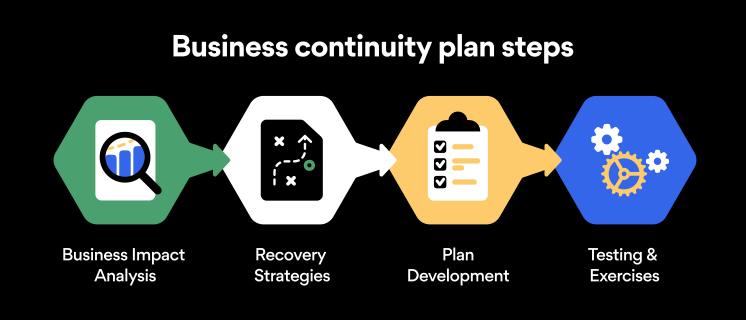
Business continuity planning steps

Here are some general guidelines that an organization looking to develop a BCP should consider:

Analysis

A business continuity plan should include an in-depth analysis of everything that could negatively affect the overall organizational infrastructure and operations. Assessing different levels of risk should also be a part of the analysis phase.

Design and development

Once you have a clear overview of potential risks your company could face, start developing a plan. Create a draft and reassess it to see if it takes into account even the smallest of details.

Implementation

Implement BCP within the organization by providing training sessions for the staff to get familiar with the plan. Getting everyone on the same page regarding crisis management is critical.

Testing

Rigorously test the plan. Play out a variety of scenarios in training sessions to learn the overall effectiveness of the continuity plan. By doing so, everyone on the team will be closely familiar with the business continuity plan’s guidelines.

Maintenance and updating

Because the threat landscape constantly changes and evolves, you should regularly reassess your BCP and take steps to update it. By making your continuity plan in tune with the times, you will be able to stay a step ahead of a crisis.

Level up your company’s security with NordPass Business

A comprehensive business continuity plan is vital for the entire organization’s security posture. However, in a perfect world, you wouldn’t have to use it. This is where NordPass Business can help.

Remember, weak, reused, or compromised passwords are often cited as one of the top contributing factors in data breaches. It’s not surprising, considering that an average user has around 100 passwords. Password fatigue is real and significantly affects how people treat their credentials. NordPass Business counters these issues.

With NordPass Business, your team will have a single secure place to store all work-related passwords, credit cards, and other sensitive information. Accessing all the data stored in NordPass is quick and easy, which allows your employees not to be distracted by the task of finding the correct passwords for the correct account.

In cyber incidents, NordPass Business ensures that company credentials remain secure at all times. Everything stored in the NordPass vault is secured with advanced encryption algorithms, which would take hundreds of years to brute force.

If you are interested in learning more about NordPass Business and how it can fortify corporate security, do not hesitate to book a demo with our representative.

About Version 2 Limited
Version 2 Digital is one of the most dynamic IT companies in Asia. The company distributes a wide range of IT products across various areas including cyber security, cloud, data protection, end points, infrastructures, system monitoring, storage, networking, business productivity and communication products.

Through an extensive network of channels, point of sales, resellers, and partnership companies, Version 2 offers quality products and services which are highly acclaimed in the market. Its customers cover a wide spectrum which include Global 1000 enterprises, regional listed companies, different vertical industries, public utilities, Government, a vast number of successful SMEs, and consumers in various Asian cities.

About NordPass
NordPass is developed by Nord Security, a company leading the global market of cybersecurity products.

The web has become a chaotic space where safety and trust have been compromised by cybercrime and data protection issues. Therefore, our team has a global mission to shape a more trusted and peaceful online future for people everywhere.

10 Best Practices for Email Security to Protect Your Business

With the rise of remote working came a surge in cybercrime. Business Email Compromise (BEC) attacks have seen a 150% year-over-year increase, so the odds are not in any business’s favor. However, staying vigilant and educated can protect your company and avoid such attacks. Keep reading to find out the main dangers business email accounts face and get 10 business email security tips.

What is Business Email Compromise (BEC)?

BEC is a type of cybercrime that involves impersonating a trusted business contact, such as a CEO or supplier, in order to trick employees into transferring money or sensitive information to the criminal’s account. These schemes often involve careful research and social engineering to create a convincing ruse.

According to the FBI, BEC fraud has cost companies over $26 billion globally since 2016, and the threat continues to grow. Small businesses are particularly vulnerable, as they may not have the resources or expertise to detect and prevent these attacks.

One example of a BEC scam involved the director of Puerto Rico’s Industrial Development Company, Ruben Rivera, who mistakenly made the transaction of $2.6 million to a fake bank account. In another case, Ubiquiti Networks Inc., the San Jose-based manufacturer of high-performance networking technologies, fell victim to a BEC attack that resulted in a loss of $46.7 million.

As the use of email continues to be an essential aspect of business communication, it is crucial for companies to remain vigilant and take proactive measures to defend against the threat of BEC.

Phishing is the number one email security threat

Phishing is a type of digital scam that is especially common in emails. It’s a form of social engineering where a hacker tries to deceive an employee into believing the email is coming from a credible source. Phishing emails usually have some sort of CTA: it’s like a form of marketing, if you will. Except that phishing CTAs usually involve clicking on a malicious link or revealing sensitive company data to outsiders.

Well, just like any other marketer, hackers employ creative techniques to improve the conversion rates of their scams. The more deceitful the email, the higher the conversion rate. That’s why phishing emails can be difficult to spot at times. Examples of phishing emails include:

  • Account verification scam. You may receive a phishing email that looks something like this: “Due to a recent security threat, we would like to ask you to verify your account by signing in through the link below. Failing to do so will result in the permanent deactivation of your account.”

  • Fake invoice scam. Hackers may send out emails saying, “We still haven’t received your payment for our services. Please use the link below to complete the transaction.”

  • Spear phishing. This is a more advanced and tailored form of phishing that requires hackers to do some research on your company. For instance, an employee may receive an email that looks like it’s coming from a specific coworker, instructing them to visit a website or disclose information.

Password security for your business

Store, manage and share passwords.

30-day money-back guarantee

Best practices for business email security

Falling for phishing scams can expose your company to data breaches and malware. Taking steps to appropriately ensure the security of your email will help protect your business from phishing and other forms of cybercrime:

1. Conduct phishing awareness training

Emails usually get breached through employee negligence and lack of knowledge. So the first way to increase email cybersecurity is to raise awareness about the main threat: phishing. All employees should receive in-depth training on recognizing and avoiding attempted phishing schemes. The main points to cover here are:

  • Becoming familiar with the main phishing schemes

  • Being suspicious about unusual requests

  • Never clicking on random links received through email

Once employees are familiar with these precautions, your company’s susceptibility to phishing emails will significantly decrease and your business email security will improve in general.

Email attachments and suspicious links are the most common methods cybercrooks use to spread malicious software. Ensure that your employees are well aware of these devious practices and are trained to spot them in real-life situations. With time and a lot of practice, your team will develop a sense for suspicious email links and attachments, which should considerably lower the potential attack vector and significantly improve your overall security posture.

3. Enable multi-factor authentication

You can make your account safer from hackers by connecting your smartphone to your email. Even if the passwords to your email accounts are leaked, no outsiders will be able to access them without having access to the device it’s connected to. All vital business accounts, not just email accounts, should have multi-factor authentication enabled.

4. Avoid using email when on public Wi-Fi

Public Wi-Fi poses massive risks to email security. If it’s unencrypted (which it often is), anybody can connect to the same network. You never know when a hacker will be that someone.

If a hacker intercepts your connection with unencrypted public Wi-Fi and catches you logging into your email, they can steal your email password. It’s best to steer clear of public Wi-Fi altogether, but if connecting to it is necessary, never transmit important data while on it.

5. Avoid using business emails for private purposes and vice versa

Most office jobs these days come with an email address. Some people get the temptation to use the new email address for all sign-ins. Need to sign up for a new streaming service? Well, why not use your brand new business email for that? Everybody else does it, anyway, right?

At first, it might sound like a great idea. Yet using your enterprise email for private purposes and vice versa could cause significant security concerns for you as an individual and the company.

First, using a company email for your personal online activities allows for easier and simpler profiling. Consequently, that could lead to spear-phishing — a targeted phishing campaign or other targeted cyberattacks.

6. Encrypt company email

Encrypting company email using special email security software is a great way to steer hackers away. Encryption ensures that the only people able to view the emails are the sender and recipient. If a hacker intercepts an employee’s Wi-Fi connection or email account, they will not see any sensitive data.

7. Set up email security protocols

Email security protocols are immensely important because they provide an extra layer of security to your digital communications. The protocols are designed to ensure the safety of your communications as they pass through webmail services over the internet. Without the aid of email security protocols, bad actors can intercept communication in a relatively easy manner. Please familiarize yourself with different email security protocols and enable them to ensure secure communications.

8. Improve endpoint security

To further fortify your security stance, take action to improve your endpoint security. Often the easiest and most effective way to boost endpoint security is by implementing security tools for company-wide use.

Consider deploying a VPN like NordLayer — a tool that encrypts the internet connection and data transferred over your business network. Antivirus software is another tool that should be used on all business workstations to ensure a proactive defense.

9. Don’t change passwords too often

Password fatigue is a fact of life — today, the average user has about 100 passwords on their hands. Keeping track of all the passwords is a challenge.

The conventional wisdom regarding password security is that you should change your passwords every 90 days. While that might sound like a reasonable security practice, it could lead to simpler and easy-to-crack passwords being used.

If you know that your employees take password hygiene seriously and craft hard-to-guess passwords and that none of their passwords were ever leaked, then they should stick to the passwords they already use. If any password (no matter how strong it is) is leaked or breached — the change should be immediate.

10. Use strong passwords for email accounts

Strong passwords are the backbone of account safety. Yet businesses often fail to secure their emails with strong passwords. If your business is like this, you should know that the easier the password, the easier it is to hack, especially through brute-force attacks. Brute-force attacks are when hackers try to guess a password by flooding your account with thousands of attempts.

To protect your business email from such attacks, ensure everyone in your organization secures their passwords. Secure email passwords are:

  • Long

  • Complicated

  • Contain different types of characters

  • Unique (never reused from other accounts)

These points are crucial if you want to ensure the safety of your business. However, passwords that are difficult to hack are also difficult to remember. The last thing anyone would want is to secure their account so well that they couldn’t even access it themselves.

Luckily, the business password manager by NordPass can come to the rescue. If all members of your company use it for their accounts, their emails will be safe, and they won’t need to scratch their heads trying to remember their passwords.

Bottom line

Business email security is never a given. Even though platforms like Gmail or Outlook do their best to ensure the safety of their users, you can easily fall victim to hackers if you don’t actively protect your account. By following these five email security best practices, the chances of getting your business emails hacked will be much slimmer because hackers will likely prefer more vulnerable prey.

About Version 2 Limited
Version 2 Digital is one of the most dynamic IT companies in Asia. The company distributes a wide range of IT products across various areas including cyber security, cloud, data protection, end points, infrastructures, system monitoring, storage, networking, business productivity and communication products.

Through an extensive network of channels, point of sales, resellers, and partnership companies, Version 2 offers quality products and services which are highly acclaimed in the market. Its customers cover a wide spectrum which include Global 1000 enterprises, regional listed companies, different vertical industries, public utilities, Government, a vast number of successful SMEs, and consumers in various Asian cities.

About NordPass
NordPass is developed by Nord Security, a company leading the global market of cybersecurity products.

The web has become a chaotic space where safety and trust have been compromised by cybercrime and data protection issues. Therefore, our team has a global mission to shape a more trusted and peaceful online future for people everywhere.

Compliance Experts on What to Expect in 2023

The consequences of non-compliance can be devastating.

In 2023, businesses have more to fear than just the formal penalties issued by regulatory or legislative entities. With cybercrime rates at a seemingly all-time high, and even once-trusted cybersecurity companies proving susceptible to breaches, organizations are on high alert.

Failing to comply is more than just a compliance issue or an unchecked box. It can represent an unchecked vulnerability that may give way to a data breach that will have your brand name on consumers’ lips for all the wrong reasons.

That’s why we invited two compliance and security experts to speak on the future and state of compliance. Here’s a short recap of the conversation moderated by Gerald Kasulis, VP of business operations at Nord Security, with:

  • Deena Swatzie, SVP, Cyber Security Strategy and Digital Innovation at Truist,

  • Joy Bryan, GRC/Privacy Technology Analyst, RNSC Technologies, LLC.

Kasulis asked the panelists astute questions about the implications of adopting tech powered by AI, the current corporate climate, and how businesses can prioritize compliance on a shoestring budget.

Watch the webinar recording in full right now or keep reading to find out three takeaways that will help kickstart or support your compliance agenda this year.

Increasingly savvy consumers will hold businesses accountable

When data breaches happen, usually it’s the consumers who suffer. The consequences range in severity and kind, but whether major or minor, reputational or financial, a violation of one’s privacy through personal data exposure is never a welcome outcome.

As businesses become hyperaware of the likelihood of a data breach, consumers are equally tuned in.

quotes

Consumers are getting smarter in that [data privacy] space. They’re going to expect more, they’re going to hold companies accountable. And so that’s why your compliance needs to be in place.

– Joy Bryan

GRC/Privacy Technology Analyst at RNSC Technologies, LLC

Consumers are more likely than ever to want assurances that their personal data will be kept safe as concerns surrounding data privacy become more mainstream. They want to know how their information will be stored and what measures businesses are taking to protect it.

In today’s climate, trust is a linchpin of customer satisfaction. A recent survey revealed that 71% of consumers are unlikely to buy from a company that loses their trust — which is bad news for businesses that have suffered major breaches.

Meeting compliance standards and earning certifications can be a shorthand for establishing (or re-establishing) customers’ confidence: this ensures that businesses are following the agreed-upon best practices in a verifiable way.

At the end of the day, the buck stops with corporations who collect and store personal data. They will be held accountable for their (in)ability to protect the data they keep.

“Consider yourself as the consumer,” says Swatzie. She suggests that businesses should use the golden rule as a framework — treat consumer data as you would hope and expect yours to be treated.

Additional resources may not be the answer

quotes

Even when we talk about talent and the workforce, everyone’s immediate response is ‘we need more resources.’ You don’t always necessarily need more resources.

– Deena Swatzie

SVP, Cyber Security Strategy and Digital Innovation at Truist

Swatzie explained that it’s important to understand what exactly is required to meet compliance standards so that you can balance what you have with what you need. Here, collaboration between teams is key. Security and compliance initiatives will overlap.

Both experts agree that it’s best to start by looking at in-house tech and talent before making an investment. And on the occasion when you do require an additional resource, like software, be sure that you’re adopting tools that serve multiple functions.

quotes

I think that whatever platforms and technologies are implemented should have a collaborative feel — where you’re tackling multiple things at once.

– Joy Bryan

GRC/Privacy Technology Analyst at RNSC Technologies, LLC

NordPass Business, for instance, delivers so much more than password management. Get a powerful data breach scanner, password health metrics, a detailed activity log, company-wide advanced security settings, and multi-factor authentication.

On the topic of breaches, take solace in NordPass’ zero-knowledge architecture which ensures that only you hold the key to your business credentials and vault items. In the unlikely event of a breach at NordPass, your private information will remain encrypted and out of reach to cybercriminals.

New investments in tech solutions should add value to what many teams are likely to prioritize the most: workflow efficiency. Consider how and whether security and compliance tools speak to that need.

Get into the nitty gritty. Take the time to consider your existing and prospective tools’ full scope to avoid overinvesting in overlapping functions.

According to Swatzie, “Privacy is everybody’s responsibility. Security is everybody’s responsibility. Compliance is everyone’s responsibility.” For that reason, it’s important not to take buy-in for granted with a top-down approach.

Ask yourself: will my team be open to adopting this policy or software? Does it promote or detract from their respective top priorities?

The word of the day is “proactive”

If we had to summarize the experts’ advice in just two words: be proactive. Specifically, on the topic of lessons learned from a turbulent 2022:

quotes

I would hope that in terms of lessons learned, it allows businesses to be a little bit more proactive in their approach and in their strategies.

– Joy Bryan

GRC/Privacy Technology Analyst at RNSC Technologies, LLC

If your compliance and security strategy is only reactive, then it shows a lack of forward-thinking, meaning you’re likely to be continuously caught off guard and lagging behind. Swatzie suggests that compliance professionals and business leaders “put on their auditor hat.”

quotes

I’m used to being heavily regulated and audited so I’ve learned enough from the auditors to know exactly what they’re going to ask me before they ask me. So going back to what Joy said earlier, be as proactive as possible.

– Deena Swatzie

SVP, Cyber Security Strategy and Digital Innovation at Truist

Where possible, brace your business for what’s likely to come down the compliance pipeline by studying the standards themselves. With an intimate understanding of the “spirit of the law” you should be able to intuit what’s next and prepare accordingly.

That being said, it’s not a lack of motivation that leaves security and compliance professionals in a reactive position. When it comes to cyber incidents, board and senior leadership members sometimes struggle to see prevention as the cure — waiting until after an event has occurred to implement more stringent security measures.

To learn more about how to get buy-in from colleagues and management before the fact, read our guide on how to campaign internally for cybersecurity.

Summary

Facing increasingly savvy and appropriately demanding consumers, businesses should understand that they will be held accountable for breaches of personal data and plan accordingly.

But, that doesn’t necessarily mean rushing to acquire additional talent and technological resources. Invest wisely and make it count. In particular, security software should be multi-functional.

Finally, the key to success is in forward-thinking. Adopt a proactive strategy to avoid a constant scramble to respond after-the-fact.

About Version 2 Limited
Version 2 Digital is one of the most dynamic IT companies in Asia. The company distributes a wide range of IT products across various areas including cyber security, cloud, data protection, end points, infrastructures, system monitoring, storage, networking, business productivity and communication products.

Through an extensive network of channels, point of sales, resellers, and partnership companies, Version 2 offers quality products and services which are highly acclaimed in the market. Its customers cover a wide spectrum which include Global 1000 enterprises, regional listed companies, different vertical industries, public utilities, Government, a vast number of successful SMEs, and consumers in various Asian cities.

About NordPass
NordPass is developed by Nord Security, a company leading the global market of cybersecurity products.

The web has become a chaotic space where safety and trust have been compromised by cybercrime and data protection issues. Therefore, our team has a global mission to shape a more trusted and peaceful online future for people everywhere.

The Passwordless Future Is Here at NordPass

You lightly place your thumb at the bottom of your phone screen and, lo and behold, it’s unlocked instantly. So why can’t we do the same at the bank or when logging in to Twitter or YouTube? Well, soon we’ll be able to do it all. The passwordless future is inevitable and it’s almost here.

At NordPass, we’re thrilled to be creating a passwordless future. But what is passwordless authentication? How does it work? Let’s answer these questions.

Why should we consider going passwordless?

Year after year, we see either “123456” or “password” top our Most Common Passwords List. Millions of people reuse absurdly simple passwords across multiple platforms, even though they are very easy to crack by using a dictionary or brute force attacks. It makes passwords (and the people using them) one of the weakest links security-wise in any company or service.

Weak passwords are just part of the problem. The way we treat passwords is an issue as well. One of the worst password sins that all of us can attest to is reusing passwords. Having a single password to secure multiple accounts is a huge security risk, to put it mildly. In such instances, a single compromised account indicates that all of user’s accounts are essentially compromised as well.

The solution lies in biometric authentication and passkeys, which combined become one of the safest and smoothest passwordless authentication options available.

Passkeys: The key to passwordless authentication

In an age where technology usage continues to rise, the need for secure and efficient authentication methods becomes all the more pressing. Passwords, which have long reigned supreme as a solution for securing online accounts, have over time proven to be unreliable and susceptible to hacking. In turn, many organizations and companies have been looking for new, more efficient, and robust ways to authenticate users.

One organization at the forefront of the effort to go passwordless is the FIDO Alliance. The alliance works with various companies, including NordPass, to develop and promote open standards for passwordless authentication.

According to the FIDO Alliance, the technology set to replace passwords is passkeys. Passkeys are digital credentials that are generated by the user’s device. Usually used in combination with biometric data, such as a fingerprint or facial recognition, to offer an extra layer of security, passkeys provide access to websites and other online services.

What passkeys bring to the table

One of the major advantages of passkeys is that the private key, which is used to generate the passkey, never leaves the user’s device. This makes it almost impossible for attackers to gain access to the key through phishing or other forms of cyberattack. Furthermore, passkeys are almost impossible to hack, making them more secure overall.

quotes

Unlike traditional passwords, passkeys are invisible to the user and are never revealed or entered manually.

Going passwordless will also improve user experience. A fingerprint scanner, for example, is a fast and reliable authentication method. It would also mean that there would be no more password reset procedures — IT departments throughout the world will be very grateful. Also, when it comes to biometric authentication, you don’t need to remember anything. You won’t have any Post-its on the computer screen or notes in your planner. You can’t lose, steal, or forget your fingerprint.

Room for improvement for current passkey-based authentication

Right now, passwordless authentication is gaining major traction among such tech giants as Microsoft, Apple, and Google. All of these companies have been introducing passwordless authentication solutions, and in most instances the solutions include the use of passkeys.

However, current passkey-based solutions have a long way to go. At the moment, these solutions limit users to a single ecosystem, which makes it difficult to share them between, say, an Android user and an iOS user. In addition, the current solutions do not offer any kind of sync with password managers.

But this is where NordPass comes into play. We are currently working on integrating passkeys into your favorite password manager.

Introducing passwordless authentication to NordPass

At NordPass, we’re excited to be at the forefront of the passwordless revolution. And by early 2023, NordPass is set to introduce passwordless authentication both for individuals and businesses.

Passwordless access to NordPass

We are currently working on enabling a passwordless sign-in to NordPass. It will be a faster and simpler process than the one now, since it will require a single biometric confirmation. In simple language, this means that you will be able to access your Nord Account and NordPass with a single tap of a finger. You read it right. No more manually entering your Nord Account and Master Password each time you need to log in. Passwordless access to NordPass is set to significantly improve user experience and overall security.

NordPass passkey storage

All NordPass users will have the ability to save passkeys for any website or app in the encrypted vault and use them to access those online services later. With NordPass, you’ll be able to use, share, and sync passkeys between multiple devices and platforms, whereas many passwordless authentication solutions tend to lack such functionalities. This will make NordPass a single place for all of your digital valuables, including passwords, passkeys, credit cards, and other sensitive information.

Passwordless multi-factor authentication (MFA) for businesses

Password-based authentication is still the industry standard. However, due to the inherent vulnerabilities that come with password-based authentication, most businesses face a variety of cybersecurity risks. To significantly reduce the risk of suffering a phishing or an account takeover attack, businesses need to rethink their security approach with regard to access to endpoint devices such as laptops, desktops, workstations, and mobile devices as well as applications that leverage regular passwords or even single sign-on solutions.

With the introduction of passwordless MFA, we’re looking to help businesses improve their overall security stance by eliminating the need for passwords and introducing an authentication method based solely on biometrics.

Passkey integration for online service providers

The world is already moving rapidly towards a passwordless future. Unfortunately, not everyone can adapt smoothly and efficiently. Many small to medium-sized businesses (SMBs) lack the resources and know-how to implement passkey authentication for their users. However, at NordPass we’re ready to leverage our security expertise to make the transition from passwords to passkeys as smooth as possible. We believe that the frictionless user experience offered by passkeys across multiple platforms and devices, combined with superior security, will help your business increase conversion rates, user engagement, and user satisfaction.

You can expect big things as early as 2023. So stay tuned, and be prepared for the inevitable passwordless future – it’s just around the corner.

About Version 2 Limited
Version 2 Digital is one of the most dynamic IT companies in Asia. The company distributes a wide range of IT products across various areas including cyber security, cloud, data protection, end points, infrastructures, system monitoring, storage, networking, business productivity and communication products.

Through an extensive network of channels, point of sales, resellers, and partnership companies, Version 2 offers quality products and services which are highly acclaimed in the market. Its customers cover a wide spectrum which include Global 1000 enterprises, regional listed companies, different vertical industries, public utilities, Government, a vast number of successful SMEs, and consumers in various Asian cities.

About NordPass
NordPass is developed by Nord Security, a company leading the global market of cybersecurity products.

The web has become a chaotic space where safety and trust have been compromised by cybercrime and data protection issues. Therefore, our team has a global mission to shape a more trusted and peaceful online future for people everywhere.

How to Change Your Netflix Password

You’re dozing off to one of your favorite shows on Netflix, and suddenly a notification flashes on your phone. You look down and see a weird message: “Someone signed into your Netflix account at 03:23 in Nigeria.” Odd, because you were asleep at that time – and certainly haven’t been to Nigeria before. Looks like it’s time to change your Netflix password.

Whether you have forgotten your password, want to wrangle Netflix away from your ex-spouse, or just want to update your passwords, this guide will tell you how to easily change your Netflix password.

How to change your Netflix password on desktop

Fortunately, Netflix foresaw the need for expediency when it comes to changing your password – the process is quick and straightforward.

  1. Open up your browser and go to the Netflix login page. Once you’ve logged in, bring your mouse to hover over your profile picture in the top right corner. Click on “Account.”

  2. The first thing you’ll see is a section marked “Membership and billing.” On the right-hand side of this section are a few hyperlinked options. Click on the “Change password” link.

  3. You’re now on the page where you can reset your password. Before you do, check out our password generator to craft the perfect password that will be extremely difficult to crack.

  4. There you have it — your Netflix password is now changed. Remember that you’ll need to re-enter this new password on whatever devices your Netflix account is connected to.

How to change your Netflix password on mobile devices

  1. Open the Netflix app on your mobile device and log in to your account.

  2. Tap the profile icon located in the upper-left corner of the screen and select “Account.” If you are using a tablet, tap “More” at the bottom of the screen and select “Account” there.

  3. Now tap “Change password.”

  4. Now enter your current and new passwords.

  5. Tap “Save” to confirm. The changes should take effect immediately.

How can you reset your Netflix password?

If you have forgotten your Netflix password, the only way to regain access to your account is by resetting your passwords. Here’s a quick guide on how to reset your Netflix password:

  1. Visit the “Sign in” page and select “Need help?” which is located below the “Sign in” button.

  2. Choose “Email” and enter your email address. Click “Email me.”

  3. You will receive an email from Netflix with instructions on how to reset your password and create a new one.

  4. You can also choose the “Text message” (SMS) option. Simply enter your phone number and select “Text me.”

  5. You will receive a text message from Netflix with instructions on how to reset your password and create a new one.

If it’s been years since you last had to reset your password, don’t worry: all hope is not lost yet! In the above image, you can see the option at the bottom that says “I don’t remember my email or phone.” Click on it.

Now, you can enter your personal and payment details to reset your password. Netflix’s UI is intuitive enough to make resetting the details of your account effortless. Just follow the on-screen instructions, and you’ll have a new password in no time.

Invest in a password manager

This is the most guaranteed way to never have to worry about your passwords again. NordPass can automatically generate top-tier strength passwords, store them in an encrypted vault, and then autofill them to whichever account it’s associated with. The unnecessary hassle of memorizing and creating passwords will be a thing of the past. With NordPass, online life is smoother and safer.

About Version 2 Limited
Version 2 Digital is one of the most dynamic IT companies in Asia. The company distributes a wide range of IT products across various areas including cyber security, cloud, data protection, end points, infrastructures, system monitoring, storage, networking, business productivity and communication products.

Through an extensive network of channels, point of sales, resellers, and partnership companies, Version 2 offers quality products and services which are highly acclaimed in the market. Its customers cover a wide spectrum which include Global 1000 enterprises, regional listed companies, different vertical industries, public utilities, Government, a vast number of successful SMEs, and consumers in various Asian cities.

About NordPass
NordPass is developed by Nord Security, a company leading the global market of cybersecurity products.

The web has become a chaotic space where safety and trust have been compromised by cybercrime and data protection issues. Therefore, our team has a global mission to shape a more trusted and peaceful online future for people everywhere.

Should Couples Share Passwords?

So what’s the deal with password sharing? Would you give your partner the password to your banking account but not your phone? Is laying all your codes on the table a sign of trust or a massive security risk? Should couples share passwords at all? While it can help to build trust with a partner, sharing your passwords isn’t always the best idea.

We are asking some basic questions on a very touchy subject just to help keep your security tip top. Don’t worry — we’re not judging your loving relationship. We just believe in safety precautions no matter what, and you will too once you get a dose of reality from these not-so-lovely situations.

It’s all about how you share them

Sometimes the risk isn’t who you share your password with, but how you do it. Sharing your passwords over the internet, whether over unencrypted email or messaging apps, is like sharing them in plain view of the world. The next time you think about doing this, remember that any of the following situations can take hold (without you even knowing).

  • Your messaging app may not be as honest as you think. A messaging app without end-to-end encryption has full access to everything you send. End-to-end encryption means that the only person who can read your message is the person you send it to. Sounds like a given, right? Not when you consider the genuine possibility that your messaging app could be giving employees access to your private conversations.
  • Man-in-the-middle attacks. It’s true, attackers lurk in the middle of an exchange waiting to steal vital information, like passwords, credit card numbers, addresses… you name it. Without end-to-end encryption and zero-knowledge architecture, your credentials could be exposed, and a cybercriminal could be in and out of your bank account within seconds.

The easy way to share passwords securely

Looking at the potential risks that one might face when trying to share passwords online, it is quite natural to question whether couples should share passwords at all and is it worth the risk? The good news is that there’s a way to share passwords securely.

Obviously, the best defense is encryption. A messaging service or website using end-to-end encryption makes sure your data is kept safe from attackers. Password managers like NordPass help you store and share your passwords in a completely secure way.

With NordPass, encryption happens on your device, scrambling your data into gibberish before it even reaches the servers. This way everything you send remains locked, even from us – until it reaches your verified recipient.

NordPass Family is a great way for couples, families, or even groups of friends to further improve their online security. The Family plan comes with six Premium accounts and includes all the advanced security features. Best of all — you’ll be able to share passwords with other NordPass users instantly and effortlessly without sacrificing security.

The takeaway

Matters of the heart aside, always think twice before you send a password by text or messaging apps. Even if the service offers encryption, subpar ciphers and weak protocols can be broken by even a mediocre cyberattacker.

Sending a password securely with NordPass is easy. It locks your sensitive credentials in an encrypted vault. You can select them from a simple drop-down list and send in complete confidence.

The internet’s primary concern and priority is functionality. Your security and privacy probably aren’t. Don’t risk all of your accounts over something as small as sending a password.

About Version 2 Limited
Version 2 Digital is one of the most dynamic IT companies in Asia. The company distributes a wide range of IT products across various areas including cyber security, cloud, data protection, end points, infrastructures, system monitoring, storage, networking, business productivity and communication products.

Through an extensive network of channels, point of sales, resellers, and partnership companies, Version 2 offers quality products and services which are highly acclaimed in the market. Its customers cover a wide spectrum which include Global 1000 enterprises, regional listed companies, different vertical industries, public utilities, Government, a vast number of successful SMEs, and consumers in various Asian cities.

About NordPass
NordPass is developed by Nord Security, a company leading the global market of cybersecurity products.

The web has become a chaotic space where safety and trust have been compromised by cybercrime and data protection issues. Therefore, our team has a global mission to shape a more trusted and peaceful online future for people everywhere.