




NordPass Desktop App: Release Notes
)
NordPass 5.17 (latest)
Hold on to your seat — we’ve got some very exciting news to announce:
TOTP is now live on Chrome and Firefox browsers for NordPass business users. You can now create time-based one-time passwords on your favorite browser.
Autofill issue on Google fixed. Autofill got confused; it recognized Google login forms but treated them as new account creation forms. From this release on, the glitch has been fixed, and you’ll no longer see incorrect prompts.
NordPass 5.16
Building good things takes time. So since the last release, we’ve mainly focused on catching and eliminating pesky bugs.
NordPass 5.15
Item Sharing: We’ve revamped our sharing permissions so that you can now enjoy more control over the access a friend, family member or colleague has to an item. More permission options + more flexibility = more peace of mind. Check out the changes in your vault today!
Import: You can now easily transfer data from KeePass into NordPass via an XML file.
NordPass 5.14
Looking to import data into NordPass from another password manager? Good news — we now support more file formats such as JSON, ZIP, and 1PUX.
NordPass 5.13
Introducing the latest NordPass updates:
New Feature: Instant Login: Logging into accounts just got even easier. Gone are the days of manually tapping the NordPass icon to fill in your passwords. With this update, NordPass automatically detects when you’re on a login page and offers to fill in your credentials for you. We hope you’ll enjoy the seamless login experience, but if you prefer the traditional method, fear not–you can disable this feature in Settings.
Email Masking Update: Forgot why you set up email masks? No worries! Now, you can easily identify which of your accounts are safeguarded by email masks with a quick glance.
NordPass 5.12
We’re kicking off 2024 with a few game-changing updates:
Email Masking: Say hello to our brand new Premium tool — Email Masking! With this tool, you can protect your real email address from spam and online threats by creating unique email masks every time a website asks for your details. With full control over email forwarding included as well, this tool really puts you in the driving seat.
Data Breach Scanner: We’ve enhanced this all-important tool so that you can now get real-time alerts if your credit card appears in a breach. We hope you enjoy the new look and feel too!
Import: We’ve tweaked our import settings so that you can now easily move all of your Proton Pass items over to NordPass.
NordPass 5.11
“Spreek je Nederlands?” Because we now do! That’s right, you can now use the NordPass extension and desktop app in Dutch — simply head over to Settings to adjust your preferred language.
NordPass 5.10
We’ve waved bye-bye to some pesky bugs and have also spruced up the place a touch. Stay tuned for some big news that’s just around the corner!
NordPass 5.9
Hold on to your seat — we’ve got some very exciting news to announce:
Browser Extension: You now have the option to use a new standalone NordPass browser extension that doesn’t require our desktop app! That’s right, you can now enjoy a fast, fully browser-based NordPass experience on Chrome, Firefox, Safari and more.
Autofill: You asked, we’ve listened. You can now tweak your app settings to enjoy a better autofill experience on websites with a subdomain.
Password Health: When logging in to a website, you’ll now be prompted if your password is weak or reused so that you can quickly act to reduce the risk of your data falling into the wrong hands.
NordPass 5.8
Gather round, folks — we’ve got some exciting updates to share:
Data hosting: Organizations using NordPass Business or Enterprise can now choose to store company data in the European Union.
Autofill: You can now instantly search for a specific item to autofill on a webpage if it’s not automatically suggested for you.
Custom fields: You can now personalize your NordPass experience by adding custom fields to all item types. From passport numbers and bank details to dates of birth, you’re free to securely store exactly what you need.
NordPass 5.7
Here are just a couple of highlights from our latest release:
Autofill: As some websites (e.g. facebook.com and messenger.com) require you to use the same login credentials, you can now add multiple web addresses to a single NordPass password item for a smoother autofill experience. Faster account access and a tidier vault — sounds good to us.
Passkeys: Already using biometrics to unlock your NordPass vault? Good news — you can now also use your face or fingerprint to verify your identity when using a passkey.
NordPass 5.6
We’ve given our passkey prompts a fresh coat of paint and have also now built them directly into the web browser experience, meaning no more jumping back and forth between our desktop app. Enjoy!
NordPass 5.5
With NordPass Enterprise, you can now instantly share a shared folder with a group! That’s right, instead of having to add teammates one by one to a shared folder, you can now share the folder with a large group of people in one go. Happy updating!
NordPass 5.4
Here’s what’s new in the latest NordPass release:
NordPass Business: Users can now move items with two-factor codes to shared folders. If a member has set up NordPass as an authenticator, they will be able to access the item’s two-factor code immediately.
Bug fixes: We’ve also fixed a few bugs and improved our app’s performance.
NordPass 5.3
As some web services now require an additional identity check to use a passkey, we’ve added a new authentication step to our passkey creation and login flows so that you can continue using passkeys to securely access your accounts.
NordPass 5.2
You asked, we’ve listened – our latest release is inspired by your valuable feedback:
Passkeys: You can now better control how often you see certain NordPass passkey prompts on websites. We’ve also introduced a new button in a couple of our passkey flows so that you can more easily switch to using another passkey solution instead of NordPass.
Autofill: You now have the power to change the autofill behavior of website form fields so that you’re suggested exactly the right information you’re looking for. For example, if you’re suggested credit card details on a login page, you can adjust the autofill logic so that you’re correctly suggested a password item in future.
File attachments: You can now save time by viewing attached .jpg and .png image files directly in the app, meaning there’s no longer a need to first download them.
Thanks as always for sharing your thoughts with us. If anything else crosses your mind, you can always find us at support@nordpass.com.
NordPass 5.1
No major updates this time, just a new and improved app release with some under-the-hood performance upgrades – enjoy!
NordPass 5.0
Introducing… file attachments!
That’s right, with NordPass Premium you can now conveniently attach documents and images to any item so that you’ve got access to all-important info when you need it most. Contracts, copies of your IDs, cat photos – you name it, you can securely store it. We hope you enjoy this highly requested feature!
NordPass 4.38
Remember when we said we had some big news to announce soon? Well, here it is… say hello to a new item category: passkeys!
Passkeys are unique, end-to-end encrypted login credentials that are stronger and more convenient to use than passwords.
You can now use NordPass to create passkeys on supported websites. NordPass will also securely store your passkeys so you can use them to instantly log in to your accounts online.
Passwordless authentication: unlocked. Enjoy!
NordPass 4.37
We’ve waved bye-bye to some pesky bugs and have also spruced up the place a touch – enjoy!
NordPass 4.36
We’re starting off 2023 on the right foot with a release that’s faster and more reliable. Stay tuned for some bigger announcements!
NordPass 4.35
No major updates this time, just a new and improved app release with some under-the-hood performance upgrades – enjoy!
NordPass 4.34
We’re happy to present you with a new release. Here’s what we’ve got this time:
DESIGN CHANGES TO ITEMS. We updated how your item details are displayed. Hope you’ll like it.
NordPass 4.33
Building good things takes time. So since the last release, we have mainly focused on catching and eliminating pesky bugs.
NordPass 4.32
This time we’ve waved bye-bye to some pesky bugs and have also spruced up the place a touch – enjoy.
NordPass 4.31
We’re happy to present you with a new release. Here’s what we’ve got this time:
AUTOFILL DISABLEMENT ON WEBSITES. You can now disable autofill on any page that you don’t want to fill your details. It won’t reset when you refresh the page but you can turn it back on at any time.
BUG FIXES.
NordPass 4.30
Here’s what you’ll see in the new NordPass release:
ONBOARDING UPDATE. New users will be greeted by a refreshed onboarding experience that will help them familiarize themselves with NordPass.
NordPass 4.29
No major updates this time, just a new and improved app release with some under-the-hood performance upgrades – enjoy!
NordPass 4.28
Building good things takes time. So since the last release, we have mainly focused on catching and eliminating pesky bugs.
NordPass 4.27
This time we’ve waved bye-bye to some pesky bugs and have also spruced up the place a touch – enjoy!
NordPass 4.26
No big announcements from us this time. However, we hope you’ll still enjoy an updated NordPass version with fewer bugs and better autofill.
)
NordPass 4.25
Our bug busters have been working hard since the last time you heard from us. That’s why today we can proudly present another NordPass release with even fewer bugs. We hope you’ll like it.
NordPass 4.24
Building good things takes time. So since the last release, we have mainly focused on catching and eliminating pesky bugs.
NordPass 4.23
We’re happy to present you with a new NordPass release. Here’s what we’ve got this time:
UPDATED PASSWORD INFO. Now you’ll get more guidance on making your passwords more secure. Open any of your passwords, and you’ll see whether it’s been reused on other accounts or it’s too old and needs changing.
BUG FIXES. Rome wasn’t built in a day. Therefore, we continuously aim to catch pesky bugs and provide you with the best password management experience.
NordPass 4.22
Here’s what you’ll see in the new NordPass release:
SWITCH ACCOUNT. A long-awaited feature is here! If you have a few NordPass accounts, like personal and business, switching between them will now be a breeze. Just click on your profile account and look for a “Switch Account” button.
LITHUANIAN LANGUAGE. For our Lithuanian friends out there, you can now use NordPass in your mother tongue. Simply head to Settings to change the language.
BUG FIXES.
NordPass 4.21
Our bug busters have been working hard since the last time you heard from us. That’s why today we can proudly present another NordPass release with even fewer bugs. We hope you’ll like it.
NordPass 4.20
We’re happy to present you with a new NordPass release. Here’s what we’ve got this week:
CARD PIN. From now on, you can also add your PIN when saving card details. Don’t worry; it won’t be autofilled. It’s for your reference only.
DELETE CLIPBOARD SETTING. When you copy your password or other item data, it’s normally saved in the clipboard. To avoid pasting it somewhere you didn’t intend; you can now choose the clipboard to clear after a set time.
BUG FIXES.
NordPass 4.19
It’s international women’s day! So we want to take this opportunity and say thank you to all the beautiful women who tirelessly work at NordPass. It wouldn’t be the same without you.
P.S. We mainly focused on fixing bugs this time, so we hope you like a better running app.
NordPass 4.18
Here’s what you’ll see in the new NordPass release:
SUBDOMAIN SORTING IMPROVEMENTS. From now on, if you have multiple items saved for one domain, the account with the matching subdomain will be shown first.
BUG FIXES.
NordPass 4.17
Did you know that January has a Blue Monday – the most depressing day of the year? The good news is it’s over. But if you’re still feeling a little bit blue, here’s a few things we’ve updated to hopefully cheer you up.
Safari import. You can now import passwords saved in Safari straight to NordPass.
Data Breach Report update. If your password appears in a Data Breach report and you update it on the website, select “Resolve” and the same details won’t appear next time you run the report.
Bug fixes. Caught many annoying bugs that hinder your experience.
Some write songs, some dedicate sonnets, some built monuments. We create release notes to honor each update of NordPass app for Windows, macOS and Linux. A single click of that magical “Update” button unlocks the newer, faster, better-performing world of stress-free password management.
NordPass 4.16
As Christmas is over, it’s time to make some New Year’s resolutions. But why wait? We want to become a better, smoother-running, and more user-friendly app now. We have strived for perfection since NordPass was launched, and this week is no exception. So we present you a new NordPass version with fewer bugs and more Autofill fixes.
NordPass 4.15
A good beginning makes a good ending, so why not start a week with a new NordPass release? Here’s what we’ve got this week:
BREACH SCANNER UPDATE. If your password was leaked in a data breach and you’ve reused it on other accounts, a new ‘Accounts at risk` tab will appear. There you’ll see a list of accounts that may be vulnerable. Don’t wait for a second and change their passwords to prevent cyber attacks.
AUTOFILL UPDATE. We’ve fixed a ton of autofill bugs so you’d have a smoother autofill experience on even more websites.
NordPass 4.14
We know that sometimes life throws challenges right at you. At those times, the last thing you want to think about is how and where to access your passwords.
That’s why from now on, you can give emergency access to your passwords and other items. Choose a person you really trust and invite them to be your emergency contact. Once they accept it, you can give them access immediately or wait for 7 days to be given automatically. Note: You can only give emergency access to another NordPass user with a Personal or Family plan.
NordPass 4.13
Trick or treat? Who are we kidding? It’s always just treated here at NordPass. So here’s our Halloween treat to you – a brand new NordPass release. Don’t worry, nothing to be scared of—just a smoother running version of your password manager.
NordPass 4.12
Tired of too many emails and banners? We get you, and we want to improve our communication with you. That’s why from now on, a lot of important information will appear as in-app notifications. So if you open the app and see a red dot next to a bell icon, just know that it’s something important from us to you.
P.S. We also solved a number of bugs.
NordPass 4.11
Getting your data stolen isn’t nice. But if that happens to you, it’s important to identify the stolen information and act quickly. That’s why with this release, Data Breach Scanner has gone even better. How?
If your data has ever appeared in any breach, you can now use the Breach Scanner to identify not just what type of data was leaked, but also see it in plain text. This includes passwords, your address, social security number, birth date, and other data types.
In addition to all this, we are continually working to improve one of our core features – Autofill. So expect to see more websites working flawlessly with NordPass.
NordPass 4.10
Can’t find tools to improve your password security? We got you. You’ll find security tools such as Password Generator, Data Breach Scanner, and Password Health in the sidebar from this release. More accessible to access and easier to use.
We also solved some pesky bugs to make your NordPass experience more enjoyable.
NordPass 4.9
What do you have in the box this time NordPass? Well, let me see…
Title and website address suggestion. That’s right, now when creating a new item, you only need to enter a few letters in the Title or Website address fields, and NordPass will suggest filling it with one of the thousand popular websites.
Spanish and Italian languages are now available on the NordPass extension.
Bug fixes, bug fixes, and more bug fixes.
NordPass 4.8
It’s August my friend. And you know what August is good for? Learning new languages.
Hablas español? Parli italiano? If you do, lucky you. Because you can now use NordPass in Spanish and Italian. Enjoy!
NordPass 4.7
Did you know that no one else has the same fingerprint as you? That’s why it’s the most unique password you can have. Dedicated Mac users, this release is for you. Yes, you can now sign in to your NordPass app with a fingerprint. Feeling like James Bond yet? We are!
P.S. We also solved a ton of pesky bugs to make your experience smoother than ever.
NordPass 4.6
Dear bugs, it’s time. Time to say goodbye. It won’t be the same without you. It will be better. The password managing experience will be much greater now.
NordPass 4.5
It’s officially summer, NordPass people! (Or winter, if you live in the southern hemisphere.) Wherever you are, we hope it’s sunny so that you can enjoy the brand new release. Here’s what we’ve got:
MULTIPLE ITEM SHARING. Sharing is caring, right? Well, now you can select multiple items and share them all at once. Easy peasy. Just always make sure you trust the people you share your credentials with.
PASSWORD GENERATOR HISTORY. You know that moment when you create a super-strong password with the NordPass Generator and forget to save it? Yeah, we’ve been there too. That’s why you’ll now see a little clock icon in your Generator where you can check your previously generated passwords.
BUG FIXES. And, of course, we won’t release a new NordPass version without getting rid of as many bugs as possible.
NordPass 4.4
“Speed” was the main keyword at NordPass this week. So what to expect in this release?
Updated designs so you could find your passwords or any other items at the speed of light.
Tons of bug fixes and maintenance work so that your app would work faster than ever and would be as pretty on the inside as it is on the outside.
NordPass 4.3
Don’t worry if you missed the chance to get NordPass Premium for less. The Summer Kick-Off Sale is here! Use this offer to get access to all the amazing Premium features.
Also, we have a little something for our Business users. From now on, all members who are added or removed from groups will be notified by email.
NordPass 4.2.18
Hello, world! We’ve prepared a nice little juicy pack of updates – just for you. Please give a warm welcome to:
Double EXTENSION-upgrade: from now on, not only it speaks German fluently but also is available in Dark Mode. Ready to give some rest for those sore eyes?
A new ge-ne-ra-tion for stronger passwords! Check out the PASSWORD GENERATOR to enjoy shiny new looks and (finally!) PASS-PHRASES for nice-and-strong-memorable-passwords.
NordPass 4.1
We are working hard on bringing Dark Mode to the NordPass extension. In the meantime, we are also doing some good old maintenance work. So expect to see some design changes in the browser extension and forget the existence of annoying bugs.
NordPass 4.0
Today is the day! You know what we are talking about. You asked for it; we delivered it. And oh boy, how good it looks! You’ll believe it once you see it.
OK, we recommend sitting down for this one. Then open your NordPass app, update it to the newest version and enjoy the shiny new DARK MODE.
Dark mode desktopDark mode desktop
And if that doesn’t impress you, well, then we have more news. You can now use NordPass in German. Whether it’s your mother tongue or just want to polish your German skills, you can now change your language preference in Settings.
NordPass 3.31
This time we’ve got many design changes to make your life easier. So let’s get to it. Here’s what you’ll see in this release.
TOAST MESSAGES UPDATE. Some of the success messages, such as when you import items or update your app, were outdated, so we made them easier to understand.
MULTISELECT REWORK. We noticed that the sorting option was missing when multiple items were selected. We introduced this option and changed long-winded buttons to visually pleasing icons.
BROWSER EXTENSION UPDATE. You can now access Tools from the NordPass extension, including the Password Health and the Data Breach Scanner.
NordPass 3.30
Are you ready to switch off the lights? Because Dark Mode is coming very very soon. We are working hard to make sure everything looks perfect for the release. A few more things, and we are done. Keep your eyes peeled.
In other news, we fixed some annoying bugs we found in Groups and took care of other bugs.
)
NordPass 3.29
Sometimes what we do is either too difficult to explain or too difficult to see. Yes, you guessed it. This week we put all our effort into finding and getting rid of bugs. We hope we’ll have something more exciting for you next week.
NordPass 2.34
NordPass has gone through some serious spring cleaning with this release. Why do we say so? Here’s what we did:
B2B GROUPS BUG FIXES. It’s new, fresh, and now with fewer bugs.
APP BUG FIXES. We’ll never give up on perfecting NordPass.
EXTENSION DESIGN REWORK. So much better looking now! You have to see it to believe it.
And something exciting is coming up very soon. So stay tuned. 😉
NordPass 2.33
This time, we’ve got good news for Business users. Let us introduce GROUPS. Admins and Owners can now assign members to groups and share passwords with a number of people instantly. Think, your finance department sharing login details every accountant needs to access.
Anything else? Of course, we got rid of more nasty bugs.
Dark mode landscapeDark mode landscape
NordPass 2.32
Happy April Fool’s! Stay vigilant, and don’t get tricked by any hackers. Keep your passwords safe with an updated NordPass app. Here’s what we’ve got this time:
CHANGES TO MASTER PASSWORD CREATION. Now it’s easier to understand what that mysterious Master Password is and how it is different from your Nord Account password. BUG FIXES as usual.
NordPass 2.31
It’s spring! Flowers are blooming, birds are chirping, and NordPass is releasing another update. In this release, you’ll find: KEYBOARD SHORTCUTS. You can now use CTRL + F to search your items and CTRL + L to lock your app instantly. BUG FIXES. No bugs allowed here.
)
NordPass 2.30
NordPass bug hunters strike again. Yes, you guessed it. We got rid of more pesky bugs so you could enjoy an even smoother experience with NordPass. That’s it for now!
NordPass 2.29
“Could NordPass be any better?” asks our team every single week. And the answer never changes. YES, it can!
But it’s not always about new features and crazy advancements. Sometimes it’s all about perfecting those nitty-gritty details. So this week, we say another goodbye to a bunch of bugs. Bye, we won’t miss you.
NordPass 2.28
Another week, another release of a better, faster, and more secure NordPass app. And for this we say a BIG thank you to our bug hunters (aka developers). You guys rock.
NordPass 2.27
If NordPass was a dog, what would he say to a flea?
Stop bugging me.
The good news NordPass doesn’t need to endure nasty bugs. Bye-bye, bugs. We don’t wanna see you no more.
Bug desktopBug desktop
NordPass 2.26
Ready, set, new release! What can you expect to see in the new and shiny NordPass 2.26?
EXTENSION REWORK. Updated, upgraded, and overall better-looking browser extension. But what did we actually do? Well, we just made it even more similar to your desktop app, meaning more functional and easier to use. Voila!
BUG FIXES. Can you tell we don’t like insects? No bugs are allowed in our app. Yuck.
CarCar
NordPass 2.25
It’s a very special day today. We thought about it over and over again. We were constantly considering, overthinking, and having sleepless nights about it. We even visited a fortune teller to ask if you’ll like it, or not. Yet still, our developers were nervously (but carefully!) coding that code.
And here it comes. A sincere love letter. In PDF format. Containing your Recovery Code. Save it, delete it, save it again, print it – do whatever you want, but please, keep it safe. And don’t show to anyone else! It was created from the bottom of our hearts to express how much we LOVE YOU.
Take care!
And don’t forget to update the app to get those extra bug fixes.
NordPass 2.24
Once upon a time, in a faraway land, a password manager named NordPass lived. His goal was to become the best password manager that there ever was. And he did it one release at a time.
He proudly presents his latest achievements:
AUTOSAVE AND PASSWORD EDIT UPDATES. Now it will be easier to understand when NordPass is prompting to update an old password or when it is offering to save a new one automatically.
HELP SECTION ADDED TO SETTINGS. If you need help using NordPass, head to Settings to be directed to the Help Center.
COPY CHANGES. Salvador Dali might have said not to fear perfection as we’ll never reach it, but we’ll still give it a good go.
BUG FIXES. No need to call the pest control officer; we got it fixed.
NordPass 2.23
AbraCadabra boom! No, it’s not magic. It’s just your passwords and personal information filling in quicker and smoother than ever before. Bye-bye, annoying bugs who tried to stop you. What else can you expect in this release?
ONLINE/OFFLINE INDICATOR appears in the NordPass extension.
COPY CHANGES to make the app easier to navigate.
MORE BUG FIXES.
NordPass 2.22
New Year, new NordPass release. Here’s what you’ll see in the latest version:
EASIER LOG IN WITH NORD ACCOUNT. We tweaked the steps you take logging in to NordPass for a smoother experience.
BUG FIXES, because no one likes bugs.
RECOVERY CODE PDF. You will now be able to download your Recovery Code in PDF. Keep it somewhere safe. 😉
NordPass 2.21
Yeah, Christmas will be different this year. But we’ve still got something to spread a little cheer.
In this release, you will see:
ICONLESS ITEMS STYLING. Your passwords that don’t have dedicated icons will light up in a variety of colors.
BUG FIXES. Well, it cannot be called a release without bug fixes, right?
NordPass 2.20
“You guys give up? Or are you thirsty for more?” – Kevin, Home Alone, 1990
That’s the NordPass spirit, Kevin! We’ve got more:
Design changes. Yes, the sky’s the limit for our designers, sorry.
Password Generator update. Did we mention that it’s important to have long and unique passwords?
Browser extension update. Easier to understand, prettier to look at.
)
NordPass 2.19
I don’t want a lot for Christmas
There is just one thing I need
I don’t care about the presents
Underneath the Christmas tree
Don’t want NordPass for my own
More than you could ever know
Making this wish come true
Giving a bug-free NordPass for you
P.S. Thanks Mariah Carey for inspiration.
NordPass 2.18
NordPass has turned 1 year old this week. Just on time for Thanksgiving, can you believe it? And we can honestly say this year we are the most grateful for YOU, our dear NordPass user. You, who believed in us and drove us to release one update after another.
So here’s one more. Full of even more design edits, bug fixes, and love:
LOGINS TURN TO PASSWORDS. Now all across the app, you’ll see the term “Password” instead of “Login” because it’s just easier to understand.
CHOOSE FOLDER WHEN AUTOSAVING to organize your passwords there and then.
RENEWED IMPORT. Importing passwords in bulk is now easier than ever.
MINOR DESIGN CHANGES because, let’s be honest, who doesn’t like a good-looking app.
NORD ACCOUNT DEEPLINK FIXES. No more accidental logouts when you use NordVPN and change your IP.
NordPass 2.17
Xmas is in less than 35 days. You’re welcome.
In other news, our designers, developers, and copywriters are presenting you with another brand new update. This time we fixed the annoying-forever-loading spinner, made minor changes to the way you see your items’ details, and updated the copy to make your app even more easier to navigate. Until next time 😉
NordPass 2.16
We know you have better things to do (like keep up with the news on the current presidential election. Yikes, so intense!). So we thought, ‘who are we to bombard you with more messages?’. Poof! Your login and logout messages are gone.
To make your day a little bit brighter, we also made some improvements to your items layout. And we can describe it with just one word – SLEEK. You’ll believe it when you see it 😉
And NordPass update wouldn’t be an update without bug fixes. We did the dirty work and crushed them once again.
NordPass 2.15
Trick or treat? Treat, always. We might be a few days late to any online Halloween party, but, to make up for it, we are bringing new treats to your desktop app:
ADD ITEM IN FOLDER. You can now add items straight from your folders. Easy, breazy, and all your items are organized.
ITEM DETAILS FIXES. “There is no limit to perfection!” screams the NordPass design team. Your items will now look more beautiful than ever.
OTHER LITTLE BUG FIXES. Little bugs and spiders might fit the Halloween theme, but they don’t look good in your NordPass app. We got rid of them to make your experience smoother and safer.
NordPass 2.14
Providing high-quality password-managing experience, routine maintenance and working under-the-hood is just as essential as releasing a new shiny feature. So nothing grand this time — just the usual bug-fixing and design-improving business. We’re packing and sending best wishes along with app improvements your way!
NordPass 2.13
BUG FIXES. Sometimes you couldn’t scroll down to the end of your passwords list. You simply couldn’t. The good news is that we did some magic tricks, so now you can.
BUG FIXES. We’ve also changed the font style, the button style, and the spacing style in the context menu of your passwords list (not exactly a bug, but we wanted to keep the release notes in style).
BUG FIXES for everyone.
BUG FIXES. Sometimes you couldn’t scroll down to the end of your passwords list. You simply couldn’t. The good news is that we did some magic tricks, so now you can.
NordPass 2.12
When life gives you Monday, we release the app update. Let’s see what we’ve got:
IN-APP NOTIFICATIONS sometimes were over-competitive and tried to overlap each other. Someone smart once said that the best way to kill competition is to partner it. So after some inspiring conversations about team spirit, the attitude was fixed – all notifications now act super friendly.
DESIGN BUG FIXES. Yes, sometimes bugs may look stylish. Even pretty. They are still bugs – and they are out now.
PASSWORD HEALTH IMPROVEMENTS. The development department was very excited about changing something with the algorithm. All I know is that the health of your passwords will be calculated even more accurately. I only write release notes – please don’t judge me. And have a nice day!
NordPass 2.11
Hey there! How are you? Ready for the update? Let’s go:
BREACH REPORT. This one feels like a lottery. By clicking a ‘Scan’ button, you can find out if any of your accounts were ever caught in data breaches. However, it probably is the first lottery where it’s better not to ‘win’ anything.
DESIGN IMPROVEMENTS. They see you scrollin’, they hatin’, – because scrolling with that new scroll bar has never felt so good. Just give it a go.
NordPass 2.1
Another week – another update. Let’s roll!
DESIGN IMPROVEMENTS. Yes, we did it again. We’ve played with UI, got lost in perfecting the details. Oh, baby baby. Yes, the item lists now look neat, the font is sent from above. It all looks perfect now!
PERFORMANCE IMPROVEMENTS. Let’s be honest – after entering your Master Password to unlock the vault, the app window was getting overexcited and moved all over the place. Not that it was a bad thing – but those moves really weren’t good. So, we’ve sent the app to some dancing classes. The result – the app learned some solid, stylish but still moves – more like JLo style.
NordPass 2.9
Faster than light.
Supersonic.
Fleet-footed.
Pronto.
Winged.
We’ve spent hours trying to find the right word to describe the improved speed of opening your passwords (and other items) in the vault, but none of them was good enough. They say that action speaks a thousand words, so enjoy viewing your items at full speed.
NordPass 2.8
Passwords are more human-natured than you could possibly think. They need a safe and cozy place to stay. Most of them eat well (cheat days included 😉 ) and constantly work out to become faster and stronger. However, sometimes they also may feel weak and unwell, so regular health check-ups are crucial. Luckily, we’ve found an easy way to maintain their well-being – set up a password health checker in the app. Take a chance to make your precious passwords happier (and accounts safer) without leaving the house.
Stay safe, everyone!
NordPass 2.7
The idea of throwing this party came out of thin air. Why not, we thought – work hard, party harder, right?
So we’ve ordered lots of food and drinks (everyone was curious seeing what new employees look like when they’re drunk), brought in a magical photo booth (making selfies was too mainstream), and prized trivia (to avoid awkward silences), and live music by our beloved DJ “Vibe Manager”.
Time flew, the party’s got in full swing (no one seemed to be running out of things to talk about – phew). Even NordVPN and NordLocker stopped by. After a not-work-related heated discussion about data privacy and online security, they promised to join our “Tools” department. Like, forever.
Autofill department surprised everyone with funky moves – those icons felt like dancin’ till the break of dawn. It was fun until the ‘fun’ went out of control – and out of login fields. Luckily, after taking a chill pill, everything’s got back in order.
By the way, some unwanted URL spaces were trying to crash both the party and the app. That’s kind of rude, so we’ve asked them to leave.
We’ve finished with a small team-building session with cleaning the office – it’s now nice and clean – and so is the app (we hope so).
That’s it – peace out!
NordPass 2.6
Our engineers are all about perfection. They literally were calculating coordinates for pixel-perfect autofill icons placement. However, some “wind of change” has happened, and those icons ended up finding their home OUTSIDE the login fields. Sorry for that – this unforgivable mistake was fixed.
Also, some sneaky, crawly, totally gross bugs were caught and removed. The app is much better without them – enjoy!
NordPass 2.5
This release contains some behind-the-scenes magic, usual tinkering-under-the-hood and minor design tweaks. By hitting the “Update” button, you will get one step closer to top-notch password-managing experience. Stay well!
NordPass 2.4
They say – small changes make a big difference. Behold – the update with a bunch of app upgrades is here. Let’s see what we’ve got here:
VISUAL IMPROVEMENTS. Mirror mirror on the wall, who is prettiest of them all? Well, our designer’s brush made some magic tweaks, so the answer is clear now – it’s those tiny cute little app icons. Lookin’ good!
APP LOADING FASTER. Need for speed? You’re welcome! Fasten your seatbelt and put the pedal to the metal – the project “Make the app faster” was completed successfully.
BUG FIXES. Dear sneaky bugs, thanks for visiting, farewell, let’s never meet again.

SafeDNS introduces advanced DoH and DoH policy features to ensure traffic security

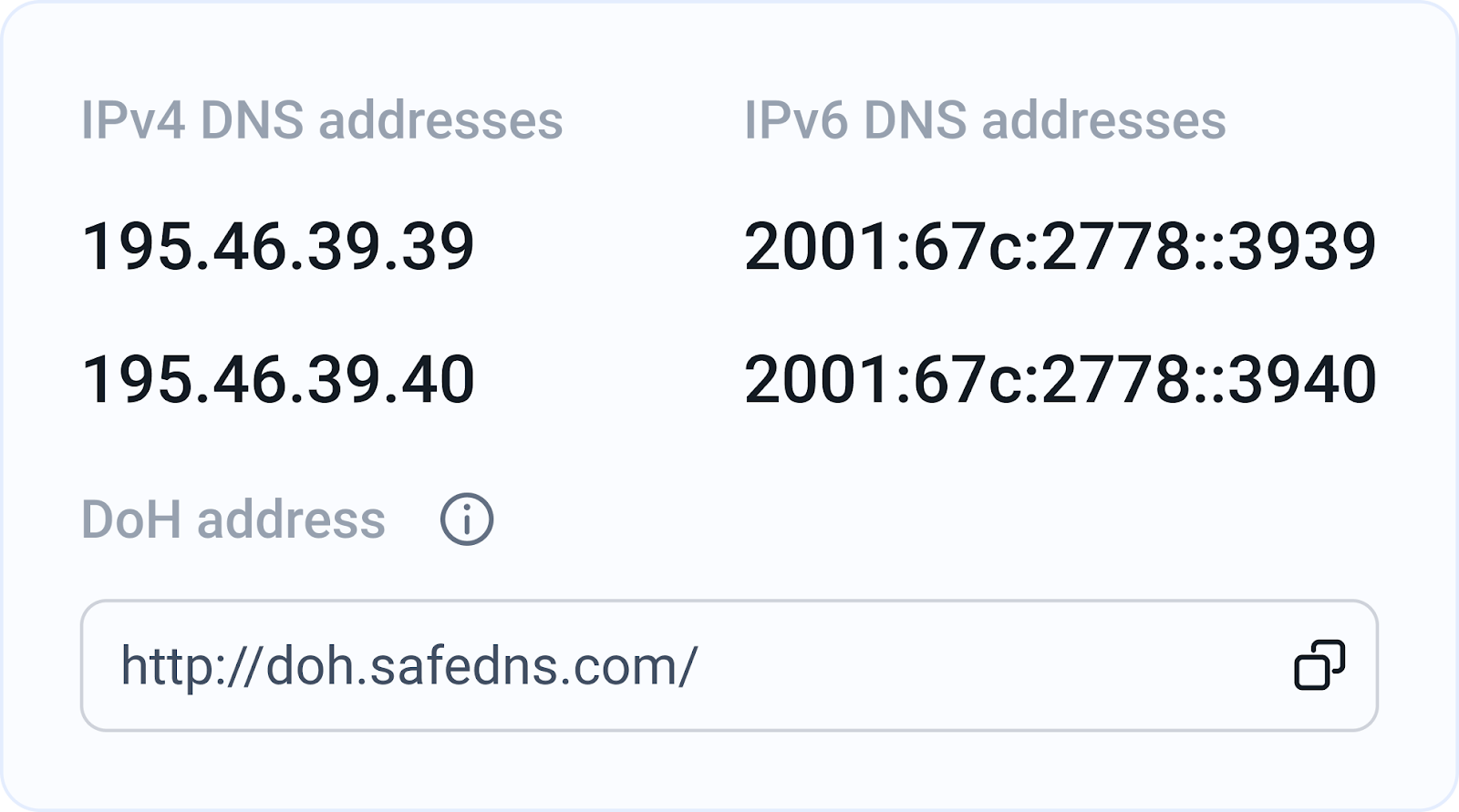
DNS-over-HTTPS (DoH) is a protocol for performing remote DNS resolution via the HTTPS protocol. DoH significantly enhances user privacy and security by encrypting DNS queries, preventing third parties from eavesdropping on user activities, and intercepting data. By encapsulating DNS requests within HTTPS traffic, DoH prevents unauthorized entities from snooping on users’ browsing activities and intercepting sensitive data. This encryption ensures that only the intended recipient, the DNS resolver, can decode and respond to the queries, maintaining the confidentiality and integrity of internet requests.
In addition to the core DoH functionality, SafeDNS is introducing the DoH policy feature. This advanced tool helps users generate their unique DoH link embedded with a policy token for applying certain filtering policies without having to manually add an IP address to the SafeDNS dashboard. The integration of this feature simplifies the management process for users, allowing them to enforce specific filtering rules effortlessly and efficiently.
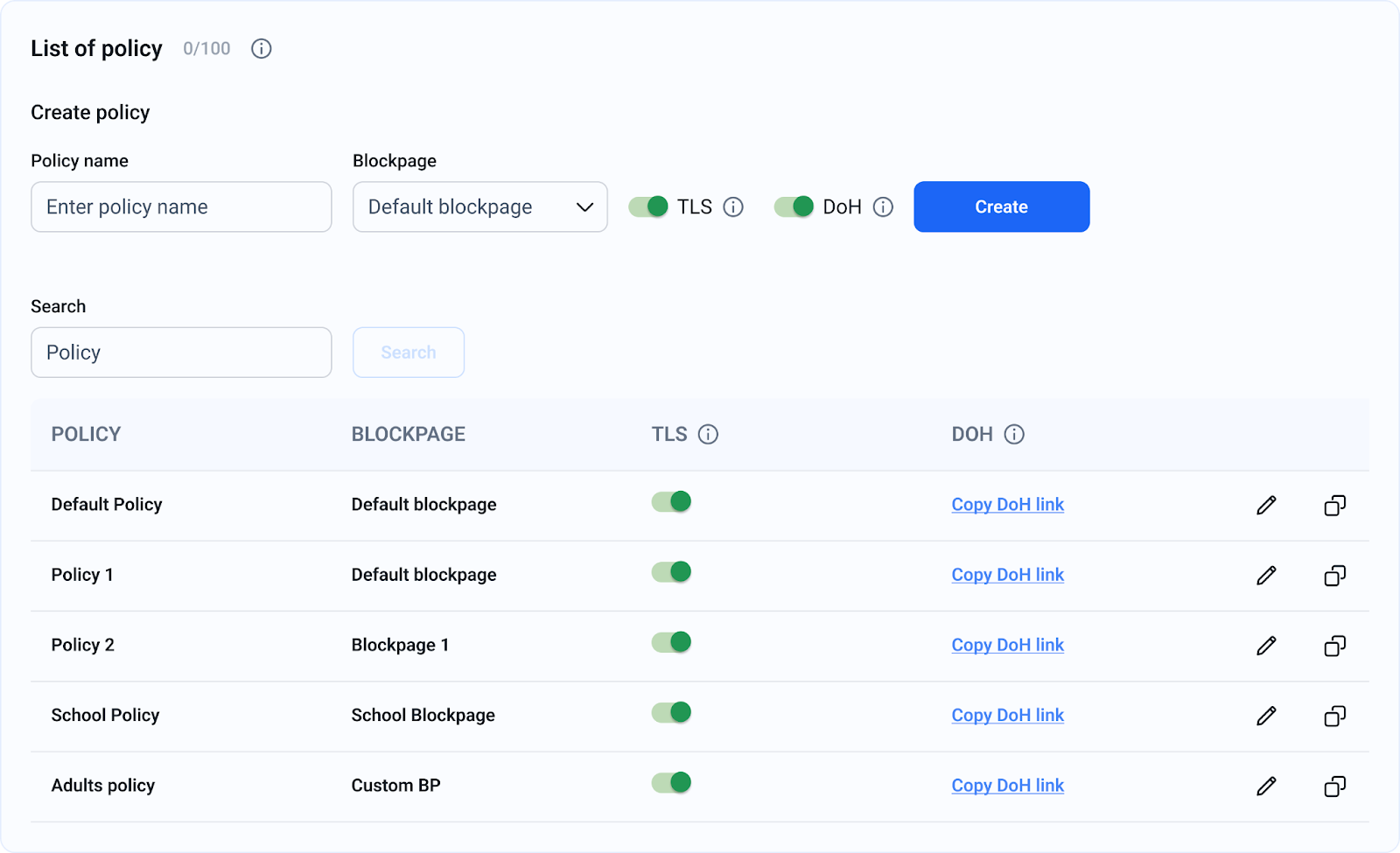
This feature is particularly beneficial for managing and protecting roaming clients without our agents. In other words, such clients will always be protected by the high level of filtering and protection provided by SafeDNS, regardless of their geolocation. It’s important to note that filtering operates within the browser where this setting is applied. We still recommend installing agents for comprehensive protection because when using only DNS over HTTPS, traffic from certain apps and services may remain unencrypted, leaving some vulnerabilities.
The DoH feature is available in all new SafeDNS plans, thus providing a guarantee of enhanced safety and privacy for all its users. However, the DoH Policy feature is exclusively available on our Pro, Pro+, and Education plans, offering advanced policy management and filtering capabilities for enhanced and comprehensive protection. With the DoH Policy feature incorporated in these upper-tier plans, we can deliver a more robust solution for customers that need the very finest level of protection and advanced policy management, ensuring that our users enjoy unparalleled internet security and privacy.
At SafeDNS, our mission is clear: to provide powerful, reliable Protective DNS solutions for safe internet use while attentively preserving users’ privacy and control. On this note, the introduction of DoH and the DoH policy feature underline that SafeDNS continues supplying its clients with all tools necessary to browse the web safely and securely, staying up-to-date with the latest DNS security technologies.
Passkeys vs. passwords — which is better?
)
It’s not if but how you authenticate
Most online services and applications require you to log in before using them. There’s no way around it, as our identity and your right to access digital products must be verified. The methods for this verification can vary though: You might enter a PIN or password, use biometrics like a fingerprint or facial recognition, click on a link sent to your email, and more.
The most commonly used authentication method remains the traditional password. However, a new kid on the block called ‘passkeys’ has recently emerged, sparking discussions about its superiority to passwords. We will now delve into and share our perspective on this debate. But first….
What is a password, really?
Passwords have existed for hundreds, perhaps thousands, of years. However, in the pre-digital age, they were primarily verbal phrases you had to say aloud to gain access to restricted areas. If this gives you the ‘Open Sesame’ vibes, you’re right on target.
These days, however, passwords inhabit the virtual realm as combinations of letters, numbers, and symbols that we use to authenticate and secure access to online accounts or systems. Their purpose is to protect our digital privacy and security, a role they have effectively fulfilled over time.
But the problem with many passwords is that they can be cracked. This is to say, if a password lacks enough complexity, cybercriminals can use modern hacking technologies to breach it, gaining unauthorized access to your accounts. For this very reason, many organizations have been searching for a successor to passwords for quite some time now—and it appears they’ve found one in passkeys.
‘Sorry, what is a passkey?’
It’s difficult to come up with a simple definition of passkeys, but we will do our best to explain this term in the easiest way possible. Basically, passkeys are a new type of credential consisting of two separate cryptography keys: a public key registered with the website or application and a private key stored locally on your device. During login, these keys must be paired to grant access.
What makes passkeys great is that biometric authentication tools on your device, such as fingerprint scanners or face ID, can initiate this pairing process, eliminating the need for passwords or other authentication factors.
As a result, using passkeys can not only enhance convenience but also significantly boost security by minimizing the risk of password theft. In other words, users can log into their online accounts much faster and with greater peace of mind regarding their cybersecurity.
The difference between passkeys and passwords
At this point, you should be able to distinguish between the two solutions, but we’ll still break down the key differences between passwords and passkeys to make sure it’s all clear. These are:
Passwords are user-created strings of characters, whereas passkeys are system-generated cryptographic keys.
Passkeys are unique by default, while passwords are as complex as the user makes them.
Passwords are stored on servers or databases, while passkeys consist of a public key stored on servers and a private key stored on a device.
Passkeys enhance cybersecurity through their dual-key authentication system, unlike passwords, which depend on their complexity.
Passwords are authenticated only via servers, whereas passkeys require pairing public and private keys, stored on the servers and the user’s device, respectively.
Users can change passwords, but managing passkeys usually requires specialized software.
Passkeys provide strong protection against phishing and brute-force attacks, whereas passwords are inherently more vulnerable to such threats.
Are passkeys safer than passwords?
Although we briefly answered this question in the previous section, we would like to discuss the security aspect in more detail.
Passkeys are generally considered more secure than passwords, and there are several reasons for this claim. Firstly, passkeys do not need to be remembered or manually created, unlike passwords, which require you to come up with complex combinations of letters, numbers, and symbols and then try to memorize them.
Moreover, passkeys are generated automatically using cryptography, which splits credentials into two parts. So, in case of a data breach where an attacker accesses your public key, that key alone remains useless without the corresponding private key.
We also need to mention that major companies like Google, Microsoft, and Apple already support passkeys and are collaborating with organizations like the FIDO Alliance to ensure passkey implementation across platforms. This widespread adoption by industry leaders underscores their trust in passkeys as a safer alternative to passwords, enhancing overall security for their users.
Store your passkeys and passwords in a secure password manager
Being one of the first password managers to support passkey technology, NordPass offers a cybersecurity solution that combines the best of both worlds, allowing you to securely and efficiently use passkeys and passwords.
With NordPass, encryption goes beyond just passkeys—stored in its encrypted vault, your passwords are protected from unauthorized access. Additionally, features such as autosave and autofill make storing and filling in passwords quick and easy. NordPass also includes a Password Generator that can create complex passwords on the spot, preventing you from using weak or previously used passwords in the future.
NordPass effectively addresses common password challenges, empowering its customers to adopt more sophisticated security practices. Whether you prefer using passwords or aim to transition to a passwordless future, NordPass provides the flexibility and tools to support both choices. Which way you will go is up to you.

NordLayer features in review: VPN split tunneling

Maintaining secure network connections is paramount when our lives merge with technology. However, striking an optimal balance between security and performance remains a complex task, especially in our fast-paced business environments.
At NordLayer, we understand this complexity, which is why we’re excited to introduce our VPN split tunneling feature—a cutting-edge solution that empowers organizations with granular control over their network traffic.
Split tunneling allows you to specify which traffic should traverse the secure VPN tunnel and which can access the internet directly. By “splitting” the traffic based on user-defined rules, you can tailor your network security approach to meet your organization’s unique needs.
Our VPN split tunneling functionality offers a tailored approach to traffic management, enabling you to selectively encrypt and route specific data streams while maintaining optimal speeds for non-sensitive traffic. This innovative feature provides a fresh approach to network security, paving the way for enhanced productivity, flexibility, and peace of mind.
How does VPN split tunneling work?
Traditional VPN connections route all internet traffic through an encrypted tunnel, providing robust security but potentially impacting performance for certain applications or services. VPN split tunneling breaks free from this one-size-fits-all approach by enabling you to specify which traffic should traverse the secure VPN tunnel and which can access the internet directly.


The process is remarkably straightforward: IT administrators define rules based on IP addresses, subnets, domain names, or even specific applications. By tailoring the rules to the organization’s needs, they can determine which network resources require the added protection of encrypted tunneling. This granular control ensures that mission-critical data associated with specific applications remains secure while other traffic, such as regular web browsing, flows uninterrupted. This optimization of network performance reduces potential bottlenecks, enhancing the user’s experience.
VPN split tunneling with NordLayer
At NordLayer, we’ve made it our mission to simplify the implementation of advanced networking solutions. Our VPN split tunneling feature easily integrates with our existing suite of products, providing a seamless and user-friendly experience.
To harness the power of VPN split tunneling, simply navigate to the “Network” section of the NordLayer Control Panel, select the desired server, and configure the split tunneling settings. Here, you can input the specific IP addresses or subnets you wish to route through our secure VPN servers, ensuring that only designated traffic utilizes the encrypted tunnel.
You also have the option to enable URL-based split tunneling directly from the Control Panel. Go to “Settings” and choose “Browser Extension Settings” to add specific domains you want to exclude from the encrypted VPN tunnel. This allows certain internet traffic to bypass encryption for optimized performance while maintaining security for other resources.
With our Core and Premium subscription plans, you gain access to this feature, unlocking new realms of network control and optimization. Premium subscribers can further leverage the Site-to-Site and Cloud Firewall capability, allowing secure access to private network subnets through the NordLayer gateway.
Differences between URL-based and IP-based split tunneling
While VPN split tunneling is not a novel concept, NordLayer’s implementation stands apart, offering a flexible split tunneling solution with both URL-based and IP-based filtering options. This dual approach addresses the needs of modern organizations by allowing customized network security configurations.


URL-based split tunneling
URL-based split tunneling for the Browser Extension allows you to create exceptions by excluding specific domains from the encrypted VPN tunnel. This method is ideal for scenarios where you want to bypass VPN encryption for certain domains to optimize the internet performance while keeping the security for organizational resources.
IP-based split tunneling
On the other hand, IP-based split tunneling, our newly released feature for desktop and mobile apps, takes a more targeted approach. Instead of excluding domains, it allows you to include specific IP addresses or subnets for encryption through the NordLayer VPN tunnel. It provides less sensitive web browsing traffic to bypass encryption while keeping the protective layer on through the use of NordLayer’s Secure Internet Access features, such as DNS Filtering by Category and ThreatBlock.
This granular control enables you to pinpoint the exact network resources that require the heightened security of encrypted tunneling, while all other traffic traverses the internet directly.
Together, these two methods create NordLayer’s comprehensive VPN split tunneling feature, providing unprecedented flexibility in tailoring your organization’s network security posture. By combining URL-based and IP-based split tunneling, NordLayer enables you to customize your network security posture according to your organization’s specific needs and use cases.
Benefits of VPN split tunneling
The advantages of implementing NordLayer’s VPN split tunneling are multifaceted, catering to the diverse needs of IT administrators, end-users, and the organization as a whole.
-
Selective encryption for resource access: By encrypting only the traffic destined for specific resources, IT administrators maintain optimal performance for non-sensitive data streams, ensuring critical resources remain secure
-
Increased flexibility for network access security: IT admins can choose whom to grant access to specific resources
-
Better VPN and internet performance: VPN split tunneling helps when users experience latency or disruptions by optimizing traffic flows
-
Optimized bandwidth usage: Some traffic bypasses the corporate network, reducing VPN congestion and improving overall performance
-
Enabling access to restricted sites: Certain websites like financial services or government portals may block VPN connections, but VPN split tunneling allows making exceptions while keeping other traffic secure
For IT administrators
Enhanced control over network traffic allows tailored routing policies based on organizational priorities. Additionally, streamlined management from the Control Panel provides the flexibility to configure the feature to suit the organization’s unique requirements.
For end-users
Improved productivity stems from encrypting only selected sensitive traffic, reducing potential latency and performance bottlenecks. VPN split tunneling also increases flexibility and freedom to access organizational resources or specific domains or applications without compromising speed or user experience.
For organizations
Optimized network efficiency results from selectively routing traffic through the VPN tunnel, reducing congestion and optimizing bandwidth usage. Furthermore, elevated security and risk mitigation are attained by directing critical internal systems through a VPN while allowing web browsing traffic to bypass encryption.
Should you use NordLayer’s VPN split tunneling?
The answer to this question lies in your organization’s specific needs and priorities. If you’re seeking a solution that strikes the perfect balance between robust security measures and uninterrupted performance, NordLayer’s VPN split tunneling is an invaluable asset.
This feature is particularly beneficial for organizations with remote or hybrid workforces, where employees require seamless access to both corporate resources and the open internet. By selectively encrypting traffic to internal systems and applications, you can maintain a high level of security without sacrificing productivity or user experience.
Additionally, VPN split tunneling can be a game-changer for businesses operating in regulated industries or those with strict compliance requirements. By granularly controlling the flow of sensitive data, you can ensure adherence to industry-specific regulations while optimizing network performance.
Take control of your network traffic with NordLayer
In the realm of cybersecurity, where threats evolve and network demands surge, mastering the delicate balance between security and performance becomes paramount. NordLayer’s VPN split tunneling feature empowers organizations to take control of their network traffic, ensuring sensitive data remains secure while maintaining optimal speeds for non-sensitive activities.
Embrace the power of VPN split tunneling and experience a new level of network control, flexibility, and peace of mind. Don’t settle for compromise—choose NordLayer’s VPN split tunneling to level up your network security and performance. Reach out to our team and discover how this innovative solution can transform the way you approach network management.
Together, let’s redefine what’s possible in the world of secure networking.

Optimize Your Security Offering with Guardz Latest Product Updates

Awareness templates & Automation
We are thrilled to announce an upcoming feature that will improve the efficiency of your awareness campaign management.
What’s New?
Configure and deploy awareness campaign templates for monthly, bi-monthly or quarterly campaigns, providing a truly “set and forget” experience.
- Global Campaign Setup: Easily set up campaign templates for all your customers at once. You can select all companies or specific companies.
- Default Campaigns: Start with 12 predefined monthly campaigns, which can be customized in frequency, content and language.
- Flexible Scheduling: Choose from predefined frequencies, set start dates and manage the order of campaigns.
- Comprehensive Tracking: Monitor the status of each campaign, including completion rates and user engagement, directly from the Awareness Page.

Business Review – Printable version
The Security Business Review is now available in its white and printable version.
You can access it by navigating to Reports -> Security Business Review -> Report History.
This option is available for newly generated reports.

CSV Export for Issue Details
What’s New?
You can now easily export detailed information for each issue, including all detections, to a CSV file. This is perfect for sharing with members who don’t have direct access to the system.
Where to Find: Within the issue drawer, a new button for exporting issue details to a CSV file was added.
In addition, issues of the same type can be exported from the issue table.
This update enhances issue tracking and resolution capabilities, providing critical information in an easily accessible format.

ServiceNow Integration
Exciting news! Guardz has now integrated with ServiceNow, bringing you a seamless way to manage security incidents. With this integration, any issue identified by Guardz can automatically create an incident in ServiceNow, ensuring your security workflows are more efficient and effective.
Setting up this integration is a breeze. You’ll be able to map customers in Guardz to those in ServiceNow, define a sync strategy, set prioritization and more to fit your workflow needs. This integration is designed to make your life easier by automating the incident creation process, allowing you to focus on what matters most—keeping your customers secure.
We’re always looking to improve and support your needs, so let us know what other integrations you’d like to see next!

Coming Soon:
Email Whitelisting for Specific File Types
We’re going to enhance email filtering to block or allow specific file types (such as WAV) per customer and add additional management options under Security Controls -> Email Protection.
Issue handling: Add ignore reason
Users can add a reason when ignoring an issue, providing evidence for compliance checks, and documenting important decisions. The “Ignore” button will open a popup to enter a timeframe and reason, and these details are included in CSV exports for better tracking and accountability.

ESET is recognized as a Customers’ Choice for Midsize Enterprises in the 2024 Gartner® Peer Insights™ Voice of the Customer for Endpoint Protection Platforms Report

The Growth of Cybersecurity Budgets Amidst Persistent Inefficiencies: How Organizations Can Ensure Effective Investments

As cyber threats become increasingly sophisticated and pervasive, organizations worldwide are ramping up their cybersecurity budgets. Gartner projects global spending on cybersecurity to reach $188 billion in 2023 and surge to $215 billion in 2024. While this surge in investment is a positive development, it does not automatically translate into enhanced security. Inefficiencies persist, and many organizations are grappling with the challenge of measuring the effectiveness of their cybersecurity investments. This blog post explores the reasons behind these inefficiencies and provides actionable tips on how organizations can better assess and enhance the effectiveness of their cybersecurity measures.
The Growing Cybersecurity Budgets
The increase in cybersecurity budgets is driven by several factors:
- Rising Cyber Threats: Cybercriminals are becoming more sophisticated, employing advanced tactics such as ransomware, phishing, and supply chain attacks. The growing threat landscape compels organizations to allocate more resources to defend against these attacks.
- Regulatory Compliance: Regulations such as GDPR, CCPA, and HIPAA impose stringent data protection requirements. Non-compliance can result in hefty fines, driving organizations to invest heavily in cybersecurity to avoid penalties.
- Digital Transformation: The rapid adoption of digital technologies, including cloud computing, IoT, and remote work, has expanded the attack surface. Organizations must invest in cybersecurity to protect their digital assets and ensure business continuity.
- Reputation and Trust: A data breach can significantly damage an organization’s reputation and erode customer trust. Investing in cybersecurity is essential to maintaining brand integrity and customer confidence.
The Persistence of Inefficiencies
Despite increased spending, many organizations struggle with inefficiencies in their cybersecurity programs. These inefficiencies arise from several factors:
- Fragmented Solutions: Organizations often deploy multiple cybersecurity tools from different vendors. While these tools may address specific security needs, they can create a fragmented security environment that is difficult to manage and integrate.
- Lack of Skilled Personnel: The cybersecurity skills gap is a well-documented issue. Many organizations lack the skilled personnel needed to effectively manage and operate their cybersecurity tools, leading to underutilization and inefficiencies.
- Reactive Approach: Some organizations adopt a reactive approach to cybersecurity, focusing on incident response rather than proactive threat prevention. This can result in a misallocation of resources and an inability to prevent breaches before they occur.
- Unclear Metrics: Measuring the effectiveness of cybersecurity investments is challenging. Many organizations lack clear metrics and KPIs to assess the impact of their cybersecurity initiatives, making it difficult to determine whether their investments are yielding the desired results.
Measuring Cybersecurity Effectiveness
To address these inefficiencies and ensure a robust security posture, organizations must adopt a more strategic approach to measuring cybersecurity effectiveness. Here are some tips on how to achieve this:
1. Develop Clear Metrics and KPIs
Establishing clear metrics and KPIs is essential for assessing the effectiveness of cybersecurity investments. These metrics should align with the organization’s overall business objectives and provide a comprehensive view of the security posture. Some key metrics to consider include:
- Incident Response Time: The time it takes to detect, respond to, and mitigate a security incident.
- Mean Time to Recovery (MTTR): The average time required to recover from a security incident and restore normal operations.
- Security Incident Frequency: The number of security incidents detected over a specific period.
- Compliance Metrics: The organization’s adherence to relevant regulatory requirements and industry standards.
2. Conduct Regular Security Assessments
Regular security assessments, such as penetration testing, vulnerability assessments, and security audits, are crucial for identifying gaps and weaknesses in the security infrastructure. These assessments provide valuable insights into the effectiveness of existing security measures and help organizations prioritize their cybersecurity investments.
3. Leverage Automation and Integration
Automation and integration can significantly enhance the efficiency and effectiveness of cybersecurity operations. By automating routine tasks, such as patch management and threat detection, organizations can free up their security teams to focus on more strategic initiatives. Additionally, integrating cybersecurity tools into a unified platform can provide a holistic view of the security environment, streamline operations, and reduce the risk of misconfigurations and human error.
4. Invest in Training and Awareness
Human error remains one of the leading causes of security breaches. Investing in training and awareness programs can help employees recognize and respond to potential threats, reducing the risk of successful attacks. Regular training sessions, simulated phishing exercises, and awareness campaigns can reinforce a security-first mindset across the organization.
5. Foster a Security Culture
A robust security posture requires a culture that prioritizes cybersecurity at all levels of the organization. Leadership should set the tone by emphasizing the importance of cybersecurity and allocating the necessary resources to support security initiatives. Encouraging open communication and collaboration between security teams and other departments can also foster a more proactive and resilient security culture.
6. Utilize Threat Intelligence
Threat intelligence provides valuable information about emerging threats and attack techniques. By leveraging threat intelligence, organizations can stay ahead of cybercriminals and proactively adjust their security strategies. Integrating threat intelligence into the security operations center (SOC) can enhance threat detection and response capabilities, ensuring a more robust security posture.
7. Monitor and Review Regularly
Continuous monitoring and regular reviews are essential for maintaining an effective cybersecurity program. Organizations should implement continuous monitoring tools to detect and respond to threats in real-time. Additionally, conducting periodic reviews of security policies, procedures, and technologies can help identify areas for improvement and ensure that the cybersecurity strategy remains aligned with evolving threats and business objectives.
Conclusion
The growth of cybersecurity budgets is a positive trend, reflecting the increasing recognition of the importance of cybersecurity in today’s digital world. However, inefficiencies persist, and organizations must adopt a more strategic approach to ensure that their investments yield tangible results. By developing clear metrics, conducting regular security assessments, leveraging automation and integration, investing in training and awareness, fostering a security culture, utilizing threat intelligence, and continuously monitoring and reviewing their security posture, organizations can enhance the effectiveness of their cybersecurity investments and build a more resilient defense against cyber threats.

24.6.2 Voyager released
Bridging the Gap: CISOs and the C-Suite on Cybersecurity

Chief Information Security Officers (CISOs) and senior leadership often find themselves at odds. This friction can be attributed to several key issues, including a lack of cybersecurity knowledge among other executives, poor communication skills among CISOs, and a misalignment between security and business metrics.
The Knowledge Gap
One of the primary sources of tension between CISOs and senior leadership is the knowledge gap. Many executives in the C-suite, including CEOs and CFOs, often lack a deep understanding of cybersecurity risks and their implications. According to a Trend Micro survey of 2,600 IT leaders, only 54% believe that the C-suite truly understands cybersecurity risks. This lack of knowledge can lead to underestimating the importance of robust cybersecurity measures and misinterpreting the advice and warnings from CISOs. This gap can be particularly problematic when it comes to decision-making. Executives may prioritize other business risks over cybersecurity, not fully grasping how a significant cyber incident could disrupt business operations, damage reputation, and lead to substantial financial losses. To bridge this gap, it’s crucial for CISOs to educate and engage with senior leaders, providing them with clear, relatable information about cybersecurity risks and their potential business impacts.Communication Barriers
Effective communication is essential for any successful relationship, and the dynamic between CISOs and senior leadership is no exception. However, many CISOs struggle with articulating cybersecurity risks in a way that resonates with non-technical executives. The Trend Micro survey highlighted that 58% of respondents believe that improved IT communication skills would help enhance their standing within the organization. CISOs often rely on technical jargon and complex risk assessments, which can be difficult for executives to understand. This communication barrier can result in misunderstandings, with senior leaders perceiving CISOs as alarmist or out of touch with business priorities. Gareth Lindahl-Wise, CISO at Ontinue, emphasizes the importance of presenting cyber risks in a common business language, focusing on the likelihood and impact of these risks in terms executives can appreciate. To overcome these barriers, CISOs should develop strong communication skills, learning to translate technical information into business terms. Regular updates and clear, concise reports can help keep the board informed and engaged. By framing cybersecurity issues in the context of business goals and financial metrics, CISOs can demonstrate the tangible value of their efforts and foster a more collaborative relationship with senior leadership.Misalignment of Metrics
Another critical issue is the misalignment between security and business metrics. CISOs typically focus on metrics such as vulnerability counts, incident response times, and compliance levels, while senior leaders are more concerned with revenue growth, market share, and profitability. This disconnect can lead to conflicting priorities and a lack of support for necessary cybersecurity investments. Jose Seara, CEO and founder of DeNexus, suggests that translating detailed cybersecurity signals into business and financial metrics is crucial. This approach allows CISOs to justify cybersecurity investments by showing how they mitigate business risks and contribute to overall corporate objectives. For example, quantifying the potential financial impact of a data breach can make a compelling case for investing in advanced threat detection and response solutions. Furthermore, aligning cybersecurity initiatives with business goals can help CISOs gain the support and resources they need from senior leadership. By demonstrating how security measures can enable business growth, protect intellectual property, and enhance customer trust, CISOs can position cybersecurity as a strategic asset rather than a cost center.Building a Stronger Relationship
To build a stronger, more effective relationship between CISOs and senior leadership, several strategies can be employed:- Continuous Education: CISOs should take the lead in educating senior leaders about the evolving threat landscape and the importance of proactive cybersecurity measures. This can be achieved through regular briefings, workshops, and tailored training sessions.
- Effective Communication: Improving communication skills and adopting a business-oriented approach to presenting cybersecurity risks can help bridge the gap between technical and non-technical stakeholders. CISOs should focus on clear, concise messaging that highlights the business impact of cyber threats.
- Metric Alignment: Aligning security metrics with business objectives can help CISOs gain the support of senior leaders. By demonstrating how cybersecurity efforts contribute to the company’s bottom line, CISOs can secure the necessary investments and resources.
- Transparency and Accountability: Establishing a culture of transparency and accountability can enhance trust between CISOs and senior leadership. Regular, open communication about cybersecurity challenges and successes can foster a collaborative environment where security is viewed as a shared responsibility.
- Proactive Engagement: CISOs should proactively engage with senior leaders, seeking their input and feedback on cybersecurity strategies. This collaborative approach can help ensure that security initiatives are aligned with business goals and have the support of key stakeholders.