Skip to content

Contextualize honeypot alerts automatically with GreyNoise, runZero, Thinkst Canary, and Tines

This is the very first post in our new runZero practitioner’s series. We’ve invited Justin Varner, who has been in the security industry for the past 17 years, to share his thoughts on the importance of asset inventory and how it can be leveraged alongside SOAR, threat intelligence, and detection technologies. He is currently part of the Thinkst Canary Partner Program and is an active speaker on the security conference circuit.

Better Use of Your Tines: How to map Canary alerts to assets in runZero

As a Principal Solutions Architect, my job is to improve security programs and recommend ways companies can improve their breach detection capabilities.

One of use cases that comes up quite often is reducing operational overhead on incident response teams. These teams are usually overwhelmed with the number of alerts they’re getting and spend a ton of time chasing down false positives. In my role, I am constantly look for new ways to approach breach detection, and breaking away from the traditional paradigm of finding needles in a haystack. I often think about how teams can leverage automation to triage alerts more effectively and focus on the issues that are really going to impact them. How can I take a process, that is usually complex and manual, and streamline it so teams can stay on top of emerging threats?

There are an incredible number of tools out there that are in position to help teams who want to save time, and zero in on the critical issues affecting them. Some of these tools are changing the game in the asset inventory, threat intelligence, SOAR (security, orchestration, automation, and response), and detection technology space. Based on my experience using these tools, I am going to share how you can use Tines, a SOAR platform, to automate sending alerts generated by Thinkst Canary to GreyNoise for context. Then, extracting the metadata used by Greynoise to tag runZero assets, so that you can continuously maintain a comprehensive inventory with rich, full details.

Benefits of asset inventory and automation

Here are some of the reasons why these tools and this approach will help you:

  • Maintaining an accurate asset inventory is critical to managing your attack surface. As the old saying goes, “You can’t protect what you don’t know.” runZero excels at making sure you know what you need to protect. It’s the first product that can accurately identify assets and continuously update them in real-time.

  • Canary alerts are typically some of the most important alerts that your organization will receive. It’s imperative to quickly understand the full context of the alert to determine the severity of the threat (this is where GreyNoise comes in) and respond accordingly.

  • A variety of emerging threats loom every day that could directly impact your organization in a significant way. Solarwinds and Log4J are two recent examples of major threats that wrecked a multitude of organizations. If you happened to use GreyNoise and runZero back then, you had the benefit of the most current threat intelligence from GreyNoise coupled with the ability for runZero to dynamically check assets that were potentially vulnerable by searching for the Apache logging framework across your inventory.

  • Once you add Tines to the mix, you have the ability to stay on top of these emerging threats and respond swiftly to mitigate the potential impact to your organization. Tines is a powerful security automation platform, but you don’t need to understand advanced programming concepts to use it like most of the other SOAR products out there. This makes a previously complex task of integrating multiple services with disparate APIs easy with Tines.

Set up all the tools

The following walk-through shows how you can use Tines to automate sending alerts generated by Thinkst Canary to Greynoise to gather threat intelligence. Then, you’ll learn how to extract the metadata used by Greynoise to automatically tag runZero assets.

Let’s get everything ready.

Step 1: Create your Tines account

Start by creating a free Tines community account, which provides a generous allotment of resources.

Tines uses the concept of stories that consist of a variety of actions used to automate various routine tasks that people shouldn’t have to do. You have more important work to do. Let Tines handle the mundane and error prone tasks.

Learn more about Stories, Actions, and the other elements of Tines.

Step 2: Create your Thinkst Canary account

You’ll need a paid subscription to Thinkst Canary and the API must be enabled. Send an email to their amazing support team using support@canary.tools and they’ll get you sorted.

Step 3: Create a resource for Thinkst Canary in Tines

In your Canary console, navigate to the API section under global settings to retrieve the domain hash and auth token. You’ll need to add these values to Tines in order to successfully run the story.

In Tines, create a resource named canary_tools_tenant_id with the value of your domain hash and a credential named canary_tools_api_key with the value of your auth token.

Step 4: Create your GreyNoise account

GreyNoise provides a community API for free, but this particular story requires the GreyNoise enterprise API due to the metadata that we need to extract from the assets. Find your API key. You can start a 30 day trial to obtain a temporary API key.

Step 5: Set up a credential for Greynoise in Tines

Create a credential in Tines named greynoise_api_key with the value of your Enterprise API key.

Step 6: Create a runZero account

And finally you’ll need a runZero Professional or Enterprise account. You can start a 21-day trial of runZero Enterprise for access to all the features runZero has to offer, including the necessary API access needed for this tutorial.

Step 7: Set up a credential for runZero in Tines

Go to the runZero console, generate an API token for your organization by navigating to Organizations. Click your organization name, scroll down to the API tokens sections, and click Generate API Key. Copy the API token.

Then, in Tines, create a credential named runzero_organization_api_key with the value of your organization’s API token from runZero.

Pull everything together with Tines

Now, everything is in place to construct a Tines story that will orchestrate sending IPs from Thinkst Canary alerts to GreyNoise for context and tagging, and then finally, to runZero to build your asset inventory.

The following story is available in the Tines Story Library. Here is what the story will look like:

Tines story

The story consists of the following events:

  • [WEBHOOK] – An incoming webhook receives events from Canary whenever an alert fires
  • [HTTP REQUEST] – The webhook activates a call to the Canary API to pull down the relevant incident details
  • [EVENT TRANSFORMATION] – The IP is deduplicated to prevent redundant events from triggering
  • [HTTP REQUEST] – The public IP is extracted from the Canary incident and sent to GreyNoise for context
  • [HTTP REQUEST] – Asset metadata from GreyNoise is extracted and sent to runZero
  • [HTTP REQUEST] – runZero updates the tags associated with the asset based on the classification field reported by GreyNoise.

If the asset has not been seen in the wild then no tag is added. You can optionally send these alerts to a third-party endpoint of your choice like Slack or Jira.

Test this story by generating a web bug token and then pasting the URL in your browser and hit enter. The Canary alert will look similar to the following:

Canary trigger

And now we see the corresponding asset in runZero added and tagged with the data from Greynoise. Now, you’ve automatically added data from Greynoise into runZero, all orchestrated by Tines. Next time an alert triggers for this asset, your runZero inventory will automatically be updated. Automation FTW!

runZero asset

About Version 2 Limited
Version 2 Digital is one of the most dynamic IT companies in Asia. The company distributes a wide range of IT products across various areas including cyber security, cloud, data protection, end points, infrastructures, system monitoring, storage, networking, business productivity and communication products.

Through an extensive network of channels, point of sales, resellers, and partnership companies, Version 2 offers quality products and services which are highly acclaimed in the market. Its customers cover a wide spectrum which include Global 1000 enterprises, regional listed companies, different vertical industries, public utilities, Government, a vast number of successful SMEs, and consumers in various Asian cities.

About runZero
runZero, a network discovery and asset inventory solution, was founded in 2018 by HD Moore, the creator of Metasploit. HD envisioned a modern active discovery solution that could find and identify everything on a network–without credentials. As a security researcher and penetration tester, he often employed benign ways to get information leaks and piece them together to build device profiles. Eventually, this work led him to leverage applied research and the discovery techniques developed for security and penetration testing to create runZero.

runZero 3.2: A 365-degree view of your Microsoft environment

What’s new with runZero 3.2?

  • Integrations with Microsoft 365 Defender and Microsoft Intune
  • Query and report on Active Directory users and groups
  • Fingerprint updates
  • User experience improvements

Complete visibility into your Microsoft assets

Over the last few months, runZero has added support for Microsoft Azure cloud assets, Azure Active Directory and on-premise Active Directory users, groups, and assets, in addition to a community integration with Microsoft Sentinel. The runZero 3.2 release fills in the missing pieces by bringing endpoint visibility into the runZero inventory through new integrations with Microsoft 365 Defender and Microsoft Intune. runZero Enterprise users can view, search, analyze, export, and alert on attributes from the Defender and Intune metadata.

Mobile device management (MDM) solutions have become essential to organizations with a remote or transient workforce because of their ability to manage and secure devices even when they aren’t on the corporate network. Similarly, endpoint detection and response (EDR) platforms are commonly used on all sorts of assets for security monitoring and automatic response. While these IT management and security tools are an important part of many security stacks, reviewing what has been onboarded to those sorts of solutions only tells you about the devices that someone is already responsible for. Those lists can’t tell you about all the assets on your network that are unprotected or unmanaged, or all the assets disconnected from your network that haven’t been scanned.

Unprotected and unmanaged devices are the bane of many organizations, and runZero can help you find them. Quickly identify unmanaged assets through a runZero query: filtering on source:runzero AND NOT (source:ms365defender OR source:intune) will return a list of assets that were found by your Explorers, but are not registered onboarded to Defender or Intune.

The inverse of this query can be used to ensure off-network assets are included in your asset inventory: (source:ms365defender OR source:intune) AND NOT source:runzero. This will give you a list of targets that may be missing from your scans and can ensure you’re gathering all the available network and asset data.

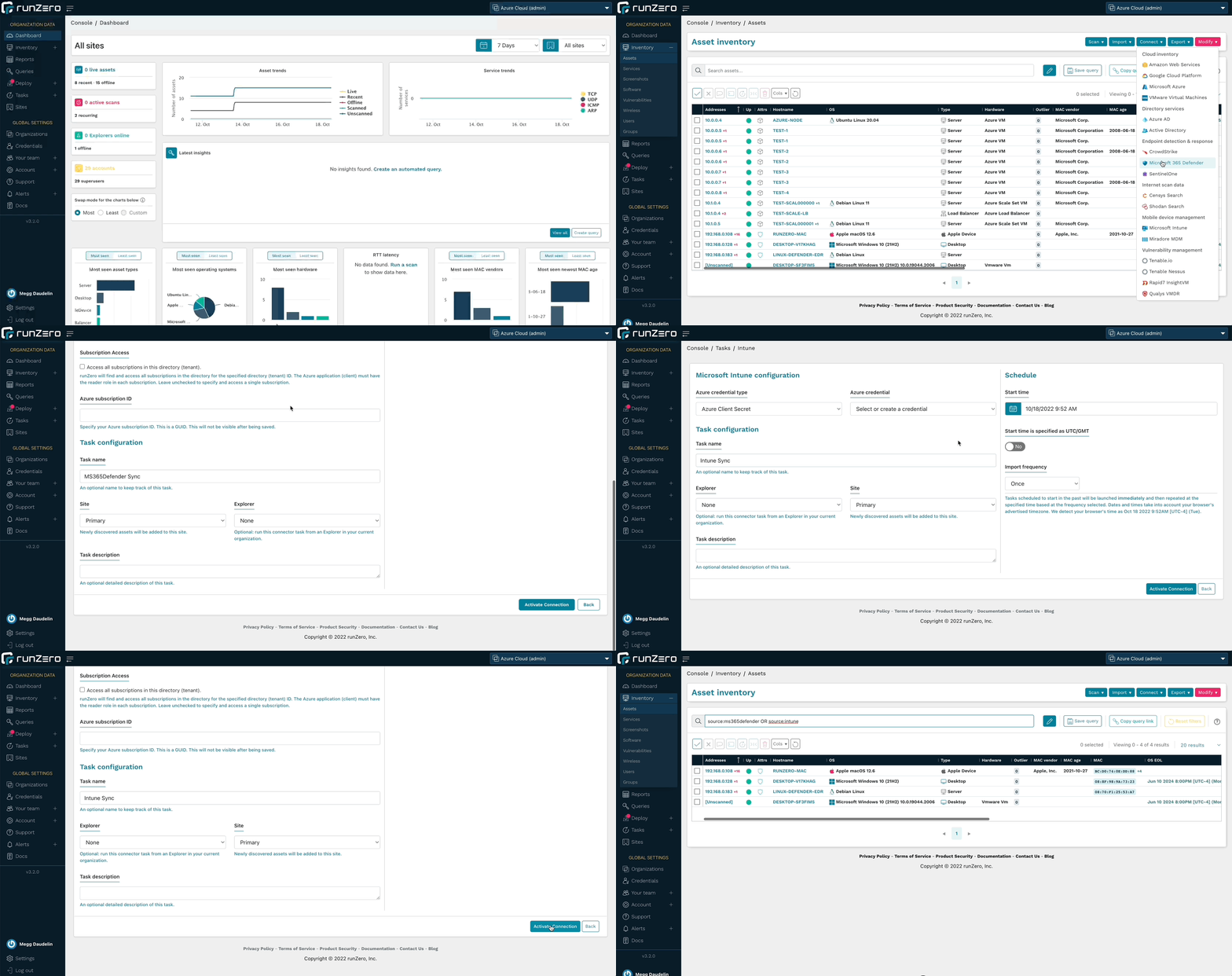
With runZero’s unmatched active network scanning and an ever-growing list of integrations, you’ll have a complete asset inventory at your fingertips. To get started, set up a connection to Microsoft 365 Defender or Microsoft Intune.

Microsoft 365 Defender and Microsoft Intune integrations

Query and alert on Active Directory users and groups

In addition to running searches in the Users and Groups inventories, runZero Enterprise users can leverage the Azure AD or Microsoft Active Directory integrations to quickly find accounts that match specific parameters. Quickly identify expired, disabled, or locked accounts, as well as managed service accounts and accounts with non-expiring passwords. These queries are included in the Query Library and can also be used to create alerts.

The Organization Overview report has also been updated to include counts of users and groups for the whole organization as well as per site.

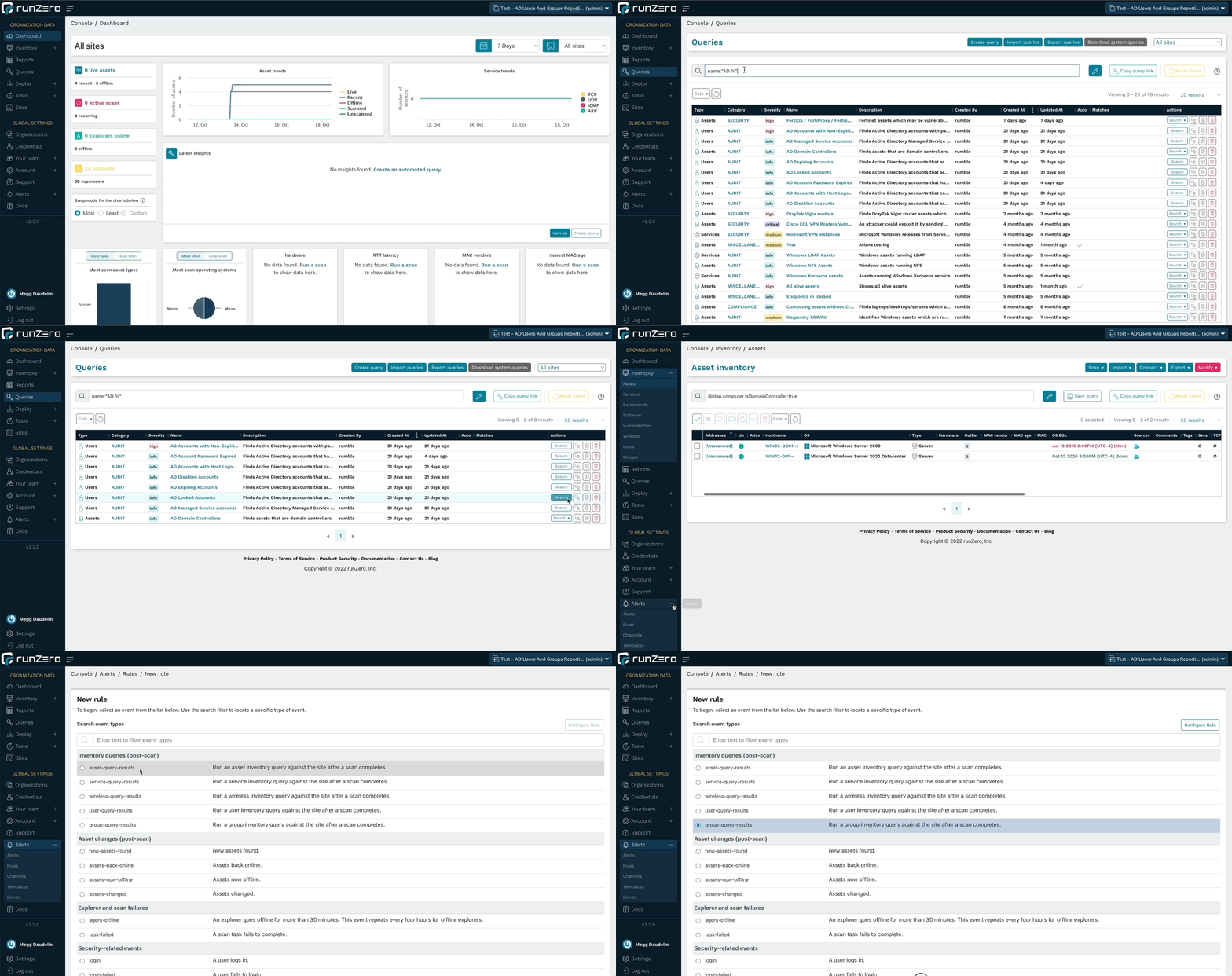
Run queries about AD users or create an alert rule to find accounts of interest.

Query and Alert on AD Results

Fingerprinting Microsoft assets

runZero includes fingerprints for the metadata returned by the Microsoft integrations. This leads to more accurate operating system and hardware data within the runZero inventory. These fingerprints cover every aspect of the Microsoft ecosystem, from Azure cloud VMs to off-network endpoints running Microsoft Defender.

In addition to Microsoft fingerprints, runZero has also improved the coverage of Tenable.io and Nessus assets, public and private AWS AMI images, and IMAP services. Additional support was added for products by Advidia, Aiphone, Apple, ARRIS, Fortinet, Honeywell, iDevices, Lutron, Midnite Solar, Netgear, Sapling, SEH, Silex, Yeelight.

User experience improvements

The 3.2 release includes several changes to the user interface to improve the performance of the runZero console, as well as a change to how page navigation transitions happen. As a result, the pages will load faster as you move between sections like the inventories and asset details pages. Additionally, the asset details page provides better performance and efficiency when loading all of the details for an asset.

Enhancements have also been added to make using the data easier than ever. On the asset details pages, the “last loaded” timestamp indicates when the asset details were loaded, and a refresh button has been added to be able to quickly reload the data without refreshing the whole webpage. The Vulnerabilities and Software tables on these pages now perform and load faster. Additionally, the navigation list for the Services table now displays the protocols and ports as a navigation tree to make finding the information you’re looking for simpler and a button has been added to quickly bring you back to the top of the page from the services table. As we continue to make progress on the architectural modernization of the runZero Console, you will see improvements to the performance and user experience of the product.

Asset Details Updates

Release notes

The runZero 3.2 release includes a rollup of all the 3.1.x updates, which includes all of the following features, improvements, and updates.

New features

  • runZero Enterprise customers can now sync assets from Microsoft 365 Defender.
  • runZero Enterprise customers can now sync assets from Microsoft Intune.
  • Fingerprint updates.

Security fixes

  • Three stored cross-site scripting vulnerabilities were identified and fixed as part of our annual third-party security assessment.
  • A bug that could lead to stored cross-site scripting in the scan templates view was fixed. This issue could be exploited by an authenticated, but unprivileged user to take over the session of another authenticated user.
  • A bug that could lead to stored cross-site scripting in the SSO group mappings view was fixed. This issue could be exploited by an authenticated superuser to take over the session of another authenticated user.
  • A bug that could lead to stored cross-site scripting in the team view was fixed. This issue could be exploited by an authenticated, but unprivileged user to take over the session of another authenticated user.

Product improvements

  • SNMPv2 options have been moved to the Probes tab (now labeled Probes and SNMP).
  • The toggle switch to use or not use SNMP now correctly reflects whether it is overridden by the “Use defaults” option on the Probes tab.
  • The asset details pages now include a “last loaded” time indicator and the ability to refresh the page data.
  • Alert notifications, user invitations, and password reset emails are now sent from the runzero.com domain name instead of rumble.run.
  • The rumblectl utility now has a diagnostics command to run or save a diagnostic script for self-hosted customers to collect information for runZero support.
  • Inventory pages now offer “all” and “none” column visibility selection options.
  • The search keyword os_eol_expired is now supported on the Assets inventory.
  • The rumblectl command can now be used with self-hosted deployments to configure additional superusers.
  • Email notifications are now enabled for non-recurring Organization Overview reports.
  • Relative time searches now accept negative numbers.
  • Scan tasks and templates now allow empty SNMPv1 and SNMPv2 community strings.
  • Credential validation has been improved to prevent common misconfigurations.
  • Support for Explorer hosts running virtual machines has been improved.
  • MAC vendor display behavior on inventory datagrids has been improved.
  • Tooltips on datatable icons have been improved.
  • Changes to directory users and groups are now included in the task change report.
  • Error messages related to API tokens have been improved.
  • Asset exports now filter subnet results to those containing the assets’ addresses.
  • Improved LDAP connector and probe logging.
  • Added group_count keyword to Users search.
  • Improved grouping of inputs in connector forms.
  • Search keyword has_group is now supported on the Users page.

Performance improvements

  • The asset details pages have been redesigned for improved performance.
  • Improved performance of asset exports with many subnets.
  • Improved loading times of the directory groups inventory page.
  • Improved loading times of the inventory screens, including multi-page selection.

Fingerprinting changes

  • Improved Active Directory collected data and fingerprint coverage.
  • Improved LDAP attributes for Active Directory objects.
  • Added new queries for quickly surfacing various Active Directory scenarios.
  • Improved fingerprinting coverage of Azure AD assets.
  • Improved fingerprinting coverage of Tenable assets.
  • Improved fingerprinting coverage of public AWS AMI images.
  • Added custom fingerprint support for private AWS AMI images.
  • Improved fingerprinting coverage of IMAP services.
  • Additional support added-or-improved for products by Advidia, Aiphone, Apple, ARRIS, Fortinet, Honeywell, iDevices, Lutron, Midnite Solar, Netgear, Sapling, SEH, Silex, Yeelight.

Integration improvements

  • Recent users from Microsoft Intune, SentinelOne, and CrowdStrike are now included on the asset details page.
  • The Azure AD integration now imports additional assets and no longer requires a Microsoft Intune license.
  • The Azure AD integration can now be configured to optionally import assets, users, and groups.
  • The Active Directory integration service options have been adjusted for consistency.
  • Directory users and groups can now be included in custom queries.
  • The Organization Overview report now contains summary information for directory users and groups when present.
  • The Tenable.io integration now supports a configurable API URL.
  • The Active Directory integration now supports optional import of assets, users, and groups.
  • The minimum TLS version supported by new Active Directory credentials has been increased from TLS 1.0 to TLS 1.2, with a configurable option to support older TLS versions.
  • The handling of Qualys concurrency and rate limiting has been improved.

Bug fixes

  • A bug that could prevent repeated import of task data that includes directory users and groups has been resolved.
  • A bug that caused subnet sampling and screenshots to be enabled for all scan tasks has been resolved.
  • A bug that could prevent modifying the maximum concurrent scans setting was resolved.
  • A bug that could result in an inaccurate task count on the credentials page was resolved.
  • A bug that could result in inaccurate searches by credential on the tasks page was resolved.
  • A bug that could result in inaccurate reporting of credential reuse was resolved.
  • A bug that could cause certain browser extensions to prevent configuring scans was resolved.
  • A bug that could prevent reuse of SNMP credentials for recurring scans was resolved.
  • A bug that could prevent initializing a scan in some cases was resolved.
  • A bug that prevented recurring scans from being saved in some cases was resolved.
  • A bug that prevented the first_seen timestamp from being set has been fixed.
  • A bug that could cause large Qualys imports to fail has been resolved.
  • A bug that prevented import of Azure AD users and groups when missing an active Intune license has been resolved.
  • A bug that could result in partial import of Azure AD users and groups has been resolved.
  • A bug which prevented the report.changed value from working in notification rule templates has been fixed.
  • A bug that prevented the use of client tokens to authenticate to the API has been fixed.
  • A bug that could cause insight queries for hosted zones to fail has been resolved.
  • A bug in the Shodan integration asset-mode query has been resolved.
  • A bug that could cause MAC vendor names to be cut off in datagrids has been resolved.
  • A bug that could result in missing Shodan services has been resolved.
  • A bug that incorrectly imported Active Directory Managed Service accounts as assets has been resolved.
  • A bug that could cause the Switch Topology report to not show all switches in certain situations has been resolved.
  • A bug that could result in a 500 error when exporting assets from sites with many assets and/or subnets has been resolved.
  • A bug that could result in UI elements becoming unresponsive has been resolved.
  • A bug that could prevent some service values from being saved has been resolved.
  • A bug that could result in all subnet tags being applied to exported assets has been resolved.
  • A bug that could result in missing Shodan services has been resolved.
  • A bug that could cause Azure AD imports to fail for certain configurations has been resolved.
  • A bug that could cause excessive export sizes has been resolved.
  • A bug that could obscure task errors from the task log has been resolved.

About Version 2 Limited
Version 2 Digital is one of the most dynamic IT companies in Asia. The company distributes a wide range of IT products across various areas including cyber security, cloud, data protection, end points, infrastructures, system monitoring, storage, networking, business productivity and communication products.

Through an extensive network of channels, point of sales, resellers, and partnership companies, Version 2 offers quality products and services which are highly acclaimed in the market. Its customers cover a wide spectrum which include Global 1000 enterprises, regional listed companies, different vertical industries, public utilities, Government, a vast number of successful SMEs, and consumers in various Asian cities.

About runZero
runZero, a network discovery and asset inventory solution, was founded in 2018 by HD Moore, the creator of Metasploit. HD envisioned a modern active discovery solution that could find and identify everything on a network–without credentials. As a security researcher and penetration tester, he often employed benign ways to get information leaks and piece them together to build device profiles. Eventually, this work led him to leverage applied research and the discovery techniques developed for security and penetration testing to create runZero.

Why unmanaged devices are a challenge for IT and security programs

Unmanaged devices pose a significant challenge for many organizations. As the number of devices connecting to their networks increase, security and IT teams can easily lose track and sight of these devices. As a result, organizations struggle with so many devices flying under the radar, leaving them unprotected and creating potential footholds into a network.

Unmanaged devices can take many forms:

  • Shadow IT: Imagine a developer’s test box set up with permission of the engineering team but without central governance: The machine is not on the Active Directory, not getting group policies, maintenance updates, or security controls. Because it doesn’t allow access via domain admin passwords, it’s off the radar for most CMDBs.
  • Rogue devices: Rogue devices may include a WiFi access point set up by an employee to get better wireless reception in their corner of the office. These are hard to detect because IT cannot install agents on them and doesn’t find them with an authenticated scan because SNMP strings won’t work on the device.
  • Orphaned devices: These devices were once managed but have fallen off the radar, for example an open-source web app run by a department that has since been superseded by a SaaS application but is now continuing its zombie life without patching or oversight.

Asset inventory of unmanaged devices tends to be particularly difficult for Internet of Things (IoT) and operational technology (OT) devices, such as programmable logic controllers (PLCs) in a factory. In an enterprise environment, these devices include printers, IP phones and uninterruptible power supplies (UPS). These devices often don’t take centrally managed administrative credentials and don’t allow IT teams to install an agent on them. That’s why they are often not covered by the enterprise inventory database.

Rogue devices slow down IT troubleshooting

The efficacy of IT helpdesks is often measured by how many tickets they can service. Anything that slows down troubleshooting impacts, not only that metric, but also the productivity of users and entire departments. An IT helpdesk person recently shared that they were investigating a networking issue with spotty connectivity for some users. The root cause was a rogue device with a static IP address that conflicted with other devices that received their address via DHCP in the same range. Without good asset inventory, that investigation would have turned into a wild goose chase.

Accidental network bridges bypass firewalls

In another case, a critical manufacturing line was shut down due to ransomware. Investigations showed that a rogue device had bridged from the IT to the OT network, enabling attackers to bypass a firewall that had been put in place to segment the networks. The security team lacked visibility into network bridges of unmanaged devices, which is why the issue wasn’t identified ahead of time.

Unmanaged devices hinder incident investigations

Analysts in a security operations center (SOC) need to quickly and efficiently work through alerts. In one case, an analyst received an alert that an internal IP address was communicating with a known-bad IP, notably the command & control (C2) server. However, neither the SIEM nor the CMDB had any record of the bad/poor IP on the network, nor did the vulnerability management or EDR consoles. The device turned out to be an IP camera that had been compromised by malware because it was using default credentials. With good asset inventory that tracks IoT devices, the analyst would have saved time resolving this incident as well as been able to find other devices of the same make and model to check if they were using default credentials.

End-of-life devices are bad for uptime and potentially vulnerable

Proactive IT lifecycle programs look for devices on the network that are approaching their end-of-life (EOL) or are outside the warranty period, replacing the devices before they become an issue. Manufacturers often no longer provide functional and security fixes for these devices, making them much more risky and difficult to service if something goes wrong. If unmanaged devices are not inventoried, IT and security teams are unable to get ahead of potential risks and issues. In addition, finance teams benefit from knowing which devices are fully depreciated and when a new budget is required to replace them.

Shadow IT makes network updates and migrations more risky

Carrying out updates and migrations of networks with a lot of shadow IT tends to be riskier because of potentially unknown applications and services. Having a full picture of all managed and unmanaged devices will de-risk the project because each part of the infrastructure can be planned and accounted for.

Rogue devices complicate governance of security controls

Proper governance dictates that you have security controls on every device. It’s impossible to figure out coverage gaps without knowing all of the devices on your network.

Once you have a full inventory of devices on your network, overlay the data from security controls and look for gaps, for example, finding all Windows machines missing CrowdStrike or other EDR systems. This can be a huge step in getting ahead of security issues.

Unmanaged devices are often the first foothold for attackers

Attackers often scan the network for any outliers: machines that have lower patch levels, unusual services running on ports, and unique pieces of software not found on the rest of the network. These typically become great entry points for an attack, because these machines tend to be more easily exploitable, are less likely to have security controls, and if orphaned, don’t have anybody minding the store. Identifying unmanaged devices to either update or decommission them is a great way to reduce your attack surface and mitigate risk.

Unmanaged devices are best discovered with unauthenticated scanning

Authenticated scans and agents are not effective for uncovering unmanaged devices because they require centrally managed credentials to scan or deploy, which are generally not available for rogue, IoT, and OT devices. The best solution is to use an unauthenticated scan as a baseline, then layer other information on top, such as data from your security controls consoles.

runZero scans your network in minutes to identify unmanaged devices

runZero offers free, professional, and enterprise plans to scan your network for unmanaged devices. It scales from home use to Fortune 50 companies. runZero uses a combination of unauthenticated, active scanning and integrations with cloud, virtualization, and security infrastructure to provide full visibility into IT, OT, cloud, and remote devices.

With runZero, you can:

  • Identify rogue devices to accelerate IT troubleshooting
  • Find accidental network bridges that bypass segmentation
  • Conduct asset-centric incident investigations
  • Find operating systems and networking devices that are EOL or out of warranty
  • Plan your network upgrades and migrations
  • Ensure great coverage for security controls
  • Reduce your internal and external attack surface

You can try out runZero for free–no credit card required–for 21 days and up to 50,000 devices. Try our free Starter Edition for up to 255 devices to get more visibility into your small business or home network.

Get runZero for free

Do you know about the unmanaged assets on your network? Find them with runZero.

Get started

Join our team

About Version 2 Limited
Version 2 Digital is one of the most dynamic IT companies in Asia. The company distributes a wide range of IT products across various areas including cyber security, cloud, data protection, end points, infrastructures, system monitoring, storage, networking, business productivity and communication products.

Through an extensive network of channels, point of sales, resellers, and partnership companies, Version 2 offers quality products and services which are highly acclaimed in the market. Its customers cover a wide spectrum which include Global 1000 enterprises, regional listed companies, different vertical industries, public utilities, Government, a vast number of successful SMEs, and consumers in various Asian cities.

About runZero
runZero, a network discovery and asset inventory solution, was founded in 2018 by HD Moore, the creator of Metasploit. HD envisioned a modern active discovery solution that could find and identify everything on a network–without credentials. As a security researcher and penetration tester, he often employed benign ways to get information leaks and piece them together to build device profiles. Eventually, this work led him to leverage applied research and the discovery techniques developed for security and penetration testing to create runZero.

Finding FortiOS, FortiProxy, and FortiSwitchManager assets on your network

News surfaced late last week of a critical authentication bypass vulnerability present in the web administration interface of some Fortinet products. Successful exploitation of this vulnerability (tracked as CVE-2022-40684) via crafted HTTP and HTTPS requests can provide remote attackers with admin-level command execution on vulnerable FortiOS devices including FortiGate firewalls, FortiProxy web proxies, and FortiSwitchManager assets.

What is the impact?

With a CVSS critical score of 9.6, attackers running admin-level commands on compromised assets may have the ability to persist presence, explore connected internal networks, and exfiltrate data. Fortinet is aware of at least one exploit of this vulnerability in the wild, and Bleeping Computer offered a Shodan search showing more than 140k publicly accessible FortiGate devices which may be running vulnerable FortiOS. Additionally, security researchers with Horizon3.ai are planning on publishing an exploit PoC this week. For admins wanting to check if a FortiOS/FortiProxy/FortiSwitchManager asset has been exploited, Fortinet does provide an indicator of compromise (see the “Exploitation Status” section).

Are updates available?

Fortinet has called out the vulnerable FortiOS, FortiProxy, and FortiSwitchManager versions in their advisory and has made updates available for affected products. Admins should ensure that affected models are updated to the latest version as soon as possible. If updates cannot be completed in the near term, Fortinet does provide some mitigation steps (see the “Workaround” section) that can be taken to secure vulnerable assets.

How do I find potentially vulnerable FortiOS, FortiProxy, and FortiSwitchManager assets with runZero?

From the Asset Inventory, use the following pre-built query to locate FortiOS, FortiProxy, and FortiSwitchManager assets that may need remediation:
os:FortiOS or product:FortiProxy or product:FortiSwitchManager
As always, any prebuilt queries are available from our Queries Library. Check out the library for other useful inventory queries.

About Version 2 Limited
Version 2 Digital is one of the most dynamic IT companies in Asia. The company distributes a wide range of IT products across various areas including cyber security, cloud, data protection, end points, infrastructures, system monitoring, storage, networking, business productivity and communication products.

Through an extensive network of channels, point of sales, resellers, and partnership companies, Version 2 offers quality products and services which are highly acclaimed in the market. Its customers cover a wide spectrum which include Global 1000 enterprises, regional listed companies, different vertical industries, public utilities, Government, a vast number of successful SMEs, and consumers in various Asian cities.

About runZero
runZero, a network discovery and asset inventory solution, was founded in 2018 by HD Moore, the creator of Metasploit. HD envisioned a modern active discovery solution that could find and identify everything on a network–without credentials. As a security researcher and penetration tester, he often employed benign ways to get information leaks and piece them together to build device profiles. Eventually, this work led him to leverage applied research and the discovery techniques developed for security and penetration testing to create runZero.

How runZero helps with red team security

It’s cyber security awareness month, which is why we’re doing a series of blogs to help you identify ways to use runZero to boost your security. We’re kicking off the series with ways to integrate runZero into your red team best practices. 

Red teams test the effectiveness of an organization’s security controls, including those in place to defend networks, endpoint hardware and software, as well as physical locations. Red teaming focuses on the concept that an organization doesn’t know how secure they are until they’re attacked. Therefore, red teams are critical in helping organizations uncover their weaknesses before a real world attacker does, empowering the organization to be proactive instead of reactive.

Let’s dig into three important red team security practices, explain their importance, and share how runZero can be best applied to each practice.

Best practice #1: Perform routine assessments

A red team assessment can include more than just penetration testing, it can also include social engineering exercises, physical penetration tests, and threat modeling as well. Tactics, techniques, and procedures (TTPs) that emulate real-world cyber attacks are critical red teaming elements. Routine assessments help keep the company prepared and can expose new vulnerabilities in the software being used or the employees that are accessing the data. Of course, these routines should always include a follow up with the results, but it is important to keep the initial assessment under wraps from the majority of the organization (except perhaps the security team, which should be determined ahead of time when negotiating the scope of assessment) to ensure an authentic representation of the existing security.

runZero delivers network visibility that can expose links between assets, helping you determine the severity of risk based on the results. For example, if someone with access to customer data succumbs to a phishing attack, you can identify systems in the network an attacker could have gained access to. runZero also offers vulnerability integrations, which will enrich your asset inventory with your vulnerability scan results. With a centralized view of your assets and their vulnerability results, you can identify high-risk assets and assess the risk to your network. This creates increased value in the security assessment results and may be a great way to encourage more thorough security training throughout the company.

Best practice #2: Record everything

runZero offers more accurate asset information so you can track and identify assets that are connected on the network. This makes those security comparisons easier, as well as the overall identification of what assets are accessible. As your red team conducts security assessments and penetration tests, the team should be recording everything–from the methods used to the assets that were accessed. This allows your team to routinely repeat the process to either validate remediation or mitigation efforts or to look for new weaknesses. Having clear documentation will allow for better analysis, as similar assets can be easily compared for the same security risks.

Knowing the assets that can be compromised is critical for identifying so many other issues and risks on your network. Users can be identified making it easier to track:

  • Remote access services
  • Software versions with unique vulnerabilities
  • Individual assets that are linked to sensitive data

Tracking the items listed above can make implementation of stronger security measures easier to execute efficiently.

Best practice #3: Choose the best tools

One of the first things that red teams focus on is reconnaissance. During this initial phase, it is critical to gather as much information as possible from target networks and systems. Discovery usually entails enumerating domains owned by the organization and scanning internal networks to collect information about the devices connected to them. Red teams generally perform both passive and active methods of reconnaissance, leveraging a myriad of tools to support their efforts.

With runZero, you can scan public facing and internal assets to gather details about them, like their OS, open services, installed software, and SSH versions. Once the red team has enough information about the target systems, they can leverage this data to find misconfigurations, identify potential vulnerabilities, and better plan their attack methods.

As a part of regular penetration tests, the red team is responsible for finding creative ways to exploit vulnerabilities. This means being aware of current system and application vulnerabilities and looking for new vulnerabilities in company software using unique methods to extract data. While this data is ultimately taken back with an intent to strengthen the security against such exploitation, the practice of being able to think like an attacker is valuable to red team practices. Red team exploitation exercises are meant to bring weaknesses in data and network security to light and can result in preventative measures.

Exploitation requires choosing the right tools. For the exercise to be as authentic as possible, the tools used often need to balance effectiveness with being undisruptive. Red team methods should safely work with fragile systems with the goal of not raising any alarms or disrupting work flow.

Stay tuned for more

This is the first post for the runZero cyber security awareness month blog series. In this post, we covered best practices of routine assessments and detailed recording. We also went over the importance of vulnerability exploitations and how runZero can be applied to help in your red team endeavors.

About Version 2 Limited
Version 2 Digital is one of the most dynamic IT companies in Asia. The company distributes a wide range of IT products across various areas including cyber security, cloud, data protection, end points, infrastructures, system monitoring, storage, networking, business productivity and communication products.

Through an extensive network of channels, point of sales, resellers, and partnership companies, Version 2 offers quality products and services which are highly acclaimed in the market. Its customers cover a wide spectrum which include Global 1000 enterprises, regional listed companies, different vertical industries, public utilities, Government, a vast number of successful SMEs, and consumers in various Asian cities.

About runZero
runZero, a network discovery and asset inventory solution, was founded in 2018 by HD Moore, the creator of Metasploit. HD envisioned a modern active discovery solution that could find and identify everything on a network–without credentials. As a security researcher and penetration tester, he often employed benign ways to get information leaks and piece them together to build device profiles. Eventually, this work led him to leverage applied research and the discovery techniques developed for security and penetration testing to create runZero.

Cyber security awareness month at runZero

October is Cybersecurity Awareness month! In honor of this event, we’re releasing a security assessment series that can help you utilize runZero to boost your security measures. We’ll go over some best practices for red, blue, and purple teaming as well as practical uses of runZero. To kick off our series for this year, we are presharing our planned topics so you can stay on top of all the content that will be dropping this month.  

We will be updating this blog post throughout the month with an overview of the key points for each topic. Subscribe to our blog to stay up to date with our latest posts.

Red teaming

Our red team blog was published on October 11 and covered three key practices: routine assessments, recording assessment data, and vulnerability exploitation. These practices are key to keeping your security team aware of cyber threats and ensuring a successful procedure is in place in the event of a real cyber attack. The digital landscape is full of new, creative exploitations, so it’s important to stay cyber smart. Check out the details on our red team blog and see how runZero can support these practices.

Blue teaming

Our blue team blog will be published on October 18. This blog will highlight three key practices for your defensive cyber security processes. A high-level overview of the discussion points will be added here upon the blog publication.

Purple teaming

Our purple team blog will be published on October 25. This blog will highlight three key practices for hybrid cyber security processes. A high-level overview of the discussion points will be added here upon the blog publication.

About Version 2 Limited
Version 2 Digital is one of the most dynamic IT companies in Asia. The company distributes a wide range of IT products across various areas including cyber security, cloud, data protection, end points, infrastructures, system monitoring, storage, networking, business productivity and communication products.

Through an extensive network of channels, point of sales, resellers, and partnership companies, Version 2 offers quality products and services which are highly acclaimed in the market. Its customers cover a wide spectrum which include Global 1000 enterprises, regional listed companies, different vertical industries, public utilities, Government, a vast number of successful SMEs, and consumers in various Asian cities.

About runZero
runZero, a network discovery and asset inventory solution, was founded in 2018 by HD Moore, the creator of Metasploit. HD envisioned a modern active discovery solution that could find and identify everything on a network–without credentials. As a security researcher and penetration tester, he often employed benign ways to get information leaks and piece them together to build device profiles. Eventually, this work led him to leverage applied research and the discovery techniques developed for security and penetration testing to create runZero.

Finding Microsoft Exchange Servers on your network

GTSC, a Vietnamese security firm, recently discovered two zero-day vulnerabilities that affect Microsoft Exchange Server 2013, 2016, and 2019. These two vulnerabilities are being tracked as CVE-2022-41040 and CVE-2022-41082. According to Microsoft, they are aware of “limited targeted attacks using the two vulnerabilities to get into users’ systems.” In order for attackers to successfully exploit the vulnerabilities, they must have authenticated access to the vulnerable Microsoft Exchange Server.

What is the impact?

The first vulnerability, CVE-2022-41040, is a Server-Side Request Forgery (SSRF) vulnerability. The second vulnerability, CVE-2022-41082, allows remote code execution (RCE) when the attacker has access to PowerShell. According to GTSC, it appears that attackers can exploit the vulnerabilities to place webshells on exploited systems and set the stage for post-exploitation activities.

Are updates available?

As of September 30, 2022, both CVEs have not been patched, but Microsoft has indicated they are actively working on an accelerated timeline to issue a fix. According to their guidance, Microsoft Exchange Online Customers do not need to take any action. However, on-premises Microsoft Exchange customers should review and apply Microsoft’s mitigation steps on URL Rewrite Instructions and block exposed Remote PowerShell ports.

How do I find Microsoft Exchange Servers with runZero?

To get started, you can scan your network with runZero to collect your asset inventory. Then, from the Asset Inventory, use the following query to locate Microsoft Exchange Servers on your network:

product:"exchange server"

Check out our Queries Library for other useful inventory queries.

About Version 2 Limited
Version 2 Digital is one of the most dynamic IT companies in Asia. The company distributes a wide range of IT products across various areas including cyber security, cloud, data protection, end points, infrastructures, system monitoring, storage, networking, business productivity and communication products.

Through an extensive network of channels, point of sales, resellers, and partnership companies, Version 2 offers quality products and services which are highly acclaimed in the market. Its customers cover a wide spectrum which include Global 1000 enterprises, regional listed companies, different vertical industries, public utilities, Government, a vast number of successful SMEs, and consumers in various Asian cities.

About runZero
runZero, a network discovery and asset inventory solution, was founded in 2018 by HD Moore, the creator of Metasploit. HD envisioned a modern active discovery solution that could find and identify everything on a network–without credentials. As a security researcher and penetration tester, he often employed benign ways to get information leaks and piece them together to build device profiles. Eventually, this work led him to leverage applied research and the discovery techniques developed for security and penetration testing to create runZero.

Scanning your external attack surface with runZero

While runZero is mostly used for asset inventory behind the firewall, you can also use its scanner to discover your external attack surface.

External scans are beneficial for a number of use cases, such as:

  • Getting visibility into external hosts and exposed services
  • Assessing infrastructure of corporate acquisition targets
  • Performing vendor security screening
  • Reconnaissance for penetration testing

Differences between runZero and EASMs

New users sometimes wonder about the differences between runZero and solutions for external attack surface management (EASM), such as Censys and ShodanHQ. Many of these solutions scan the whole world so you can query their host database. However, network owners can ask to exclude their IP ranges for all users (i.e., not all hosts show up in your search). Some vendors will have tools or services that discover all of your externally-facing assets.

By contrast, runZero:

  • Is primarily an internal asset inventory and network discovery tool, but also has the ability to discover public-facing hosts.
  • Collects data through a combination of active scanning and integrations.
  • Takes inputs in the form of ASNs, domains, IPs, and FQDNs (as well as public IPs discovered in internal scans).
  • Can integrate with Shodan & Censys to identify hosts and augment data.
  • Augments scans with other sources through integrations (e.g., cloud hosting providers, vulnerability scanners, and EDR platforms).
  • Offers a much richer data set per asset.

How to scan your public-facing hosts

If you don’t have access to runZero Enterprise Edition, you can sign up for a free 21-day trial to follow this walkthrough. The free Starter Edition doesn’t contain some of the features described in this blog post.

Step 1: Determining domains and ASNs to scan

The easiest way to get started with external scans is through:

  • Domains – There are several options for finding the domains associated with your organization. Best to check with the person who’s managing your domain registrations and renewals. Doing a reverse WhoIs lookup hasn’t been a good option for a couple of years now, but if you lack alternatives, use Whoxy to find all domains registered to the same company.
  • ASNs – If you don’t know the ASN for your company, you can use a lookup service, such as ASNLookup to identify the ASNs for your organization.

For this example, let’s scan the external attack surface of a real organization and its properties, but blur any identifying data to ensure that the organization doesn’t become a target as a result of this post.

ASN lookup

Step 2: Adding Censys or Shodan integrations

You can also discover your external hosts via Shodan or Censys integration. The integration can pull in additional machines that may not be in your ASN or domain scope. To use the integration, go to Inventory > Assets in your navigation menu and select Censys search or Shodan search from the Connect dropdown menu. You’ll have to set up credentials with an API key to build the query.

Censys Search configuration

In the Censys configuration, we query acme.org in our search. This will also find any hosts that use the string acme.org in the common name of a TLS certificate. You can run this import either once or on a schedule.

Alternatively, you can set the Censys search mode to All external assets, which will not discover new assets, but enrich the assets already captured in runZero with Censys data. However, for this use case, we’ll go with the former setting.

The import will pull any information about the matching hosts, including services and attributes, into your inventory. You should now see some assets with limited data being populated in your runZero inventory. You can view the details for one of the imported hosts and see the following information:

Censys attributes

Step 4: Starting an external scan using hosted zones

In runZero, set up a new organization or project, then go to the inventory, click the Scan button and select Standard scan.

From the scan configuration page:

  • Choose US – New York as the Hosted zone (this is a runZero-hosted Explorer in the cloud).
  • Increase the scan rate from 1,000 to 5,000 (to accelerate the scan).
  • In the Discovery scope, enter the following data:
    • public:all: This will scan all the public IPs that were pulled in via Shodan or Censys in the previous step. If you are scanning your internal network with runZero, this will also add all public IPs discovered by any other means into the scope.
    • asn4:12345: Enter all ASNs in this format to target all IP addresses registered to this ASN. Note the digit 4 after ASN in the notation.
    • domain:acme.org: Add all domains that you are targeting. runZero will add all subdomains connected to these domains.
Scan configuration

Click Initialize scan. runZero now looks up both the IPs registered under the ASNs as well as all subdomains associated with the domains you are looking to scan and displays a sample for confirmation. Confirm your scan settings.

Scan configuration confirmation

Once the scan task has completed, go view your populated inventory.

View your populated inventory

runZero hosted zones are deployed with Digital Ocean. If you prefer to host your own Explorer, we recommend Digital Ocean because AWS, Azure, and GCP all rate-limit or filter outbound scan traffic in a way that impacts the quality of scan results. The runZero hosted zones performed much better than running a scan from an ISP as well, regardless of whether a VPN was used or not.

Step 5: Digging into your inventory

Looking at this data set, there are quite a few hosts with EOL operating systems. You can use the following query to find these:

os_eol:<now

Some operating system vendors will enable you to purchase extended support services. To only view systems that are outside the extended support period, use the following query:

os_eol_extended:<now

Assets can often leak secondary IP addresses, often within the RFC 1918 range. These machines are potential pivot points into private network spaces. To find those quickly, use the query:

has_private:t

Best practices are to have as few services on a single host as possible, especially when they are public-facing, to avoid the risk of one vulnerable service compromising another one. Sorting the column with the number of services per host reveals one host with eight services. After opening the Asset Details page, we can see these in the Services section.

Services list

Each one of these services has an extensive list of attributes that provide more information.

Step 6: Finding problematic SSH services

Looking at the SSH service on port 22, we see that it supports the authentication method of both password and public key. Allowing a simple password authentication may indicate elevated risk to your infrastructure.

SSH service

Clicking on the magnifying glass with the + sign next to the attribute name reveals that there are a total of 24 hosts that allow this kind of authentication.

Auth method results

Clicking on the attribute value or the count will display a list of hosts that match the query.

Back on the Asset Details page, clicking the magnifying glass next to the banner shows an overview of all the different SSH versions deployed in the infrastructure.

SSH versions

This works for all of the banner versions for other protocols as well. For example, you can very quickly and easily get a list of all of the Microsoft SQL Servers deployed in the environment, sorted by version number.

Going back to the Asset Details page, clicking the magnifying glass next to ssh.hostKey.md5 displays the frequency report for this attribute. It shows that several machines share the same SSH private key. This presents a security risk because if one of the hosts is compromised, it would also compromise other hosts sharing the same SSH private key. This typically happens when virtual machines are cloned without regenerating the SSH keys.

SSH host keys

Step 7: Identifying databases exposed to the Internet

Generally, databases should be accessible only to the applications that require access. They should never be accessible on a public IP. The same host exposes MariaDB version 10.5.15 on port 3306, which has several associated security vulnerabilities.

Identify databases exposed to the Internet
Is runZero a vuln scanner?

runZero is an asset inventory and network discovery solution, not a vulnerability scanner, but its findings can sometimes point to security vulnerabilities.

Step 8: Looking at exposed services

Let’s move on to the Services Inventory now. A great way to find unusual services exposed on an external IP is to sort the ports by high numbers first.

Services Inventory

In this environment, we’re seeing a Prometheus Node Exporter metrics server on port 9100, three IRC services, a mySQL/MariaDB service, NFS on port 2049, and RSYNC on three different machines. These may all provide options to an attacker. For example, insecurely configured Rsync servers are found during network penetration tests about a third of the time.

Step 9: Browsing web service screenshots

The Screenshots Inventory lists all screenshots taken from Web services. runZero uses the Google Chrome browser to render and screenshot any web pages. If you are using the cloud-hosted explorer as described above, you’re all set. If you are hosting your own explorer, please ensure that you have Chrome installed on the same machine to enable this feature.

Screenshots Inventory

Browsing through the screenshots is a great, visual way to inspect exposed websites. In our example, we’re seeing Jitsi Meet and GitLab sites, which may be OK to host externally as long as they’re updated and use strong authentication.

Step 10: Looking at software inventory

runZero can also infer installed software if it can be deduced either from a network scan or an integration. runZero’s Software Inventory provides a great way to get insight into software installed on hosts that are reachable over the Internet.

Software Inventory

A view that may be even better in understanding your product exposure is the Most seen products report on the dashboard. To access the report, go to the Dashboard and look for the Most seen products card. After you find it, click View more.

Most Products Seen

The results for least seen products are actually more interesting than the most seen ones because these show the long tail of the software inventory. If a piece of software is only installed once in your environment, it is less likely to be well configured and patched.

Step 11: Create a report for your external assets

Now that you have discovered and analyzed all of your externally-facing assets, you can also generate a report for others to review. Go to Reports, find the External Assets Report, and launch it.

External Assets Report configuration

From the External Assets Report configuration screen, you can choose what you’d like to include in the results. Additionally, if you need to view it regularly, you can set up a schedule and email it to yourself (and any other runZero user who wants a copy). Initialize the report when you’ve finished configuring the settings. The generated report will display and show you the results. You can save the report as a PDF to easily share with others.

External Assets Report

Step 12: Get alerted on changes to your external asset inventory

If you work in enterprise security, you probably want to know about any changes to your external asset inventory. In this case, you should set up a Censys or Shodan import and run the hosted scan on a schedule. Then, you can set up alerts to trigger post-scan, so you know everything that has changed in your environment.

In this example we’ll use email as the method of communication. To set up an alert, go to Alerts > Channels and click Create channel. Pick a name for your channel, select Email as Channel type and enter the email address you want to notify. Then click Save channel.

New channel

Go Alerts > Rules, and click Create rule. Select new-assets-found and click Configure rule.

Rule event

When the New rule configuration page appears, enter the following:

  • Name:
    • A name for your rule.
  • Conditions:
    • Enter 0 to the right of is greater than. This will trigger the rule if there are any changes to assets.
    • In Limit to organization, select an organization if you have several in your account. You may choose a different organization (or site) for your external point of view rather than your internal assets.
  • Action:
    • Choose the notification channel you just created.
New rule

You’ll now be notified after each import or scan if the assets have changed.

Use runZero for your internal asset inventory

runZero is primarily made for discovering your internal asset inventory. As you can see, it can also be useful for understanding your externally-facing assets.

As a next step, you should set up another organization and to scan your internal network to get a better understanding of your asset inventory. You can sign up for the free 21-day trial of runZero Enterprise Edition (no credit card required). If you are a private user or work for a company with less than 256 assets, you can use runZero Starter Edition for free.

About Version 2 Limited
Version 2 Digital is one of the most dynamic IT companies in Asia. The company distributes a wide range of IT products across various areas including cyber security, cloud, data protection, end points, infrastructures, system monitoring, storage, networking, business productivity and communication products.

Through an extensive network of channels, point of sales, resellers, and partnership companies, Version 2 offers quality products and services which are highly acclaimed in the market. Its customers cover a wide spectrum which include Global 1000 enterprises, regional listed companies, different vertical industries, public utilities, Government, a vast number of successful SMEs, and consumers in various Asian cities.

About runZero
runZero, a network discovery and asset inventory solution, was founded in 2018 by HD Moore, the creator of Metasploit. HD envisioned a modern active discovery solution that could find and identify everything on a network–without credentials. As a security researcher and penetration tester, he often employed benign ways to get information leaks and piece them together to build device profiles. Eventually, this work led him to leverage applied research and the discovery techniques developed for security and penetration testing to create runZero.

runZero 3.1: Sync Active Directory, import assets from Shodan, and launch integrations from Explorers

What’s new with runZero 3.1?

  • Sync your Active Directory users, groups, and machines with runZero
  • Import assets and external services from Shodan
  • Launch integrations from Explorers

Connect and sync Active Directory with runZero

runZero Professional and Enterprise users can now enrich their inventory with asset data from Microsoft Active Directory and Azure AD. runZero Enterprise users will also be able to view, search, analyze, and export users and groups imported from Active Directory. This integration brings Active Directory context to your existing assets and simplifies the process of identifying unmanaged assets. Once the sync completes users can query the asset inventory to identify unmanaged assets on the network. Using a query like source:runzero AND NOT (source:azuread OR source:ldap) will return a list of assets that weren’t in the integration results. Enterprise users can also leverage queries to search the attributes of users and groups. For example, to find accounts that have never logged in, you can use the following query: last_logon_at:<1. To get started, set up a connection to Azure AD or your Active Directory domain controller. Active Directory integrations runZero Enterprise users can now sync data about their public-facing assets from Shodan Search. Assets and services pulled in from Shodan can be correlated against public-facing assets in your runZero inventory. All Shodan users can craft custom queries to gather Shodan data about public assets and services, and licensed Shodan users can also add filters for more specific criteria. Licensed Shodan users can also have runZero automatically build a filtered query to search all external IP addresses in your inventory. This correlation supports cyber hygiene and attack surface management efforts across IT and security teams. The external view of your environment provided by Shodan may not match the current state of your assets. By first importing the public data for your external IP addresses from Shodan then scanning them with runZero, you can determine what has changed. Reviewing the Assets changed section of a completed task will let you see what has changed on your public-facing assets since the last scan. To start pulling asset and service data from Shodan, set up a connection. Shodan Search integration

Launch integrations from Explorers

You can now run third-party integrations from your runZero Explorers as well as the runZero cloud. This feature is useful for IT and security teams that restrict the allowed network traffic connecting to the APIs of their various tools and platforms. This capability also allows integrations to on-premise tools to run as an independent connector in addition to being run as part of network scans. To run an integration from an Explorer, use the Connect menu to choose the source and then select an available Explorer from the configuration dialog. Connector Tasks on Explorers

Add custom fingerprints to runZero

runZero users that have a self-hosted platform or standalone scanner now have the ability to add custom asset and service fingerprints. Following the structure and format of the open-source Recog fingerprint database, users can author their own fingerprint XML files and add them to a directory that the runZero platform or scanner can access. This capability can be useful in adding new fingerprint coverage for unique or custom assets and services, such as a device prototype or a proprietary, internal-use application or service. Custom fingerprints can also be configured to override similar runZero fingerprints by using a same-or-higher certainty value.

Release notes

The runZero 3.1 release includes a rollup of all the 3.0.x updates, which includes all of the following features, improvements, and updates.

New features

  • runZero Enterprise customers can now sync assets from Shodan.
  • runZero Enterprise customers can now sync assets from Azure Active Directory.
  • runZero Enterprise customers can now sync assets from Microsoft Active Directory via LDAP.
  • Connector tasks now can optionally be run from an Explorer on a network.
  • The Events datatable has been redesigned and is now more performant.
  • The Qualys integration now provides a more descriptive error message when rate-limited by the Qualys API.
  • Network File System (NFS) protocol detection on TCP ports has been improved.
  • A bug that prevented editing certain probe options when configuring a scan has been resolved.
  • Fingerprint updates.

Product improvements

  • Event details have been added to alert templates by default.
  • Task statistics for asset counts are now included in CSV exports and can be used in task searches.
  • The license-limit-exceeded event has been added to alert when the live asset count exceeds an accounts license.
  • Dashboard metrics now account for unscanned assets imported from third-party integrations.
  • Internal recurring tasks for metrics calculation no longer show in the recurring task count.
  • A notice was added to the MFA page to inform users that they can continue to use the old rumble.run domain until they re-enroll their authenticators for the new runzero.com domain.
  • Font rendering in Safari browsers now matches Firefox and Chrome.
  • UI improvements were made to the queries table.
  • Inventory searches now support runZero as an asset source type.

Performance improvements

  • The Events datatable has been redesigned and is now more performant.
  • The Asset Route Pathing Report is now more performant due to improved algorithm cycle detection.
  • Web screenshots are now limited to a maximum of 16 concurrent processes.
  • Web screenshots will now run concurrently on arm64 macOS systems.
  • Improved error handling for the GCP integration.
  • Improved parsing of input hostnames.
  • Dashboard insights have been limited to a maximum of three rows.
  • Processing performance for foreign asset data has been improved.

Fingerprinting changes

  • Improved Network File System (NFS) protocol detection on TCP ports.
  • Added OS fingerprinting support for our new Active Directory and Azure AD integrations.
  • Added a new ldap.notes attribute for assets with exposed LDAP/ActiveDirectory services, decoding well-known oids into a user-friendly representation to help with asset hunting.
  • Improved Endpoint Mapper (EPM) fingerprinting, including new service/configuration coverage and support for Unix domain sockets.
  • Improved VMware guest asset fingerprinting coverage.
  • Improved GitLab fingerprinting to include version information, when available.
  • A bug where a TLS common name (CN) field could contain more than the hostname has been resolved.
  • A bug where a Pegasystems version fingerprint could capture additional data has been resolved.
  • Additional support added for products by Amcrest, Aruba, ASUS, AudioCodes, Avaya, Bosch, Brother, CAREL, Continia Software, D-Link, Datapath, Dell, Epiphan Video, ESET, eufy, HikVision, Honeywell, HP, IBM, iRobot, KE2, Kirk Telecom, Kong, Lenovo, Lorex, Meross, MSB Technology, Netgear, NVIDIA, Panasonic, Proofpoint, Roku, Saia-Burgess Controls, Samsung, Soundweb London, Spectrum Instrumentation, TP-LINK, TRENDnet, Uniview, Vikylin, VMware, XAC Automation, Yamaha, and Zyxel.

Integration improvements

  • The Qualys integration now provides a more descriptive error message when rate limited by the Qualys API.
  • A new optional filter has been added to the Crowdstrike connector.
  • The performance of the Qualys connector has been improved.
  • The Tenable integration now excludes terminated and deleted assets.
  • The timeout for Qualys connection tasks has been increased from 60 seconds to 5 minutes.

Bug fixes

  • A bug that prevented editing certain probe options when configuring a scan has been resolved.
  • A bug where a TLS common name (CN) field could contain more than the hostname has been resolved.
  • A bug where a Pegasystems version fingerprint could capture additional data has been resolved.
  • A bug that could cause the browser to freeze when viewing assets with many attributes has been resolved.
  • A bug that could prevent rendering dashboard insights has been resolved.
  • A bug that could result in minimal assets being skipped has been resolved.
  • A bug that could result in the wrong insight counts on the dashboard has been resolved.
  • A bug that could cause attributes and screenshots to be removed from offline assets has been resolved.
  • A bug that prevented using certain organization and export tokens has been resolved.
  • A bug that caused the token to be missing from password reset emails has been resolved.
  • A bug that could cause query timeouts has been resolved.
  • A bug that could cause large Qualys imports to timeout has been resolved.
  • A bug that prevented Qualys from being fully imported from large sites has been resolved.
  • A bug that led to slow exports and job processing has been resolved.
  • A bug that affected formatting of _asset.match values has been resolved.
  • A bug that caused internal tasks for metrics calculation to generate scan-completed events has been resolved.
  • A bug that prevented reports for specific asset attributes has been resolved.
  • A bug that could prevent exporting asset attributes has been resolved.
  • A bug that could prevent CrowdStrike tasks from processing has been resolved.
  • A bug that could prevent the generation of some asset attribute reports has been resolved.
  • A bug that could cause offline self-hosted platform updates to fail has been resolved.
  • A bug that could prevent exporting selected assets and asset search results has been resolved.
  • A bug that could prevent starter accounts from setting up recurring tasks has been resolved.
  • A bug affecting organization selection when a default organization is set has been resolved.
  • A bug that could cause SSH probes to occasionally deadlock has been resolved.
  • A bug that prevented WebAuthn from registering correctly on console.runzero.com has been resolved.
  • A bug that could cause the topology in the asset details page to be mangled has been resolved.
  • A bug that could affect the default probes selector functionality has been resolved.

About Version 2 Limited
Version 2 Digital is one of the most dynamic IT companies in Asia. The company distributes a wide range of IT products across various areas including cyber security, cloud, data protection, end points, infrastructures, system monitoring, storage, networking, business productivity and communication products.

Through an extensive network of channels, point of sales, resellers, and partnership companies, Version 2 offers quality products and services which are highly acclaimed in the market. Its customers cover a wide spectrum which include Global 1000 enterprises, regional listed companies, different vertical industries, public utilities, Government, a vast number of successful SMEs, and consumers in various Asian cities.

About runZero
runZero, a network discovery and asset inventory solution, was founded in 2018 by HD Moore, the creator of Metasploit. HD envisioned a modern active discovery solution that could find and identify everything on a network–without credentials. As a security researcher and penetration tester, he often employed benign ways to get information leaks and piece them together to build device profiles. Eventually, this work led him to leverage applied research and the discovery techniques developed for security and penetration testing to create runZero.

What I’ve learned working at runZero as a UX/UI designer

When I joined the company a little over a year ago, I knew almost nothing about networking. For example, I couldn’t tell you the difference between an authenticated and unauthenticated scan. Most of my networking knowledge came from working with my own home network. I could identify my modem, knew how to connect it to the router, and then set up my network from there. I understood that I had a designated IP address, and that I could connect to the Internet through an Ethernet cable or through my WiFi. I also knew that the Internet and mobile data came from the giant lines and towers outside. Joining runZero unlocked a huge opportunity for me to expand my perspective and learn more about networks.

I know every company says that they have great people, but I feel like runZero has an exceptional team that really prioritizes collaboration and knowledge sharing. runZero cultivates a culture of learning, making it easy for me to pick up so much information about networking and network discovery. The things I’ve learned are practical, which means I can use in my everyday life. For example, one time, I scanned a local nail salon’s network (with their permission, of course), and I discovered a PAX point-of-sale (POS) device. Thanks to runZero I knew about a worrisome incident involving PAX POS devices. I was able to explain the issue to the owners and helped them understand how using PAX devices could affect their business. I’ve also gotten into the habit of scanning new devices that I come across or acquire, like a new phone or printer. I love that I am able to practically use the knowledge I learn at runZero in my everyday life.

Something I really appreciate about runZero is the investment in our people. runZero sent a bunch of us to DEFCON recently, which provided a great opportunity for us to immerse ourselves in the security world. Without my recent experience in the industry, I would have been a fish out of water. While I spent a lot of time attending talks, I was also reeled into other things, like learning to solder and participating in CTFs (capture the flag). Working through CTF challenges was an exciting way to drive personal growth and bond with my colleagues. Attending security conferences in the future will be invaluable for my professional growth, as well as writing blog posts like this one! Professional development is crucial for my role because it helps me better understand the industry, and as a result, design and deliver better user interfaces and experiences for our customers.

My journey at runZero has taken me deep into the world of networking and network discovery. I’ve enjoyed both applying and sharing what I have learned, as well as continuing to grow. And now I can tell you the difference between authenticated and unauthenticated scanning! The tech world is constantly evolving, and so am I.

About Version 2 Limited
Version 2 Digital is one of the most dynamic IT companies in Asia. The company distributes a wide range of IT products across various areas including cyber security, cloud, data protection, end points, infrastructures, system monitoring, storage, networking, business productivity and communication products.

Through an extensive network of channels, point of sales, resellers, and partnership companies, Version 2 offers quality products and services which are highly acclaimed in the market. Its customers cover a wide spectrum which include Global 1000 enterprises, regional listed companies, different vertical industries, public utilities, Government, a vast number of successful SMEs, and consumers in various Asian cities.

About runZero
runZero, a network discovery and asset inventory solution, was founded in 2018 by HD Moore, the creator of Metasploit. HD envisioned a modern active discovery solution that could find and identify everything on a network–without credentials. As a security researcher and penetration tester, he often employed benign ways to get information leaks and piece them together to build device profiles. Eventually, this work led him to leverage applied research and the discovery techniques developed for security and penetration testing to create runZero.