Tampering with data and systems has become a significant practice in modern and advanced cyberattacks. It involves the unauthorized modification of information or systems, which can compromise the security of an organization and have serious consequences. For example, in this article from CISA (America’s Cyber Defense Agency) where they advise on practices to stop ransomware, they explain that during the initial stages of the deployment of Snatch ransomware they try to disable antivirus. The same practice has been used to disable other solutions, such as EDRs, or any solution that monitors, detects, or records activity that allows attackers to infiltrate systems undetected. According to Huntress 2025 Cyber Threat Report, advanced methods such as defensive tampering have become the norm.
This approach ensures that the malicious activity remains hidden, delaying detection and response. Not only can malicious actors do this, but internal personnel can also manipulate data and solutions for their own benefit or simply to bypass security controls for their own convenience. Unlike outright theft, detecting tampering can be more challenging, as changes may be subtle yet highly impactful. According to IBM cost of a data breach report it took an average of 194 days to identify a data breach globally in 2024. When data is tampered with, its integrity is compromised and can lead to erroneous decisions affecting all types of data, from personal information to intellectual property (To learn about all types of sensitive information, read our guide.). In one way or another, directly or indirectly, these practices can result in financial, operational and reputational damage.
2. Understanding Tampering in Cyber Security Solutions & Data
To safeguard against tampering, it is crucial to comprehend the distinct types that can compromise an organization’s cybersecurity. These include data tampering and solutions tampering.
What is Tampering?
Solutions tampering targets the very systems and software that are designed to protect against cyberattacks. By tampering with these solutions, attackers can disable or shut down monitoring tools and security solutions, allowing them to perform malicious activities undetected. For example: A hacker infiltrates an organization’s network and disables solutions such as Endpoint Detection and Response (EDR) and Next Generation Anti-Virus (NGAV) before launching an attack. This allows malware to spread undetected, or an attacker may modify a security monitoring tool to ignore certain types of traffic, facilitating data exfiltration without triggering alerts.
What is Data Tampering?
Data tampering is the unauthorized alteration, deletion, or manipulation of data, often carried out by cybercriminals for various nefarious purposes. Attackers may pursue financial gain, conduct espionage, or sabotage an organization. Data tampering can also be a component of larger cyber attacks, such as ransomware, where data is manipulated to coerce victims into paying ransoms. This type of threat can sometimes be the result of mistakes or negligence by employees, or deliberate insider threats, where employees with access to sensitive data misuse it for personal gain.
While both types of tampering are highly damaging, it is important to understand that data tampering directly affects the integrity and reliability of critical data. Solutions tampering compromises the effectiveness of cybersecurity measures and enables broader attacks.
3. Real-World Examples of tampering
Internal Sabotage
Internal sabotage involves an individual within the organization deliberately altering data or systems to cause harm. For example, a disgruntled employee at a financial institution manipulated transaction records to create unauthorized wire transfers. This not only caused financial loss, but also damaged the bank’s reputation and customer confidence. The perpetrator exploited his access privileges to perform the sabotage undetected.
Ransomware Integration
Ransomware integration is a common tactic wherein attackers use malicious software to encrypt data and demand a ransom for its release. In a ransomware attack, criminals not only encrypted data but also tampered with backup systems, ensuring that data recovery processes were crippled, increasing the likelihood of ransom payment. Another technique they use is to tamper EDRs, as detailed in Huntress’ report. A trend they see continuing to grow. It has also been seen that in the early stages of ransomware attacks, at the moment of infiltration, they use this technique to go unnoticed and leave no trace in the records. If you want to learn more about modern ransomware, here is a complete guide.
Skipping security controls
Sometimes security controls can hinder employees in their day-to-day work, and for convenience and speed they may find a way to disable services. This can lead to data leakage if information is not encrypted before it is sent or shared. For example, when employees want to share sensitive documents from their mobile devices using Whatsapp or other communication apps.
Data Modification
Data modification target the alteration of specific data. Those responsible may try to manipulate the data for a variety of reasons. Financial gain, espionage, or sabotage are just a few. Data tampering can occur for other reasons, such as human error or negligence on the part of employees. Imagine an employee accidentally deleting or modifying critical data. Data should be protected in its three states: At rest, in motion, and in use.
4. Actions and Measures to Prevent Data Tampering
Implement Multi-Factor Authentication (MFA): Enhance security by requiring multiple forms of verification before granting access.
Data Encryption:Protect sensitive data by converting it into a secure format, making it unreadable for unhautorized users. Use the most secure encryption; read our guide to find out which provides the highest level of security.
Regular Audits and Monitoring: Continuously review and analyze systems to detect and respond to anomalies or unauthorized actions swiftly.
Access Control and Privileged Access Management: Restrict access to data and systems based on user roles, ensuring only authorized personnel can access critical information. This is a principle stated by the Zero Trust strategy, learn more here.
Version Control: Store and manage older versions of files, allowing you to revert, compare, or identify changes across different versions easily and quickly.
File Integrity Monitoring (FIM): Implement tools to continuously check file integrity and alert on any unauthorized changes. Know more about FIM here.
Implement User Permissions Controls and Least Privilege Models: Limit user permissions to the minimum necessary for their job functions to reduce the risk of accidental or intentional tampering. Restrict not only access, but also the permissions that each user should have, for example preventing editing of highly sensitive documents.
5. Tools for Data Anti-Tampering
Splunk: A powerful analytics tool for monitoring, searching, and analyzing machine-generated data for audits and security monitoring.
CyberArk: An access management tool focused on securing privileged accounts, enforcing access controls, and managing session activities.
Tripwire: A file integrity monitoring system that detects changes to file systems, ensuring data integrity.
Box: A cloud storage service that keeps track of file versions, enabling users to revert, compare, and identify changes across different versions easily.
Veritas Backup Exec: A backup and recovery solution to ensure data is regularly backed up and can be restored when needed.
Okta: A cloud-based identity management service that enables user access control and implements the least privilege models effectively.
SealPath: An enterprise digital rights management tool that protects sensitive documents and controls access rights wherever data goes.
6. SealPath Anti-Tampering Protection
SealPath Enterprise Digital Rights Management (EDRM) is a robust solution designed to secure sensitive information and control document access. It provides organizations with advanced capabilities to protect their data across various platforms and devices, ensuring that sensitive files remain secure even when shared externally. It offers comprehensive features, including Identity and Access Management, Encryption, Permission Management, and Monitoring.
In addition to providing control over files, it is an important tool against data tampering with:
Strict Access Control: SealPath implements stringent access control measures based on user roles. By protecting sensitive documents with encryption, it ensures that only authorized users can access or modify files. This minimizes the risk of data tampering by restricting file access to trusted individuals.
Detailed Audit Logs: SealPath provides comprehensive audit logs that track all accesses to documents. These logs facilitate regular audits and monitoring by providing detailed records of who accessed the files, when, and from what location. This transparency allows for quick identification of unauthorized access or potential tampering attempts.
Role-Based Permissions: The platform ensures that users only have the permissions necessary for their roles, reducing the risk of intentional or accidental tampering. By limiting the actions users can perform on sensitive documents, SealPath maintains a higher level of document integrity.
Monitoring Capabilities: SealPath’s monitoring features enable administrators to track and control access to documents effectively. Administrators can oversee SealPath’s activation status and access detailed activity information directly from the web console. This includes grouping by agent or user to identify recent activities, such as connections, IP addresses, and machine names.
It also has protection against tampering with the solution. SealPath’s anti-tampering capabilities are centered on the SealPath Desktop Monitoring process, which ensures that the app remains operational at all times. This process automatically relaunches the app if it is detected to be not running, using the correct user profile and permissions. This ensures persistent application usage and adds non-bypassable security measures that align with key best practices.
The key benefits include:
Persistent Application: Users cannot uninstall SealPath due to admin-level installation privileges.
Non-Bypassable Security: Once logged in, users stay logged in; attempts to alter configuration files are negated as settings are reloaded.
Profile and Server Consistency: Cache and server configurations are locked, ensuring users cannot alter their profiles or switch servers.
These features prevent both employees and unauthorized third parties from deactivating SealPath, ensuring continuous data security. This enhanced protection integrates seamlessly with automatic folder protection, DLP, or discovery rules, ensuring that sensitive data is always protected because SealPath cannot be disabled or tampered with.
Example: Admins can use SealPath to distribute automatic folder protection rules to users’ computers via Group Policy Objects (GPO). An XML file indicates which folder (e.g., “My Documents”) is automatically protected. If files are added to this folder, they are immediately protected. Even if users attempt to close SealPath to prevent this protection, they will fail due to SealPath’s anti-tampering controls.
7. Conclusion
Data tampering poses significant risks to the integrity, confidentiality, and availability of critical information (CIA triad). Unauthorized modifications can lead to data breaches, financial loss, reputational damage, and operational disruptions. Additionally, tampering with solutions or security tools themselves can undermine entire security frameworks, leaving systems more vulnerable and ineffective. The importance of taking proactive actions and implementing robust anti-tampering measures cannot be overstated.
By utilizing best practices such as data encryption, multi-factor authentication, regular audits, access control, and file integrity monitoring, organizations can significantly reduce their vulnerability to data tampering. Moreover, the deployment of advanced tools can further enhance protection by enforcing strict access controls.
Taking these preventive steps is essential for ensuring data integrity and security, mitigating the risk of tampering, and safeguarding organizational assets against future consequences. Implementing a comprehensive anti-tampering strategy will not only protect data but also build trust among customers, partners, and stakeholders.
About SealPath SealPath is the European leader in Data-Centric Security and Enterprise Digital Rights Management, working with significant companies in more than 25 countries. SealPath has been helping organizations from different business verticals such as Manufacturing, Oil and Gas, Retail, Finance, Health, and Public Administration, to protect their data for over a decade. SealPath’s client portfolio includes organizations within the Fortune 500 and Eurostoxx 50 indices. SealPath facilitates the prevention of costly mistakes, reducing the risk of data leakage, ensuring the security of confidential information, and protecting data assets.
About Version 2 Limited Version 2 Digital is one of the most dynamic IT companies in Asia. The company distributes a wide range of IT products across various areas including cyber security, cloud, data protection, end points, infrastructures, system monitoring, storage, networking, business productivity and communication products.
Through an extensive network of channels, point of sales, resellers, and partnership companies, Version 2 offers quality products and services which are highly acclaimed in the market. Its customers cover a wide spectrum which include Global 1000 enterprises, regional listed companies, different vertical industries, public utilities, Government, a vast number of successful SMEs, and consumers in various Asian cities.
SolidWorks is a 3D solid parametric modeling software developed by Dassault Systèmes. One notable aspect of SolidWorks’ supplementary capabilities includes its ability to emulate the physical properties of an object. In this context, SolidWorks employs sophisticated simulation technologies to assess the performance and behavior of mechanical products. This crucial feature enables businesses to save valuable time and resources in their product development process.
SolidWorks platform provides instinctive solutions tailored to every phase of the design process. Its comprehensive suite of tools is devised to make the overall lifecycle of product development more effective and productive. The platform’s inherent simplicity, a key characteristic of its value proposition, has been instrumental in driving the success of numerous clients.
Many companies in the manufacturing and engineering environment use SolidWorks in their processes, and in their designs, they include highly sensitive and confidential information, namely intellectual property.
The challenge of protecting SolidWorks CAD designs
Organizations that manage these types of CAD designs need to share them throughout the supply chain, with other internal users, subcontractors, external partners, customers, collaborators etc. It is difficult to maintain security over sketches if they must pass through several hands in the design and manufacturing process, which increases the risk of intellectual property and trade secret leakage.
The basis of the new Smart Industry involves deep factory automation, digitization of processes and new communication channels. This, together with new ways of working, increases the possibility of targeted attacks and information that was previously kept only within the security “perimeter” of the network, has to be shared with different systems and external actors.
A large part of information leaks in organizations originate from external suppliers. Through an attack directed at a partner, or through a security incident at a third party, our information can be left unprotected, even though we have put measures in place within our organization. In the manufacturing/industry sector, the main actor behind an information leak is in 93% of the cases an attacker coming from abroad. The main motivation is espionage in 94% of cases. In fact, the most common type of data, 91%, stolen in this sector is Intellectual Property and industrial secrets.
And once the intellectual property has been stolen, competitors can take advantage of the leaked information. And this, in turn, can cause long-term damage to a company’s competitive advantage. This translates into substantial losses in turnover, loss of market share and loss of reputation. Companies working in this sector with SolidWorks require the ability to protect and control their 3D SolidWorks designs. Auditing access, controlling what they can and cannot do and being able to revoke access to designs when they stop working with a certain partner or when an employee leaves the organization.
3 ways for securing and Lock SolidWorks 3D CAD files
In terms of safeguarding SolidWorks 3D CAD designs, either internally or through external parties, various alternatives exist. These include implementing password security, utilizing DXF formatting or exporting to PDF, as well as the application of Information Rights Management solutions.
1. Traditional Password Protection
As clearly indicated by its name, password protection entails incorporating a secret cryptographic key to your SW CAD files, ensuring that only the preapproved users can access the content of the file. In the event of a security compromise where the malicious cyber threat actor gets access to the file, they will still be faced with the hurdle of cracking the correct secret key for unveiling the content of the file.
Implementing passwords provides a basic method of ensuring protection of designs, irrespective of the adopted file format or utilized software for the creation of the CAD files. You can set a password by:
Password protection by SolidWorks: You can set a password for a SolidWorks file by going to File > Save As > Options. In the Save As Options dialog box, select the Security tab and enter a password.
Use a .zip/.rar tool: Compress a SLDPRT file with a password.
While passwords serve as a competent means of safeguarding files from unwarranted access, their protective capacities become limited once the file has been accessed. Upon opening the file in question, the recipient possesses complete control over its contents, allowing them to potentially utilize designs and drawings without proper consent.
In certain instances, they may opt to modify the design by incorporating unique aspects, subsequently publishing the end product under their own designation. Consequently, password reliance does not fully eradicate the notion of theft, especially in light of prevalent data demonstrating the frequency of employee-driven intellectual property theft. They will also have access to other parts of the design such as other pieces that make up the overall design that you would not want to reveal.
2. Using other formats
An alternative method to prevent unauthorized access of CAD drawings entails their conversion to eDrawings or 3D PDF formats. These are superior formats that enable the receiver to unlock the file’s content using a password, without granting them the power to alter or adjust the content, only to visualize them.
eDrawing of your Assembly: eDrawings is another way to share your design with third parties. You are not giving 3d model but eDrawings can be used for visualization. Go to File > Save As > eDrawings (*.easm) in save as type. Also eDrawings can be protected with password. To add a password click File > Password, in the dialog box, select Password Required to Open Document, then type a password and save.
Save as 3D PDF: It’s possible for you to store an assembly in PDF format. Additionally, you have the capability of generating a 3D PDF that enables you to share a 3D model that an individual can view, hide/show, and rotate, but is unable to measure or export as solid geometry. Start from the ‘File’ menu, then navigate to ‘Save As…’, and find Adobe Portable Document Format (*.pdf) in the ‘Save as Type’. It’s critical to ensure that the ‘Save as 3D PDF’ option is checked. These can be used to share your design without actually sharing your 3d model.
Should team members or employees require to analyze, mark or annotate the design, they can conveniently utilize a complimentary software named Design Review. This software becomes necessary only when additional measures are imperative. However, for simply observing the content, a web browser will be adequate.
Furthermore, as we mentioned at the beginning of this article, in a sector where collaboration with different internal and external agents is essential these are not useful techniques for a secure collaboration. In many cases access is needed to edit, modify or perform any action on the design, so sharing it in a visualization format is not an option.
3. Using Enterprise Digital Rights Management Solutions
An exceptionally efficient method for safeguarding your SolidWorks CAD files involves utilizing third-party security software solutions, like Enterprise Digital Rights Management (EDRM). Employing dependable security software is crucial for ensuring tranquility and top-notch protection. This leads us to the introduction of SealPath.
Introducing SealPath Smart CAD Protection for SolidWorks
SealPath is a firm specializing in cybersecurity, offering advanced solutions to data protection and security issues encountered by firms. The technology employed by SealPath gifts you with full authority over sensitive documents and files, and enables you to observe the happenings around your property, even subsequent to sharing them with an external party.
SealPath delivers safeguards that escort your document across both your network and the recipients’ networks, whether located in the cloud or on a PC. You possess the ability to govern access, timing, and level of actions that users can have on the file. With SealPath, delicate documents are secured (encrypted utilizing digital rights management) when at rest, during transmission, and while in use.
For example, do you desire for the recipient of your file to only possess reading rights, devoid of the capability to edit, duplicate, or even produce a printout of your work? Or do you wish for them to own the document, but be incapable of opening it until a certain date, despite possessing the password? SealPath can facilitate the attainment of all these needs with ease.
Furthermore, SealPath empowers you to rescind file access remotely and even expunge them from the recipients’ repository, should collaboration with the possessor cease or if you prefer the work not being in their possession. In the event that an unauthorized entity endeavors to obtain access to your file, SealPath allows for real-time monitoring of their details.
Outstanding features
Undoubtedly, SealPath is the safest way to protect and lock SW CAD drawings from being leaked or accessed, and it offers tons of outstanding features, including:
Control Permissions: Manage the actions of your customers or employees with just a few clicks.
Seamless integration with SolidWorks: Access to designs without obstacles or intermediate agents.
Effortless Sharing: Experience unparalleled ease when sharing encrypted files. No recipient registration is required for sharing files and controlling their usage.
Comprehensive Access Control: View the activities of other users, such as document opening, protection tampering, or unauthorized access attempts to the protected documentation.
Automated Protection: When files are moved or copied to a designated folder, protection is automatically activated. Monitor users who extract files from protected folders based on their usage.
Adaptive Watermarks: In case of a screenshot attempt, your document attaches the email address of the individual, their IP address, and the date/time.
Corporate System Integration: Log in to SealPath with your domain credentials, even if your LDAP differs from Microsoft Active Directory.
Extensive Format & Platform Support: Protection is applicable to a vast array of CAD file formats.
How can SealPath help to protect 3D CAD designs in SolidWorks?
SealPath protection for SolidWorks, through its SealPath Security Sandbox technology, adds persistent protection to CAD designs no matter how they are shared within or outside the organization. The platform allows companies and engineering or design personnel to establish usage controls over designs (e.g., view only, edit, print, copy and paste, etc.), and monitor file usage.
Even though they are shared, the company protecting them will retain ownership of these designs so that if there is a potential risk of data leakage they can remotely delete these files or see who has attempted to access them without authorization. When you no longer wish to collaborate with these designs, the owner of the design can destroy it with a simple “click” of the mouse.
Initially, SealPath obstructs unauthorized users from accessing your CAD drawings, ensuring the safety of your files. By authentication methods secure your CAD files, prohibiting unintended individuals from accessing your documents’ content. As a result, even if cybercriminals manage to obtain your CAD files, they are unable to access the information inside.
Moreover, SealPath assists in limiting the actions selectable by your intended recipients. This feature holds significance, as you might require a partner or client to solely view particulars of your work, while preventing copying, printing, or manipulation of data.
How does it work?
Users protect designs through the SealPath client by indicating the users, groups or domains with access to the information and their permissions (e.g. view only, edit, print, etc.). They can add expiration dates, and other controls such as offline access capability. Protection can be manual or automatic, integrated with different information repositories, just by storing or copying the designs in the repository they will be protected with the selected protection policy.
Share the design protected with SealPath by any means you want, whether by email, cloud, usb or any other means.
Once shared internally or with external partners, users can access the designs protected with SealPath, without external viewers. The user must first install the SealPath lite client with SealPath Security Sandbox technology, which will validate the user, control the user’s permissions and only allow the user to perform the actions permitted by the information owner.
The owner of the designs, will be able to see who is accessing, when, if someone tries to access without permissions, ultimately having full control of their files regardless of where they are.
What Solidworks Versions and Formats is SealPath compatible with?
Supported Versions: 2022 & 2023. 64 bits.
Client Platform: Windows 7 to Windows 11.
Formats: .slddrw .sldprt .sldasm .sldxml .dwg
Available Permissions: View, Edit, Export (STEP, PDF, Save As, etc.), Copy & Paste, Print (Plot, Batch Plot, 3D Print), Add Users.
Additional support: Microsoft Azure Purview Information Protection (old AIP Azure Information Protection).
Subassemblies support: SealPath is the only security solution for SolidWorks that supports designs with references to other parts contained in other files.
Importing files support: It allows importing files with external extensions from sources such as CATIA, AutoCAD, Pro / Engineer, etc.
Exporting files support: It allows exporting files to other formats such as .DWF, .STEP, .JT, .SEP, etc.
Benefit Summary
SealPath for SolidWorks provides the following benefits in summary:
Prevent potential data leakage by controlling who can access designs and with what permissions.
Ability to monitor access and have complete visibility throughout the supply chain and when collaborating with partners or global engineering teams.
Ability to revoke access to information by preventing users from accessing it once they have left the organization or stopped collaborating with a partner.
Ease of use and management, allowing users to work with native CAD tools, without viewers, and with protection automation capabilities.
About SealPath SealPath is the European leader in Data-Centric Security and Enterprise Digital Rights Management, working with significant companies in more than 25 countries. SealPath has been helping organizations from different business verticals such as Manufacturing, Oil and Gas, Retail, Finance, Health, and Public Administration, to protect their data for over a decade. SealPath’s client portfolio includes organizations within the Fortune 500 and Eurostoxx 50 indices. SealPath facilitates the prevention of costly mistakes, reducing the risk of data leakage, ensuring the security of confidential information, and protecting data assets.
About Version 2 Limited Version 2 Digital is one of the most dynamic IT companies in Asia. The company distributes a wide range of IT products across various areas including cyber security, cloud, data protection, end points, infrastructures, system monitoring, storage, networking, business productivity and communication products.
Through an extensive network of channels, point of sales, resellers, and partnership companies, Version 2 offers quality products and services which are highly acclaimed in the market. Its customers cover a wide spectrum which include Global 1000 enterprises, regional listed companies, different vertical industries, public utilities, Government, a vast number of successful SMEs, and consumers in various Asian cities.
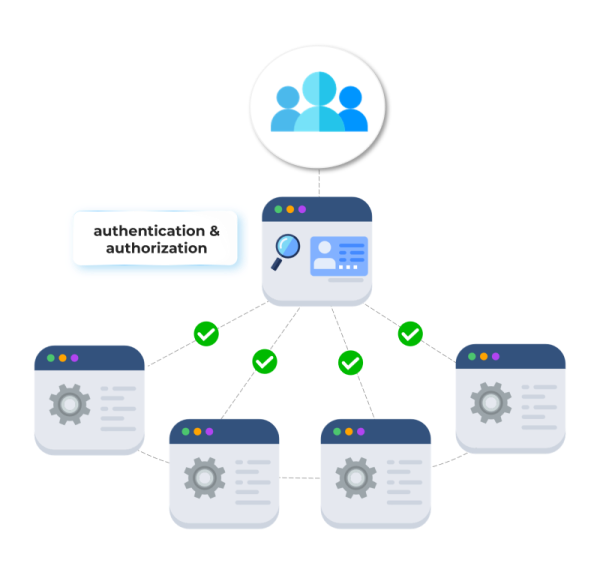
Federated security is an IT security methodology that allows centralized authentication and authorization to be applied across multiple, interconnected systems or organizations. It provides a way to ensure seamless integration and interoperability between various platforms while maintaining robust access control. Instead of managing separate credentials for each system, federated security enables users to authenticate once and gain access to multiple resources, reducing complexity and enhancing security.
A key concept within federated security is federated identity, which is the foundation of this approach. Federated identity is a trusted connection between identity providers (IdPs) and service providers (SPs). Here, user credentials are managed by a central identity provider, and other interconnected systems trust this provider to authenticate users. This trust framework ensures that a user’s identity is consistently recognized across different platforms. If you would like to learn more, here is an article from Microsoft.
A typical federated security architecture consists of:
1. Identity Providers (IdPs): These manage user authentication and identity verification.
2. Service Providers (SPs): These are the systems or applications that rely on the IdP to validate user access.
4. Policies and Agreements: Predefined security policies and trust agreements that outline roles, permissions, and access rules between entities.
This architecture simplifies access management, enhances user experience, and ensures security policies are uniformly enforced across diverse platforms. Federated security not only reduces administrative workloads but also mitigates risks associated with fragmented systems and multiple access credentials.
2. And Federated Access?
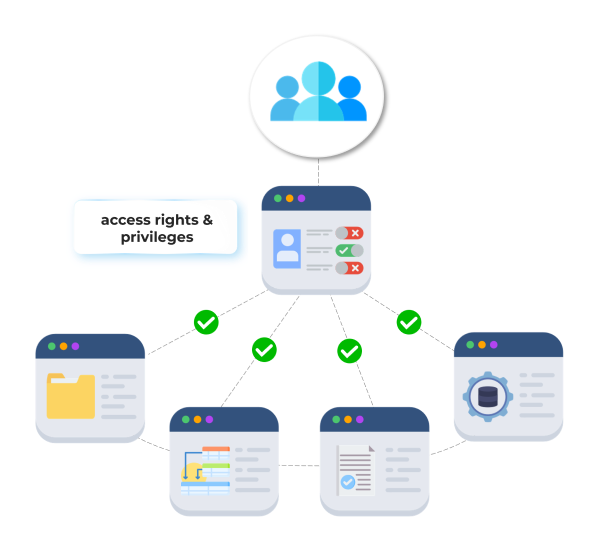
Federated access extends the principle of federated identity into the realm of IT security by focusing specifically on how access to resources and applications is managed across multiple systems. It is a method where access rights and privileges are centralized yet seamlessly extended to various interconnected environments or systems. This approach not only simplifies the user experience but also streamlines the management of access permissions.
In a federated access environment, the link between identity providers and service providers ensures that access policies are consistent and uniformly applied. This simplifies administrative processes and reduces the risk of unauthorized access, as users’ permissions are centrally managed rather than being scattered and duplicated across disparate systems.
Federated access plays a crucial role in enhancing security and operational efficiency by ensuring that access controls are aligned with the organization’s overall security policies and business needs. This approach not only boosts security but also supports compliance with regulatory requirements, making it a vital component of modern IT security strategies.
3. Why is Federated Security Important in Cybersecurity?
Federated security is essential in cybersecurity because it simplifies access management while strengthening protection against data breaches and unauthorized access. By centralizing authentication and extending secure access controls across systems, organizations can ensure consistent enforcement of security policies. This approach reduces human errors, eliminates redundant tools, and addresses key risks associated with fragmented security practices.
Key benefits include:
1. Enhanced Data Protection: Federated security ensures sensitive information remains secured through unified access management.
2. Operational Efficiency: IT teams spend less time managing individual credentials and permissions across systems.
3. Improved User Experience: Single sign-on (SSO) eliminates the need for multiple passwords, making workflows smoother and reducing credential fatigue.
4. Regulatory Compliance: Simplified auditing of access controls ensures alignment with industry regulations like DORA or NIS2.
Consider the cloud-based collaboration tools used in large organizations, such as Google Workspace or Microsoft 365. Without federated security, employees would require separate credentials for each service, increasing the risk of weak passwords and inconsistent access control. With federated security, organizations integrate these platforms under a trusted identity provider, ensuring employees can securely access multiple tools or data through SSO.
Overall, federated security delivers a cohesive strategy to safeguard organizational resources while improving efficiency.
4. Real-World Examples of Federated Practices
Federated security is increasingly adopted across various sectors, from industry to finance and public administration, reflecting its versatility and effectiveness. Let’s explore two real-world examples and understand how different types of federated security systems are applied.
1. Industry: Manufacturing
In the manufacturing sector, federated identity management systems streamline access to shared resources across multiple plants and partners. By adopting Single Sign-On (SSO), employees can access a range of tools from CAD software to supply chain management platforms without logging in separately for each one. This integration not only enhances productivity but also ensures stringent security protocols are consistently applied, preventing unauthorized access across the vast industrial network. Learn more about data protection in the supply chain here.
2. Financial Company: Banking Sector
Financial institutions are particularly sensitive to security breaches. A large bank might employ Federated Identity as a Service (IDaaS) to manage customer access across digital banking services, investment platforms, and partner financial services. This federated system enhances user convenience by allowing seamless transitions between services, while also safeguarding sensitive financial data through a centralized, secure authentication process. The bank can thus offer robust customer experiences without compromising security standards.
5. How does federated access help with data permission management?
Federated access plays a pivotal role in permission management by offering a centralized approach to controlling and monitoring data access across multiple systems. In today’s interconnected digital ecosystems, ensuring secure and efficient permission management is critical for preventing unauthorized data access and minimizing the risks of breaches.
Here’s how federated access enhances permission management:
1. Centralized Authorization Control Federated access enables organizations to unify permission management under a single framework, rather than managing individual systems independently. This centralization improves consistency in enforcing access policies and reduces the complexity associated with fragmented security protocols.
Administrators can define roles, attributes, and permissions in one place, with those policies automatically reflected across all connected systems.
This strengthens governance, as organizations gain a clear overview of “who has access to what” across all platforms.
2. Granular Access Management Federated systems often leverage attribute-based access control (ABAC) or role-based access control (RBAC) principles, know more here. These models allow permission levels to adapt dynamically based on a user’s role, location, or specific attributes.
For example: A healthcare worker may access specific patient data during working hours but have restricted permissions outside of those hours. Federated access ensures permissions align with organizational policies while preventing excessive or unnecessary data access.
3. Scalability Across Complex Environments
As organizations grow, managing permissions across multiple databases, cloud services, and applications can become overwhelming. Federated access scales with expansion, ensuring robust permission management across diverse infrastructures, whether they include remote teams, external partners, or multi-cloud environments.
4. Reduced Risk of Human Error Manual permission management often leads to mistakes, such as granting incorrect access levels or forgetting to remove permissions after an employee leaves. Federated access automates these processes, reducing vulnerabilities caused by human error and improving overall security hygiene.
This approach eliminates silos by linking permission policies to a centralized identity, enabling organizations to apply uniform security protocols across file storage, document management, and collaboration tools. The result is a more cohesive, scalable, and secure method for controlling data access in increasingly complex environments.
6. Introducing SealPath´s Federated Policies for SharePoint and Nextcloud
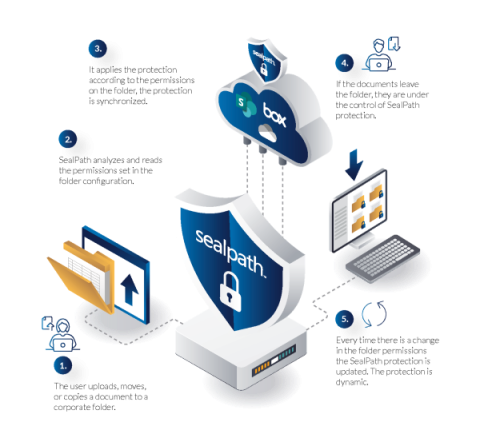
SealPath’s Federated Policies offer a seamless and dynamic approach to protecting sensitive data stored in platforms like SharePoint and Nextcloud. By automatically applying protection to a root folder and its contents, these policies ensure that access permissions are continuously synchronized with the folder’s permission settings. This integration removes the need for manual updates, providing robust security that adapts in real-time to changes in user permissions.
Automatic Protection: SealPath federated rules automatically apply protection to designated root folders and their files, ensuring consistent security.
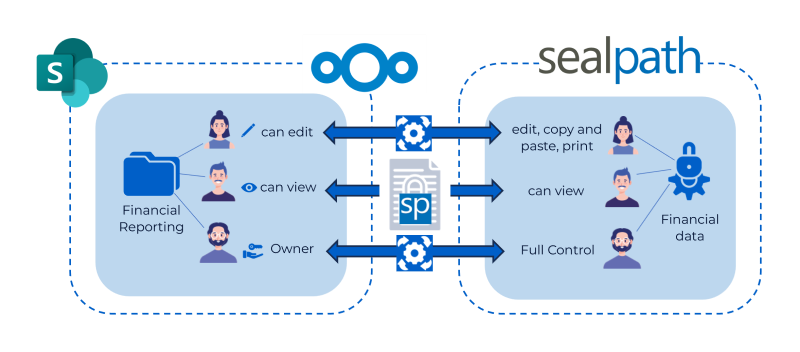
Dynamic Synchronization: Permissions within SealPath federated policies mirror the user permissions assigned to the folder. For example, an employee with edit permissions for a SharePoint folder (e.g., Financial Reportings) is granted equivalent edit permissions for the protected documents within that folder.
Granular Control: User permissions are determined exclusively based on the folder’s access rules and are managed via the SealPath web administration console. These permissions are non-editable by users, ensuring centralized control.
Folder-Specific Protection: Federated policies apply only to the defined folder and its contents, cannot be associated with other folders, and cannot be used to protect individual files outside the defined scope.
Real-Time Detection of Changes: SealPath reads folder permissions continuously and adapts protection settings immediately upon detecting changes. This ensures evolving permissions (e.g., promotions or role changes) are reflected in real-time.
Flexible Permission Equivalence: Organizations can customize how folder permissions translate to SealPath policy access levels.
For example:
Read in SharePoint → View permission in SealPath policy. Write in SharePoint → Edit, copy, paste, and print permissions in SealPath policy. Owner in SharePoint → Full control in SealPath policy.
Security Beyond the Folder: Even if documents leave the protected folder, they remain under SealPath control ensuring continued protection and mitigating the risks of unauthorized access or data leakage.
SealPath’s Federated Policies create a powerful synchronization mechanism between folder permissions and document security, providing organizations with automated, scalable, and airtight protection for sensitive files stored in SharePoint and Nextcloud.
7. Advantages and Benefits of Using SealPath Federated Policies
SealPath’s Federated Policies introduce a highly efficient and automated approach to securing sensitive data across platforms like SharePoint and Nextcloud. By aligning security measures with folder permissions, organizations can achieve dynamic protection without the complexity of manual intervention.
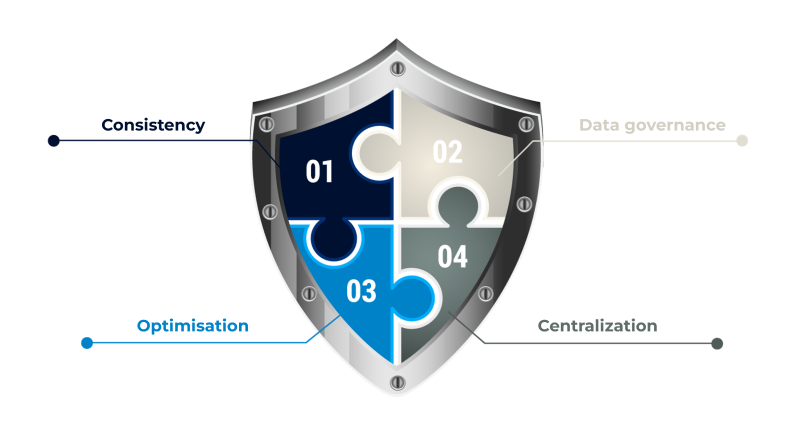
1. Aligned Data Security Measures SealPath federated policies ensure that data protection is always in sync with folder access permissions, promoting a uniform approach to security across the organization.
2. Consistent Data Access Policies Federated policies eliminate inconsistencies in access control, ensuring all users have permissions that align with their roles, improving transparency and trust.
3. Improved Data Governance By applying uniform controls across folders, SealPath federated policies enhance data governance, reducing the risk of misconfigured rules or permissions that could lead to security vulnerabilities or operational friction.
4. Centralized Access Control Permissions and rules are managed directly from the SealPath web administration console, simplifying access control management and eliminating the need for individual file-level adjustments.
5. Real-Time Application of Policies Protection is applied instantaneously based on predefined rules, adapting dynamically to changes in folder permissions without disrupting workflows.
Key Benefits
1. Reduced Risk of Human Error Automating the synchronization of permissions with data protection significantly reduces the likelihood of mistakes or oversights that could result in a data breach.
2. Eliminates Repetitive Manual Adjustments The automation provided by SealPath federated policies removes the need for repeated manual input, enhancing operational hygiene and freeing up time.
3. Greater Operational Efficiency By minimizing the effort required to manage permissions and protection, teams can shift their focus to higher-priority strategic initiatives instead of tackling administrative tasks.
4. Prevention of Conflicting Rules Federated policies avoid overlapping or contradictory permissions, ensuring a streamlined and frictionless experience for employees while maintaining airtight security.
In conclusion, federated rules for protecting files in folders follow the principles of federated security applied to data access rights, thereby providing greater protection against data leaks and risks. Therefore, based on our experience of more than 10 years helping various entities protect their most sensitive data and information, we strongly recommend that organizations implement this practice.
About SealPath SealPath is the European leader in Data-Centric Security and Enterprise Digital Rights Management, working with significant companies in more than 25 countries. SealPath has been helping organizations from different business verticals such as Manufacturing, Oil and Gas, Retail, Finance, Health, and Public Administration, to protect their data for over a decade. SealPath’s client portfolio includes organizations within the Fortune 500 and Eurostoxx 50 indices. SealPath facilitates the prevention of costly mistakes, reducing the risk of data leakage, ensuring the security of confidential information, and protecting data assets.
About Version 2 Limited Version 2 Digital is one of the most dynamic IT companies in Asia. The company distributes a wide range of IT products across various areas including cyber security, cloud, data protection, end points, infrastructures, system monitoring, storage, networking, business productivity and communication products.
Through an extensive network of channels, point of sales, resellers, and partnership companies, Version 2 offers quality products and services which are highly acclaimed in the market. Its customers cover a wide spectrum which include Global 1000 enterprises, regional listed companies, different vertical industries, public utilities, Government, a vast number of successful SMEs, and consumers in various Asian cities.
BILBAO, SPAIN, FEBRUARY 10, 2025 – SealPath Technologies, a pioneer in data security solutions, is thrilled to announce the launch of its latest mobile application, the SealPath Information Protector.
Designed for both Android and iOS platforms, this powerful new app empowers users to protect and manage their sensitive documents seamlessly from their mobile devices, offering an unprecedented level of control, security, and convenience.
Mobile access to documents is crucial, the SealPath Information Protector app is set to revolutionize how users handle confidential files. This mobile application integrates the robust SealPath technology to deliver cutting-edge document protection capabilities, ensuring that sensitive information remains secure even when accessed remotely.
Key Features of the SealPath Information Protector:
Robust Document Protection: Users can now easily protect and unprotect files directly from their mobile devices. By selecting from a comprehensive list of established security policies, individuals and organizations can apply the necessary protection on-the-go.
Seamless Sharing and Management: Once a document is protected, the application provides intuitive options to share or save the file securely. Users can rest assured that whether sharing protected documents with colleagues or storing them for future reference, their security is uncompromised.
Remote Control: The app ensures that users maintain ownership of their documents. Features like the ability to block files or alter access permissions remotely enable unparalleled document oversight from anywhere in the world.
User-Friendly Interface: With an easy-to-navigate home screen and clear alerts, users can manage their document security with confidence, understanding both successes and any issues that arise during the protection process.
SealPath’s commitment to user security is evident in its new app’s ability to cater to the needs of organizations striving for enhanced control over their secure data management. “With the SealPath Information Protector app, we offer an advanced solution enabling users to protect their sensitive information intelligently. Mobile users can now manage document security effortlessly while ensuring compliance with corporate security policies,” said Luis Ángel del Valle, CEO at SealPath Technologies.
This app not only represents a leap forward in document security technology, but also reflects SealPath’s commitment to providing users with the tools they need to meet the challenges of data security.
About SealPath SealPath is the European leader in Data-Centric Security and Enterprise Digital Rights Management, working with significant companies in more than 25 countries. SealPath has been helping organizations from different business verticals such as Manufacturing, Oil and Gas, Retail, Finance, Health, and Public Administration, to protect their data for over a decade. SealPath’s client portfolio includes organizations within the Fortune 500 and Eurostoxx 50 indices. SealPath facilitates the prevention of costly mistakes, reducing the risk of data leakage, ensuring the security of confidential information, and protecting data assets.
About Version 2 Limited Version 2 Digital is one of the most dynamic IT companies in Asia. The company distributes a wide range of IT products across various areas including cyber security, cloud, data protection, end points, infrastructures, system monitoring, storage, networking, business productivity and communication products.
Through an extensive network of channels, point of sales, resellers, and partnership companies, Version 2 offers quality products and services which are highly acclaimed in the market. Its customers cover a wide spectrum which include Global 1000 enterprises, regional listed companies, different vertical industries, public utilities, Government, a vast number of successful SMEs, and consumers in various Asian cities.
Do you feel unsure if a confidential document you sent or you want to send from your mac could be accessed by unhautorized people?. Don’t worry, you are in the right article if you want to know how to protect PDF, Word, Excel, ZIP, Folders… from unauthorized access, we will explain all the methods, steps, advantages and disadvantages of each one.
Securing business data on Mac devices is essential yet challenging. Macs, while robust, face several data security risks. These include malware targeting unprotected systems, phishing attempts to snag sensitive information, loss or theft leading to data breaches, and internal threats stemming from unauthorized access. Ensuring the confidentiality and integrity of enterprise documents on macOS requires a vigilant, multi-layered approach to safeguard from these prevalent risks.
Encryption is vital for safeguarding sensitive information, ensuring that data remains secure and accessible only to authorized users. To protect and encrypt enterprise documents on macOS there are 3 methods:
Full Disk Encryption: This feature offers comprehensive encryption for all data on the disk, making it unreadable to unauthorized persons unless they have your password. You have the option to utilize FileVault, the most commonly used Full Disk Encryption (FDE) feature in macOS (it´s free, built-in), or another tool from specialized vendors.
Password Protection of Documents: Individual documents can be encrypted with a password, providing an additional layer of security. This method is beneficial for documents shared across different platforms. This can be done with PDFs or images through the Preview App, in the Print Dialog for PDFs, and password protection (Pages, Numbers, Keynotes, Word, Excel, and PowerPoint Documents) or choosing a vendor specialized in password encryption.
Enterprise Digital Rights Management (EDRM) Tool: EDRM secures sensitive information by controlling access and usage rights, offering a robust way to protect and manage enterprise documents across all devices regardless of the file’s location. Identity and access management + encryption + permissions management + Monitoring of accesses.
Each method provides a strategic approach to data protection, but we want to explain how they work as well as the best and worst of each one so that you are clear about which one to choose.
As FileVault comes integrated into the Mac and is the most used disk encryption, we will focus only on it. Enabling FileVault adds an extra layer of security, requiring a login password to access your data. It is important to note that you must be an administrator to configure FileVault. When you power it on, all data on your drive is encrypted; as you work, write, and edit new files, they are encrypted in real time.
To enable FileVault, follow these steps:
On the Mac, select Apple menu > System Preferences.
Click on “Security & Privacy” in the sidebar.
Scroll down to the FileVault section on the right.
Click Turn On.
A window will appear to select how to unlock the disk and reset the login password in case you forget it:
iCloud account: Click “Allow unlock my drive from my iCloud account” if you already use iCloud. Click “Set up my iCloud account to reset my password” if you do not use iCloud yet.
Recovery key: Click “Create a recovery key and do not use my iCloud account”. Write down your recovery key and keep it in a safe place. If you lose your key all the data on your disk will be lost.
Click on Continue and the system will start encrypting the disk. A bar will be shown with the remaining time. *Your Mac must be connected to power for the encryption process to proceed. Encryption only takes place when the Mac is awake.
*Warnings to be taken into account:
If the Mac has multiple users, their information is also encrypted, and they unlock the encrypted disk with their login password.
Enabling FileVault also activates additional security features to ensure the protection of your Mac. For instance, when FileVault is enabled, you will be required to enter a password to log in if the Mac is in sleep mode or when exiting the screen saver.
To log in to a Mac with an account that does not have FileVault enabled, if another user with an account that has FileVault enabled has started the Mac, logged in, and then logged out, the user with the non-FileVault enabled account can then log in.
3.1 Benefits of full-disk encryption
Automated Encryption Process: Once the initial access is granted by users, encryption and decryption occur automatically during data write and read operations, requiring no further user intervention.
Adds a Security Measure: Data extraction is inhibited without the proper device password and corresponding encryption key, ensuring a high level of security.
Data Protection at rest: Safeguards data at rest by mitigating risks from potential cyber-attacks and securing data in cases of device loss or theft.
Efficiency: Outpaces manual and traditional encryption approaches in speed, fostering a more efficient workflow with minimal risk of human error.
3.2 Drawbacks of full-disk encryption
Performance Consideration: The process of encryption and decryption may impact data access speeds, especially during extensive virtual memory usage. For each data access, the authentication key is necessary to enable decryption.
Password Management: Users must remember their password and keep their recovery key safe. Without these, access to the device and data recovery becomes highly challenging, sometimes impossible.
In-transit Data Risks: The protection provided does not extend to data shared between devices or sent via email. Such data remains susceptible to unauthorized access, so an additional security solution is required.
All your information depends on one password: In case your password is weak, and therefore hacked, or even obtained by any spy method, all your information is revealed forever.
Encrypting enterprise documents on a Mac ensures valuable business information remains secure when at rest, but when it comes to the need to share documents such as PDFs, or Office files by email with other colleagues or external parties you can password-protect the documents and send them as you usually do. We are going to mention 5 ways to do it with functions that are already integrated into macOS or that most of us already have tools.
Preview App: Easily apply a password to PDFs directly within the Preview app to prevent unauthorized viewing.
Print Dialog: Use the Print dialog for existing PDFs to add password protection without additional software.
iWork Suite: Secure documents, spreadsheets, and presentations in Pages, Numbers, and Keynote with built-in password features.
Microsoft Office: Implement password protection on Word, Excel, and PowerPoint files to safeguard sensitive data.
Other specialized Tools: You can find searching in Google numerous tools that specialize in traditional document encryption, although each has its own peculiarities, interface, and additional settings, they are all based on password protection.
4.1 Steps to Password Protection Images and PDFs through the Preview App
You can protect PDFs or images using the Preview App by setting a password for opening the file. You can also set a password to control access to features such as printing, copying text, and adding annotations.
To do it, follow these steps:
In the app Preview, open the PDF file or image.
Choose File > then click on Export…
Change the format to PDF if it´s not by default.
Click on the Permissions button located at the bottom and perform any of the following operations:- Set a password to open the file: Select “Require a password to open document”. Enter a password, then retype it to verify it.- Set permissions: You can allow some changes to be made without entering the owner password by clicking on the box near each permission, such as to be printed, its content copied, and more…
End the process by clicking on the “Apply” button and then click on Save.
4.2 Steps to Password Protection Pages, Numbers, and Keynote Docs
Sometimes you want to share a document as editable to work with other colleagues or business partners, this can be done with password protection with your Pages, Numbers, or Keynote documents. You can assign a password so that only those who know the password can open the document.
To do it, follow these steps:
Open the document and choose “File” at the top of the screen > Set Password.
Please enter a password, enter it a second time in the Verify field, then click Set Password.
*Warning: There is no way to recover a password if you forget it. Be sure to choose a password that you will not forget or write it down in a safe place.
4.3 Steps to Password Protection Word, Excel, and PowerPoint Documents
We know that Office apps are the most used, especially at the enterprise level, so it is important to know how to password-protect Word, excel, and PowerPoint. As mentioned above, this method allows you to keep the document editable for future modifications.
To do it in Word, follow these steps:
click the Review tab.
then click Protect in the ribbon and choose Protect Document.
A dialog displays giving you options to password-protect a document for opening and modifying the document, as well as other permissions.
To do it in Excel, follow these steps:
choosing File > Passwords.
then A small dialog displays, where you can set a password to open the document and modify it.
To do it in PowerPoint, follow these steps:
Choose File > Passwords.
Then A small dialog displays, where you can set a password to open the document, and another to modify it.
*Warning: There is no way to recover a password if you forget it. Be sure to choose a password that you will not forget or write it down in a safe place.
4.4 Benefits of Password Protection of Files
Simple and easy for anyone: Most of the ways we have viewed here are simple to follow. You don´t need complex steps or software, anyone can do it with basic knowledge using a computer.
Cost-free or cheap: You can protect documents without having to buy any software with the mentioned methods. Even if you want to use premium solutions they are usually accessible with a low budget.
Compatibility: Files are widely used and supported by most operating systems and applications, making it easy to share files with others regardless of the platform they are using.
4.5 Drawbacks when protecting files with a password
Offers Partial Security: You have to share the password with your recipient, this sometimes is made by email, online message, or even written on a note. This means that if someone has gained access to the recipient’s email account, device, online message platform, or note, he can view all the information contained in the password-protected documents. In some cases, if he steals the files, he can do whatever he wants with them, meaning that he can cause damages.
Password Strength: The security is also dependent on the robustness of the password itself. If it´s used a weak password like 123456789 or the date of birth, it can be easily cracked with some malicious tools.
No Authentication: The recipient can send the password and the files to whoever he wants secretly. You can´t limit who can view the shared files, anyone with the password can access them.
Not efficient: Anytime you want to share protected documents, you have to set a new password to keep your data safe and reduce the risks. You also need to send the password to recipients in a secure way. This process usually takes time and can lead to avoiding using it cause of commodity.
Risk of Loss: You have to remember all your passwords or have them well saved on a password manager, an additional step. If you forget it, you lose access to files forever. There is no way to regain access.
5. Protecting Files with Enterprise Digital Rights Management in Mac
In simple terms, DRM is a combination of identity and access management and encryption but with traceability. It offers Advanced and Robust protection that travels with the files wherever they go. The technology acts as if your files always had a transparent shielded box and only lets access to the people you decide. It’s used and known for its granular permissions, blocking unauthorized users or actions. It controls who accesses the data, when, and with what permission (read-only, edit, print, copy and paste, etc.).
For businesses, this technology is named E-DRM, and it offers features specifically designed for the enterprise. SealPath is one of the leaders in the market in this field and stands out for its usability and simplicity of use. As you may have seen, there are not many alternatives when you need advanced features or high security for macOS, and this is where SealPath plays an important role in protecting corporate data with robustness. Let’s see how is the process of data protection with our own tool so you can see its power at a glance.
5.1 Steps to EDRM protection of documents with SealPath
With SealPath Information Protector for Mac, you can protect any file using its agent in a few clicks. You can also set who can access the file, when, and with what permissions: View, edit, copy and paste, print. To protect files follow these steps:
Open the SealPath Information Protector for Mac.
Select a protection policy or create a new one. The protection policies are displayed as cards on the agent. a) Creating a new protection policy: Click on the blue button on the top right “+ New protection”. b) Editing an existent protection: Go to your desired protection policy and click over the pencil icon.
Introduce the recipient’s email and its permissions. Save the protection.
Select the files you want to protect and Drag and drop them into the protection policy. You can also click over a protection policy (on the cards) and use Finder to select your files. With either of these methods, the protection will be immediately applied.
Share the files by any means: Email, Instant Messaging, etc.
To better understand how this technology works on a technical level: when a user requests to view content, the EDRM client checks the user’s permissions on the server for that particular file. If the user has the necessary permissions, they receive an End User License (EUL). This EUL defines the assigned permissions, and SealPath decrypts the content and applies it accordingly.
5.2 Benefits of EDRM Protection
Easy to use and Convenient: Protecting documents is so easy, that you only have to drag and drop or select the files on a folder picker. in less than a minute your file is protected without complex steps. Anyone can do it, even users with basic informatics knowledge.
Advanced and Granular controls: You can restrict specific actions, have more control over the documents, and adapt the protection for each use case. The security it offers is higher and therefore minimizes the probability of suffering a data breach or exfiltration.
Prevents Unauthorized Use of Content: You can see who is accessing your files and when. It allows you to detect suspicious actions.
Permanent Protection: Recipients can work with your files while the protection is active, even if they are on their PCs. They have to authenticate to access the files, so only those users you have specified can access them.
High Security: You can set expiration dates, watermarks, restrict by IP, and many other features that keep your files protected against any risk situation, so you keep control of your information with you at all times.
Native access in Office files: Almost all companies work with office files, and in this case, if they have been protected, access is agentless, natively. There is no need to install anything.
5.3 Drawbacks of an EDRM
Budget Allocation: It requires a budget and a willingness to invest in this type of security, although they are not expensive compared to other cybersecurity solutions. But for cases in which we have no resources to invest, it is a measure to be discarded.
Registration process for externals: When working with third parties, they must register in the system to be able to access the documents. Sometimes, external partners or collaborators are reluctant to take this extra step.
Use of agents to access non-Windows office files: In file formats such as PDFs or images that have been protected, it is necessary to install an agent to view the protected content.
6. Summary
Maintaining robust protection over business data should be a top concern. Mac devices are also being targeted by cyber threats, it is clear that relying solely on their built-in defenses is insufficient. Organizations must adopt higher security measures if they don´t want to suffer serious harm such as financial losses, reputation damage, or legal issues. Data leaks or fines for non-compliance with measures are constantly in the news.
While encrypting your entire disk with FileVault encrypts all data and renders it inaccessible to unauthorized users, it does not protect data during transit. Password protection for individual documents is a straightforward and accessible option but carries the risk of password sharing and potential losses if a password is forgotten.
However, the most robust and complete protection regardless of the location of the file is the EDRM. Solutions like SealPath offer granular controls, vastly reducing the exposure to unauthorized access and data breaches. Remember, the longevity, resilience, and success of your business may well depend on the security measures you put in place today.
Do not hesitate to contact our team here if you want further support addressing these data security measures.
About SealPath SealPath is the European leader in Data-Centric Security and Enterprise Digital Rights Management, working with significant companies in more than 25 countries. SealPath has been helping organizations from different business verticals such as Manufacturing, Oil and Gas, Retail, Finance, Health, and Public Administration, to protect their data for over a decade. SealPath’s client portfolio includes organizations within the Fortune 500 and Eurostoxx 50 indices. SealPath facilitates the prevention of costly mistakes, reducing the risk of data leakage, ensuring the security of confidential information, and protecting data assets.
About Version 2 Limited Version 2 Digital is one of the most dynamic IT companies in Asia. The company distributes a wide range of IT products across various areas including cyber security, cloud, data protection, end points, infrastructures, system monitoring, storage, networking, business productivity and communication products.
Through an extensive network of channels, point of sales, resellers, and partnership companies, Version 2 offers quality products and services which are highly acclaimed in the market. Its customers cover a wide spectrum which include Global 1000 enterprises, regional listed companies, different vertical industries, public utilities, Government, a vast number of successful SMEs, and consumers in various Asian cities.
1. Understanding Security Risks and Needs in Storage Repositories
Data breaches rose by 72% between 2021 and 2023 according to the 2023 Data Breach Report by The Identity Theft Resource Center (ITRC), which has underscored the importance of robust document security. The main risks include phishing attacks, Zero-Day vulnerabilities, malware infections such as ransomware, insider threats, and insufficient encryption, all of which can result in significant financial loss, $4.45 million on average according to IBM Cost of a Data Breach Report 2023. Since 2020, the average cost of a data breach has increased 15.3% from $3.86 million. The costs are expected to reach $5 million within the next few years based on this trend.
Let’s take a closer look at the types of threats and the importance of establishing adequate data security measures.
1.1 Why is it Critical Document Security for Businesses?
Document security is paramount for businesses as it safeguards the most valuable digital assets, which have escalated in frequency and severity. Since Cybercriminals have discovered new ways to profit, they have not stopped evolving, and they know that data is a gold mine. Their main motivation is to gain access to the most critical documents and data of companies to make a profit.
The average cost of an organization detecting and escalating a data breach is $1.58 million, according to the IBM 2023 Cost of a Data Breach Report, but cyberattacks have steep financial repercussions: remediation efforts, legal fees, regulatory fines, intellectual property theft, operational disruption, and reputational damage are several factors that account for the total cost. These facts highlight the financial imperative of robust data security measures. Effective document security strategies not only protect sensitive information but also uphold trust, proving invaluable in maintaining client relationships and business integrity. It´s important to highlight the role of CISOs, constantly facing Data Security issues, challenges, risks, and concerns to lay a foundation for enduring resilience and adaptability.
1.2 Types of Threats: Data Security in Document Storage System
Business data at rest in document storage systems face various threats:
Network Infiltration via Phishing: Unauthorized access to business data through stolen credentials, 15% of breaches or infiltration. This is the most common data breach and the initial vector, it accounts for 16% of all breaches according to IBM’s Cost of a Data Breach report.
Malware, Ransomware: Attacks where the files are encrypted, stolen, and used to extort the organization. Ransomware attack victims increased by 128.17% between 2022 and 2023, as detailed in the Security Affairs Ransomware Attacks 2023 Report. According to IBM’s Cost of a Data Breach report, a ransomware attack costs a business $5.13 million on average, constituting 24% of malicious cyberattacks and 62% of financially motivated data breach incidents, 2024 Data Breach Investigations Report by Verizon. Know the real impact of ransomware on businesses here.
Insider threats: In these cases, employees steal critical information for their profit, they can sell it or use it to work for another company that can be interested in developing new products, extending the business, or making improvements. Internal threat actors accounted for 35% of breaches in 2024, indicating a significant increase from previous years according to Verizon´s DBIR 2024.
Third-party breaches: Cybercriminals can also gain access to your critical data leveraging the access privileges of your partners. A recent report by SecurityScorecard reveals that the exploitation of trusted third parties is also an important security concern. Research shows that 29% of breaches have been caused by third-party attacks.
Vulnerabilities: Some attacks can start from a known vulnerability nonpatched or even a Zero-day affecting a service provider or a specific software to penetrate the network with free access to all the documentation. 14% of breaches involved the exploitation of vulnerabilities as an initial access step, almost triple the amount from the 2023 report, as reflected in Verizon’s 2024 Data Breach Investigations Report (DBIR).
2. Evaluation of Current Document Storage Systems
Current document storage systems often display weak points in encryption, access control, and vulnerability to insider threats, underscoring a prevalent insufficiency in data security measures. The lack of robust encryption exposes documents to unauthorized access, while inadequate access controls increase the risks of data leaks. Insider threats further exploit these vulnerabilities, leading to potential breaches.
Did you know that cryptography plays a fundamental role in the current digital era? Explore here the different types of Encryption.
Here comes another concern, when users download files from the document storage system or share them, the risk of data security breaches increases. This action can inadvertently expose sensitive information to unauthorized individuals due to insufficient encryption or secure sharing protocols. Sensitive Information is categorized into different levels, from personal identities to high-risk data.
3. Best Practices in Document Storage Security
As data security experts, it’s essential to stay updated with the latest guidelines for robust document storage security. Here’s a checklist of best practices you should consider:
Implement Advanced Encryption: Ensure all stored documents are encrypted with strong algorithms to protect data at rest. In case of any breach, your documents must be safe from any unauthorized access, having an additional layer of protection. Learn who should encrypt the data in your company, what documents, and its benefits here.
Enforce Multi-Factor Authentication (MFA): Add a layer of security by requiring MFA for system access to avoid infiltration with stolen credentials and make things harder for cybercriminals.
Regularly Update Access Rights: Review and adjust permissions periodically to minimize the risk of unauthorized access. Employees over the years can extend their access permissions even to documents that they don´t currently need. Remember to follow the principle of least privilege (PoLP), as part of the Zero-Trust Security model with internals and externals, where a user only has access to the specific data needed to complete his tasks. Remove access to partners you don´t collaborate more or to ex-employees. Explore the Zero-Trust Security model here.
Employ End-to-End Encryption for Sharing: Protect documents during transit with end-to-end encryption to avoid interceptions or techniques like man-in-the-middle.
Conduct Regular Security Audits and Compliance Checks: Keep track of vulnerabilities and ensure adherence to security policies.
Train Employees in Security Awareness: Educate staff about phishing and social engineering attacks to reduce insider threats.
Utilize Secure Backups: Maintain regular, secure backups of documents to prevent data loss from cyber incidents. It´s also useful against ransomware attacks when restoring all the documentation to the previous status.
Invest in Advanced Data Protection Tools: Use tools that provide real-time monitoring and threat detection for document access such as Enterprise Digital Rights Management Solutions. Don´t rely at all on your perimeter, if it is penetrated your data is defenseless and you lose control of who can access it, and what they can do with it.
3.1 Industry Standards for Secure Document Storage
Adopt ISO/IEC 27001: This is the leading international standard for information security management systems (ISMS). It outlines the requirements for implementing a comprehensive approach to data protection and cyber resilience.
Adhere to GDPR Principles: For organizations operating within or dealing with data from the European Union, following the General Data Protection Regulation’s strict data protection and privacy guidelines is crucial.
Embrace NIST Frameworks: The National Institute of Standards and Technology provides comprehensive frameworks for improving critical infrastructure cybersecurity, applicable to document storage strategies. Check out more about CMMC and NIST here.
Integrate NIS2 Directive Compliance: The recent update to the Network and Information Systems directive, known as NIS2, extends essential requirements for cybersecurity across various sectors. It is vital to align with these evolving rules to ensure resilient infrastructure and robust data protection practices. Incorporating NIS2 helps safeguard against emerging threats and strengthens overall security posture. Check here all you should know about NIS2 Directive.
3.2 Protecting Documents at Rest in Your Storage System
Securing documents at rest within storage systems is foundational to avoiding data breaches and data-related incidents. The cornerstone of this approach lies in adopting a data-centric security model. This perspective prioritizes the protection of the data itself rather than focusing solely on the perimeter. Here are key practices to ensure the safety of your documents at rest:
Encrypt Documents: Encryption transforms your documents into unreadable formats for unauthorized users, providing a robust layer of security. Utilizing advanced encryption standards ensures that even if the storage system is penetrated, the data remains incomprehensible to unauthorized users.
Apply Persistent Security Policies: Security policies that follow your data—no matter where it moves or is stored—offer continuous protection even beyond the repository.
Regularly Update Access Controls: Access controls should be stringent and regularly updated to reflect changes in roles and responsibilities. Implementing least-privilege access ensures individuals have only the access necessary for their roles, significantly reducing the risk of internal threats.
Monitor and Audit Access Logs: Keeping detailed records of who accesses your documents and when provides valuable insights for identifying suspicious activities. Regular auditing of these logs helps detect anomalies early and can aid in rapid response to potential breaches.
Implement Secure Backup Solutions: Secure, encrypted backups protect against data loss due to system failures, ransomware attacks, or other disasters. Regularly tested backups ensure that critical documents can be recovered swiftly, maintaining business continuity.
Adopting a data-centric approach to document security at rest empowers organizations to protect their most valuable assets effectively. It elevates the emphasis on the data itself, ensuring comprehensive protection that aligns with the evolving landscape of cyber threats.
3.3 Securing Document Access and Sharing
Ensuring secure access and sharing of documents is crucial to maintaining productivity while safeguarding sensitive information. Effective security strategies should enhance, not hinder, the ability of team members to collaborate and perform their tasks efficiently. Here are key practices to optimize both security and user experience:
Implement Role-Based Access Control (RBAC): Assign document access based on the roles within an organization to ensure that employees have the necessary permissions to fulfill their duties without compromising security. This proven approach minimizes risk and simplifies management.
Use Secure Collaboration Tools: Opt for proven, secure platforms for document sharing and collaboration. These tools should offer end-to-end encryption and compliance with data protection regulations, ensuring that information remains protected during transmission and access.
Educate and Train Employees: Continuously educate your workforce on the best practices for document security, including secure handling and sharing protocols. Regular training enhances awareness and adherence to security policies without impacting productivity.
Enable Secure Mobile Access: With the rise of remote work, providing secure mobile access to documents is essential. Use secure containers or apps that allow employees to access documents safely from any device, ensuring productivity from anywhere without compromising data integrity.
Monitor and Audit Document Access and Sharing: Continuous monitoring and auditing provide insights into document access and usage patterns. This helps identify potential security risks proactively and ensures compliance with internal and external regulations.
Incorporating these strategies can significantly enhance document security while supporting dynamic and efficient collaboration across your organization. This balanced approach not only protects sensitive data but also supports the natural workflow of teams, ensuring business operations are both safe and streamlined.
4. Technologies to Enhance Document Security in Repositories
Implementing robust security technologies within document repositories is essential for safeguarding sensitive data. These technologies must enhance security without compromising user productivity, ensuring seamless access and collaboration. Below, we outline key technologies:
Traditional Encryption: Ensures that data is only readable by authorized users who own the key, even in a breach. Provides a foundational layer of security for documents stored in repositories, maintaining confidentiality and integrity.
Identity and Access Management (IAM): Controls who has access to your organization’s documents, ensuring only authorized individuals can view or edit. Streamlines user access enhances security through multi-factor authentication (MFA) and reduces the risk of unauthorized access.
Data Loss Prevention (DLP): Monitors and controls data transfers, preventing sensitive information from leaving the secure environment. Offers proactive security by identifying and blocking potential breaches or data loss incidents, ensuring compliance with regulations.
Enterprise Digital Rights Management (EDRM): Secures documents throughout their lifecycle, even beyond the repository after they’ve been downloaded or shared. Allows control over who can view, edit, copy, or print documents, enforcing security policies directly on the document itself. It also enables you to access traceability, alerts of attempts, and auditing capabilities. It combines the best of Identity and access management + encryption + permissions management + Monitoring. Here we developed a complete guide on how to deploy an EDRM successfully.
Anomaly Detection Systems: Uses machine learning to detect unusual access patterns or modifications to documents that may signify a security threat. Provides early warning of potential security incidents, allowing for rapid response to mitigate risks.
Choosing the right technology requires a balance between security, effectiveness, and usability. By carefully considering the value and benefits of each option, organizations can implement effective security measures that protect sensitive documents in repositories without obstructing users’ access or their ability to collaborate.
5. Implementing a Secure Document Storage Strategy
Establishing a secure document storage strategy is vital for shielding sensitive company data from cyber threats and compliance violations. Below are some valuable, practical recommendations that companies can implement to ensure robust document security:
Develop a Comprehensive Security Policy: Creates a solid foundation for all security measures. Clearly articulates expectations and responsibilities for document handling, storage, and access controls to all stakeholders, reducing the likelihood of security mishaps.
Classify Data Based on Sensitivity: Efficiently allocates resources to protect data depending on its criticality. Ensures that highly sensitive documents receive the highest level of security, optimizing both cost-effectiveness and protection detail.
Implement Strong Access Controls: Restricts document access to authorized personnel only. Minimizes the risk of data exposure or alteration from both internal and external threats, ensuring that integrity and confidentiality are maintained.
Use Encryption Solutions: Protect the confidentiality and integrity of documents, and take care of the CIA Triad. Even if data is intercepted or accessed improperly, encryption renders the information unreadable and unusable to unauthorized individuals.
Regularly Update and Patch Systems: Keeps security systems up to date with the latest protections. Reduces vulnerabilities that could be exploited by cyber attackers, maintaining a fortified defense against emerging threats.
Educated and trained employees: Enhances the human element of your security defenses. Reduces risks associated with human error, which remains a leading cause of security breaches, by ensuring all employees understand and comply with your organization’s security protocols.
Monitor and Audit Access and Usage: Provides ongoing visibility into the security status of document storage systems. Identifies potentially malicious activity early, allowing for immediate corrective actions, thus maintaining continuous protection of sensitive documents.
Implement a Reliable Disaster Recovery Plan: Ensures business continuity in the event of data loss. Quick and efficient restoration of data backups minimizes downtime and operational disruptions, safeguarding your organization’s productivity and reputation.
5.1 Steps to Create and Implement a Secure Document Storage Plan
Here’s a practical step-by-step guide that any organization can follow to enhance its document security measures:
Assess Current Security Posture: Identifies existing vulnerabilities and strengths. Provides a clear starting point and prioritizes areas needing immediate attention, ensuring resources are allocated effectively. Identify and classify your most sensitive data with a Data Security Posture Management.
Define Security Objectives: Align security initiatives with business goals. Ensures that the security strategy supports overall business objectives and drives value, fostering organizational alignment.
Classify and Prioritize Documents: Differentiates documents based on sensitivity and importance. Allows for tailored security measures that provide appropriate protection levels for different types of documents, optimizing both security and resource use.
Select Appropriate Security Technologies: Utilizes proven technology solutions for document protection. Enhances document safety through advanced security tools like encryption and access controls, reducing the risk of unauthorized access or data breaches. Take into account your budget and prioritize ones that give you more security with less investment, ones that give you security for all threats and use cases.
Develop Policy and Procedures: Establishes clear guidelines for document handling. Ensures consistent and effective implementation of security practices, minimizing risks associated with human error.
Train and Educate Staff: Boosts data security awareness across the organization. Empowers employees to act securely and responsibly, significantly strengthening the human aspect of document security.
Implement and Integrate Solutions: Seamlessly introduces security measures into existing systems. Maintains operational continuity while enhancing document security, ensuring that new security measures do not impede business performance. Be sure that new implementations don´t disrupt the operativity or present issues with current systems.
Monitor and Audit Compliance: Provides ongoing oversight of security practices. Detects and addresses non-compliance or security gaps promptly, ensuring continuous improvement and adaptation of the security strategy.
Review and Update Regularly: Keeps the document storage plan current with evolving threats. Adapts to new threats and changing business conditions, ensuring that the organization’s documents remain secure against emerging challenges.
6. Introducing SealPath AutoVault Protection for Storage Systems
In the blog, we mentioned EDRM technology as a good choice to elevate the security of your data stored in repositories, so here we will delve into its power, specifically into the solution we have been developing for the last 10 years, SealPath.
In simple terms, SealPath is a combination of identity and access management and encryption but with greater flexibility. It offers advanced protection that travels with the files wherever it goes. Data remains encrypted in 3 states: at rest, in transit, and use. It’s known for its granular permissions, blocking unauthorized users or actions.
Specifically, we have developed a product for storage systems that works automatically, AutoVault. Without user intervention you choose the folders you want to protect and with which restrictions so that every time a document is uploaded it is protected.
Here is how our solution stands out:
Permanent Access Control: Restrict access to files by controlling which users can access, what they can do, and When and from where.
Automatic and Transparent Protection: Enable a protection applied to files every time they are copied, moved, or uploaded to folders, without requiring continuous manual actions.
Threat Detection and Identification: View which users access information and their activity for full traceability. Receive alerts with suspicious accesses and analyze detailed reports.
Immediate Response and Remediation: Revoke access to users at any time or block a specific document in the event of suspicious actions. Change permissions on the fly.
Synchronized Folder Protection: SealPath can read the permissions of the folders and detect changes in real-time, to automatically update the protection settings applied to that folder.
Web or local native access: Facilitate access to protected documents via the web without requiring additional agents or on-premises with usual tools.
A comprehensive approach to safeguarding sensitive information requires not just protection within a central repository but security that travels with the data, irrespective of its location. The key to an effective document storage system lies in its ability to seamlessly integrate encryption and access controls, ensuring that documents are readable only by those with explicit permissions. The primary objective is to guard against unauthorized access, even if documents leave the secure perimeter of the corporate network. It reflects an understanding that in the flexible work environments of today, data mobility is a necessary given, rather than an exception.
In summarizing our discussions on advancing document security, it’s imperative to incorporate encryption, identity, and access management, consistent monitoring, and remediation capabilities. These methods ensure the safeguarding of sensitive information, both within and beyond organizational boundaries.
About Version 2 Limited Version 2 Digital is one of the most dynamic IT companies in Asia. The company distributes a wide range of IT products across various areas including cyber security, cloud, data protection, end points, infrastructures, system monitoring, storage, networking, business productivity and communication products.
Through an extensive network of channels, point of sales, resellers, and partnership companies, Version 2 offers quality products and services which are highly acclaimed in the market. Its customers cover a wide spectrum which include Global 1000 enterprises, regional listed companies, different vertical industries, public utilities, Government, a vast number of successful SMEs, and consumers in various Asian cities.
About SealPath SealPath is the European leader in Data-Centric Security and Enterprise Digital Rights Management, working with significant companies in more than 25 countries. SealPath has been helping organizations from different business verticals such as Manufacturing, Oil and Gas, Retail, Finance, Health, and Public Administration, to protect their data for over a decade. SealPath’s client portfolio includes organizations within the Fortune 500 and Eurostoxx 50 indices. SealPath facilitates the prevention of costly mistakes, reducing the risk of data leakage, ensuring the security of confidential information, and protecting data assets.
Know in depth the CIS Security Control 3 v8, a set of security safeguards to help organizations on data protection, the new changes compared to v7, all the safeguards and how to implement CIS Control 3 effectively.
A brief background about data breaches
IBM and the Ponemon institute released a report on the cost of a data breach in 2022, surveying 550 breaches with data gathered from over 3,600 interviews across 17 countries, and the result was mind-blowing. The results show that the average data breach cost US$4.35 million in 2022, indicating that the figures have further risen from the $4.24 million recorded in 2021.
Every year, IBM statistics for the cost of data breaches indicates that the figures keep rising by at least 2.6 per cent, and numbers are expected to shoot up in the coming years. However, in the US, the figures and drastically different, as the average cost of a data breach was found to be $9.44M, more than double the global average. Know how is the Data Breach loss cost estimate obtained?
The IBM report also showed the causes of most breaches, with stolen or compromised credentials accounting for 19% of breaches, phishing being responsible for 16%, and Cloud misconfiguration causing 15% of breaches.
It’s essential for organizations to deploy a robust data protection strategy to reduce the possibility of a data breach or data leakage, which often leads to financial loss. The CIS Controls is a collection of the best data and computer security practices to mitigate attacks on cyber systems and networks.
CIS Security Controls v8, Data Protection
The CIS Critical Security Controls (CIS Controls) is a set of security Safeguards to help organizations mitigate the most prevalent cyber-attacks against computer systems and networks. These Controls are improved from time to time to address constantly evolving cyber threats and keep up with modern systems and technologies.
More specifically, CIS Control 3 focuses on ensuring data protection both in storage and when transmitted through data management for mobile devices and computers. The Controls map out processes and techniques to identify, classify, safely handle, retain, and dispose of data in a way that minimizes the risks of a data breach.
It’s no news that an organization’s data is no longer restricted to its borders. Some data are now stored in the cloud, shared with partners, transferred over portable end-user devices, and so on. This diverse handling of data opens it to more risks of attack, making data protection a great concern for organizations.
Although encryption offers a lot of protection to data, it doesn’t offer much help in the face of malicious actors with deep-rooted knowledge of bypassing encrypted data. As a result, organizations need to incorporate a holistic data protection strategy outlined by CIS Control 3 to strengthen their security and mitigate cyber-attacks.
Changes compared to v7 where Data Protection is now the Control 3
CIS Control 3v8 is a comprehensive revision of the 3v7 and contains safeguard updates to improve data security and reduce the risks of a breach. Some of the changes include:
– the addition of Service Provider Management Control: a new control that tackles the sensitivity of data in SaaS platforms, including their storage and processing.
– moving Data Protection from the number 13 spot to number 3 and adding five new Safeguards to this Control. These five new Safeguards are focused on managing and identifying data in a more secure approach to minimize vulnerabilities.
Other changes involved Controls, such as Controls 4,5,6,14, and so on.
What data protection safeguards does CIS Control 3 include?
Below are the safeguards of CIS Control 3
3.1: Establish and Maintain a Data Management Process
Organizations should put in place an effective data management process that handles data sensitivity, ownership, storage, retention, backup, and disposal. The data management process should align with the regulations of your specific organization and be reviewed annually or wherever there’s a major policy change.
3.2: Establish and Maintain a Data Inventory
Your inventory outlines the type of data your organization produces, the degree of sensitivity, and how they’re retained and consumed. Typically, your inventory should reflect both structured data (e.g., data stored in databases) and unstructured data (e.g., documents and photos) to ensure a comprehensive data protection policy.
3.3: Configure Data Access Control Lists
Restricting each user’s access is a crucial part of data security, and each user should only have access to the data, applications, and systems on the organization’s network that they require to do their job. Having access to other than what they need (especially sensitive data) increases the risk of a data breach and security compromise, either deliberately or accidentally.
Regular review of access control lists should be done to detect and swiftly remove any unauthorized permissions that a user has, such as when they move to a new department, branch, or role.
3.4: Enforce Data Retention
Data should have minimum and maximum timeframes to control the extent to which different types of data should be retained. To ensure full compliance, you should consider automating the data retention process so that certain types of data do not stay beyond their expiry period due to forgetfulness.
3.5: Securely Dispose of Data
Whether you need to dispose of data because it’s old and irrelevant or due to standard regulations, ensuring secure disposal is crucial to preventing unauthorized access to the data. You should dispose of data according to their sensitivity, making sure that sensitive data are entirely eliminated in a way that no user can access.
3.6: Encrypt Data on End-User Devices
In certain scenarios, company devices get compromised by internal or external threats. Encrypting data on end-user devices helps prevent data misuse when such scenarios arise, adding an extra layer of security to your organization. Typical examples of encryption tools are Windows BitLocker, Linux dm-crypt, and Apple FileVault.
3.7: Establish and Maintain a Data Classification Scheme
Not all the data in your organization are on the same level. Some are sensitive, while others aren’t. Establishing and maintaining a data classification scheme helps you to distinguish sensitive data from non-sensitive data, so you can provide more protection for sensitive ones. Even non-sensitive data can also be further classified as private or public to enhance data protection.
Organizations should review their data classification scheme annually or whenever there’s a significant policy change.
3.8: Document Data Flows
Organizations should keep tabs on the movement and flow of data in and out of the enterprise in order for timely detection of vulnerabilities that could weaken their cybersecurity. You should review documentation annually and apply necessary updates whenever a significant change that could potentially impact this safeguard occurs.
3.9: Encrypt Data on Removable Media
Organizations should prepare for scenarios of device theft by encrypting the data on external hard drives, flash drives, and other removable media. These devices may also be misplaced and eventually land in the wrong hands, but with encryption, you can rest assured that the data will not be misused or exploited.
3.10: Encrypt Sensitive Data in Transit
Organizations should encrypt critical data in transit to ensure optimal protection wherever the data goes. Popular encryption options for companies are Open Secure Shell (OpenSSH) and Transport Layer Security (TLS). All encryptions must also be adequately authenticated. For example, OpenSSH validates host keys and investigates any connection warnings, while TLS uses valid DNS identifiers with certificates signed by a trusted and valid certification authority.
3.11: Encrypt Sensitive Data At Rest
Sensitive data at rest either on servers, databases, or applications, should be encrypted with at least Storage-layer encryption. Additional encryption methods can be deployed to ensure that only authorized users can view and use the data, even if the storage device gets into the wrong hands.
3.12: Segment Data Processing and Storage Based on Sensitivity
Data processing and storage should be segmented based on data classification to ensure that sensitive data is treated with more caution than less sensitive data. Avoid processing sensitive data on enterprise assets that manage less sensitive data at the same time. Doing this will prevent a hacker from automatically accessing all company data once they gain access to some less sensitive data.
3.13: Deploy a Data Loss Prevention Solution
Data loss protection (DLP) is a powerful automated system for protecting on-site and remote data from accidental loss and exfiltration. The tool identifies all sensitive data processed, stored, or transmitted through enterprise assets and updates the data inventory. Know more about DLP vs IRM here.
3.14: Log Sensitive Data Access
All sensitive data actions should be logged, including access, modification, and disposal, as this is essential for timely detection and response to malicious activity. Post-attack investigations and detection of breach culprits for appropriate accountability also require data access logs to be fully carried out.
How a data-centric security approach can help you to implement CIS Control 3
Organizations deploying data-centric security can better implement CIS Control 3 because their technologies, processes, and policies are concerned with the lifecycle of data, including its location, collection, transfer, storage, and visibility.
Key Elements And Benefits of a Data-Centric Security Approach
The key elements of an effective data-centric security system include the following:
1. Identification, discovery, and classification of sensitive information
An internal or external attacker’s primary target is to access the most sensitive company information since they carry the highest benefits. They may as well go after other data, e.g., regulation data like EU-GDPR, PCI, or others. Often, these data are stored in specific repositories known to only the company’s team; however, they can be shared, putting the data at risk. Organizations interested in implementing data-centric security controls need tools and technologies that help to identify where their data is at all times to prevent unauthorized access. Know the Advantages of Data Classification boosted by AI and Machine Learning.
2. Data-centric protection
Data-centric security controls focus on monitoring and securing an organization’s sensitive information to prevent unauthorized access due to cloud, network, or data leakage. You know where your data is and where it goes while having absolute control over it, regardless of how far it travels.
3. Audit and monitoring of access to data
Organizations must analyze data use and determine if users’ behavioural patterns are within the acceptable standard so as to know the level of risk associated with the data at any time.
4. Administration and management of data policies
Employees come and go, but company data remain relevant at all times. A data-centric security approach allows organizations to determine who should or shouldn’t have access to certain data, depending on their policies. So when you stop collaborating with someone or find out they’re at risk, you immediately revoke access to the data, destroy it, or prevent it from leaving the corporate network.
How can SealPath help?
When it comes to improving your organization’s data protection strategy, SealPath can offer a data-centric security system that effectively monitors your data at rest, in transit, and in use. Thus, regardless of how far your data travels, you are not only aware of its journey, but you still have absolute control over it and can destroy it in case of a breach risk.
SealPath offers you Information Rights Management (IRM) / Enterprise Digital Rights Management (E-DRM) / Enterprise Information Protection and Control (IPC) over all your data, preventing a breach incident.
Information Rights Management (IRM)/Enterprise Digital Rights Management (E-DRM)/Enterprise Information Protection and Control (IPC) solution
The IPC (Information Protection and Control), or IRM / E-DRM (Information Rights Management / Enterprise Digital Rights Management) technologies give you the power to control information wherever they are, even if it’s outside the cloud. It combines identity control + encryption + auditing + remote control and takes them beyond the sphere of traditional encryption.
Some of the capabilities of this technology include the ability to: • provide protection that travels with the information • monitor access to information and limit the permissions on the documentation (Only View, Edit, Print, etc.). • revoke access, no matter where the files are stored
A data-centric approach to security makes protection user-driven or managed by the administrator in order to secure certain folders. In the cloud, folders or documentation repositories are automatically protected by encrypting them in systems with O365, Box, etc.
These technologies can be integrated with classification tools so that classified data within or outside the corporate network or cloud are automatically protected, depending on their level of confidentiality, DLP, or CASB.
About SealPath SealPath is the European leader in Data-Centric Security and Enterprise Digital Rights Management, working with significant companies in more than 25 countries. SealPath has been helping organizations from different business verticals such as Manufacturing, Oil and Gas, Retail, Finance, Health, and Public Administration, to protect their data for over a decade. SealPath’s client portfolio includes organizations within the Fortune 500 and Eurostoxx 50 indices. SealPath facilitates the prevention of costly mistakes, reducing the risk of data leakage, ensuring the security of confidential information, and protecting data assets.
About Version 2 Limited Version 2 Digital is one of the most dynamic IT companies in Asia. The company distributes a wide range of IT products across various areas including cyber security, cloud, data protection, end points, infrastructures, system monitoring, storage, networking, business productivity and communication products.
Through an extensive network of channels, point of sales, resellers, and partnership companies, Version 2 offers quality products and services which are highly acclaimed in the market. Its customers cover a wide spectrum which include Global 1000 enterprises, regional listed companies, different vertical industries, public utilities, Government, a vast number of successful SMEs, and consumers in various Asian cities.
5 tools to prevent data exfiltration when sharing files from mobile devices are analyzed to help you take the best steps to protect the business information. Learn how to improve security, make informed decisions and understand the effectiveness of each option based on our more than 10 years of experience helping organizations with their data security.
Although we come from a security mindset where everything is perimeter-focused and every action is blocked, the reality is that business professionals often need to share sensitive documents with others. And if they have blocking measures in place, they may even bypass them in order to be productive, agile, and meet business objectives. It is therefore undeniable that the secure sharing of sensitive documents with others is a gap.
And of course, the fastest and most convenient way to share documents is via mobile devices. There may be several reasons for this: not having a PC at hand, not being in a good location to access a PC, or simply not having much time because you are traveling, at a business lunch, or away from the office. But at the same time, you need to send a document right away, you need to share it urgently. We take risks when we send sensitive files without any security measures. We sacrifice security for convenience and speed.
The risks run are not only when storing sensitive documents on the mobile device but also when sharing this information with third parties. Nor do you have any guarantee that the person you send sensitive files to will apply effective security measures to prevent your sensitive information from being exfiltrated. Mobile devices are one of the main risk vectors for companies, where less security is applied, as detailed in this Security Intelligence article.
Therefore, it’s crucial for organizations to recognize that data exfiltration from mobile devices is a far more serious threat than it appears. Businesses must strike a balance between the necessity for mobile productivity and the imperative to protect sensitive data from unauthorized access. Related Article: 9 tools to prevent data theft in your organization.
Imagine the life of a busy executive, Sarah, who is always on the move, traveling between cities for high-stakes meetings. One afternoon, while waiting for her next flight in a bustling airport lounge, she receives an urgent message on Microsoft Teams from her company’s internal channel. It’s a sensitive document outlining the latest corporate strategy, meant only for top-tier management.
The urgency of the situation presses Sarah to act swiftly; she contemplates sharing it with a few key colleagues via WhatsApp for immediate input. Unbeknownst to her, this seemingly simple act of convenience could expose the company’s sensitive data to unauthorized access, compromising corporate confidentiality and security.
Sales representatives on the road
Now consider Alex, a dedicated sales representative who spends his days maneuvering through endless hours of travel between client meetings. His effectiveness depends on agility and the ability to instantly respond to clients’ needs.
While on the road, Alex receives a personalized technical guide through Slack, crafted specifically for a high-profile client. Time is of the essence, so Alex decides to forward the guide to the client using Outlook on his smartphone. While his intention is to offer exemplary service, this act of expedience could potentially bypass security protocols and put proprietary company information at risk.
These scenarios underscore the pervasive threat of data exfiltration from mobile devices in the enterprise world. The need for a balance between efficiency and data protection has never been more critical, as data exfiltration incidents can occur at any moment. This highlights the necessity for businesses to establish comprehensive mobile security strategies that safeguard sensitive information, even amidst the constant urgency and demands of corporate operations.
Preventing data loss in organizations requires a multifaceted approach, leveraging various tools and methods designed to address specific use cases and contexts. Each tool offers unique strengths and capabilities, aimed at minimizing the risk of data exfiltration and ensuring the secure sharing of files across mobile devices. Let’s take a look at what our options are:
Password Protection
It’s as simple as creating a password for your document or folder with documents and sending that password through another channel to the recipient so that only the person with the password can access it. File encryption tools such as AxCrypt, SecureZIP, or GnuPG are a good option.
Pros:
Useful for very ocasional sends: It’s useful if you need to send sensitive documents a very small number of times. Password encryption is simple and can be fast.
Cons:
You have no control over the document: There is a risk that unauthorized persons can access it. Either because the password and file was obtained (or stolen) or because the authorized person shared the password and file with others.
Manage and remember passwords: It is not safe to send documents always with the same password, so you will have to manage the different ones you create, store them securely and/or remember them.
It is not an agile method for everyday use: Every time you want to send sensitive documents, you have to create new passwords, store them, and send them securely through a different channel.
Virtual Private Networks (VPNs)
VPNs create a secure tunnel between the user’s device and the internet or a remote network. They provide an encrypted connection. This helps protect data transmitted over public or unsecured networks by ensuring that the data remains private and concealed from unauthorized access or interception. Commonly Used VPN Services are Palo Alto GlobalProtect, Cisco AnyConnect, OpenVPN and NordVPN.
Pros:
A good choice for securing data in transit: This option is good to make sure that no one intercepts the files while they are being sent, while they are in transit.
Cons:
The data is not protected once downloaded or at rest: They do not provide protection for data once it has been downloaded. If the recipient does not follow security best practices, the data could still be compromised.
Upload the files to a Repository, Cloud Storage or File Sharing Service
A great choice for collaboration: They are a great way to store files or collaborate on the same document.
Cons:
It requires that the documents be uploaded first: This is an essential step that can be a hindrance to the user, making them less agile, adding an extra step and taking more time.
You lose control once they are downloaded: Even if you only give access to authorized people who have to log in, once they download the file, you run the risk of exfiltration again. And it is not always enough to simply allow viewing of documents and block downloads.
Email Encryption Services
Email encryption services are designed to protect the content of email from being read by unauthorized parties. These tools ensure that only the intended recipient can access and read email content by encrypting it during transmission and storage. Commonly Used Email Encryption Services are ProtonMail, Microsoft Purview Message Encryption or Zix. Learn about the 3 common types of encryption in our in-depth article.
Pros:
This is a good way to send secure e-mails: They are a good option when only sending sensitive documents via email.
Cons:
It limits the channels of secure communication: Nowadays we communicate through different channels such as Teams, WhatsApp, Slack… Limiting it to email only can present obstacles for users and they may decide to skip it. Or, the conversation with the recipient may be on a different communication channel.
Large Attachments: Sending very large files as email attachments can be cumbersome and might not be supported by all email encryption services.
You lose control once they are decrypted: The document is sent securely but once the recipient has decrypted the document and downloaded it, you lose all control over it. You run the risk of it being exfiltrated.
Enterprise Digital Rights Management (DRM) Solutions
The primary purpose of enterprise digital rights management (DRM) solutions is to protect sensitive digital content from unauthorized use and distribution inside and outside an organization. These tools control access, usage, and distribution of digital files, ensuring that only authorized parties can view, edit, or share the content. They enforce protection on the document itself. DRM solutions protect digital content by encrypting files and applying policies that dictate how the content can be accessed and used.
Pros:
Protection is permanent: It is a good option because it focuses its security and protection on the data itself, accompanying it wherever it goes or travels, in all three data states: at rest, in transit and in use. If you want to know more about the 3 data states, visit our article.
Cons:
User Frustration with Restrictions: EDRM can lead to user frustration if it interferes with usability or creates a poor user experience.
It is perhaps the most comprehensive and versatile approach to mobile data security because it focuses security on the data. For us, it is the safest way, and we believe so strongly in this technology as a game changer.That is why we have developed an EDRM product specifically for mobile devices. We present it to you below.
SealPath is the most advanced EDRM solution that provides persistent protection for documents regardless of how they are stored and shared, and has been in the market for over 10 years. Satisfied with SealPath protection on their PCs and Macs, our customers asked us to bring protection to their mobile phones and tablets. They wanted a flexible yet robust way to protect documents on the go. And it is with this in mind that we present the SealPath Information Protector App, so that they can continue to be productive and agile in their day-to-day work while protecting the information with the highest level of controls.
How does it work SealPath Information Protector App
1. Open the File: Open the file within your desired app such as Slack, Outlook, or WhatsApp on your phone or tablet.
2. Share the File: Tap on the options menu and select the share option.
3. Protect the Document. Inside the SealPath Information Protector App, tap the “Protect Document” button.
4. Select Protection Policy: A window will open allowing you to search and select your desired protection policy. You can type the policy name for quick access.
5. Final Steps: The app will protect the document. A window will open offering you the choice to either share the protected document via your desired app or save it on your phone or tablet .
Note: The entire process only takes a few seconds to complete.
Secure File Sharing with Real Use Cases
From Teams internal channel to board members via Whatsapp
John, an executive at a multinational company, is traveling for business. While at the airport, he receives a sensitive document containing strategic information through Teams on an internal channel. John needs to share this document with other executives quickly and securely. Using his tablet, he opens the document, taps the share option, and selects the SealPath Information Protector App.
Within the app, he taps “Protect Document” and chooses the “Confidential” policy, ensuring that only a small group of executives have permission to access the document. Once the app protects the document, John shares it via WhatsApp. This process ensures the sensitive information is secure while allowing him to stay productive and efficient.
Receive a document in Slack and email it to a client
Emily, a sales representative, spends most of her time on the road, traveling between client and partner meetings. During a break, she receives a personalized technical guide with important customer details through Slack’s internal channel on her phone. Emily needs to protect this sensitive information before sharing it with the customer.
She opens the document, taps share, and selects SealPath Information Protector App. She then taps “Protect Document” and secures the guide with the appropriate protection policy. After protecting the guide, Emily shares it with the customer via Outlook. This ensures the document is secure, and Emily can maintain her agility and responsiveness, even while on the go.
Key Features of SealPath Information Protector App
Protect and unprotect from your usual apps: Protect and share in seconds via whatsapp, slack, teams, gmail, google drive, sharepoint, OneDrive, Telegram… You can also unprotect files using the same process.
Easy and fast: Protecting files is very easy with an intuitive interface, and the process is very fast so it takes very little time.
You control the data wherever it goes: You have the ability to limit who can access it and what usage permissions they have (edit, view only, print…). You can even block access after the document has been sent and monitor accesses.
Secure login: To prevent anyone from unprotecting confidential files on your device and to make it more convenient to log in, you can use your fingerprint or face.
Available for phones and tablets: Available on the App Store and Google Play for iOS 11 or higher and Android 5.0 lollipop or higher.
Protect your sensitive business data throughout its lifecycle with our easy-to-use EDRM App
In the quest to secure mobile document sharing, organizations must weigh convenience against security to select the optimal solutions. It’s crucial to implement tools that secure data without hindering user experience, as overly complicated systems may lead to user workarounds. Key considerations include ensuring robust encryption to protect data at rest and in transit, and implementing user-friendly authentication processes to streamline access without sacrificing security.
Solutions should offer seamless integration with existing applications and workflows to minimize disruption. Real-time monitoring and alerts can help detect and mitigate exfiltration attempts swiftly. Ultimately, the chosen approach should provide strong data protection while maintaining efficiency and productivity, fostering a secure yet convenient environment.
About SealPath SealPath is the European leader in Data-Centric Security and Enterprise Digital Rights Management, working with significant companies in more than 25 countries. SealPath has been helping organizations from different business verticals such as Manufacturing, Oil and Gas, Retail, Finance, Health, and Public Administration, to protect their data for over a decade. SealPath’s client portfolio includes organizations within the Fortune 500 and Eurostoxx 50 indices. SealPath facilitates the prevention of costly mistakes, reducing the risk of data leakage, ensuring the security of confidential information, and protecting data assets.
About Version 2 Limited Version 2 Digital is one of the most dynamic IT companies in Asia. The company distributes a wide range of IT products across various areas including cyber security, cloud, data protection, end points, infrastructures, system monitoring, storage, networking, business productivity and communication products.
Through an extensive network of channels, point of sales, resellers, and partnership companies, Version 2 offers quality products and services which are highly acclaimed in the market. Its customers cover a wide spectrum which include Global 1000 enterprises, regional listed companies, different vertical industries, public utilities, Government, a vast number of successful SMEs, and consumers in various Asian cities.
9 tools to prevent data theft in your organization are analyzed in this essential guide that provides expert insight into protecting your business data. Learn how to improve security, make an informed decision, and understand the effectiveness of each tool.
The security of sensitive information has transcended the confines of IT departments, becoming a boardroom imperative. The threat of data theft looms larger than ever, casting a long shadow over the corporate landscape. But just how pervasive and damaging can data theft be for companies? Let’s dive into some real-world case studies and statistics that throw light on this growing concern.
Equifax: In a landmark event of digital compromise in this century, Equifax revealed in September 2017 the unsettling news that the personal details, inclusive of Social Security numbers, belonging to about 147 million consumers had been exposed. The financial repercussions? Equifax had to part with $575 million in settlements.
MOVEit: In 2023, a significant breach occurred within a managed file transfer (MFT) application, known for its secure file transfer capabilities and relied upon by a wide range of organizations and government agencies. A ransomware attack resulted in the extraordinary exposure of sensitive data belonging to approximately 77 million individuals and approximately 2,600 organizations worldwide. Notable organizations affected included the U.S. Department of Energy, all of which saw their data dramatically exposed. The global financial impact of this breach is estimated to be in excess of $12 billion.
Diving into the findings of IBM’s Cost of a Data Breach assessment for the year 2024, we find ourselves looking squarely at a daunting figure: the worldwide average fiscal fallout from a data breach now sits at $4.88 million. This isn’t just another statistic; it’s the crest of a menacing wave, representing a sharp 10% climb from the previous year and setting a new record high. It’s a stark reminder of the hefty price tags attached to breaches in the digital era. This upward trend in data breach expenditures is partially attributed to an 11% swell in two key areas: the business losses resulting from interrupted operations and the expenditures tied to the response after a breach.
Think of the painstaking marathon many organizations undergo post-breach—over three-quarters find themselves caught in a recovery bind extending past 100 days, and a substantial 35% crossing the 150-day threshold. Zoom in on the anatomy of the average $4.88 million price tag for these data breaches, and we unearth that a considerable chunk—$2.8 million—is stemming from the toll of lost business. This encompasses the ripple effects of downtime and the departure of customers, as well as the scaled-up efforts in customer support and compliance with surging regulatory penalties. Remarkably, this sum stands as the heftiest record of financial impact from such losses and breach-mitigation endeavors in a six-year span. How is the Data Breach loss cost estimate obtained?, We break it down here.
Data theft is the unauthorized acquisition of sensitive, proprietary, or confidential data. This could involve personal details, financial information, or intellectual property. It is a clandestine operation that infringes on privacy and can have catastrophic consequences as we have seen in the previous section. → Find out about all the different types of sensitive information here.
Forms of Data Theft
Direct Theft: It involves directly accessing and copying data from networks or devices, often through hacking or malware.
Interception: Here, data is captured while it’s on the move. For instance, data being transmitted over unsecured networks can be intercepted using eavesdropping techniques.
Unintentional Disclosure: Sometimes data is not stolen but rather exposed accidentally, often due to lax security measures or human error.
The Agents of Data Theft
Internal Actors: It involves directly accessing and copying data from networks or devices, often through hacking or malware. Employees are often overlooked threats. From the highest levels of management to the operational staff, anyone with privileged access can become a vector for data theft. Insiders might include contractors or anyone else who has temporary but integral access to systems and information.
External Actors: Here, data is captured by all available means in its 3 states: At rest, in motion, and in use. For instance, data being transmitted over unsecured networks can be intercepted using eavesdropping techniques. Hackers from lone wolves to organized syndicates, these are the profilers of the digital world, always on the lookout for vulnerabilities for financial gain. Competitors are also a threat, believe it or not, industrial espionage is a common motivator for data theft. → Find out the three states of data here.
Data theft location:
Inside the Network: Data theft isn’t always an external assault. It often occurs within the supposed safety of an organization’s own network.
At first glance, the act of stealing data may seem uniform, but the motivations, methodologies, and mitigation strategies for insider versus outsider threats are as distinct as they are complex.
Insider Data Theft
Imagine for a moment that you’re part of a crew on a ship. You know the layout, the schedule, and the weak points. An insider, much like a rogue crew member, has a deep understanding of the company’s defenses. An example that’s often shocking but not surprising is the disgruntled employee. Picture John, a long-time IT technician, overlooked for a promotion one too many times. Feeling undervalued, John decides to exit with a parting gift – sensitive client data that he casually slips into his personal cloud storage over weeks, undetected. John plans to use this data as a bargaining chip with a competitor or as a springboard for a new venture.
Insider threats like John exploit their access and in-depth knowledge of security measures to siphon off data, often slowly, to avoid detection. Beyond the obvious financial gain, insiders might be motivated by revenge, a sense of injustice, or ambitions that align with a competitor’s interests. Their actions are facilitated by their legitimate access and their intimate understanding of the company’s data landscape and security protocols.
Outsider Data Theft
Now, envision your ship encountering pirates. Outsiders, much like these pirates, are external entities lacking authorized access but are skilled in navigating through or circumventing defenses. These digital marauders deploy a gamut of tactics, from phishing expeditions to brute force attacks against the company’s digital infrastructure. Consider the example of a hacker collective targeting a multinational bank. They initiate a sophisticated phishing campaign, tricking employees into disclosing their credentials.
With these keys to the kingdom, they bypass security measures designed to repel unauthorized entry, making off with millions of customer records. Typically fueled by profit, political agendas, or the thrill of the challenge, outsiders often deploy elaborate schemes to breach defenses. Their lack of inside access necessitates the use of technical skills to exploit vulnerabilities in software, human psychology, or both. A current example of attacks that cause a lot of damage is the new generation of ransomware. → Dive into the digital underworld of 2024’s ransomware here.
The fight against data theft requires a two-front battle. Against insiders, it’s about fostering a culture of accountability, employing strict access controls, and maintaining an environment where loyalty is appreciated but not exploited. For outsiders, the emphasis must be on robust security measures, employee training to recognize phishing attempts, and adopting a layered defense strategy that assumes breach attempts are not a matter of if, but when.
it is paramount to draw a line—or rather, a firewall—between the threats that brew within the confines of our networks and those that lurk in the shadows beyond. Inside-the-network and outside-the-network data thefts are two sides of the same coin, yet they play by vastly different rules.
Inside-the-Network Data Theft
Visualize a fortress. Inside its walls, the keep, various chambers, and even the hidden passages are familiar grounds to its inhabitants. In the context of data theft, insiders operate within this fortress. They are your employees, contractors, or anyone who has been granted the keys to the castle. An illustrative scenario could involve a procurement officer in your supply chain. With access to vendor lists, pricing data, and contract details, this person decides to divert some of these treasures to a rival bidder in exchange for a lucrative kickback.
Here, physical access, legitimate credentials, and an intimate knowledge of the internal processes empower the insiders to exploit vulnerabilities from within the network’s protective embrace. In this case, vulnerabilities can also be exploited by intruders to gain access or credentials can be stolen to impersonate an employee without arousing suspicion. The amount of damage an insider can do is often directly proportional to the level of trust and access they are granted. Their intimate knowledge of the system’s architecture and operational blind spots allows them to navigate and extract information with alarming precision and discretion.
Outside-the-Network Data Theft
On the flip side, imagine adversaries scaling the walls, unseen, in the dead of night. These are the outsiders—hackers, competitors, or state actors—who have no sanctioned foothold within the network. Their approach? Identify and exploit vulnerabilities as data leaves the perimeter. An example that encapsulates this scenario involves attackers targeting a contractor who has sensitive information, sometimes smaller organizations with less security measures and therefore easier to penetrate.
Outside attackers are constrained by their lack of authorized access and intrinsic knowledge of the targeted network. Their success hinges on skill, persistence, and often, exploiting the human element of security. Today it is essential to send certain, sometimes sensitive, data outside the network. This data is no longer controlled by the organization once it leaves and we can only rely on the recipients to act diligently and have adequate measures in place.
Security measures must take this into account, adapting to the reality of organizations is imperative to ensure maximum effectiveness. It is no longer enough to protect only the perimeter, now it is necessary to go further as recommended in the popular cybersecurity strategy called Zero-Trust. → Know how to implement this strategye here.
Deciding which tools are best for each organization’s needs can be a complicated task, as there are numerous technologies, each with its strengths and weaknesses. In an ideal world, it would be best to apply most of them integrated with each other, but this is not always possible. That’s why it’s important to keep a few things in mind before jumping into the first one you find.
Gauging Your Cybersecurity Maturity: Just as a sapling differs vastly from an ancient oak, organizations have varying degrees of cybersecurity maturity. Before diving into the toolbox, take a step back. Assess where you stand on this continuum. Do you have a sufficient team to manage the new tools, are they trained, do you have basic measures in place? An organization’s maturity will dictate the complexity and sophistication of the tools that will be most effective and manageable. NIST Cybersecurity Framework can help you to know your cybersecurity maturity, access our guide here.
Balancing the Budget with Board Commitment: In the realm of cybersecurity, the adage “You get what you pay for” often rings true. However, allocating resources wisely demands a dance between ambition and practicality, spearheaded by your board’s commitment. Your strategy should communicate the value of investment in cybersecurity, not as a cost, but as insurance against potential losses, ensuring the board’s alignment and support.
Prioritizing Key Risks: Not all treasures are equally coveted by pirates. Identify the crown jewels within your digital vault. What data, if lost or compromised, could sink your ship? Prioritizing these key risks will guide your investment towards tools that offer the best defense where it’s most needed. Risk assessment is your treasure map; follow it diligently.
Tailoring to Your Specific Context: Every ship has its unique build, and similarly, every organization operates within a distinct context—be it infrastructure, sector, or the types of information it holds dear. A cargo ship has different needs than a battleship. Perhaps your organization deals in sensitive health records, requiring HIPAA compliance, or maybe it’s a financial institution beholden to PCI-DSS regulations. Select tools that are not just best in class but best for your class.
Implementing Continuous Monitoring and Response Strategies: Finally, remember that setting sail is just the beginning. Continuous monitoring and swift response mechanisms ensure that should a storm arise, your ship can weather it. Investing in tools that offer real-time monitoring and alerting capabilities means you’re always one step ahead, ready to batten down the hatches and repel boarders at a moment’s notice. A smooth data breach response plan can help you, check our detailed guide here.
Embrace a Zero-Trust approach: A Zero-Trust approach operates on the assumption that threats could originate from anywhere, both outside and within your walls. You must therefore verify everything attempting to connect with your system, no matter how trustworthy it appears. It’s a proactive stance, where trust is earned and continually reassessed. This methodology not only strengthens your defenses but also significantly minimizes the impact of an intrusion, should one occur.
Each tool or set of tools addresses a unique aspect, from the specific use cases like guarding against sophisticated cyber threats, to broader applications such as ensuring compliance with global data protection regulations. Some of them work perfectly well together, but this does not mean that they are mutually exclusive, so we have organized them by the main problem they focus on. We know that data security challenges are a priority for organizations, on this article we detailed them, but its imperative to take action.
4.1 Firewalls and Network security solutions for Defending Perimeters
The primary purpose of firewalls and network security solutions is to act as the first line of defense for an organization’s digital domain. These tools are designed to inspect incoming and outgoing network traffic based on predefined security rules, thus determining which traffic is safe and which poses a threat. Let’s delve into some of the most commonly used tools in this domain and outline their roles:
Traditional Firewalls: These act as a barrier between trusted, secure internal networks and untrusted external networks such as the internet. They inspect packets of data to determine if they meet the set of defined rules before allowing them into the network.
Next-Generation Firewalls (NGFWs): Beyond the capabilities of traditional firewalls, NGFWs offer deeper inspection levels. They can identify and block sophisticated attacks by enforcing security policies at the application level, including intrusion prevention systems (IPS), and incorporating intelligence from outside the firewall.
Intrusion Detection Systems (IDS) and Intrusion Prevention Systems (IPS): IDS are designed to detect potential threats and alert the relevant parties. IPS, on the other hand, not only detects threats but also takes preemptive action to block them from entering the network.
Virtual Private Networks (VPNs): VPNs create a secure and encrypted connection over a less secure network, such as the internet. This shields the browsing activity from external inspection and makes data transmission more secure.
When Are They Best Used?
Traditional Firewalls are most effective in preventing unauthorized access and guarding against large-scale attacks targeting the network perimeter. They are best suited for businesses of all sizes as a foundational security measure.
Next-Generation Firewalls are particularly useful for organizations that require deep packet inspection and sophisticated defense mechanisms against malware and advanced persistent threats (APTs)..
IDS/IPS systems are ideal in environments where continuous network monitoring for suspicious activities is paramount and where proactive measures are needed to prevent potential breaches.
VPNs are most beneficial for companies with remote or mobile workforces, ensuring secure access to corporate resources from any location.
When Are They Not the Best Option to avoid data theft?
Traditional Firewalls may not adequately prevent data theft as they do not inspect the content of encrypted traffic, which can be a significant loophole for data exfiltration.
NGFWs, while more advanced, can struggle with encrypted traffic as well unless specifically configured to decrypt and inspect this data, which not only requires additional resources but also raises privacy concerns.
IDS/IPS systems can miss data theft via sophisticated, low-and-slow data breaches that do not trigger the predefined threat thresholds, making them less effective against stealthy data exfiltration methods.
VPNs, though crucial for secure data transmission, do not protect against internal threats or data theft from within the organization, as they primarily secure data in transit rather than at rest.
These tools are very useful when defending the perimeter or connecting from outside the network. They are basic measures that protect and hinder access from the outside. But like castle walls, they are not enough to prevent data theft. They are not targeted at insiders, or even disguised attackers, who are already inside the network and can access data with some freedom. There may be breaches such as vulnerabilities that bypass the controls as well. Its technology is not designed to prevent human error where sensitive data is disclosed or where it is sent outside the perimeter such as to partners. It fulfills its primary function, hindering access to the network.
Data Loss Prevention (DLP) aims to detect and prevent the unauthorized transmission of confidential information. DLP tools monitor, detect, and block sensitive data through deep content inspection, contextual analysis, and matching data fingerprints against pre-defined policies. It’s like being a policeman.
For example, an employee, Alice, works for a healthcare provider and has access to patient records. One day, she decides to download several records onto a USB drive, potentially to use them outside the company’s secure environment. The DLP tool has predefined policies to identify sensitive data, as Alice transfers the files, the DLP system monitors the data movement and recognizes the patient records as sensitive based on its content, the DLP tool automatically blocks the file transfer to the USB drive because it violates the company’s data handling policy.
When is The Best option?
Against Insider Theft: Effective in mitigating risks posed by employees or contractors by monitoring user behavior and access to sensitive data, preventing intentional or accidental leaks. In a scenario where an employee attempts to transfer confidential financial reports to an unauthorized recipient, the DLP system can recognize the document as sensitive and block the transfer.
When It’s Not the Best Option
Implementation and Operation Complexity: Smaller companies may find DLP systems complex and resource-intensive to implement and manage.
Limited Outside the Network: DLP tools are less effective when data is handled outside the corporate network, such as on personal devices or in non-controlled cloud environments.
Pre-configured Policies Required: The effectiveness of DLP hinges on well-defined policies; without them, unauthorized data transfers might not be detected. It can be complex to develop effective measures and may require expert assistance.
Issue with False Positives: Overly strict or inaccurately configured DLP policies can lead to false positives, where legitimate data transfer processes are incorrectly flagged as security risks, hampering productivity and potentially leading to unnecessary investigative efforts.
A DLP is a very useful tool to control the actions that are performed with sensitive data within the network, intentionally or by mistake, either by camouflaged external agents or internal ones, but it has its limitations when certain data needs to leave the network.
The main purpose of IAM (Identity and Access Management), MFA (Multi-Factor Authentication), and RBAC (Role-Based Access Control) is to enhance security by ensuring only authorized individuals can access sensitive company data and systems. IAM systems manage and track user identities and their associated access permissions throughout the organization. MFA adds an extra layer of security by requiring users to present two or more verification factors before gaining access. RBAC allows companies to restrict system access to authorized users based on their role within the organization.
When is The Best option?
For Comprehensive Access Control: IAM is a good option when organizations need a detailed and overarching system for managing user identities and access permissions across all systems and applications. It’s particularly effective in environments where users require different levels of access. In a large healthcare institution, IAM can ensure that only certified medical personnel can access patient records, while administrative staff may only have access to scheduling systems.
Against Credential Theft: MFA can prevent unauthorized access even if a user’s primary credentials are compromised. If a company executive’s password is stolen, MFA would still block an attacker since they lack the second factor, such as a fingerprint or a mobile device with a one-time passcode.
Against Excessive Access Rights: RBAC minimizes the risk of data theft by ensuring employees only have access to the information necessary for their job, focusing specifically on access control based on roles. An accountant might have access to financial software but not to the company’s client databases, mitigating the risk of accessing and potentially leaking sensitive client information.
When It’s Not the Best Option:
RBAC Rigidity: If job roles are not clearly defined or if they change frequently, maintaining accurate role definitions in RBAC can become complex and error-prone.
IAM Complexity: Small organizations with limited IT resources may find IAM systems complex to set up and maintain.
Internal Threats: While these tools are effective at managing how access is granted, they may be less effective once an authorized insider decides to act maliciously.
Off-Network Access: If data is accessed from outside the network, say through a personal device that is not managed or monitored, these tools may not provide protection against theft.
Authentication and access control tools are very effective in ensuring that only authorized persons have access to confidential information. But once they have access they cease to exercise control, giving malicious employees or disguised attackers the freedom to do whatever they want with the data. It’s like a door that is locked but if you get hold of the key, you can do whatever you want behind it, and even take what you’re looking for.
EDRM (Enterprise Digital Rights Management) serves to secure and manage documents and sensitive information continuously, from their inception to their final disposal, ensuring protection irrespective of the data’s location or movement. EDRM secures data by embedding protection directly into the files, allowing only authorized users to access, edit, print, or share the information. It can control who has access to data, set permissions for different levels of interaction, and apply policies that persist with the data as it moves both inside and outside the organization. It is a mix of encryption, access and identity control and permissions management.
When is The Best option?
Protecting Sensitive Documents: EDRM is ideal when organizations need to protect sensitive documents, especially after they have been shared outside the organization. A law firm sharing confidential case files with external and internal consultants can use EDRM to ensure that only the intended recipients can open, edit, or print the documents.
Having traceability of shared data: If you want to be proactive by monitoring the accesses and permissions granted on the data in real time.
Acting fast and responding to data threats: In cases where there has already been a leak or collaboration with other organizations has stopped, it allows you to revoke access even if the data is out of our reach.
When It’s Not the Best Option:
Very Complex Environments: EDRM might be overly restrictive or challenging to implement in environments that handle a vast array of collaborative workflows.
User Frustration with Restrictions: EDRM can lead to user frustration if it hinders usability and productivity due to strict control policies or poor user experience.
Considering that its technology arises mainly for data control, perhaps these tools are the ones that best protect against theft, whether against internal or external, outside or inside the perimeter, or even by human error. By having an approach that focuses on the data itself and accompanies it, it may be the measure that covers the most contexts in data security and therefore the most versatile.
Endpoint encryption tools aim to safeguard data on devices such as laptops, mobile phones, and tablets by transforming it into a format that only individuals with the decryption key can access, effectively blocking unauthorized entry. Endpoint encryption tools encrypt the data stored on end-user devices, ensuring that data remains protected even if the device is lost, stolen, or compromised. Encryption can be applied to the entire disk (full-disk encryption), to specific files or folders (file-level encryption), or to data in transit.
When is The Best option?
High-Risk Devices: These tools are best used for devices that frequently leave the secure physical controls of an office environment, such as laptops and mobile devices used by field employees. A sales company equips its remote sales staff with laptops that contain sensitive client information. Using endpoint encryption ensures that the data on these laptops is unreadable to unauthorized users if the laptops are lost or stolen.
Having traceability of shared data: If you want to be proactive by monitoring the accesses and permissions granted on the data in real time.
Acting fast and responding to data threats: In cases where there has already been a leak or collaboration with other organizations has stopped, it allows you to revoke access even if the data is out of our reach.
When It’s Not the Best Option:
Performance Issues: Encryption can sometimes decrease system performance, which might not be suitable in highly performance-sensitive environments.
User Experience Limitations: The need for encryption keys can sometimes complicate the user experience, particularly in terms of data sharing and collaboration.
Insider Threats: Endpoint encryption does not prevent data theft by authorized users who have access to decryption keys.
Mismanagement of Encryption Keys: If encryption keys are not managed securely, they can become a point of vulnerability, potentially allowing unauthorized access to the encrypted data.
Encryption is one of the oldest basic tools, it can be very useful for specific situations where something agile is required and we are sure to manage passwords with good practices. The limitations come when we want to continuously protect many different types of data, as applying the same password is not secure, and managing hundreds of them is not practical. Another point to take into account is that once someone has the password and decrypts it, he becomes helpless and loses all control. If you want to know the 3 encryption types go here.
Data Discovery and Classification tools are designed to pinpoint and organize data dispersed throughout an organization’s digital assets, thus facilitating improved data management and bolstering security protocols tailored to the data’s level of sensitivity. These tools automatically scan data repositories to discover data and classify it according to predefined criteria such as sensitivity, regulatory compliance requirements, or business value. Classification labels help in applying appropriate security policies and controls, such as access permissions and encryption requirements.
When is The Best option?
Compliance with Regulations: These tools are particularly useful in environments where compliance with data protection regulations (like GDPR, NIS2, DORA, HIPAA) is critical. A healthcare provider uses data discovery and classification tools to categorize patient information as confidential and apply stringent access controls and encryption, ensuring compliance with health data protection laws. →Learn everything you need to know about NIS2 here.
When It’s Not the Best Option:
Low Complexity Environments: In smaller or less complex environments where data types and storage locations are limited and well-known, the cost and complexity of implementing these tools may not justify the benefits.
Initial Setup and Maintenance Demand: The tools require initial setup to define data categories and policies, and ongoing maintenance to adjust for new data types and business changes, which could be resource-intensive.
Limited Impact on Threats: While effective in managing how data is handled internally, these tools do not directly protect data against external or internal threats unless coupled with other security measures.
Dependency on Accurate Classification: Misclassification of data can lead to inadequate protection measures, still exposing sensitive data to potential theft or loss.
These tools are very useful to inform users and other tools about the sensitivity of a data, so they will know how to act according to the guidelines established for each sensitivity level. However, they do not protect the data, they only inform about the sensitivity or policy that we must follow, so they do not play a decisive role in security by themselves, although it is worth noting that they are very valuable in conjunction with other proactive protection tools.
User and Entity Behavior Analytics (UEBA), Security Information and Event Management (SIEM), and User Activity Monitoring (UAM) tools are primarily focused on offering proactive security. They achieve this by observing, analyzing, and reacting to internal and external threats in real-time, thus guarding against possible data theft incidents. SIEM collects and aggregates log data from various sources within an organization’s IT environment, analyzing that data to identify suspicious activities. UAM monitors and records activities of users across company systems and networks, identifying unauthorized access or operations that could lead to data breaches.
When is The Best option?
Complex IT Environments: These tools are best utilized in complex IT environments where there are many endpoints, user activities, and data transactions to monitor. A financial institution implements SIEM and UEBA to monitor for unusual access patterns to sensitive customer financial data, enabling the IT security team to quickly respond to and mitigate unauthorized access attempts.
When It’s Not the Best Option:
Small-scale implementations: For smaller companies with limited IT infrastructure and simpler data workflows, the cost and complexity of implementing and managing these tools may not be justified.
Limited IT Resources: Organizations with limited IT security personnel may find these tools challenging to manage effectively, as they require constant tuning and analysis to provide value.
False Positives: These tools can sometimes generate false positives, leading to unnecessary alarms and potentially diverting resources from genuine threats.
Adaptation by Threat Actors: Sophisticated cybercriminals may adapt their tactics to avoid detection by these tools, necessitating continuous updates and adjustments to the security measures in place.
The real-time monitoring and analysis tools mentioned above are quite powerful in certain scenarios to detect threats, especially external ones, in time. However, with respect to data theft, the role they play is mainly in alerting about unusual access within the network. For cases where data has left the perimeter they no longer exert control. With them it is difficult to detect internal users with permissions who want to misuse the data. Working in conjunction with other proactive protection tools, they can enhance security with great success.
Cloud Access Security Brokers (CASBs) aim to enhance organizational policies regarding visibility, compliance, data security, and threat protection by applying them to cloud applications and services. This ensures access to cloud resources is both secure and compliant. CASBs provide a comprehensive view of an organization’s cloud usage, including unsanctioned apps (shadow IT) and user activities. They also help enforce compliance policies across cloud services, aligning with regulations. They focus on threat protection, identifying and mitigating threats from compromised accounts, malware, and insider threats by analyzing user and entity behavior in the cloud environment.
When is The Best option?
Hybrid and Cloud-First Environments: For organizations that rely heavily on cloud services or have a hybrid mix of cloud and on-premises applications, CASBs are essential for maintaining security parity across environments. An e-commerce company uses a CASB to enforce access controls and monitor for suspicious activities across its cloud-based inventory management and customer service platforms, effectively preventing unauthorized data exposure.
When It’s Not the Best Option:
Cloud-Averse Organizations: For companies that primarily use on-premises IT infrastructure and have minimal cloud exposure, the investment in a CASB may not provide significant benefits.
Simple Cloud Environments: Small businesses utilizing a single or few cloud services with straightforward security needs may find CASBs overly complex and not cost-effective.
Dependency on Configuration and Policies: The effectiveness of a CASB in preventing data theft heavily depends on the accurate configuration of control policies and the understanding of cloud-specific risks.
CASBs can be very useful in controlling security within cloud platforms, being an additional policeman in charge of enforcing the policies established within the cloud perimeter. Similar to DLPs, their focus is on the inside and for internal users, they can get in the way when you need to send data outside the network, as they no longer have control. They are specialized in the cloud, so their use case is quite specific to organizations that have that specific need.
The main purpose of awareness and training tools is to educate employees about cybersecurity best practices, recognize and respond to potential threats such as social engineering attacks, and ultimately reduce human error that could lead to data theft. These tools deliver engaging content on cybersecurity topics, including phishing, password security, and safe internet practices, often using quizzes and simulations to test knowledge. They create realistic but harmless phishing campaigns to test employees’ responses to suspicious emails, providing teachable moments for those who fall for the simulations. By tracking participation and performance in training programs and simulations, these tools help identify areas where additional education is needed.
When is The Best option?
Companies of Any Size: From small businesses to large enterprises, any organization can benefit from strengthening their human firewall against cyber threats. An industry organization implements an ongoing cybersecurity awareness program, significantly reducing incidents of successful phishing attacks amongst its staff, protecting sensitive intellectual property data from potential exposure.
When It’s Not the Best Option:
Over-Reliance Without Supplementary Security Measures: Depending solely on training tools without implementing adequate technical safeguards does not provide a holistic security posture, leaving potential vulnerabilities unaddressed.
Infrequent or One-Time Training: Organizations that treat cybersecurity training as a one-off event, rather than an ongoing process, may find these tools less effective over time as threats evolve and employees forget best practices.
Knowledge is power, training employees can make the difference between suffering an attack or preventing one. The continuous training offered by these tools is an essential value for organizations. Although it is important to be trained, this does not guarantee that there will be no human error, deception or malpractice. It is one more tool that improves the security posture but that needs proactive protection tools to shield itself in cases where people fail or there are gaps from which to perform malicious actions.
In today’s context, data is a gold mine, and malicious actors are constantly developing methods to extract this valuable asset and monetize it for their own benefit. Organizations need to be vigilant and proactive in defending their data against threats, and make the best decision by choosing the right tools based on their needs, context, and resources.
The stark reality is that data often needs to traverse beyond the traditional security perimeter due to remote working, cloud services, and the need for collaboration with external partners. The enclosure of company data within a secure perimeter is no longer sufficient. Given the flexible and dynamic ways in which data is accessed and shared, it’s crucial to implement a measure or a combination of measures that protect data across all scenarios to prevent security gaps.
Enterprise Digital Rights Management (EDRM) is recommended as a potent solution for companies aiming to deter data theft. EDRM is a versatile and powerful tool in the fight against data theft.
Persistent Protection: It secures data consistently, regardless of where the data resides or with whom it is shared.
Granular Access Control: EDRM allows organizations to define who can view, edit, print, or forward a file, providing fine-grained control over data handling.
Audit Trails: The ability to track and log all actions performed on data enables better regulatory compliance and forensics in the event of a security incident.
EDRM differs from other tools in that it focuses on the data itself rather than the environment or infrastructure, making it uniquely suited to the modern, perimeter-less landscape where data mobility is a given.
Protect your sensitive business data throughout its lifecycle with our easy-to-use EDRM tool
The gravity of data theft cannot be understated, posing immediate and long-term threats to a company’s operational integrity and its survival. Securing data transcends a simple technical requirement; it is a critical investment in the future of the business. The necessity of investing in prevention measures is paramount, given the complex landscape of threats. Organizations must adopt a comprehensive approach to protect their invaluable data assets, ensuring security across all possible scenarios and contexts.
Choosing the right tools to protect data is a significant decision for any organization. With a wide array of security tools available, making an informed choice that aligns with the specific needs and operational framework of a business is crucial. The effectiveness of a data protection strategy significantly depends on selecting tools that are adaptable, scalable, and well-suited to the unique challenges faced by the business.
If navigating the selection of optimal data protection measures feels overwhelming, SealPath is at your service. We provide personalized and detailed advice, guiding your business toward implementing the best security practices and tools. Contact SealPath here for a consultation, and embark on a journey to ensure your company’s future is protected against the dangers of data theft.
About SealPath SealPath is the European leader in Data-Centric Security and Enterprise Digital Rights Management, working with significant companies in more than 25 countries. SealPath has been helping organizations from different business verticals such as Manufacturing, Oil and Gas, Retail, Finance, Health, and Public Administration, to protect their data for over a decade. SealPath’s client portfolio includes organizations within the Fortune 500 and Eurostoxx 50 indices. SealPath facilitates the prevention of costly mistakes, reducing the risk of data leakage, ensuring the security of confidential information, and protecting data assets.
About Version 2 Limited Version 2 Digital is one of the most dynamic IT companies in Asia. The company distributes a wide range of IT products across various areas including cyber security, cloud, data protection, end points, infrastructures, system monitoring, storage, networking, business productivity and communication products.
Through an extensive network of channels, point of sales, resellers, and partnership companies, Version 2 offers quality products and services which are highly acclaimed in the market. Its customers cover a wide spectrum which include Global 1000 enterprises, regional listed companies, different vertical industries, public utilities, Government, a vast number of successful SMEs, and consumers in various Asian cities.
“We all agree that data is fundamental to an organization today. Without data, we lack the ground,” said João Arriaga, Country Manager at SealPath, in his speech on the Technical Tracks stage, where he also stressed the central importance of data for the operation and survival of companies.
In an insightful session at the annual IT Security Conference in Lisbon, SealPath once again demonstrated its commitment and leadership in innovative data protection solutions. Entitled “The Importance of Identifying the Most Risky Data in an Organisation”, our expert Joao’s presentation highlighted the emerging challenges and dynamic strategies for achieving robust data security in today’s business environment.
This year’s conference, which brought together top professionals and thought leaders in cybersecurity, provided the perfect backdrop for SealPath to articulate how advanced, data-centric security measures can profoundly shield and protect organizational data across all platforms. Our session, particularly noted for its depth and clarity, was also featured in the IT Security’s magazine article.
Reflecting on the event, Luis Ángel del Valle, CEO of SealPath, noted, “Our participation in this year’s IT Security Conference was yet another opportunity to share insights with our peers and demonstrate SealPath’s deep commitment to evolving data protection standards. We are pleased to provide thought leadership that resonates within the cybersecurity community.”
Read the full article in IT Security Magazine here. (Portuguese).About IT Security Magazine
IT Insight Security appears in a context of accelerated digital transformation and, at the same time, growing vulnerability to cybercrime, with a different and innovative perspective. It is a publication born in the digital world, conceived from scratch for this new reality and which will combine a rigorous factual approach with an analysis of the market and the strategic and leadership challenges required to meet this growing challenge.
About SealPath SealPath is the European leader in Data-Centric Security and Enterprise Digital Rights Management, working with significant companies in more than 25 countries. SealPath has been helping organizations from different business verticals such as Manufacturing, Oil and Gas, Retail, Finance, Health, and Public Administration, to protect their data for over a decade. SealPath’s client portfolio includes organizations within the Fortune 500 and Eurostoxx 50 indices. SealPath facilitates the prevention of costly mistakes, reducing the risk of data leakage, ensuring the security of confidential information, and protecting data assets.
About Version 2 Limited Version 2 Digital is one of the most dynamic IT companies in Asia. The company distributes a wide range of IT products across various areas including cyber security, cloud, data protection, end points, infrastructures, system monitoring, storage, networking, business productivity and communication products.
Through an extensive network of channels, point of sales, resellers, and partnership companies, Version 2 offers quality products and services which are highly acclaimed in the market. Its customers cover a wide spectrum which include Global 1000 enterprises, regional listed companies, different vertical industries, public utilities, Government, a vast number of successful SMEs, and consumers in various Asian cities.