Skip to content

How to block websites on Safari: A complete guide for iPhone, iPad & Mac

Safari is a solid browser—fast, clean, and secure. But what it doesn’t offer out of the box is deep website blocking, especially when you’re trying to prevent distractions like YouTube or restrict certain sites for kids or teams.

So, what do most people do first? They go manual. And while manual methods do offer some control, they’re not foolproof, especially if you’re managing multiple devices across home, classroom, or workplace.

How to Block websites on Safari

Let’s discuss how to block a website on Safari manually on iPhones and Macs, where those methods fall short, and how a unified solution like Scalefusion helps block websites on Safari at scale with more control and visibility.

Why would you want to block websites on Safari?

Let’s start with the obvious.

Blocking websites in Safari serves the purpose of enhancing focus, safety, and productivity, rather than being an exercise in mere control. Common reasons for doing so include:

  • Parents want to restrict adult content or social media on kids’ iPads.
  • Schools need to stop access to YouTube and similar sites during lessons.
  • Businesses aim to cut down on time-wasting sites or secure devices from risky URLs.

Regardless of the goal, the question remains the same: how to block websites on Safari effectively?

How to block websites on Safari – iPhone/iPad (Manual way)

If you’re on an iPhone or iPad, Apple offers basic tools under Screen Time settings. Here’s how to block websites on Safari iPhone using those options:

Steps:

  1. Go to Settings > Screen Time.
  2. Tap Content & Privacy Restrictions.
  3. Turn on Content & Privacy Restrictions (if not already).
  4. Tap Content Restrictions > Web Content.
  5. Select Limit Adult Websites
  6. Under Never Allow, tap Add Website and enter the URL you want to block (e.g., http://www.youtube.com).

And that’s how you manually block a website like YouTube on Safari on an iPhone.

What’s good?

  • No extra apps.
  • Free and built-in.
  • Works for specific URLs.

What’s missing?

  • Limited scope: Only works on that one device.
  • No bulk control: Can’t push this across multiple iPhones or iPads.
  • Bypass risks: Smart kids or users can reset Screen Time passcodes.
  • No URL filtering: Only blocks exact URLs, not categories or partial domains.

How to block websites on Safari – Mac (Manual Way)

On a Mac, there’s no “Screen Time” level website blocking like on iOS, but it’s still possible using Screen Time or third-party workarounds.

Method 1: Use Screen Time on macOS

  1. Open System Settings > Screen Time.
  2. Select your user profile.
  3. Click Content & Privacy.
  4. Enable Limit Adult Websites under Web Content.
  5. Click Customize > Restricted, then add the URLs manually.

Method 2: Edit the Hosts File (Not recommended for everyday users)

You can technically block sites using the Mac’s /etc/hosts file, but this method is tricky and resets after OS updates or if tampered with.

Common manual method limitations

Whether you’re using iPhone or Mac, here’s what manual methods lack:

  • No central control: You can’t manage or push policies remotely.
  • Scalability issues: For schools or businesses with 10+ devices, repeating the same steps is time-consuming.
  • No tracking or visibility: You don’t know if the user accessed a blocked site via a different browser or bypassed the restriction.
  • Zero real-time control: You can’t update or adjust restrictions on the go.

So if you’re wondering how to block websites on Safari at scale or without constant manual effort, the manual route isn’t enough.

Read more: How web filtering improves security for businesses

How to block sites on Safari with Scalefusion UEM 

Scalefusion offers a simple, scalable way to block websites on Safari across managed iPhones, iPads, and Macs—no manual device handling needed.

Whether you’re preventing access to social media or need to block websites on Safari for work compliance, Scalefusion’s Custom Payloads let you enforce these restrictions remotely.

For iOS and macOS devices:

  1. Enroll Mac devices in Scalefusion.
  2. Go to Device Profiles > Create/Edit device profile.
Create a new profile to block website in safari
  1. Scroll to Custom Settings.
  2. In the Custom Payload section, paste your XML-based policy using Apple’s MDM protocol. You can allow or deny specific URLs while keeping general browsing open.
custom payload under custom settings for blocking websites on safari
  1. Under Select Conflict Resolution Method, you can choose how to resolve conflicts if the same settings are found in both the custom payload and the Device Profile:
  • Custom payload wins over device profile settings.
  • Device profile wins over custom payload settings.
choose custom payload to block websites on safari

Full guide & tested XML code: Block Websites on the Safari Browser – Scalefusion Help Doc

Note: Always test the payload on a single machine before mass deployment. 

Why use Scalefusion to block websites on Safari?

Here’s what makes Scalefusion a better answer to how to block sites on Safari:

FeatureManualScalefusion
Works on iOS and macOS✅✅
Blocks exact URLs✅✅
Category-based blocking❌✅
Centralized control❌✅
Scalable to 100s of devices❌✅
Prevents bypass❌✅
Audit logs & reporting❌✅
Supports kiosk/lockdown modes❌✅

Who needs this?

  • Schools managing student iPads/Macs for distraction-free learning.
  • Retailers or logistics companies using iPhones or iPads as POS or field tools.
  • Corporate IT teams wanting to restrict access to entertainment, social media, or unknown sites.
  • Parents looking for more effective control than Apple’s built-in options.

Final thoughts

If you’re just trying to block a site or two on your own device, manual methods are fine—for now. But if you’re dealing with multiple users, devices, or looking for tighter management, you’ll hit a wall quickly.

Scalefusion Apple MDM solution offers a better way to block websites on Safari—efficient, scalable, and secure. Whether it’s blocking websites on Safari for a classroom or restricting all social media in a retail setup, it gives you the tools and visibility to manage it all from one place.

About Scalefusion
Scalefusion’s company DNA is built on the foundation of providing world-class customer service and making endpoint management simple and effortless for businesses globally. We prioritize the needs and feedback of our customers, making sure that they are at the forefront of all decision-making processes. We are dedicated to providing comprehensive customer support services, and place emphasis on customer-centric thinking throughout the organization.

About Version 2 Limited
Version 2 Digital is one of the most dynamic IT companies in Asia. The company distributes a wide range of IT products across various areas including cyber security, cloud, data protection, end points, infrastructures, system monitoring, storage, networking, business productivity and communication products.

Through an extensive network of channels, point of sales, resellers, and partnership companies, Version 2 offers quality products and services which are highly acclaimed in the market. Its customers cover a wide spectrum which include Global 1000 enterprises, regional listed companies, different vertical industries, public utilities, Government, a vast number of successful SMEs, and consumers in various Asian cities.

How to find ScreenConnect installations

Latest ScreenConnect vulnerability #

Certain versions of ConnectWise ScreenConnect may be susceptible to ViewState code injection attacks in ASP.NET Web Forms. The ViewState is used by ASP.NET to preserve page state across multiple requests. The data is encoded using Base64 and protected by cryptographic keys referred to as machine keys. It is important to note that it typically requires privileged system level access to obtain these machine keys. This issue could potentially impact any product utilizing ASP.NET framework ViewStates. There is evidence that this vulnerability is being actively exploited in the wild.

The following versions are affected:

  • ConnectWise ScreenConnect versions prior to 25.2.4

This vulnerability has been designated CVE-2025-3935 and has a CVSS score of 8.1 (high).

What is the impact? #

If machine keys are compromised, successful exploitation of the vulnerability could allow attackers to create and send a malicious ViewState to the website, potentially leading to remote code execution on the server.

Are updates or workarounds available? #

ConnectWise has released an update, 25.2.4, that fixes these issues by disabling the ViewState and removing any dependency on it. ConnectWise recommends that all users upgrade to this version immediately.

How do I find vulnerable ScreenConnect installations with runZero? #

From the Software Inventory, use the following query to locate potentially vulnerable ConnectWise ScreenConnect installations:

vendor:ConnectWise AND product:ScreenConnect AND (version:>0 AND version:<25.2.4)

Previous ScreenConnect vulnerabilities (CVE-2024-1708, CVE-2024-1709) #

On February 19, 2024, ConnectWise disclosed two serious vulnerabilities in their ScreenConnect (formerly Control) remote-access product.

The first vulnerability is an authentication bypass vulnerability. Successful exploitation of this vulnerability would allow attackers to execute arbitrary commands with full privileges on the target system. This vulnerability has been assigned a CVSS score of 10, indicating a highly critical vulnerability.

The second issue is a path-traversal vulnerability. Successful exploitation of this vulnerability would allow attackers to access restricted resources on vulnerable systems. The vendor has not disclosed what resources may be accessed when exploiting this vulnerability. This vulnerability has been assigned a CVSS score of 8.4, indicating a high severity.

Note that CVEs are not yet assigned for these vulnerabilities.

Note that there is evidence that these vulnerabilities are being actively exploited in the wild.

What is the impact? #

Successful exploitation of these vulnerabilities would allow attackers to execute arbitrary commands with full privileges on the target system, potentially leading to complete system compromise.

Are updates or workarounds available? #

ConnectWise has released an update, version 23.9.8, that fixes these issues. ConnectWise recommends that all users upgrade to this version immediately.

How do I find ScreenConnect installations with runZero? #

From the Services Inventory, use the following query to locate potentially vulnerable ConnectWise ScreenConnect systems:

vendor:ConnectWise AND (product:Control OR product:ScreenConnect)

Note the check for the former product name (“Control”).

Additional fingerprinting research is ongoing, and additional queries will be published as soon as possible.

About runZero
runZero, a network discovery and asset inventory solution, was founded in 2018 by HD Moore, the creator of Metasploit. HD envisioned a modern active discovery solution that could find and identify everything on a network–without credentials. As a security researcher and penetration tester, he often employed benign ways to get information leaks and piece them together to build device profiles. Eventually, this work led him to leverage applied research and the discovery techniques developed for security and penetration testing to create runZero.

About Version 2 Limited
Version 2 Digital is one of the most dynamic IT companies in Asia. The company distributes a wide range of IT products across various areas including cyber security, cloud, data protection, end points, infrastructures, system monitoring, storage, networking, business productivity and communication products.

Through an extensive network of channels, point of sales, resellers, and partnership companies, Version 2 offers quality products and services which are highly acclaimed in the market. Its customers cover a wide spectrum which include Global 1000 enterprises, regional listed companies, different vertical industries, public utilities, Government, a vast number of successful SMEs, and consumers in various Asian cities.

Ransomware lifecycle: every stage you need to know

Ransomware lifecycle

Summary: The ransomware lifecycle spans seven stages from targeting to recovery. Understanding each step helps businesses prepare, contain threats, and mitigate long-term damage.

Ransomware is malicious software that infects systems, locks sensitive data, and demands payment to restore functionality.

With an average ransom payment of $2.73 million, ransomware directly harms targeted companies. However, attackers can also steal data whether victims pay or not. When that happens, the reputational and regulatory consequences are devastating.

Ransomware is a rising threat. Attacks against US targets surged by 150% during the first five weeks of 2025 versus early 2024. Companies must take action and safeguard their networks and understanding the ransomware lifecycle is critical.

This article will introduce the ransomware lifecycle and how it works. Understanding how ransomware attacks progress is the first step in mitigation, so let’s get started.

The average duration of a ransomware attack

The ransomware lifecycle describes the duration and stages of a ransomware incident. On average, ransomware attacks last 21 days. This duration runs from the identification of the threat to restoring system availability. It does not cover post-incident activity to ensure data security or pre-incident preparation.

The average duration above also does not include secondary attacks. For instance, a company might suffer an initial attack lasting one week. However, inadequate security controls mean the attacker returns repeatedly.

Even so, 24 days is a long time to lack system coverage. In that period, your website may be down. Customers cannot access services, while employees struggle to log into network resources. The result is huge financial costs for every day of ransomware infection.

Ransomware lifecycle breakdown

Attackers prepare meticulously, infiltrate strategically, and act ruthlessly to maximize profits.

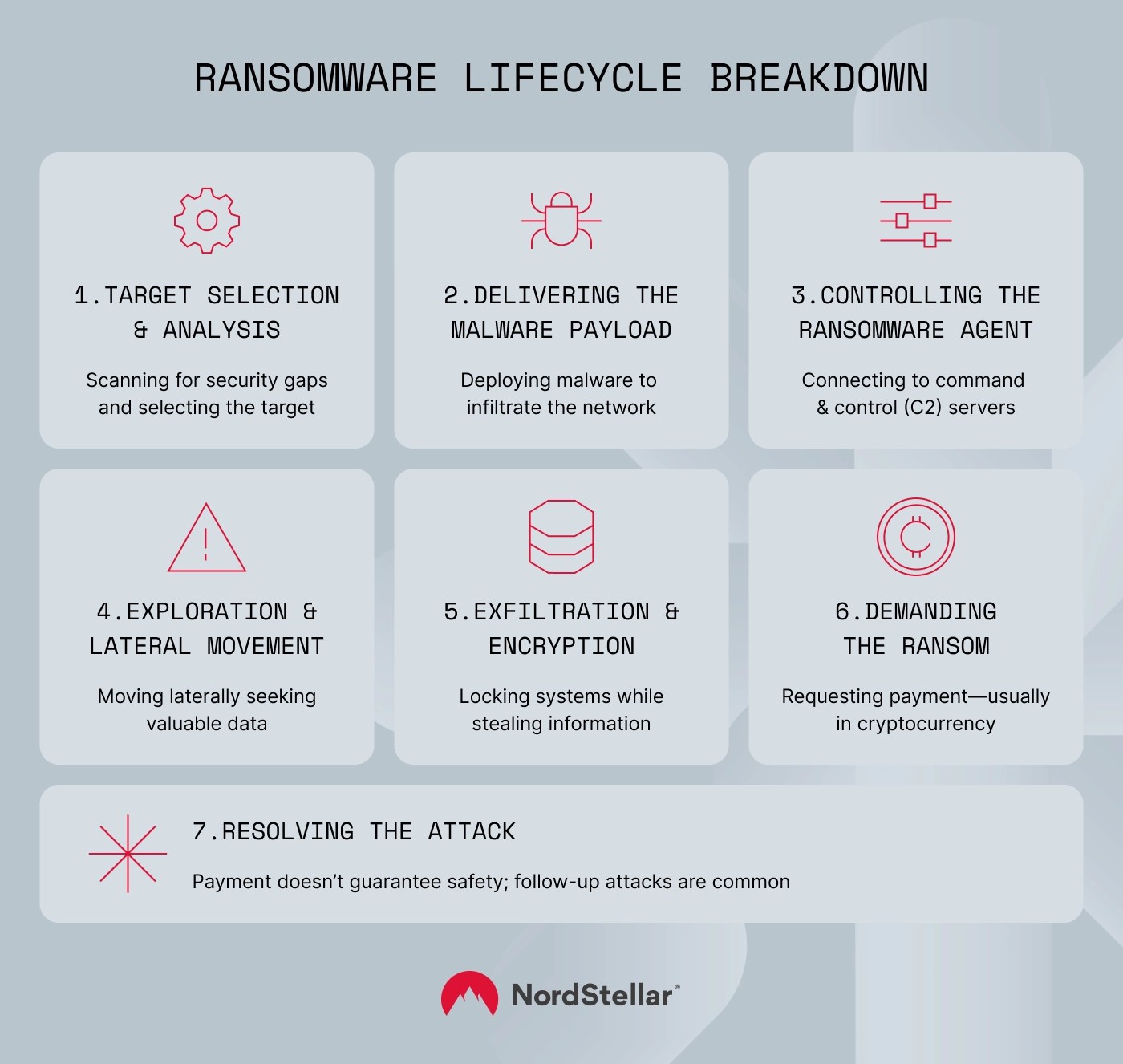
The best way to visualize this process is as a “lifecycle” – a series of steps that follow each other naturally. The ransomware attack diagram below shows how this 7-stage lifecycle works.

Ransomware lifecycle breakdown

1. Preparation: target selection and analysis

Ransomware targets are rarely random. Criminal collectives scope out companies with sufficient resources, sensitive data, and weak security measures. Before taking action, attackers filter targets by all three criteria and create a shortlist of potential victims.

This phase of the attack scans for security vulnerabilities. For example, threat actors will look for unpatched remote access software or previous phishing incidents involving company staff. This knowledge helps criminals choose the best vector for their ransomware attacks.

Criminals strategically assess the best internal targets for data extraction. For example, hackers gaining access to a health insurer would probably prefer to extract sensitive patient records. Employee data is less valuable.

Attackers also need to prepare the way for ransomware delivery. They research employees and executives at the target to build profiles of their connections, responsibilities, and online activity. This information feeds into social engineering attacks, allowing attackers to build trust.

2. Delivering the malware payload

The second stage in the ransomware attack lifecycle infects target networks and makes threat vectors operational. Cyber attackers use several methods to achieve initial access to target systems, including:

  • Fake websites. Criminals lure victims to malicious versions of trusted websites and convince visitors to enter credentials or download infected files. This enables threat actors to compromise the network and deliver their payload.
  • Social engineering and email phishing. Criminals research their victims and write persuasive emails disguised as a legitimate contact (for instance, a vendor, colleague, or bank). Victims believe the phisher’s story and download attachments or provide credentials directly.
  • Exploit kits. Attackers deliver ransomware attacks via code flaws in outdated software. They may use backdoors to access networks and spread malware below the radar.
  • RDP attacks. Attackers use brute-force attacks against weakly secured Remote Desktop Protocol tools. They then distribute malware via a legitimate remote user account.
  • Social media spam. Attackers target victims with attractive social media links (for instance, to videos or explainer articles). Targets click the link, which downloads and executes the ransomware agent.

All the attack methods above deliver malware onto the target network. Agents execute either automatically or when users click a malicious link or file. They may also disable network security tools to evade detection and establish a persistent presence.

After that, the agent connects to remote control systems, giving attackers the green light to proceed.

3. Controlling the ransomware agent

Ransomware agents communicate with command and control (C2) centers. C2 centers allow attackers to monitor network activity, update malware settings, fetch encryption keys, and deliver additional software if required.

Encrypted communication channels make it hard to break the chain and disable active agents. Criminals also protect C2 centers by switching IP addresses. Domain generation algorithms (DGAs) conceal the location and ownership of C2 modules, providing space to assess the network and organize the encryption process.

4. Exploration and lateral movement

The next step in ransomware attacks enables attackers to encrypt systems and exfiltrate data. Attackers use lateral movement to roam the compromised network, seeking confidential data stores and ways to establish control.

Attackers do not need to search manually. Advanced ransomware attacks use automated tools to probe networks and discover high-value assets.

This phase looks for additional vulnerabilities, allowing access to more websites or network locations. Criminals have a range of options:

  • Pass-the-hash techniques extract credentials from compromised systems and apply them to other assets.
  • Attackers use previously leaked or stolen credentials or extract credentials via keyloggers. Users rely on the same credentials for different services, making lateral movement much simpler.
  • Misconfigured cloud environments often enable access to many assets, extending the scope of encryption processes.

Attackers also look for flaws in authorization tools like Active Directory to escalate their privilege levels and achieve greater control.

5. Data exfiltration and encryption

Criminals have now mapped internal assets, identified high-value data, disabled security controls, and hijacked administrative accounts. The next stage is data encryption. This is when most victims become aware of ransomware attacks, which is too late for effective prevention measures.

Criminals use strong encryption to lock down servers, operating systems, critical applications, and individual files. They then refuse to provide the decryption key until victims meet ransom demands.

Attackers adopt an encryption strategy to maximize disruption. Well-designed attacks leave no way to restore systems via fail-safe mechanisms and data backups. However, disruption is rarely the only tactic.

In many ransomware variants, attackers extract and encrypt sensitive data without detection. Threat actors store encrypted data on secure servers and threaten to leak or sell that data unless victims make additional payments.

6. Demanding the ransom

Extortion is the next part of the ransomware lifecycle. Ransomware attackers generally send a digital notification demanding payment in a chosen cryptocurrency.

Instructions inform victims about the nature of the attack and how to make payments. Distressingly, they also tend to include a countdown timer. When the timer expires, attackers may increase ransom demands, sell stolen data, or permanently refuse to unlock encrypted systems.

Ransomware attacks may involve two or three extortion steps. The first demand unlocks encrypted systems. The second demand returns encrypted data. A third demand requests payment to avoid denial-of-service (DoS) attacks.

Note: Law enforcement agencies rarely recommend paying ransoms. If companies continue to pay, ransomware attacks will continue to rise. However, companies must balance ethical concerns with protecting their data and systems. It’s not an easy balance to strike.

7. Resolving the attack

Ransomware attacks do not end with payment. As noted earlier, successful cybercriminals may return with secondary attacks. Companies must respond to ransomware incidents by strengthening their security posture.

The recovery process starts immediately. Security teams must scan for persistent malware and eradicate any surviving agents. Officers should verify that ransomware attackers have returned all stolen data and that systems function normally.

In the medium and long term, security teams must assess their tools for updating software, detecting malware, protecting credentials, and preventing lateral movement via network segmentation.

How to defend against a ransomware attack

A proactive security approach is the best way to neutralize ransomware attackers before they can encrypt corporate data. Here are some best practices to defend in depth against ransomware attacks:

Create a streamlined incident response plan

Security teams need a playbook for quarantining ransomware agents, protecting data, and resolving attacks. Teams must know what assets are affected, who they are dealing with, and how to inform key stakeholders. Workshopping different scenarios and ransomware variants is advisable.

Prioritize patch management

Unpatched systems represent open doors for initial access and lateral movement. Use automated tools to deliver updates as soon as they become available.

Scan incoming files and documents

Use download protection tools to guard against infected attachments or malicious downloads. Block any files from the network without scanning them first.

Monitor user behavior

Threat actors organize extensive reconnaissance and network activity before encrypting systems. User Entity Behavior Analytics (UEBA) tools let you compare user activity with normal baselines and detect suspicious transfers or access requests.

Segment network assets

Preventing lateral movement helps block ransomware escalation. Use network segmentation to limit access to sensitive resources and deny access without multiple authentication factors.

Regularly back up sensitive data

Backing up data limits the damage from ransomware incidents, enabling rapid system restoration. Store backups in a secure off-site location.

Detect your data on the Dark Web

When employee or customer credentials appear on Dark Web marketplaces, ransomware attacks could be on the horizon. Use Dark Web monitoring solutions like NordStellar to identify leaks and secure accounts before attacks occur.

The biggest real-life ransomware attacks

Ransomware attacks affect companies of all sizes in every conceivable economic sector. And it’s far from a standard malware threat. Real-world examples show that ransomware can quickly spiral from a single malware infection to an existential crisis.

Wannacry hits the UK health sector

In 2017, the UK’s National Health Service suffered a crippling series of attacks using the WannaCry ransomware agent. Attackers managed to take hospital servers offline, leading to closures and missed operations. Total costs amounted to £92 million (around $120 million).

In this case, threat actors leveraged flaws in the Windows Server Message Block (SMB) protocol. This flaw enabled remote code execution on infected devices with zero user interaction. As a result, the agent spread quickly and overwhelmed NHS security teams.

Colonial Pipeline: Energy at risk

In 2021, energy firm Colonial Pipeline reported a severe ransomware attack on its pipeline management systems. Staff at the energy distributor paid the $4.4 million ransom but suffered lengthy restoration delays due to problems with the decryption key provided by the threat actors.

The attack was organized by a group called DarkSide and coupled disruption with, stealing over 100 GB of company data. It exploited credentials from a disused VPN tool without multi-factor authentication. Together, those two security mistakes opened up Colonial’s entire network.

The Dark Angels mystery

Our final example is a bit shadier and much larger. We still don’t know for sure which company was affected. However, reports suggest that in 2024, pharma giant Cencora transferred $75 million to a criminal group called Dark Angels, almost doubling the previous record for a (disclosed) ransom payment.

The Russian collective targets Windows and VMware ESXi network infrastructure and organizes rapid data exfiltration. Operating alone, Dark Angels follows a “big game hunting” approach, focusing on Fortune 500 companies and working as quickly as possible.

Ransomware evolves constantly, and security measures need to keep pace. For example, recent years have seen the emergence of ransomware-as-a-service (RaaS), enabling attacks by less-skilled groups. Bug bounties operate via Dark Web services, helping to fine-tune ransomware toolkits.

Criminals now use AI to research targets and design exfiltration strategies. Double extortion (systems and data) has mutated into triple extortion incidents, adding the risk of DDoS threats.

Attackers have learned to “live off the land,” squatting under the cover of legitimate network software. High-speed encryption makes it easier to exfiltrate huge data stores, while blockchain innovations complicate efforts to trace and recover payments.

That’s the tip of the iceberg. Deepfakes and AI video are set to revolutionize phishing techniques; targeted attacks on IoT devices will challenge industrial businesses, while AI-powered polymorphic agents could adjust in real time to evade security measures.

Breaking the ransomware lifecycle with NordStellar

Legacy systems can’t stand up to emerging attack variants. Defeating ransomware requires cutting-edge threat intelligence and network security tools that stay ahead of criminal techniques.

NordStellar can help you meet tomorrow’s ransomware attacks and safeguard every asset. Dark Web Monitoring picks up leaked credentials and chatter about upcoming attacks. Intelligence lets you implement defensive measures, while real-time alerts detect attacks and provide essential context.

Attack Surface Management (ASM) solution scans every exposed endpoint that ransomware attackers could exploit. Cybersquatting detection flags impersonators and fake sites that could deliver ransomware downloads. Meanwhile, smooth integration with NordLayer’s network segmentation tools makes it easier to limit lateral movement.

Take a comprehensive approach and break the ransomware life cycle. To find out more, contact the NordStellar team today.


About NordStellar
NordStellar is a threat exposure management platform that enables enterprises to detect and respond to network threats before they escalate. As a platform and API provider, NordStellar can provide insight into threat actors’ activities and their handling of compromised data. Designed by Nord Security, the company renowned for its globally acclaimed digital privacy tool NordVPN.

About Version 2 Limited
Version 2 Digital is one of the most dynamic IT companies in Asia. The company distributes a wide range of IT products across various areas including cyber security, cloud, data protection, end points, infrastructures, system monitoring, storage, networking, business productivity and communication products.

Through an extensive network of channels, point of sales, resellers, and partnership companies, Version 2 offers quality products and services which are highly acclaimed in the market. Its customers cover a wide spectrum which include Global 1000 enterprises, regional listed companies, different vertical industries, public utilities, Government, a vast number of successful SMEs, and consumers in various Asian cities.

The Ultimate Guide for MSPs: How Clientless Multi-Monitor VDI Drives Revenue Growth

For Managed Service Providers (MSPs), the quest for the next high-margin, recurring revenue stream is relentless. As traditional services become commoditized, the key to growth lies in offering specialized, high-value solutions that solve critical client challenges. The virtual desktop infrastructure (VDI) market, projected to skyrocket from $6.9 billion in 2022 to an astounding $31.5 billion by 2032, represents one of the most significant opportunities today.

But not all VDI is created equal. The real game-changer, and the focus of this guide, is a powerful niche that directly impacts your clients’ number one asset: their productivity.

We’re talking about clientless, multi-monitor VDI.

This isn’t just another service to add to your portfolio. It’s a strategic move that positions your MSP as a forward-thinking partner, capable of delivering secure, flexible, and incredibly productive work environments. This article will break down how MSPs can leverage clientless VDI solutions, specifically Thinfinity Workspace on Oracle Cloud Infrastructure, to build a powerful new revenue engine and establish a formidable competitive advantage against incumbents like Amazon and Microsoft.

The Untapped Goldmine: Why Multi-Monitor VDI is Your Next Big Service Offering

For years, the second monitor was a nice-to-have. Today, for many professionals, it’s an absolute necessity. The data is unequivocal: transitioning from a single monitor to multiple displays boosts user productivity by anywhere from 9% to a staggering 50%.

  • University of Utah: Found that dual-monitor users saw a 33-50% productivity jump and made 33% fewer errors.
  • Microsoft Research: Documented productivity gains of 9-50%, depending on the complexity of the tasks.
  • Jon Peddie Research: Reported an average productivity increase of 42% across the board.

For your clients, this isn’t just a statistic; it’s billable hours saved, projects completed faster, and a more efficient workforce. For you, the MSP, this is a premium service that sells itself. By providing VDI solutions that seamlessly support multi-monitor setups, you are directly enabling your clients’ success and creating an incredibly sticky service offering.

Pyramid illustrating multi-monitor VDI benefits: sticky offering, MSP premium service, and client success.

Finding Your Niche in a Crowded Market

The cloud VDI landscape is dominated by giants. AWS holds about 32% of the market with its AppStream and WorkSpaces offerings, and Microsoft Azure Virtual Desktop claims another 25%. At first glance, Oracle Cloud’s 3% share might seem like a disadvantage.

This is where savvy MSPs will see the opportunity.

Instead of fighting for scraps in the hyper-competitive AWS and Azure ecosystems, you can become a dominant player in a less saturated, high-growth environment. Oracle Cloud is expanding aggressively, with 52% year-over-year infrastructure growth, and is strategically focused on the enterprise customers that need these powerful VDI solutions the most. This is your “blue ocean”—a chance to build expertise and capture market share where others aren’t looking. The key that unlocks this opportunity is Thinfinity Workspace.

Technical Deep Dive: Why Thinfinity on Oracle Cloud Outperforms the Giants

To win clients, you need a solution that is demonstrably better. Here’s how you can position Thinfinity on Oracle Cloud as the superior choice for modern businesses.

1. The Unbeatable Multi-Monitor Advantage

This is your knockout punch. In a world where screen real estate equals productivity, more is always better.

  • Thinfinity Workspace: Supports up to 16 monitors through a single browser window.
  • Azure Virtual Desktop (AVD): Tops out at 8 monitors and requires a client application.
  • Amazon AppStream 2.0 & WorkSpaces: Limited to just 4 monitors.

For high-value clients in finance, engineering, or design, this 2x to 4x advantage is not a minor feature—it’s a core requirement that the competition simply cannot meet.

PlatformMax MonitorsAccess Method
Thinfinity on Oracle Cloud16Clientless (Browser)
Azure Virtual Desktop8Client Install Required
Amazon AppStream 2.04Clientless (Browser)
Amazon WorkSpaces4Client Install Required

2. The “Clientless” Revolution: Your Secret to Reduced Overhead

The single biggest operational headache with traditional VDI is the client software. It needs to be installed, configured, updated, and patched on every single endpoint.

Thinfinity is clientless. Access is through any modern HTML5 browser.

For an MSP, this translates to massive business benefits:

  • Zero Endpoint Software Management: Eliminate the time and cost of deploying and managing client applications.
  • Instant Onboarding: Onboard a new employee or contractor in minutes. All they need is a URL and a login.
  • True BYOD Freedom: Securely support any device (Windows, Mac, Linux, Chromebook, iPad) without worrying about compatibility.
  • Drastically Reduced Support Tickets: No more “the client won’t connect” or “I need to update my software” calls.

3. Security as a Service: The Power of Zero Trust

Cybersecurity is the top concern for every business. Thinfinity Workspace, combined with Oracle Cloud, is built on a Zero Trust Network Access (ZTNA) model. Its reverse gateway architecture means you never have to open inbound ports on your firewall. All connections are initiated from the inside out, dramatically reducing the network attack surface.

This is a powerful selling point that moves the conversation beyond features and into enterprise-grade security, a language every decision-maker understands.

Diagram showing Thinfinity's competitive edge: multi-monitor, clientless revolution, and zero trust security.

From Features to Revenue: High-Value Use Cases You Can Sell Today

Armed with this solution, you can now target specific, high-margin industries with tailored offerings.

Target: Financial Services & Trading

  • The Need: Traders need 4+ monitors to display market data, charts, and execution platforms with high refresh rates. They need instant, secure access from anywhere.
  • Your Offering: “Secure Trader Workstation as a Service.” Deliver a 4-to-8 monitor VDI experience that meets the intense demands of financial markets, complete with ZTNA security for compliance.

Target: CAD, Architecture & Engineering

  • The Need: Engineers and designers need 3+ monitors to work on complex AutoCAD or SOLIDWORKS files, view reference materials, and collaborate. They need access to high-performance GPU-enabled workstations from the field.
  • Your Offering: “Remote Engineering & Design Desk.” Provide secure, clientless access to powerful virtual workstations, enabling seamless remote work for design professionals.

Target: Data Analysis & Business Intelligence

  • The Need: Data scientists need multiple screens for visualization tools, databases, and reporting dashboards.
  • Your Offering: “Secure Analytics Workspace.” A VDI solution that integrates with Oracle’s powerful database capabilities, giving analytics teams the tools and screen space they need.

Target: Healthcare & Medical Imaging

  • The Need: Clinicians and radiologists need 2-3 monitors to view patient records (EHR), medical images (PACS), and diagnostic tools simultaneously. Security and HIPAA compliance are non-negotiable.
  • Your Offering: “HIPAA-Compliant Clinical Workspace.” A secure, clientless solution that enables BYOD policies in hospitals while keeping patient data protected.

The Business Case for MSPs: Building a More Profitable Practice

Adopting this solution isn’t just about adding a new service; it’s about fundamentally improving your business model.

  • Higher Margins: Oracle Cloud’s competitive pricing, combined with Thinfinity’s user-managed infrastructure model, gives you full control over costs. You avoid the mandatory user fees (like RDS SALs) that managed services like AppStream impose, allowing you to set more profitable price points.
  • Differentiated Service Tiers: Create new revenue streams by structuring your offerings. For example: “Business Pro (2 Monitors)”, “Power User (4 Monitors)”, and “Financial Trader (8 Monitors)”.
  • Reduced Operational Drag: The clientless model simplifies deployment and management, freeing up your technicians to work on higher-value projects instead of tedious endpoint support.
  • Strategic Client Partnerships: You’re no longer just the “IT guy”. You’re a strategic partner delivering solutions that directly enhance your clients’ productivity, security, and flexibility.

Your Go-to-Market Strategy

  1. Identify Targets: Review your existing client list. Who is in finance, engineering, healthcare, or software development? They are your prime candidates.
  2. Craft the Message: Focus your marketing on the business outcomes: “Boost Your Team’s Productivity by 42%”, “Secure Remote Access from Any Device, Instantly” and “Cut Your VDI Management Overhead.”
  3. Build Your Demo: The beauty of clientless VDI is how easy it is to demonstrate. Set up a demo environment and let prospective clients experience the seamless, multi-monitor performance directly in their own web browser. Seeing is believing.
  4. Leverage the Partnership: Emphasize the strength of the solution—proven Thinfinity technology running on Oracle’s enterprise-grade cloud infrastructure.

Conclusion: Seize the Clientless Advantage

The VDI market is booming, but the real opportunity for MSPs isn’t in reselling the same solutions as everyone else. It’s in identifying and mastering a superior technology that solves real-world business problems.

Clientless, multi-monitor VDI with Thinfinity Workspace on Oracle Cloud provides a rare combination of technical superiority, operational simplicity, and strategic market positioning. It allows you to offer a service that your competitors in the AWS and Azure camps can’t match, particularly for the most demanding, high-value use cases.

Don’t let your competition capture this ground. The time is now to explore clientless VDI, differentiate your service portfolio, and build your next high-growth recurring revenue stream.

About Cybele Software Inc.
We help organizations extend the life and value of their software. Whether they are looking to improve and empower remote work or turn their business-critical legacy apps into modern SaaS, our software enables customers to focus on what’s most important: expanding and evolving their business.

About Version 2 Limited
Version 2 Digital is one of the most dynamic IT companies in Asia. The company distributes a wide range of IT products across various areas including cyber security, cloud, data protection, end points, infrastructures, system monitoring, storage, networking, business productivity and communication products.

Through an extensive network of channels, point of sales, resellers, and partnership companies, Version 2 offers quality products and services which are highly acclaimed in the market. Its customers cover a wide spectrum which include Global 1000 enterprises, regional listed companies, different vertical industries, public utilities, Government, a vast number of successful SMEs, and consumers in various Asian cities.