Skip to content

Secure Remote Desktop for MSPs: Scale Revenue & Security with Thinfinity® Workspace


Introduction

Managed service providers (MSPs) are staring at a perfect storm of opportunity: the remote‑desktop software market will more than double from $2.75 billion in 2024 to $6.13 billion by 2029 (18.3 % CAGR). Clients need friction‑free access for hybrid workforces, but they also demand airtight protection against the surge in RDP and VNC attacks. Delivering a secure remote desktop service has become the fastest path to new monthly recurring revenue—if you have the right platform. Thinfinity Workspace gives MSPs that edge with built‑in Zero Trust, clientless HTML5 delivery, and multitenant management.

MSPs Opportunity in Secure Remote Desktop: Market Growth, Client Needs, Security, Thinfinity Workspace.

Why “Secure Remote Desktop” Is Mission‑Critical for MSPs

  • Exploding demand: Hybrid work makes secure, always‑on access a priority budget line for SMBs.
  • Attack surface chaos: VNC generated 98 % of traffic on remote‑desktop ports in 2023, with RDP exploits close behind—legacy VPN tunnels can’t keep pace.
  • High‑margin services: Clients will pay for managed security; MSPs that solve the problem first earn stickier contracts and higher ARPU.

Challenges in Secure Remote Desktop for MSPs: Market Demand, Attack Surface, Legacy VPNs, Service Opportunities.

Thinfinity Workspace: The Purpose‑Built Secure Remote Desktop Platform

1. Zero Trust Network Access (ZTNA) from Day One

Thinfinity Workspace enforces “never trust, always verify” for every session—no external add‑ons required. Granular policies authenticate and authorize each user, device, and context before a connection is allowed.

2. Reverse Gateway + Clientless HTML5 Access

RDP, VNC, and SSH sessions travel through a reverse gateway in an SSL/TLS tunnel, so you never open inbound ports on customer firewalls. End users launch desktops or RemoteApps from any modern browser—no client installs, no version drift, fewer tickets.

Thinfinity Workspace features →

3. Hybrid & Multicloud Console for MSP Efficiency

Manage on‑prem clusters and any major public cloud—Azure, AWS, OCI, or GCP—from one secure dashboard. Spin up, brand, update, and monitor unlimited customer tenants while built‑in load balancing and autoscaling keep performance steady and costs predictable.

4. Native Cloud Integrations & Automated Provisioning

Thinfinity Workspace ships with out‑of‑the‑box APIs and Terraform modules that hook directly into your clients’ cloud accounts. Automate VM creation, gateway deployment, scaling policies, and identity bindings so new secure‑remote‑desktop environments come online in minutes—not days.

5. Seamless Identity Integration

Plug into Active Directory, Azure AD, Okta, or any SAML/OAuth provider to deliver single sign‑on and MFA that satisfy even the strictest audit teams. 

6. Cost‑Efficient Citrix & VPN Alternative

Thinfinity Workspace packages remote application delivery, VDI, and secure gateway functions in one license—no complex editions or third‑party brokers—making it an easy upsell against Citrix or legacy VPN solutions.

Learn more →

Enhancing Remote Desktop Security: Zero Trust, Identity, Secure Gateway, Automation, Hybrid Cloud.

Implementation Blueprint for MSPs

PhaseWhat You DoOutcome
1. Select Your Deployment ModelChoose Fully‑Hosted Cloud (Azure, AWS, OCI) for zero infrastructure, or On‑Prem/Hybrid if clients need local data residency. Thinfinity brokers and gateways are containerized, so switching models later is drag‑and‑drop simple.Right‑sized costs, compliance alignment, and faster time‑to‑value for every client.
2. Trial & SandboxActivate your 15‑day MSP trial, spin up a dedicated tenant, and import a pilot client (10–25 users). Leverage Thinfinity’s “one‑click” reverse gateway to avoid opening inbound ports.Hardware‑free proof‑of‑concept that showcases secure remote desktop performance and Zero Trust workflow.
3. Policy Templating & AutomationCreate global templates for MFA, ZTNA zones, and micro‑segmentation. Tag them to security profiles (e.g., Finance, Dev, Guest) and set them to auto‑inherit when you add new tenants.Consistent, audit‑ready security with near‑zero manual effort—every client starts compliant.
4. Partner Program OnboardingEnroll in the Thinfinity MSP Partner Program (Silver, Gold, Platinum). Gain co‑branding assets, deal‑registration protection, and tier‑based margin boosts.Marketing muscle and higher ARPU, plus priority roadmap input as you climb tiers.
5. Go‑Live & UpsellPublish branded HTML5 portals, enable real‑time usage analytics in the multitenant console, and bundle add‑ons—backup, DRaaS, SOC monitoring—into premium plans.New high‑margin recurring revenue and a “single pane” view that slashes support tickets by up to 40 %.
6. Continuous Co‑Sell & SupportTap Thinfinity’s technical SE team for pre‑sales demos, architecture reviews, and POC guidance; lean on the channel desk for joint campaigns and MDF funds.Faster deal cycles, expert coverage on every opportunity, and happier, stickier customers.

Quick Tip: Whether you deploy fully hosted or on‑prem, every tenant lives in its own micro‑segmented enclave—so scaling from one SMB to a hundred never compromises security or performance.

Thinfinity Workspace Features: Security, Fast Onboarding, Identity, Multi-Cloud, MSP Trial.


About Cybele Software Inc.
We help organizations extend the life and value of their software. Whether they are looking to improve and empower remote work or turn their business-critical legacy apps into modern SaaS, our software enables customers to focus on what’s most important: expanding and evolving their business.

About Version 2 Limited
Version 2 Digital is one of the most dynamic IT companies in Asia. The company distributes a wide range of IT products across various areas including cyber security, cloud, data protection, end points, infrastructures, system monitoring, storage, networking, business productivity and communication products.

Through an extensive network of channels, point of sales, resellers, and partnership companies, Version 2 offers quality products and services which are highly acclaimed in the market. Its customers cover a wide spectrum which include Global 1000 enterprises, regional listed companies, different vertical industries, public utilities, Government, a vast number of successful SMEs, and consumers in various Asian cities.

How to manage passkeys on Android

Wait… what are passkeys, again?

For those who don’t know, passkeys are a new authentication method designed specifically to allow users to log in to their online accounts securely—but without the need for passwords. The goal is to leverage technological innovation to improve both cybersecurity and user convenience. How does it work?

Each passkey uses a pair of cryptographic keys: one public key stored on the app or website’s server, and one private key that stays on your device. When you log in, the server sends a request with the public key to your device, which then responds with the private key. If both keys match, you’re granted access.

Since the private key is safely stored on your device and never leaves it, the risk of unauthorized access is much lower. That’s also because passkeys, unlike passwords, can’t be cracked, guessed, or easily stolen. And the cherry on top is that, with passkeys, you don’t have to remember or type in anything—you can just quickly and safely access your accounts.

Passkey requirements for Android

At this point, it’s worth noting that not all Android versions or devices fully support passkeys. So, if you’re thinking about going passwordless, you should keep that in mind, especially if you plan to use a third-party passkey provider like NordPass. Here’s a quick breakdown of which Android versions support passkeys—and how far that support goes.

Android versionPasskey support
Android 9 (Pie)Basic passkey support—works only with external security keys (e.g., YubiKey).
Passkeys are stored locally (no cross-device synchronization).
Android 10/11/12Improved integration with browsers and apps via WebAuthn.
Android 13Full native passkey support.
Integrated with Google Password Manager for syncing across devices.
Biometric or screen lock authentication.
Android 14Support for third-party passkey providers (e.g., NordPass).
Enhanced multi-device syncing and usability.
Android 15More seamless cross-platform passkey usage.
Improved user experience in apps and websites.

As for the other software and hardware requirements for running passkeys on Android, the good news is that most modern Android devices already meet them. This means that if you purchased your device in late 2023 (when Android 14 was launched) or later, it most likely has full support for third-party passkeys.

Still want more details? Here are the key technical requirements your Android device must meet to use passkeys:

  • Your device must have a trusted execution environment (TEE) or secure element (SE) component for storing cryptographic keys.

  • Biometric authentication or a screen lock must be enabled.

  • The Google Play Services app needs to be up to date.

  • You must have an internet connection to sync passkeys across devices.

How to create and save a passkey on your Android device

The process of setting up, creating, and storing passkeys on your Android device can be a bit different depending on a few factors—like which version of Android you have, the passkey provider you’re using (such as Google’s native option or a third-party service like NordPass), and the websites or services you want to use passkeys for. That said, creating passkeys usually involves the following steps:

  1. Enable the lock screen on your Android device (if you haven’t already).

  2. Go to a website or app that supports passkey logins.

  3. Choose to sign up with a passkey option. (If you already have an account, go to the account settings and find the passkey login option.)

  4. Follow the on-screen instructions to create a passkey.

  5. Confirm and save the passkey using your device’s built-in biometrics.

Once confirmed, your new passkey will be stored in your default passkey provider—if you have Android 14 or later, you can choose that to be either Google Password Manager or a third-party solution like NordPass.

How to log in with a passkey on Android

Logging in with a passkey to a website or app is super easy—way easier than using a password. Here’s how it goes:

  1. Go to the website or open the app where you’ve saved your passkey.

  2. Select the option to log in with a passkey (it’ll usually say something like “Use passkey” or “Sign in with passkey”).

  3. Authenticate by following the on-screen prompts (like using your device’s fingerprint scanner or Face ID).

That’s it! If the two cryptographic keys match, you’ll get instant access to your online account or app.

Using passkeys on Android with NordPass

While NordPass is best known as a password manager, it’s also fully equipped to support passkey technology across all major platforms and browsers—and it was one of the first to do so! This is because we believe passwordless authentication is the way forward, and we want you to experience it with top-tier security and ease.

Getting started with passkeys in NordPass is really simple. Just install the NordPass app on your device and set it as your primary passkey manager in your device’s “Passwords and Accounts” settings. Once that’s done, NordPass will prompt you every time you want to create or log in with a passkey, guiding you through the process.

Managing your passkeys in NordPass is also a breeze—they’re stored securely in your vault under a dedicated item category. There, you can easily see when each passkey was created, share them with trusted people without compromising your security, and even add secure notes to help you keep track of important details for any service or account.

For a step-by-step guide on using passkeys with NordPass, check out our Help Center article, where we cover everything from passkey setup to login.


About NordPass
NordPass is developed by Nord Security, a company leading the global market of cybersecurity products.

The web has become a chaotic space where safety and trust have been compromised by cybercrime and data protection issues. Therefore, our team has a global mission to shape a more trusted and peaceful online future for people everywhere.

About Version 2 Limited
Version 2 Digital is one of the most dynamic IT companies in Asia. The company distributes a wide range of IT products across various areas including cyber security, cloud, data protection, end points, infrastructures, system monitoring, storage, networking, business productivity and communication products.

Through an extensive network of channels, point of sales, resellers, and partnership companies, Version 2 offers quality products and services which are highly acclaimed in the market. Its customers cover a wide spectrum which include Global 1000 enterprises, regional listed companies, different vertical industries, public utilities, Government, a vast number of successful SMEs, and consumers in various Asian cities.

ITSM for Financial Services: Efficiency, Compliance, and Quality

Introducing Automated Endpoint Compliance for Apple devices with Veltar

IT and security teams are under increased pressure to maintain consistent compliance while minimizing manual effort. At Scalefusion, we understand the need for secure, scalable, and automated compliance, especially within Apple ecosystems. 

Manual compliance management is time-consuming, error-prone, and doesn’t scale well. Traditional endpoint tools often lack native integration with compliance frameworks, particularly for Apple devices. Most are built with a Windows-first mindset, treating macOS and iOS support as an afterthought. As a result, they either offer limited functionality or fail to address Apple-specific compliance requirements altogether.

This creates critical blind spots in enterprise security.

Automated Endpoint Compliance

Today, we’re excited to announce a significant addition to Scalefusion Veltar- Automated Endpoint Compliance for Apple devices. Now organizations can stay audit-ready and achieve security excellence with CIS Level 1 compliance for macOS, iOS, and iPadOS.

Our goal was simple: To enable continuous, UEM-native CIS compliance that strengthens the security posture of your Apple devices without the added complexity.

Automated Endpoint Compliance enables IT and SecOps teams to continuously monitor, enforce, and remediate CIS benchmarks for macOS, iOS, and iPadOS devices, all without the burden of repetitive audits or configuration drift. 

Unlike generic compliance engines, Veltar is built directly into Scalefusion UEM, offering Apple-first policy controls, automated remediation without third-party agents, and audit-ready guidance. It’s compliance that works natively, where your devices already live.

Key capabilities of Automated Endpoint Compliance with Veltar

  • Enforce CIS benchmarks with precision

You can apply 95+ prebuilt CIS compliance rules and enhance security adoption across macOS and iOS devices. Customize rules based on your unique security posture, ensuring your devices are hardened against threats and policy drift.

  • Monitor compliance continuously

You can track enforcement status continuously and get visibility into deviations as they happen, not after.

  • Remediate policy drift automatically

When devices fall out of compliance, Veltar can auto-remediate configurations based on predefined rules, removing the need for manual fixes.

  • Purpose-built for Apple environments

Enjoy granular control tailored for Apple systems, including support for application restrictions, I/O device access, and OS-level configurations without third-party agents or workarounds.

What this means

  • ITOps: Keeping Apple devices compliant shouldn’t mean juggling between checklists and spending hours on remediation. With Veltar’s automated endpoint compliance, you can set your policies, get that crucial time back, and let Veltar handle the rest.
  • SecOps: Compliance drift is real and risky. This feature gives you continuous visibility and automatic policy enforcement, so you can stay ahead of vulnerabilities before they surface.
  • CIOs & Compliance Officers: Audits shouldn’t catch you off guard. With Veltar, you can be audit-ready at all times, with access to compliance summary dashboards and policy history at your fingertips.

Start building a compliance-first Apple device strategy

With this release, Veltar takes a step forward in becoming a truly compliance-driven governance layer for Apple devices, tightly integrated with Scalefusion UEM. We would like to extend our thanks to the macOS Security Compliance project (mSCP) and all the team involved in creating a useful repository for benchmarks for macOS.

We’re dedicated to bridging the gap between ITOps and SecOps across different operating systems. Keep watching this space as we extend our automated endpoint compliance to other platforms. 

About Scalefusion
Scalefusion’s company DNA is built on the foundation of providing world-class customer service and making endpoint management simple and effortless for businesses globally. We prioritize the needs and feedback of our customers, making sure that they are at the forefront of all decision-making processes. We are dedicated to providing comprehensive customer support services, and place emphasis on customer-centric thinking throughout the organization.

About Version 2 Limited
Version 2 Digital is one of the most dynamic IT companies in Asia. The company distributes a wide range of IT products across various areas including cyber security, cloud, data protection, end points, infrastructures, system monitoring, storage, networking, business productivity and communication products.

Through an extensive network of channels, point of sales, resellers, and partnership companies, Version 2 offers quality products and services which are highly acclaimed in the market. Its customers cover a wide spectrum which include Global 1000 enterprises, regional listed companies, different vertical industries, public utilities, Government, a vast number of successful SMEs, and consumers in various Asian cities.

How to find AutomationDirect Modbus Gateways on your network

Latest AutomationDirect MB-GATEWAY vulnerability #

vulnerability has been disclosed in AutomationDirect MB-GATEWAY Modbus gateways. This vulnerability in the embedded web server allows unrestricted remote access to the device. This device is no longer supported by the vendor and will not receive updates, including security patches.

This vulnerability has been designated CVE-2025-36535 and has a CVSS score of 10.0 (critical).

What is the impact? #

Successful exploitation of this vulnerability could lead to configuration changes, operational disruption, or arbitrary code execution depending on the environment and exposed functionality.

Are any updates or workarounds available? #

This device is no longer supported by the vendor and users are encouraged to discontinue their use. If this is not possible, users are strongly recommended to implement network access controls to limit access to these devices to trusted networks.

How do I find AutomationDirect MB-GATEWAY Modbus gateways with runZero? #

From the Asset Inventory, use the following query to locate potentially impacted assets:

hw:="Automation Direct Modbus Gateway"

About runZero
runZero, a network discovery and asset inventory solution, was founded in 2018 by HD Moore, the creator of Metasploit. HD envisioned a modern active discovery solution that could find and identify everything on a network–without credentials. As a security researcher and penetration tester, he often employed benign ways to get information leaks and piece them together to build device profiles. Eventually, this work led him to leverage applied research and the discovery techniques developed for security and penetration testing to create runZero.

About Version 2 Limited
Version 2 Digital is one of the most dynamic IT companies in Asia. The company distributes a wide range of IT products across various areas including cyber security, cloud, data protection, end points, infrastructures, system monitoring, storage, networking, business productivity and communication products.

Through an extensive network of channels, point of sales, resellers, and partnership companies, Version 2 offers quality products and services which are highly acclaimed in the market. Its customers cover a wide spectrum which include Global 1000 enterprises, regional listed companies, different vertical industries, public utilities, Government, a vast number of successful SMEs, and consumers in various Asian cities.

Inside the World’s Largest Cyber Defense Exercise: Lessons from Locked Shields 2025 with Joseph Carson, Advisory CISO for Segura®

How do you prepare for the kind of cyberattack that could shut down a country?

This isn’t a theoretical scenario. NATO’s Locked Shields is the world’s most advanced live-fire cyber defense exercise. In 2025, nearly 4,000 cybersecurity experts from 41 nations came together to defend against more than 9,000 simulated attacks. These weren’t simple technical challenges. Participants were tasked with defending critical infrastructure – energy grids, financial systems, military communications – while simultaneously managing legal decisions, strategic communications, and crisis leadership.

Among this year’s participants was Joseph Carson, Segura®’s new Advisory CISO and Chief Evangelist, backed by Evandro Gonçalves, our Principal Solutions Architect & Presales Technical Lead, and Yago Lissone, our Security Analyst. Joseph’s experience on the front lines of Locked Shields 2025 offers critical insights into the future of cybersecurity defense and what organizations must do today to strengthen their resilience.

Before we share his first-hand account, here’s why Locked Shields remains one of the most important exercises for global cyber defense and why leaders like Joseph play a vital role in shaping modern security strategies.

About NATO’s Locked Shields: Where Cyber Defense Meets Reality

Organized annually by NATO’s Cooperative Cyber Defence Centre of Excellence (CCDCOE), Locked Shields is the largest and most sophisticated real-time cyber defense exercise in the world.

Each year, participants face a series of highly realistic cyberattacks designed to simulate the technical, operational, and strategic complexity of a full-scale cyber crisis. In 2025, the scenario focused on defending the fictional nation of Berylia, whose government, critical infrastructure, and military networks came under sustained attack.

Over two days, Blue Teams worked around the clock to prevent catastrophic failures in essential services while navigating political pressure, disinformation campaigns, and legal response challenges. The objective: test not only their technical defenses but their ability to lead through crisis under extreme pressure.

As Mart Noorma, Director of the CCDCOE, noted:

“In a world where cyber threats cross every border, Locked Shields proves that resilience in cyberspace is built together.”

Meet Joseph Carson: A Global Leader in Cybersecurity Resilience

Joseph Carson is an award-winning cybersecurity professional with over 30 years of experience in enterprise security and critical infrastructure protection. As Segura®’s Chief Security Evangelist and Advisory CISO, he focuses on identity security and helping organizations build resilient cybersecurity strategies capable of withstanding today’s most advanced threats.

Joseph holds CISSP and OSCP certifications and actively advises governments, critical infrastructure sectors, and global enterprises on strengthening security postures against evolving cyber risks.

He is the author of the widely recognized Cybersecurity for Dummies, read by more than 50,000 professionals worldwide, and regularly contributes expert insights to leading publications including The Wall Street Journal, Dark Reading, and CSO Magazine.

With a passion for advancing cybersecurity as a people-first mission, Joseph helps organizations integrate technology, processes, and leadership strategies to drive long-term resilience. Now, at Segura®, he brings this field-tested expertise directly to organizations working to secure privileged access, protect identities, and stay ahead of the next critical threat.

Inside the Action: An Interview with Joseph Carson

We spoke with Joseph shortly after his return from Locked Shields 2025 to discuss his experience and the critical lessons every organization can apply from this global exercise.

Q: Could you describe your role and responsibilities during Locked Shields 2025?

Joseph Carson:
“In Locked Shields 2025, I served as a Blue Team Defender with a specific focus as a subject matter expert on credential protection. My responsibilities included securing authentication systems, monitoring for potential credential abuse, and responding rapidly to any threats targeting user accounts. I was also on standby to provide urgent support to teammates across different domains, ensuring we could respond to critical incidents without delay.”

Q: What were some of the key challenges your team faced during the exercise?

Joseph Carson:
“One of the biggest challenges was maintaining situational awareness across multiple systems while under continuous and sophisticated attack from the Red Team. Coordinating responses in real time, especially during credential-based attacks or privilege escalation attempts, tested both our technical skills and our ability to communicate under pressure. The pace was relentless, and ensuring that team members had the right support exactly when needed was critical.”

Q: How does participating in Locked Shields influence your approach to real-world cybersecurity strategies?

Joseph Carson:
“Locked Shields reinforces the importance of preparation, collaboration, and agility in real-world cybersecurity. It highlights the need to build resilient systems that don’t just prevent attacks, but can recover and adapt quickly under pressure. The exercise has influenced my emphasis on incident readiness, credential hygiene, and fostering cross-team communication channels in professional environments.”

Q: In your opinion, how does Locked Shields contribute to international collaboration in cybersecurity?

Joseph Carson:
“Locked Shields is one of the most effective platforms for fostering international cybersecurity cooperation. It brings together experts from around the world to tackle realistic, high-pressure scenarios, forcing participants to rely on shared knowledge, trust, and rapid information exchange. It breaks down silos and encourages a collaborative mindset that’s essential for defending against modern, transnational cyber threats.”

Q: What were your main takeaways or lessons learned from participating in Locked Shields 2025?

Joseph Carson:
“My key takeaways from this year’s exercise include the power of coordinated teamwork, the need for clearly defined roles in incident response, and the critical importance of staying calm and focused during high-stress events. Holding back the Red Team was a testament to our preparation and collaboration. Each round of Locked Shields deepens my appreciation for collective defense and the importance of continuous learning in the field.”

Why This Matters for Today’s Cybersecurity Leaders

Locked Shields may be a simulation, but the risks it highlights are real. Privileged access remains the most common target for attackers in the modern threat landscape. The speed at which your organization can detect, respond to, and recover from incidents will determine whether a breach becomes a headline or a footnote.

One immediate action to prioritize? Tighten control over privileged credentials.

Review privileged accounts, eliminate unused credentials, and enforce strong authentication and rotation policies. As Locked Shields 2025 shows, even the most advanced defenses can falter if credential management is overlooked.

At Segura®, we are proud to have Joseph Carson helping shape our vision for a more secure future. His field-tested expertise directly informs how we help organizations strengthen privileged access controls, improve credential hygiene, and reduce the time it takes to detect and respond to advanced threats.

With the right controls in place, your team can move beyond constant firefighting and focus on bigger strategic initiatives, knowing your most critical accounts are protected.

Our mission is to help organizations take these critical first steps while building toward long-term resilience. Because in the next crisis, every second will count.

Ready to take control of your credentials before attackers do? → Talk to Our Team Today

About Segura®
Segura® strive to ensure the sovereignty of companies over actions and privileged information. To this end, we work against data theft through traceability of administrator actions on networks, servers, databases and a multitude of devices. In addition, we pursue compliance with auditing requirements and the most demanding standards, including PCI DSS, Sarbanes-Oxley, ISO 27001 and HIPAA.

About Version 2 Limited
Version 2 Digital is one of the most dynamic IT companies in Asia. The company distributes a wide range of IT products across various areas including cyber security, cloud, data protection, end points, infrastructures, system monitoring, storage, networking, business productivity and communication products.

Through an extensive network of channels, point of sales, resellers, and partnership companies, Version 2 offers quality products and services which are highly acclaimed in the market. Its customers cover a wide spectrum which include Global 1000 enterprises, regional listed companies, different vertical industries, public utilities, Government, a vast number of successful SMEs, and consumers in various Asian cities.

What is a DDoS attack? Types and mitigation strategies

What is a DDoS attack: Types, examples, mitigation

Not every online outage is an accident. Some are carefully orchestrated, meant to disrupt, damage, and draw attention. A DDoS attack is one of the most common methods used for this purpose, and it has become a serious threat to any business with a digital presence.

DDoS attacks are cheap to launch, hard to trace, and increasingly used to target the most sensitive institutions, such as banks, retailers, media outlets, and even hospitals. In a world that runs on constant connectivity, the effects are immediate — websites go down, users get locked out, and trust takes a hit.

In this article, we’ll explore what DDoS attacks are, how they work, and why they’re so effective. You’ll see real-world examples, learn to spot the warning signs, and discover the latest strategies to protect your systems from getting overwhelmed.

What is a DDoS attack?

A distributed denial-of-service (DDoS) attack is a cyberattack that disrupts the normal operation of a target server, service, or network connection. Unlike a traditional DoS attack, a DDoS attack uses multiple compromised devices, making it much harder to defend against.

Dangers caused by DDoS attacks

DDoS causes immediate and sometimes hard-to-recover damage, including:

  • Service disruption. The primary goal is to overwhelm a target server or network, rendering it slow, unresponsive, or completely unavailable to legitimate users.
  • Bandwidth exhaustion. Many DDoS attacks flood the target with more traffic than it can handle, blocking legitimate requests and consuming all available bandwidth.
  • System crashes. The flood of data can cause servers to crash or freeze, leading to significant downtime for businesses relying on those services.

Motivations behind DDoS attacks

The reasons behind DDoS attacks can vary, and attackers often have specific motives for launching them. Whether for political, financial, or competitive reasons, DDoS attacks can have far-reaching consequences.

Most common motivations include the following:

  • Hacktivism. Attacks are launched for political or social causes to disrupt organizations seen as unethical or oppressive.
  • Extortion. Cybercriminals demand a ransom to stop the attack. Failure to comply results in continued disruption.
  • Sabotage. Competitors or adversaries use DDoS attacks to damage an organization’s reputation, operations, or customer trust.
  • Distraction. A DDoS attack can serve as a smokescreen, distracting from more sophisticated attacks like data breaches or network infiltrations.

How does a DDoS attack work?

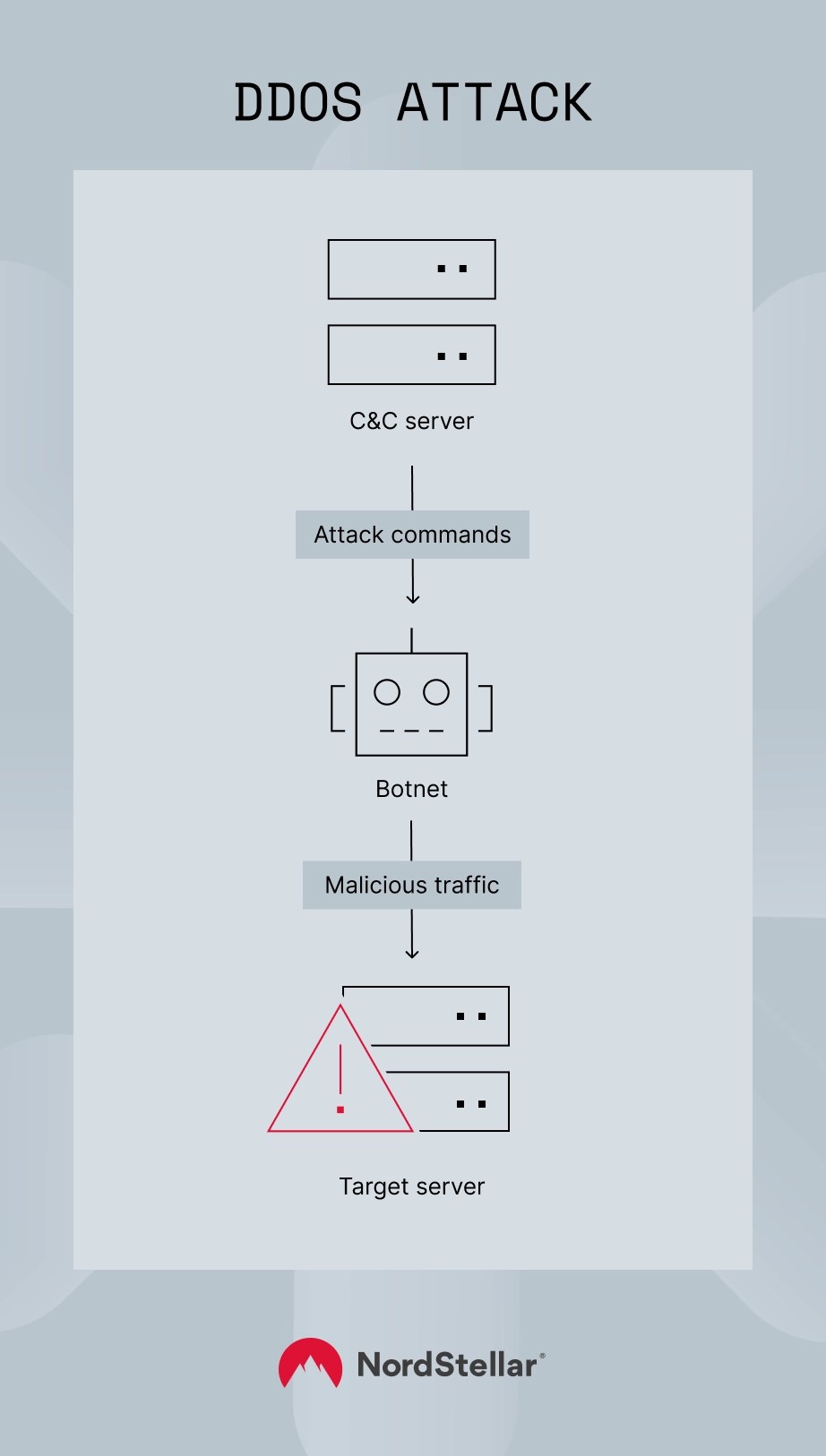
A successful DDoS attack works as a well-coordinated and systematic effort to overwhelm a target by sending an enormous amount of traffic to its systems. To understand how these attacks unfold, let’s break them down step by step.

DDoS attack

1. Preparation and planning

To launch DDoS attacks, attackers often research the target’s infrastructure to identify vulnerabilities and weak points. Attackers may also recruit a network of compromised devices (bots) to carry out the attack, which makes it harder to trace the origin of the traffic. Understanding what DDoS does in this phase is key — it identifies weak points and sets the stage for maximum disruption.

2. Building a botnet

The core of many DDoS attacks is the botnet — a network of infected devices, also known as bots. Attackers usually take control of thousands or even millions of devices by exploiting vulnerabilities in internet of things (IoT) devices, computers, and servers. These infected devices are referred to as zombies, and they’re often spread across the world, giving the attack a global scale. The devices could be anything from smart home appliances to personal computers.

How does infection happen? The botnet creator often infects devices by spreading malware through phishing emails, malicious websites, or other cyberattack methods. Once infected, these devices become part of the botnet and await instructions.

3. Command and control servers (C&C)

Once the botnet is built, the command and control servers (C&C) take over. These servers are controlled by the attacker and issue the attack commands to the botnet. Essentially, the C&C servers tell the infected devices when and how to attack the target.

The C&C servers often use encrypted channels to communicate with the bots, making the attack more difficult to detect or stop.

4. Initiation of the attack

When everything is set up, the botnet is triggered to flood the target with a large volume of traffic. The traffic could come in various forms — volumetric attacks, protocol attacks, and application layer attacks. This phase highlights the full scope of a DDoS attack in cybersecurity, where multiple vectors are used to degrade or take down a target’s operations.

5. Overloading the target

As the traffic increases, the targeted server or network begins to slow down due to resource exhaustion. Legitimate users experience delays, and eventually, the system becomes unresponsive. The attack continues, often forcing the targeted service to go offline.

The most common DDoS tactics include:

  • DNS amplification. A common tactic in DDoS attacks, where attackers exploit vulnerabilities in DNS servers to amplify the size of the service attack.
  • SYN flood. A type of protocol attack that targets the server’s TCP connection handling by sending incomplete connection requests.

6. Execution and impact

At this point, the target is under siege. The attacker’s goal is either to disrupt services (causing downtime and service unavailability) or to distract from other malicious activities. Some attackers might demand ransom in exchange for stopping the attack, while others are just trying to make a statement, disrupt operations, or cause financial damage.

The server struggles to handle the constant flow of requests, and downtime ensues, leading to service disruption, potential financial loss, and damage to the company’s reputation.

One common question businesses ask is how long does DDoS last, and the answer varies. Some attacks only last a few minutes, while others persist for hours or even days, depending on the resources and determination of the attacker.

Categories of DDoS attacks

DDoS attacks don’t all look the same. Some flood the network with meaningless traffic, while others quietly exhaust server resources with seemingly normal requests. To make sense of the chaos, these attacks are generally classified based on which layer of the OSI (Open Systems Interconnection) model they target — from the application itself all the way down to the physical infrastructure.

Here’s an overview of the main DDoS attack categories:

Application layer attacks

These attacks focus on Layer 7 — the application layer — where web pages are loaded and API requests are processed. They mimic real user behavior to overwhelm applications while remaining hard to filter out.

  • Typical attacks: HTTP floods, Slowloris, DNS query floods.
  • Goal: To crash websites or services by exhausting server-side resources.
  • Targets: Public-facing apps like shopping carts, login pages, or search functions.

Protocol (infrastructure layer) attacks

Targeting Layers 3 and 4, these attacks exploit the underlying transport and network protocols like TCP, UDP, or ICMP. They aim to exhaust the processing capacity of routers, firewalls, or load balancers.

  • Typical attacks: SYN floods, UDP floods, fragmented packet attacks.
  • Goal: To disrupt service by breaking the rules of how devices talk to each other.
  • Targets: Network infrastructure, gateways, or edge devices.

Volumetric attacks

These are the “blunt force” attacks of the DDoS world — they flood the network with sheer volume, consuming all available bandwidth.

  • Typical attacks: DNS amplification, NTP floods, UDP floods.
  • Goal: To saturate the internet connection and take the entire service offline.
  • Targets: Entire network segments, ISPs, or cloud platforms.

To put it in context, here’s how these attacks line up with the OSI model:

OSI layer

Type of attack

Examples

Impact

Layer 7: Application

Application layer attacks

HTTP floods, Slowloris, DNS query floods

Web server overload, app downtime

Layer 4: Transport

Protocol attacks (infrastructure)

SYN flood, UDP flood, TCP connection flood

Resource exhaustion of firewalls/load balancers

Layer 3: Network

Protocol and volumetric attacks

ICMP flood, IP fragmentation

Network equipment congestion

Layer 2: Data link

Rare/targeted disruption

MAC flooding, ARP spoofing

MAC flooding, ARP spoofing
Switch/router table overflows, link disruption

Layer 1: Physical

Hardware-level disruption

Cable cuts, signal interference

Complete physical disconnection

DDoS attack examples and real-world cases

Distributed denial-of-service (DDoS) attacks have made headlines over the years for taking down some of the internet’s most widely used services.

One of the most well-known examples occurred in 2018, when GitHub was targeted with a record-breaking attack that peaked at 1.35 Tbps. The attackers used a technique called memcached amplification, overwhelming the platform with traffic. Although GitHub responded quickly by rerouting the traffic through a mitigation service, the attack demonstrated just how fast and massive these attacks can become.

In 2016, DNS provider Dyn suffered a major DDoS attack that temporarily knocked major websites offline, including Twitter, Reddit, and Netflix. The attack was powered by the Mirai botnet, a DDoS network of compromised IoT devices like security cameras and routers. This event drew global attention to the vulnerabilities in consumer-grade connected devices.

Amazon Web Services (AWS) reported mitigating a DDoS attack in 2020 that reached 2.3 Tbps, making it the largest on record at the time. While the disruption was contained, the scale of the attack marked a shift toward more powerful and complex threats targeting cloud infrastructure.

These attacks are highly dangerous as they often result in lost revenue, customer trust issues, and high response costs.

How to detect a DDoS attack

Detecting a DDoS attack early is important to minimize its impact. While some disruptions are immediately obvious — like your website going down — others are more subtle and can look like ordinary performance issues, which include:

  • Unusually slow network performance. Pages take longer to load or time out entirely, even though user activity or backend operations haven’t changed.
    _ Unexplained spikes in traffic. A sudden surge in incoming requests, especially from unfamiliar IP addresses, locations, or devices, can signal hostile traffic. These spikes can vary based on the DDoS attack types, such as volumetric, protocol, or application-layer attacks.
  • Website or service outages. If your site becomes inaccessible or returns error codes (like 503 Service Unavailable), it might be overwhelmed by fake traffic — a common indicator of a DDoS attack in cloud computing environments where elastic resources are still not infinite.
  • Abnormal traffic patterns. For example, a flood of requests hitting a single API endpoint, login page, or checkout flow, often used as a tactic in application-layer attacks.
  • System resource exhaustion. Servers run out of CPU, memory, or bandwidth as they try to handle the flood of requests, impacting legitimate users.

To confirm whether you’re under attack, review logs and analytics. Also, consult your hosting or content delivery network (CDN) provider.

How to mitigate DDoS attacks

Mitigating a DDoS attack requires a combination of proactive planning, real-time monitoring, and the right defensive tools. Since no two attacks are identical, having a multi-layered enterprise security strategy ensures that you can employ a DDoS protection plan under a wide range of attack types while reducing your threat exposure.

Risk assessment

Consider integrating vulnerability scanning into your routine assessments. Regularly assessing your system’s vulnerabilities is crucial to understanding potential weak spots. External vulnerability scanning, in particular, helps identify issues from an outsider’s perspective — just like a hacker would.

Traffic differentiation

Distinguishing between legitimate and compromised traffic is the first line of defense. You can use firewalls and intrusion detection systems (IDS) to analyze incoming traffic patterns and drop suspicious requests early.

Continuous monitoring of network traffic

Setting up real-time monitoring of your network helps identify anomalies and attack patterns. Many DDoS mitigation services offer automated alerts to notify your team about traffic spikes and unusual patterns.

Black hole routing

When under attack, redirecting malicious traffic to a null route — a “black hole” — ensures it doesn’t affect your servers. While this doesn’t prevent the attack, it can isolate it from impacting your website or services.

Rate limiting

Rate limiting restricts the number of requests that can be made from a single IP in a specific timeframe. This measure prevents bots from flooding your system with requests and gives legitimate users a better chance to access your services.

Firewalls and anti-DDoS services

Advanced firewalls can block incoming attack traffic based on signature patterns. Additionally, subscribing to anti-DDoS services helps mitigate large-scale attacks by filtering the attack traffic.

Anycast network diffusion

Anycast routing allows legitimate traffic to be distributed across multiple data centers globally, making it harder for attackers to overwhelm a single point of failure. By spreading traffic out, the attack becomes less concentrated.

Incident response plan

An effective incident response plan ensures your team knows exactly what to do when an attack is detected. The plan should outline procedures for notifying key stakeholders, immediate actions to take, coordination with your hosting or CDN provider for faster response, and communication strategies for informing customers or users about the disruption.

Having a clear plan in place will reduce downtime, minimize confusion, and speed up recovery time.


Increasing DDoS attack threats

The nature of DDoS attacks is changing. While traditional attacks are still a concern, new techniques are appearing that complicate defense efforts and expand the attack surface — the total number of entry points that could be exploited.

The following are some of the emerging trends and the increasing threats in the world of DDoS attacks.

Multi-vector attacks

Attackers are no longer limited to a single type of DDoS attack. Multi-vector attacks combine multiple techniques — such as volumetric, protocol, and application layer attacks — into one devastating strike. These DDoS attacks are harder to block because they target different layers of a system simultaneously, often overwhelming defenses at multiple points in the cyber kill chain.

IoT botnets and Mirai variants

The proliferation of connected devices has led to a rise in IoT botnets — networks of compromised internet of things devices (like cameras, routers, and thermostats). The Mirai botnet, which was responsible for the 2016 Dyn DNS attack, is a prime example. With millions of IoT devices susceptible to compromise, attackers now have an enormous pool of devices to leverage for DDoS attacks.

AI-enhanced automations

Artificial intelligence (AI) is being used to enhance the effectiveness of DDoS attacks. With AI, attackers can automate and fine-tune service attacks in real time, making these attacks harder to detect and mitigate. AI can also be used to adjust the attack’s scale and timing based on the system’s defenses.

“Carpet-bombing” attacks

In a carpet-bombing attack, the attacker floods a network with traffic across a wide range of IP addresses. This tactic makes it difficult to filter out malicious traffic because it doesn’t come from a single source but from many, often making it harder for defenses to identify the attack as malicious.

DDoS as a service

As DDoS attacks become easier to execute, a new DDoS-as-a-service business model has emerged. This model allows attackers to rent botnets or perform service attacks to target their victims. The availability of DDoS tools for hire has lowered the barrier to entry, meaning that even less technical attackers can launch significant disruptions.

With the growing complexity of DDoS strategies, attack surface management has become essential. By continuously identifying, monitoring, and reducing exposed assets and entry points, organizations can make it harder for attackers to find weaknesses, especially in distributed and cloud-native environments.

How organizations can defend against DDoS threats

As DDoS attacks grow more sophisticated, organizations must adopt advanced and proactive strategies to protect their networks and services.

The following are the most common tactics for DDoS protection:

  • AI-based detection and mitigation. AI systems can analyze network traffic patterns, learning to identify anomalies or malicious behavior in real time. Such tools allow for quicker responses, reducing the time it takes to detect and neutralize an attack. AI can also be used to automate mitigation, adjusting defenses without human intervention.
  • Threat intelligence platforms. By analyzing real-time data from global threat feeds and monitoring sources, organizations can gain insights into ongoing service attack trends and proactively adjust defenses. Threat intelligence helps predict attack patterns, allowing for more targeted defenses.
  • Edge computing for enhanced defense. Edge computing allows data processing to occur closer to the source of the traffic, reducing the amount of data that needs to be processed centrally. By distributing traffic load and using edge locations, organizations can divert or mitigate DDoS attacks before they hit the core network.
  • Cloud-based DDoS protection services. Cloud providers offer specialized DDoS protection services. These platforms use advanced mitigation techniques, including massive traffic scrubbing capabilities, to filter out malicious traffic at the network edge before it reaches your servers.
  • Hybrid defense strategies. Many organizations are adopting hybrid defense models, combining on-premises security systems with cloud-based DDoS protection. Such a multi-layered approach ensures that defenses are robust across all points in the network.
  • Real-time monitoring and incident response. By implementing a real-time monitoring solution, organizations can quickly detect traffic anomalies, analyze the scope of the attack, and deploy mitigation tactics. Having a dedicated incident response team ready to handle a DDoS attack helps reduce downtime and ensures that businesses can return to normal operations swiftly.

For organizations looking to strengthen their defenses against DDoS attacks, NordStellar provides an attack surface management service that helps you better understand your company’s attack surface, find and fix vulnerabilities in your external digital assets, and meet the necessary compliance requirements.

Discover threats before they impact your business. Contact NordStellar to learn how our solutions can help your organization stay one step ahead of cybersecurity threats.


About NordStellar
NordStellar is a threat exposure management platform that enables enterprises to detect and respond to network threats before they escalate. As a platform and API provider, NordStellar can provide insight into threat actors’ activities and their handling of compromised data. Designed by Nord Security, the company renowned for its globally acclaimed digital privacy tool NordVPN.

About Version 2 Limited
Version 2 Digital is one of the most dynamic IT companies in Asia. The company distributes a wide range of IT products across various areas including cyber security, cloud, data protection, end points, infrastructures, system monitoring, storage, networking, business productivity and communication products.

Through an extensive network of channels, point of sales, resellers, and partnership companies, Version 2 offers quality products and services which are highly acclaimed in the market. Its customers cover a wide spectrum which include Global 1000 enterprises, regional listed companies, different vertical industries, public utilities, Government, a vast number of successful SMEs, and consumers in various Asian cities.

The Importance of Triage in Incident Response

Gamers of a certain age likely remember the video game Asteroids. You played as a little triangular spacecraft shooting at big space rocks that started traveling towards you slowly at first, then gained speed. As you revolved around trying to protect yourself by shooting them, you inevitably had to make some rapid decisions about which asteroids would harm your ship the most and which ones you could potentially ignore.


In cybersecurity, you do the same thing when trying to triage alerts. Just like not all asteroids would cause the same amount of damage to your ship, not all incidents have the same impact on systems and data. Triage in cybersecurity is a process that you can use to understand and prioritize threats, so you can more efficiently respond to alerts. When you have a structured approach to triaging incidents, you can appropriately allocate resources during the response process and communicate more effectively with everyone involved.


By centralizing all security activities and leveraging the right technologies, security teams can implement a structured, risk-based approach to triage in incident response that helps them protect systems more effectively.

What is Triage in Cybersecurity?

In cybersecurity, triage is a structured incident prioritization process that accounts for impact and urgency. The process begins with an initial assessment, focusing on severity, potential impact, and escalation likelihood. By implementing a triage process, security teams can investigate and respond to incidents faster, reducing the damage that a security incident can cause.


At a very high level, the triage process looks like this:

  • Identify and analyze: quickly review the incident report to evaluate validity
  • Incorporate threat intelligence: correlate incident with existing threat intelligence
  • Apply predefined criteria: use set standards to determine the incidents that require immediate action


When prioritizing incidents, most organizations use the following three levels:

  • High: Respond immediately
  • Medium: Handle as soon as possible and review within 24 hours
  • Low: Continue monitoring but no urgent action required


How triaging works in the incident response process

Triaging allows you to focus on the threats that can pose the most harm to your organization. As attackers continue to bombard companies with various attack types and methodologies, triaging gives you a way to organize your activities and optimize your response capabilities.

Detect and Report Initial Incident

Effective detections should allow you to identify, analyze, and report on security events by monitoring for abnormal activities across the environment. The initial report should include an overview of what happened and the assets impacted.

Assess and Categorize

In the assessment stage, incidents are evaluated based on impact, urgency, and severity. Once alerted to a potential even, your teams should have a way to assess the potential incident’s:

  • Functional Impact: the systems involved and the incident’s effect on business operations
  • Information Impact: the effect on data’s confidentiality, integrity, and availability, including potential theft of sensitive information
  • Recoverability: incident size and resources impacted to determine the time and resources needed to recover


For example, the categorization of functional impact might look like this:

  • None: services remain available to all users
  • Low: critical services remain available but may not be delivered efficiently
  • Medium: critical services unavailable to a portion of users
  • High: critical services unavailable to all users


Prioritize Incidents

The assessment and categorization step allows you to determine an incident’s urgency. Using potential impact and severity as the basic building blocks of your prioritization, you should focus activities on high-priority incidents so you can minimize harm. In theory, prioritization should help your team avoid alert fatigue by allowing you to focus on the most immediate and dangerous incidents.

Assign and Allocate Resources

Each incident’s nature and severity guides resource allocation so that you can have the people with the right skills and experience working on the issue. This structured approach to resource allocation means that you can focus staff and response activities around addressing specific threats or critical systems, minimizing overall incident impact by responding faster.

Start Investigation

During the investigation, you start trying to find the incident’s root cause by gathering data and looking for indicators of compromise (IoCs). As part of this process, you will look for forensic evident that can include data like:

Communicate and Coordinate

To resolve an incident as quickly as possible, you often need to coordinate across different team members and provide updates to impacted users. For example, security teams and network administrators may need to work together to contain a threat by preventing access to or from a specific network segment. With a centralized location for all activities, you can effectively and efficiently inform everyone involved in the incident response process and complete it faster.


What are the challenges of incident response alert triage?

Despite the important role that alert triage plays in mitigating an incident’s impact, many security teams struggle to implement an effective strategy. Some of the main challenges they face include:

  • False positives: Alerts lack important context and fail to identify a real security incident.
  • Alert fatigue: Chasing down too many false positives causes security teams to tune out alerts or fail to respond to actual incidents.
  • Human error risk: Analysts manually prioritizing alerts can make mistakes due to environment and incident complexity.
  • Immature data analytics: Machine learning (ML) and artificial intelligence (AI) models that focus on IoCs can inaccurately prioritize alerts, especially if they are not focused on cybersecurity use cases.


What are the benefits of alert triage?

A security operations center (SOC) gain various benefits when it appropriately triages alerts, including:

  • Improved Efficiency: Quickly identifying high-priority incidents among numerous security alerts reduces response times and helps focus on real threats.
  • Reduced Alert Fatigue: A structured approach makes it easier to filter out false positives so analysts can concentrate on legitimate, high-priority alerts.
  • Enhanced Decision-Making: Using indicators of compromise and other threat intelligence gives SOCs context about the alert and an incident’s potential impact for faster assessment and response.
  • Proactive Security Posture: Identifying suspicious activity promptly enables security teams to counteract malicious activity before it escalates.


Best Practices for Improving Triage for Incident Response

Alert triage helps your team protect critical assets and respond to potentially harmful incidents faster.

Centralize Security Activities

During an incident, coordinating and communicating across various people and departments is key to a fast, efficient response. When you create a central hub for all security activities,  you can assign people the permissions they need to monitor or interact with the investigation. Additionally, with everyone working from the same information, you can document the triage process and incident response activities for compliance purposes.

Use Security-Focused AI/ML

AI/ML can improve your team’s incident response processes, but you should look for analytics models that are purposely trained on cybersecurity use cases. When looking for an anomaly detection solution, you should consider whether it:

  • Defined normal activity
  • Identified outliers using behavioral analysis
  • Sends alerts from the activity deviates from the normal levels
  • Provides an anomaly index to generate alerts based on your team’s configurations


Leverage Risk Scores

With risk scoring, you can create a quantitative metric for prioritizing an incident. However, you should consider two different types of risk scores:

  • Event: the potential impact to your environment to help decide whether an investigation is necessary
  • Asset: the potential impact to a critical assets based on both the event’s risk and any vulnerabilities associated with the assets that make it easier for attackers to complete their objectives


Map Detections to Attack Methods

Your detections, like Sigma rules, help you identify security incidents. When you map detections to threat actor tactics and techniques, you can more accurately understand the potential impact. For example, mapping Sigma rules to the MITRE ATT&CK framework can help you identify high-impact issues based on your current threat coverage without requiring your team to have specialized security skills.

Incorporate Generative AI Purposefully

Generative AI (GenAI) provides a different value than anomaly detection analytics. GenAI models are well-suited to ingesting large amounts of raw data then providing summaries of it. For security teams, this offers a benefit when trying to sort through the log data generated by their environment. When SOCs have a security-focused GenAI tool, they can use the log and event data to generate detailed reports that include key finding and recommended remediation actions.


Graylog Security: Risk Scoring and High-Fidelity Alerts to Improve Incident Response

Using Graylog Security, you can rapidly mature your alert triage capabilities. Graylog Security’s Illuminate bundles include rulesets with content that includes Sigma detections, enabling you to uplevel your monitoring by incorporating threat hunting capabilities and correlations to ATT&CK TTPs.

By leveraging our cloud-native capabilities and out-of-the-box content, you gain immediate value from your logs. Our anomaly detection ML improves over time without manual tuning, adapting rapidly to new data sets, organizational priorities, and custom use cases so that you can automate key user and entity access monitoring.

With our intuitive user interface, you can rapidly investigate alerts. Our lightning-fast search capabilities enable you to search terabytes of data in milliseconds, reducing dwell times and shrinking investigations by hours, days, and weeks.

To learn how Graylog Security can help you implement robust threat detection and response, contact us today.


About Graylog
At Graylog, our vision is a secure digital world where organizations of all sizes can effectively guard against cyber threats. We’re committed to turning this vision into reality by providing Threat Detection & Response that sets the standard for excellence. Our cloud-native architecture delivers SIEM, API Security, and Enterprise Log Management solutions that are not just efficient and effective—whether hosted by us, on-premises, or in your cloud—but also deliver a fantastic Analyst Experience at the lowest total cost of ownership. We aim to equip security analysts with the best tools for the job, empowering every organization to stand resilient in the ever-evolving cybersecurity landscape.

About Version 2 Limited
Version 2 Digital is one of the most dynamic IT companies in Asia. The company distributes a wide range of IT products across various areas including cyber security, cloud, data protection, end points, infrastructures, system monitoring, storage, networking, business productivity and communication products.

Through an extensive network of channels, point of sales, resellers, and partnership companies, Version 2 offers quality products and services which are highly acclaimed in the market. Its customers cover a wide spectrum which include Global 1000 enterprises, regional listed companies, different vertical industries, public utilities, Government, a vast number of successful SMEs, and consumers in various Asian cities.