Skip to content

What is Credential Stuffing? And How to Defend Against It

While credential-stuffing attacks are nothing new, they have been on the rise in recent years. For example, security researchers detected 193 billion credential-stuffing attacks worldwide in 2020, and 3.4 billion of these were in the financial sector. That’s a surge of more than 45% from the year before. And more recently, the first quarter of 2022 saw so many credential-stuffing attacks that the traffic from these attacks surpassed legitimate login attempts in some countries.

With the spike in these attacks, organizations are under pressure to develop solutions to tighten their network access control and keep cybercriminals at bay. Luckily, several security solutions can eliminate these attacks, namely passwordless authentication methods like certificate-based authentication. With this in mind, let’s explore everything you need to know about credential-stuffing attacks and how to prevent them.

What is Credential Stuffing?

Credential stuffing is a type of cyberattack wherein attackers utilize large sets of stolen username-password pairs to gain unauthorized access to user accounts. Central to this strategy is “password recycling,” where users reuse the same passwords across multiple online platforms.

In a typical scenario, cybercriminals might procure credentials leaked from one breach and then attempt to use these credentials on other sites, banking on the tendency of users to repeat passwords. For example, if a hacker obtains login details from a compromised e-commerce site, they might try those same details on popular email or social media platforms. If the user has recycled their password, the attacker can gain entry, potentially compromising more sensitive information.

Credential stuffing works because password recycling is rampant. For example, one study found that 72% of people reuse passwords in their personal life, while nearly 50% of employees simply add a character or digit to their password when a forced reset rolls around. And another worrying study found that 25% of employees use the same password across all logins.

Why Are Credential Stuffing Attacks Increasing?

The alarming increase in credential stuffing attacks is directly linked to the escalating number of high-profile and low-profile data breaches. While significant breaches capture media attention, countless smaller businesses suffer quietly, potentially compromising hundreds of records in each incident.

So, what’s fueling the growth of credential-stuffing attacks? The answer lies in the sheer abundance of stolen passwords. The underlying principle of a credential-stuffing attack is straightforward: the more stolen passwords hackers have in their arsenal, the more they can try to access other systems using those same credentials. These stolen passwords, typically a byproduct of data breaches, are frequently sold on the dark web.

This explosion in available username-password pairs offers a treasure trove for hackers, making it easier than ever to infiltrate various services and apps. The result? A vicious circle: data breaches lead to more stolen credentials, which spur more credential stuffing attacks, resulting in even more data breaches.

And the absence of modern security measures further exacerbates the situation. Multi-Factor Authentication (MFA) — an authentication method that requires users to provide two or more verification factors — is often neglected, making systems more vulnerable. Similarly, passwordless authentication methods, like certificate-based authentication, which uses digital certificates instead of traditional passwords, aren’t as widely adopted as they should be. These advanced security practices can add an extra layer of protection, making it much more challenging for hackers to gain unauthorized access.

Credential Stuffing Prevention – The Best Methods

In today’s evolving cyber landscape, the key to robust defense lies in multi-layered security.

Multi-Factor Authentication

Defined by its use of multiple verification methods — something you know (like a password), something you have (a security token or a phone), and something you are (biometric data like fingerprints or facial recognition) — MFA is a powerful adversary to credential stuffing. This is because even if a hacker obtains a user’s username and password, MFA still requires an additional verification step that the hacker will most likely be unable to bypass. It’s akin to a thief having the key to your house but still unable to get in without the alarm code.

It’s worth noting that while MFA can help prevent the majority of credential-stuffing attacks, it does have some limitations:

  • Phishing Attacks: Sophisticated phishing schemes can trick users into revealing their MFA credentials, like one-time codes.
  • Man-in-the-Middle Attacks: Cybercriminals can intercept MFA tokens in real time, allowing unauthorized access.
  • Account Recovery Loopholes: If MFA recovery processes are weak, hackers can bypass MFA by exploiting the password recovery mechanism.
  • SIM Swapping: By convincing telecom providers to switch a user’s phone number to a new SIM, attackers can hijack MFA tokens sent via SMS.
  • Social Engineering: Cybercriminals can use social engineering tactics manipulate customer service representatives or other personnel to bypass or reset MFA settings.
Secondary Passwords, PINs, and Security Questions

Besides the primary password, users can be prompted to provide an assortment of security information. This might be a PIN, select characters from an auxiliary password, or answers to personal security questions. Again, this provides an extra layer of protection that should stop a cybercriminal in their tracks.

Although layered, it’s essential to understand that secondary passwords, PINs, and security questions don’t count as MFA and still have limitations. For example, they suffer from the “same factor vulnerability,” where both primary and secondary passwords belong to the “something you know” category. Essentially, it lacks diverse authentication factors. Similarly, many users choose easily guessable information for their PINs or answers to security questions, like birthdates or a pet’s name.

CAPTCHA

CAPTCHA is a popular deterrent for automated login attempts, a backbone of credential stuffing. By making users solve a CAPTCHA, you can slow the onslaught of bots, putting a dent in their attack momentum.

However, CAPTCHAs aren’t perfect. Advanced tools can decipher them. And they’re also poor from a usability perspective – users become frustrated at solving CAPTCHAs and see it as an annoying waste of time.

Device Fingerprinting

Device fingerprinting is a technique that captures specific attributes of a user’s device, such as the browser type, version, screen resolution, and even more granular details like the set of installed fonts. By building a unique profile for each device, organizations can employ network access control mechanisms to determine whether a login attempt is coming from a recognized or unfamiliar device.

Device fingerprinting adds an extra layer of security against credential-stuffing attacks. If an attacker attempts to gain unauthorized access from an unrecognized device, the network access control can trigger additional authentication requirements or block the access attempt outright. This proactive approach makes credential stuffing significantly more challenging for cybercriminals.

Certificate-Based Authentication

Certificate-based authentication is paving the way for a more secure online realm, especially as data breaches soar. It’s a type of passwordless authentication, which, as the name implies, is a method of verifying users without requiring them to enter a password.

Certificate-Based authentication uses digital certificates to verify a user’s or device’s identity. This is much like showing an ID card in a digital context. Here’s how it works:

  1. The user or device holds a private key and a corresponding digital certificate.
  2. When trying to authenticate, the user or device shows the digital certificate to the server.
  3. The server then sends a challenge to the client, asking it to prove it has the private key.
  4. The client signs the challenge using its private key.
  5. Using the public key from the certificate, the server checks the client’s signature, confirming the client has the matching private key and authenticating it.

As data breaches rise, more companies are pivoting to certificate-based methods. Why? Traditional tools like CAPTCHAs and even Multi-Factor Authentication (MFA) can still be susceptible to attacks. However, stealing a digital certificate is notably harder than guessing a password or tricking a CAPTCHA system.

As we touched on above, while other methods can significantly enhance security, they’re not infallible. Attackers have found ways around SMS codes or can exploit weak secondary questions. On the other hand, certificate-based authentication ties the authentication to a unique digital certificate – not something easily replicated or stolen.

Benefits of Certificate-Based Authentication:
  • Enhanced Security: Digital certificates are more challenging to compromise than traditional passwords. They employ cryptographic techniques, ensuring a higher level of security and complexity compared to easily guessable or hackable traditional passwords.
  • Reduced Friction: Users don’t need to remember or change passwords periodically. Periodic password changes tend to lead to insecure human behavior, like altering previous passwords by one digit.
  • Scalability: Easily deployed across large enterprises without the hassle of managing numerous passwords.
  • Resistance to Phishing: No passwords to steal means phishing attempts are less likely to succeed.
  • Cost-Effective: Reduces the overhead of password reset requests and support related to password issues.

Final Thoughts

Credential stuffing attacks, while not a new threat, have seen a sharp rise in recent years, and this upward trend shows no signs of abating. In fact, with more and more stolen credentials making their way onto the dark web, we can expect credential-stuffing attacks to become even more prevalent in the coming years.

As a result, the need for robust security measures and stringent network access control is greater than ever. Among the available defenses, certificate-based authentication stands out as the best solution, offering unparalleled security against the ever-evolving menace of credential stuffing.

About Version 2 Limited
Version 2 Digital is one of the most dynamic IT companies in Asia. The company distributes a wide range of IT products across various areas including cyber security, cloud, data protection, end points, infrastructures, system monitoring, storage, networking, business productivity and communication products.

Through an extensive network of channels, point of sales, resellers, and partnership companies, Version 2 offers quality products and services which are highly acclaimed in the market. Its customers cover a wide spectrum which include Global 1000 enterprises, regional listed companies, different vertical industries, public utilities, Government, a vast number of successful SMEs, and consumers in various Asian cities.

About Portnox
Portnox provides simple-to-deploy, operate and maintain network access control, security and visibility solutions. Portnox software can be deployed on-premises, as a cloud-delivered service, or in hybrid mode. It is agentless and vendor-agnostic, allowing organizations to maximize their existing network and cybersecurity investments. Hundreds of enterprises around the world rely on Portnox for network visibility, cybersecurity policy enforcement and regulatory compliance. The company has been recognized for its innovations by Info Security Products Guide, Cyber Security Excellence Awards, IoT Innovator Awards, Computing Security Awards, Best of Interop ITX and Cyber Defense Magazine. Portnox has offices in the U.S., Europe and Asia. For information visit http://www.portnox.com, and follow us on Twitter and LinkedIn.。

How to sync data from MySQL to Google BigQuery using Debezium and Kafka Connect

Syncing data from a MySQL database to Google BigQuery can be a great way to keep your data up to date and easily accessible for analysis. In this article, we will explore the process of setting up Debezium and Kafka Connect to sync data from MySQL to BigQuery, providing you with all the information you need to get started. 

Why use Debezium and Kafka Connect? 

Debezium and Kafka Connect are open-source platforms that provide a powerful solution for streaming data changes in real-time between systems. That real-time interaction allows you to keep your data in sync and easily accessible for various use cases such as real-time analytics, data warehousing, and data pipeline integrations.

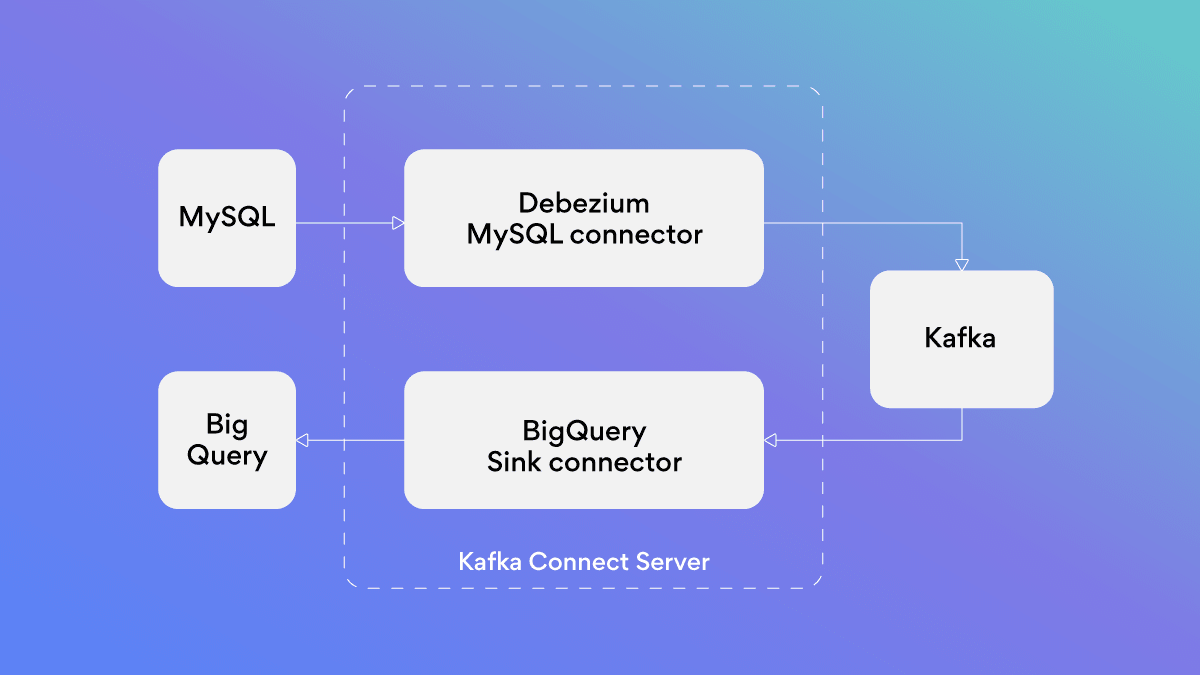
High level solution diagram

solution architecture

solution architecture

Technology used

Before we go into the details of setting up Debezium and Kafka Connect to sync data from MySQL to BigQuery, it is important to understand the technologies that you will be using and how they are connected.

Change data capture

Change Data Capture (CDC) is a technique for capturing and recording all the changes made to a database over time. This allows for real-time data replication, making it easy to keep multiple systems in sync.

CDC does this by detecting row-level changes in database source tables, which are characterized as “Insert,” “Update,” and “Delete” events. CDC then notifies other systems or services that rely on the same data.​

Apache Kafka

Apache Kafka is a distributed streaming platform that is used for building real-time data pipelines and streaming applications. It allows for the storage and processing of streams of records in a fault-tolerant way.

Kafka Connect

Kafka Connect is a framework for connecting Kafka with external systems such as databases, key-value stores, search indexes, and file systems, using so-called connectors.​

Kafka connectors are ready-to-use components that can help you to import data from external systems into Kafka topics and export data from Kafka topics into external systems. You can use existing connector implementations for common data sources and syncs or implement our own connectors.​

Debezium

Debezium is an open-source platform that allows you to easily stream changes from your MySQL database to other systems using CDC. It works by reading MySQL binlog to capture data changes in a transactional manner, so you can be sure that you’re always working with the most up-to-date data.

By using Debezium, you can capture the changes made to the MySQL database and stream them to Kafka. Data on the changes can then be consumed by Kafka Connect to load the data into BigQuery.

BigQuery setup

1. Creating a BigQuery project and dataset:

a. In the Google Cloud Console, navigate to the BigQuery page and create a new project (Creating and managing projects | Resource Manager Documentation | Google Cloud). We will name it “mysql-bigquery” for this tutorial.

b. Within the project, create a new dataset (Creating datasets | BigQuery | Google Cloud). We will name it “debezium” for this tutorial.

c. Note that Debezium will automatically create tables in the dataset that match the structure of the MySQL tables being monitored.

2. Creating a GCP service account with BigQuery editor role:

a. In the Google Cloud Console, navigate to the IAM & Admin page and create a new service account (Creating and managing service accounts | IAM Documentation | Google Cloud).

b. Give the service account a name and description, then select the “BigQuery Data Editor” role

3. Generating and downloading a key for the service account:

a. In the Google Cloud Console, navigate to the IAM & Admin page, find the service account, and click on the three dots on the right, then select “create key” (Create and manage service account keys | IAM Documentation | Google Cloud).

b. Select JSON as the key type and download the key file.

c. Store the key file securely and use it to authenticate the connector in Kafka Connect when accessing the BigQuery dataset.

Tutorial

To start syncing data from MySQL to BigQuery we will need following components:

Start required services

1. Let’s start with creating a new directory. Open Terminal and run:

1

$ mkdir mysql-to-bigquery

2

$ cd mysql-to-bigquery

2. Create a plugins directory

1

$ mkdir plugins

3. Download Debezium mysql plugin:

4. Download BigQuery plugin and put the contents into your plugins directory (in this tutorial we are using version v2.4.3). Now your plugins directory should look like this:

1

$ ls plugins

2

debezium-connector-mysql wepay-kafka-connect-bigquery-2.4.3

5. Create a new file (“docker-compose.yml”) with these configurations:

1

version: ‘2’

2

services:

3

zookeeper:

4

container_name: zookeeper

5

image: quay.io/debezium/zookeeper:2.1

6

ports:

7

2181:2181

8

2888:2888

9

3888:3888

10

kafka:

11

container_name: kafka

12

image: quay.io/debezium/kafka:2.1

13

ports:

14

9092:9092

15

links:

16

zookeeper

17

environment:

18

ZOOKEEPER_CONNECT=zookeeper:2181

19

mysql:

20

container_name: mysql

21

image: quay.io/debezium/examplemysql:2.1

22

ports:

23

3306:3306

24

environment:

25

MYSQL_ROOT_PASSWORD=debezium

26

MYSQL_USER=mysqluser

27

MYSQL_PASSWORD=mysqlpw

28

connect:

29

container_name: connect

30

image: quay.io/debezium/connectbase:2.1

31

volumes:

32

./plugins:/kafka/connect

33

ports:

34

8083:8083

35

links:

36

kafka

37

mysql

38

environment:

39

BOOTSTRAP_SERVERS=kafka:9092

40

GROUP_ID=1

41

CONFIG_STORAGE_TOPIC=my_connect_configs

42

OFFSET_STORAGE_TOPIC=my_connect_offsets

43

STATUS_STORAGE_TOPIC=my_connect_statuses

6. Let’s start the services:

1

$ docker-compose up

You should see an output similar to the following:

1

...

2

2023-01-16 15:48:33,939 INFO || Kafka version: 3.0.0 [org.apache.kafka.common.utils.AppInfoParser]

3

...

4

2023-01-16 15:48:34,485 INFO || [Worker clientId=connect-1, groupId=1] Starting connectors and tasks using config offset -1 [org.apache.kafka.connect.runtime.distributed.DistributedHerder]

5

2023-01-16 15:48:34,485 INFO || [Worker clientId=connect-1, groupId=1] Finished starting connectors and tasks [org.apache.kafka.connect.runtime.distributed.DistributedHerder]

7. Check if Debezium is running with Kafka Connect API.

1

$ curl -i -X GET -H “Accept:application/json” localhost:8083/connectors

An empty array in response shows that there are no connectors currently registered with Kafka Connect.

8. We also have MySQL running with an example database inventory. You can check what tables are there by running:

1

$ docker exec -it mysql mysql -uroot -pdebezium -D inventory -e “SHOW TABLES;”

2

+———————+

3

| Tables_in_inventory |

4

+———————+

5

| addresses |

6

| customers |

7

| geom |

8

| orders |

9

| products |

10

| products_on_hand |

11

+———————+

1

$ docker exec -it mysql mysql -uroot -pdebezium -D inventory -e “SELECT * FROM customers;”

2

+——+————+———–+———————–+

3

| id | first_name | last_name | email |

4

+——+————+———–+———————–+

5

| 1001 | Sally | Thomas | sally.thomas@acme.com |

6

| 1002 | George | Bailey | gbailey@foobar.com |

7

| 1003 | Edward | Walker | ed@walker.com |

8

| 1004 | Anne | Kretchmar | annek@noanswer.org |

9

+——+————+———–+———————–+

Configure Debezium to start syncing MySQL to Kafka

Now let’s configure Debezium to start syncing the inventory database with Kafka.

1. Create a new file (“register-mysql.json”) with these configurations:

1

{

2

“name”: “inventory-connector-mysql”,

3

“config”: {

4

“connector.class”: “io.debezium.connector.mysql.MySqlConnector”,

5

“tasks.max”: “1”,

6

“database.hostname”: “mysql”,

7

“database.port”: “3306”,

8

“database.user”: “root”,

9

“database.password”: “debezium”,

10

“database.server.id”: “184054”,

11

“topic.prefix”: “debezium”,

12

“database.include.list”: “inventory”,

13

“schema.history.internal.kafka.bootstrap.servers”: “kafka:9092”,

14

“schema.history.internal.kafka.topic”: “schemahistory.inventory”

15

}

16

}

You can find information about these configuration properties in the Debezium documentation.

2. Register a MySQL connector:

1

Bash$ curl i X POST H “Accept:application/json” H “Content-Type:application/json” http://localhost:8083/connectors/ d @registermysql.json

3. Verify that “inventory-connector” is included in the list of connectors:

1

$ curl -H “Accept:application/json” localhost:8083/connectors/

2


3

[“inventory-connector-mysql”]

4. You can now see database contents in Kafka. To see topics, run:

1

$ docker exec -it kafka bash bin/kafka-topics.sh –list

2


3

–bootstrap-server kafka:9092

4

...

5

debezium.inventory.addresses

6

debezium.inventory.customers

7

...

8


Let’s check debezium.inventory.addresses:

1

Bash$ docker exec it kafka bash bin/kafkaconsoleconsumer.sh bootstrapserver kafka:9092 topic debezium.inventory.addresses frombeginning

2


3

{“schema”:{“type”:“struct”,“fields”:[{“type”:“struct”,“fields”:[{“type”:“int32”,“optional”:false,“field”:“id”},{“type”:“int32”,“optional”:false,“field”:“customer_id”},{“type”:“string”,“optional”:false,“field”:“street”},{“type”:“string”,“optional”:false,“field”:“city”},{“type”:“string”,“optional”:false,“field”:“state”},{“type”:“string”,“optional”:false,“field”:“zip”},{“type”:“string”,“optional”:false,“name”:“io.debezium.data.Enum”,“version”:1,“parameters”:{“allowed”:“SHIPPING,BILLING,LIVING”},“field”:“type”}],“optional”:true,“name”:“debezium.inventory.addresses.Value”,“field”:“before”},{“type”:“struct”,“fields”:[{“type”:“int32”,“optional”:false,“field”:“id”},{“type”:“int32”,“optional”:false,“field”:“customer_id”},{“type”:“string”,“optional”:false,“field”:“street”},{“type”:“string”,“optional”:false,“field”:“city”},{“type”:“string”,“optional”:false,“field”:“state”},{“type”:“string”,“optional”:false,“field”:“zip”},{“type”:“string”,“optional”:false,“name”:“io.debezium.data.Enum”,“version”:1,“parameters”:{“allowed”:“SHIPPING,BILLING,LIVING”},“field”:“type”}],“optional”:true,“name”:“debezium.inventory.addresses.Value”,“field”:“after”},{“type”:“struct”,“fields”:[{“type”:“string”,“optional”:false,“field”:“version”},{“type”:“string”,“optional”:false,“field”:“connector”},{“type”:“string”,“optional”:false,“field”:“name”},{“type”:“int64”,“optional”:false,“field”:“ts_ms”},{“type”:“string”,“optional”:true,“name”:“io.debezium.data.Enum”,“version”:1,“parameters”:{“allowed”:“true,last,false,incremental”},“default”:“false”,“field”:“snapshot”},{“type”:“string”,“optional”:false,“field”:“db”},{“type”:“string”,“optional”:true,“field”:“sequence”},{“type”:“string”,“optional”:true,“field”:“table”},{“type”:“int64”,“optional”:false,“field”:“server_id”},{“type”:“string”,“optional”:true,“field”:“gtid”},{“type”:“string”,“optional”:false,“field”:“file”},{“type”:“int64”,“optional”:false,“field”:“pos”},{“type”:“int32”,“optional”:false,“field”:“row”},{“type”:“int64”,“optional”:true,“field”:“thread”},{“type”:“string”,“optional”:true,“field”:“query”}],“optional”:false,“name”:“io.debezium.connector.mysql.Source”,“field”:“source”},{“type”:“string”,“optional”:false,“field”:“op”},{“type”:“int64”,“optional”:true,“field”:“ts_ms”},{“type”:“struct”,“fields”:[{“type”:“string”,“optional”:false,“field”:“id”},{“type”:“int64”,“optional”:false,“field”:“total_order”},{“type”:“int64”,“optional”:false,“field”:“data_collection_order”}],“optional”:true,“name”:“event.block”,“version”:1,“field”:“transaction”}],“optional”:false,“name”:“debezium.inventory.addresses.Envelope”,“version”:1},“payload”:{“before”:null,“after”:{“id”:10,“customer_id”:1001,“street”:“3183 Moore Avenue”,“city”:“Euless”,“state”:“Texas”,“zip”:“76036”,“type”:“SHIPPING”},“source”:{“version”:“2.1.1.Final”,“connector”:“mysql”,“name”:“debezium”,“ts_ms”:1673446748000,“snapshot”:“first”,“db”:“inventory”,“sequence”:null,“table”:“addresses”,“server_id”:0,“gtid”:null,“file”:“mysql-bin.000003”,“pos”:157,“row”:0,“thread”:null,“query”:null},“op”:“r”,“ts_ms”:1673446748425,“transaction”:null}}

4

5


For more information on Debezium events, see this Debezium documentation.

Configure Debezium to start syncing data to Google BigQuery

Before you start configuring the BigQuery connector, move the Google BigQuery service account key file (details in previous section) to your working directory and name it “bigquery-keyfile.json”.

1. Once you have the key file, copy it to the Connect container:

1

$ docker cp bigquery-keyfile.json connect:/bigquery-keyfile.json

2. Now create a file register-bigquery.json with these configurations:

1

{

2

“name”: “inventory-connector-bigquery”,

3

“config”: {

4

“connector.class”: “com.wepay.kafka.connect.bigquery.BigQuerySinkConnector”,

5

“tasks.max”: “1”,

6

“consumer.auto.offset.reset”: “earliest”,

7

“topics.regex”: “debezium.inventory.*”,

8

“sanitizeTopics”: “true”,

9

“autoCreateTables”: “true”,

10

“keyfile”: “/bigquery-keyfile.json”,

11

“schemaRetriever”: “com.wepay.kafka.connect.bigquery.retrieve.IdentitySchemaRetriever”,

12

“project”: “mysql-bigquery”,

13

“defaultDataset”: “debezium”,

14

“allBQFieldsNullable”: true,

15

“allowNewBigQueryFields”: true,

16

“transforms”: “regexTopicRename,extractAfterData”,

17

“transforms.regexTopicRename.type”: “org.apache.kafka.connect.transforms.RegexRouter”,

18

“transforms.regexTopicRename.regex”: “debezium.inventory.(.*)”,

19

“transforms.regexTopicRename.replacement”: $1,

20

“transforms.extractAfterData.type”: “io.debezium.transforms.ExtractNewRecordState”

21

}

22

}

You can find information about these configuration properties in the official documentation.

3. To register the BigQuery connector, run:

1

$ curl -i -X POST -H “Accept:application/json” -H “Content-Type:application/json” http://localhost:8083/connectors/ -d @register-bigquery.json

In your BigQuery dataset, you will now be able to see tables matching those in MySQL.

BigQuery table data 1

Now, select data from your customers table. Emails used are for example purposes only and do not correspond to real individuals.

BigQuery table data 2BigQuery table data 2

You can create a new entry in MySQL customers table:

1

$ docker exec -it mysql mysql -uroot -pdebezium -D inventory -e “INSERT INTO customers VALUES(1005, \”Tom\”, \”Addams\”, \”tom.addams@mailer.net\”);”

You will see that a new entry has automatically synced to BigQuery.

Bigquery dataset tables

Conclusion

You should now have a clear understanding of the benefits of syncing data from MySQL to BigQuery using Debezium and Kafka Connect. With the detailed tutorial found in this article, you will be able to set up and configure Debezium and Kafka Connect yourself.

As a reminder, it’s important to test and monitor the pipeline to ensure that data is being synced as expected and to troubleshoot any issues that may arise.

For more information on Debezium and Kafka Connect, you can refer to the following resources:

About Version 2 Limited
Version 2 Digital is one of the most dynamic IT companies in Asia. The company distributes a wide range of IT products across various areas including cyber security, cloud, data protection, end points, infrastructures, system monitoring, storage, networking, business productivity and communication products.

Through an extensive network of channels, point of sales, resellers, and partnership companies, Version 2 offers quality products and services which are highly acclaimed in the market. Its customers cover a wide spectrum which include Global 1000 enterprises, regional listed companies, different vertical industries, public utilities, Government, a vast number of successful SMEs, and consumers in various Asian cities.

About Nord Security
The web has become a chaotic space where safety and trust have been compromised by cybercrime and data protection issues. Therefore, our team has a global mission to shape a more trusted and peaceful online future for people everywhere.

About NordLayer
NordLayer is an adaptive network access security solution for modern businesses – from the world’s most trusted cybersecurity brand, Nord Security.

The web has become a chaotic space where safety and trust have been compromised by cybercrime and data protection issues. Therefore, our team has a global mission to shape a more trusted and peaceful online future for people everywhere.

Best security tools for remote work in 2023

The traditional office is becoming harder to find these days. Across the world, millions of people have shifted to hybrid or fully remote work lifestyles. In the USA, 53% of workers have adopted hybrid patterns, and 24% work from home full-time. Those numbers are likely to rise with employee expectations drifting towards flexible working. 

But how should companies respond? Enabling remote working can be risky, but it comes with many benefits. In this article, we’ll introduce the best security tools for remote work, making it easier to relocate employees without creating extra cybersecurity risks.

Key takeaways

  • Remote working is more popular than ever. Choosing the right software and hardware tools allows off-site workforces to operate safely and productively.

  • Efficient video conferencing solutions connect team colleagues, managers, and third parties seamlessly. And they secure communications against eavesdroppers.

  • Messaging apps ensure consistent information flows between remote employees. They should allow regular updates, quality assurance checks, and assist with team building.

  • Project management systems make it easier to control dispersed teams. Managers can monitor remote workforces and set schedules for project delivery.

  • Secure storage solutions keep critical data safe. Access controls and encryption make data available for team members while preventing illegitimate access.

The evolution of remote work

Remote work is not a new phenomenon. And in the past 20 years, remote work has become routine for occupations like IT support.

However, the number of remote employees was relatively small until the Covid pandemic. When it hit, millions of workers were suddenly barred from workplaces. But companies needed to continue operations, which sparked a search for remote solutions.

Apps like Zoom became household names overnight. And organizations suddenly had to adapt their working practices to accommodate working remotely.

Fortunately, Covid-19 coincided with technological developments that made remote working easier. Internet bandwidth is increasing at a rate of around 29% per year. This allowed employees to collaborate via video conferencing without lag issues. And remote security solutions like Virtual Private Networks (VPNs) and multi-factor authentication enabled companies to create secure remote work connections.

The pandemic and technological change have paved the way for an age of flexible remote working. And this change is mainly driven by employees.

As the Covid pandemic receded, many people didn’t return to their workplaces. Workers became accustomed to spending more time at home. Now, as many as 65% of workers seek full-time remote work, and the employers need to adapt fast.

country statistics for remote work 1400x800However, not all sectors have embraced remote work. Healthcare and care professions still generally rely on face-to-face contact. Manual trades like mining or construction may always require employees to be present on site. Despite that, many industries support remote work strategies.

The IT sector has the highest proportion of home workers right now. But jobs as diverse as accounting, non-profit administration, tutoring, and graphic design are also compatible with home working.

Recent years have also seen the emergence of remote workforce technologies that enable productive and secure remote work. Project management tools, VPNs, collaboration and video conferencing apps, and cloud storage platforms make remote work easier than ever. Thus, the future of remote working seems bright.

Evaluating remote work effectiveness

Remote work is already mainstream. But it isn’t necessarily the best solution for all companies and employees.

On the positive side, statistics suggest that working from home boosts productivity and streamlines corporate operations. Additionally, major companies say that remote work is 35-40% more productive than office-based alternatives.

This increase could be due to the absence of distractions. Remote employees put time spent on commutes to better use. Or they might just be happier and energized by controlling their working lives.

On the other hand, remote work isn’t suitable for many occupations. As this list from the New York Times shows, this trend has barely touched plenty of jobs. Education, medicine, and construction are just a few good examples.

The pandemic forced teachers to run classes remotely. Such a method led to frustration and stress for educators and damaged educational outcomes for learners. Therefore, organizations should think long and hard before relocating any jobs involving face-to-face contact.

Companies must be aware of potential problems with remote or hybrid work models. Researchers report that remote work can come with a “promotion penalty.” Employees away from managers and offices may lose out during internal recruitment.

On-site staff also benefit from the assistance of more experienced colleagues. Younger remote workers may be disconnected from sources of knowledge. Isolation hurts productivity and dents the career prospects of remote employees.

Poorly-organized remote working systems can also lead to problems with managing them. As a result, managers may gradually extend surveillance reach to track projects and productivity. Because of that, surveillance can negate the feeling of freedom that makes working remotely so appealing.

To sum up, there are good reasons to embrace remote work. But companies should be careful when designing home working setups as this comes with new risks. Let’s explore some tools to simplify this critical task.

The best remote workforce technologies in 2023

Organizations should employ a suite of technologies for working remotely. These cover critical areas like cloud storage, project management, communication, data security, and secure remote access. Let’s see what are the top options in each category.

Cloud storage tools

Remote work teams should use secure cloud storage to host workloads and communication apps. Secure platforms apply encryption to protect data at rest. Furthermore, firewalls block illegitimate external access, and physical controls protect data centers.

Cloud platforms couple security with ease of use, meaning remote users can share files and databases instantly. Moreover, teams can update work documents, client databases, or code bases in real time. And cloud data protection tools keep the workloads safe from external intruders.

It usually makes sense to build remote work setups around cloud environments. But which cloud services provider should you choose?

Microsoft Azure

This is a popular option for cloud storage. Azure Bastion provides secure shell access for remote connections. It also features the ability to create virtual desktop infrastructure with ease. That way, remote employees can access central resources without storing data locally.

Microsoft’s cloud platform has other remote security benefits. Learn more by reading our Azure best practices guide.

Amazon Web Services (AWS)

AWS is another good cloud storage option and virtual workspace. For instance, it’s ideal for creatives working remotely who need virtual workstations for graphic design or video production.

Users can encrypt data easily and manage data retention policies. And they can track data movements between home and cloud locations.

Finally, cybersecurity is very tight if you follow AWS security best practices.

Google Cloud

Google Cloud offers excellent document storage and editing features. Flexible bucket storage is a core feature of Google’s platform. When cloud services fail in one region, remote workers can access workloads hosted elsewhere.

Google’s storage systems scale smoothly. They are fitted with critical remote security tools like encryption, cloud-native access controls, signed URLs, and data retention locks. By following Google Cloud security best practices, you can design a remote work solution that secures data and serves employee needs.

Project management

Managing projects is a crucial aspect of any remote workplace. Managers need to set targets and monitor employee progress. They need awareness of project achievements. Finally, they require the ability to change plans as projects develop.

Project management tools make these tasks much more manageable. What’s more, they give an overall awareness to their users. Also, some solutions enable detailed worker surveillance via time-tracking tools.

Jira

Atlassian’s Jira platform is a good solution for creating a flexible remote team. Targeted at code developers, Jira enables complete awareness of production status. Managers can track progress with productivity reports and timeline tools. In the meantime, task management hubs allow them to set flexible workflows for each team member.

Jira is a solid option for DevOps teams that depend on distributed remote workers. That’s because it blends flexibility and security. For instance, users can encrypt data at rest and in transit, and they can set permissions for each object. NordLayer’s guide to Jira security best practices offers a comprehensive overview of the product’s remote security features.

Microsoft Teams

Teams is the most popular platform for remote work operations. However, it doesn’t include native project management features.

Instead, users can create integrations with third-party management tools like Monday or Brightworks. These tools link together the video conferencing and messaging functions that make Teams useful. And they let managers schedule events and track progress easily.

Microsoft Teams is part of Office 365. This suite allows easy assimilation of Excel or Word into remote workflows. But this solution might come with security vulnerabilities. Learn more by reading our blog about Office 365 best practices.

Figma

Product designers rely on Figma to collaborate and develop ideas. The platform’s Juncture tool enables in-depth project management for every team and product. Co-creation spaces bring workers together to share prototypes or test apps. And tools like FigJam provide online whiteboards for real-time collaboration.

Figma is an excellent development platform for remote teams. But as with Microsoft Teams, it’s not entirely secure. Therefore, be sure to implement Figma security best practices before teams go online.

Communication and collaboration tools

Communication and collaboration are critical to the success of every remote team. And for that, there are many different tools to choose from.

communication tools for teams

The most secure options are end-to-end encrypted messaging apps. Troop Messenger and Element are designed to suit business communications. They encrypt messages between remote team members without compromising performance.

Other communication tools bring team members together to discuss ongoing projects. For example, Slack features customizable one-to-one, enterprise-wide, or departmental group chats, including live voice communications. It includes encryption, key management, audit logs, and data loss prevention.

Video collaboration is another must-have for most remote work operations. Zoom is optimized for distributed teams, with collaborative whiteboards, up to 100 meeting attendees, and instant team meetings for spur-of-the-moment contact. Zoom Events is another neat feature that helps build togetherness within a distributed workforce.

Video communication tools improve collaboration, but they can bring remote security risks. During the Covid pandemic, there were many cases of attackers recording Zoom calls. That’s because threat actors can steal credentials or hijack calls over insecure connections.

Companies should couple collaboration tools with a reliable B2B VPN and access management systems. They ensure that calls are private and only legitimate invitees will be present.

Access control and data security tools

Remote work setups should always include filters to exclude unauthorized users from corporate resources. Therefore, authentication and access control solutions are critically important. After all, managers will probably want to give the IT admins more freedom than a trainee.

Authentication

Authentication compares user access credentials to secure credentials databases. The gold standard for remote access is multi-factor authentication (MFA). This demands more than one unique identifier when users access work resources.

MFA can involve passwords and one-time codes sent via SMS or email. But more secure versions deliver encrypted codes to mobile apps. This avoids security issues related to email and SMS. Organizations can also switch from passwords to hardware tokens provided to remote workers.

Access management

Access control portals complement authentication tools. Identity and Access Management (IAM) systems verify users’ identities and connect them to the correct privileges.

Remote workers can access resources needed by their team or project. However, under the Zero Trust model, IAM tools limit access to all other network assets. This strengthens the network perimeter and boosts cybersecurity.

Encryption

Encryption is another critical aspect of secure remote working. Companies should leverage encryption features on apps and cloud platforms to safeguard sensitive information. And they should use encrypted channels to connect remote devices and central resources.

Data Loss Prevention (DLP)

DLP tools can also help businesses a lot with their remote workforce. They track sensitive data and prevent misuse by remote users. This way, managers can protect the most important databases and documents. As a result. extracting valuable data will be much more difficult.

In summary, strong encryption is essential when designing remote work setups. Insecure user devices can become entry points for malware and data thieves. Moreover, weak authentication and authorization systems make access easy for anyone with a functioning user ID and password.

Secure remote access solutions

Remote access workforces expand the threat surface and create new cybersecurity risks. This makes it critical to secure every remote connection. Encrypting cloud platforms and implementing MFA is not enough. Companies must lock down connections between remote devices and network assets.

Virtual Desktop Infrastructure (VDI) is one way to do so. It creates centralized servers on the cloud. These servers host workloads and data, meaning nothing is stored locally on employee devices. However, users can run apps hosted on the VDI in their home office.

VDI tools create encrypted connections between local devices and the virtualized environment. This is relatively secure. Unfortunately, attackers can still gain network access if they have legitimate credentials.

Companies can also use Virtual Private Networks (VPNs) to create encrypted tunnels for remote connections. VPN providers operate servers across the world, which can even improve connection speeds.

They apply cutting-edge encryption that is virtually impossible to crack. Moreover, your IP address will stay hidden, increasing anonymity. This makes it harder for hackers to mount interception and other types of attacks.

VPNs are a flexible security and privacy option for on-site and remote workforces. What’s more, these tools can secure access points in public locations. In the meantime, access company networks or attend client meetings while traveling.

NordLayer’s VPN solutions make creating safe remote work setups easier. Our Remote Access VPN encrypts connections via a simple client interface. Users can protect their devices instantly, whether they are accessing cloud platforms or central offices.

Make remote work secure with NordLayer

Remote work should always be protected. However, companies may struggle to secure data as employees shift away from centralized offices. This blog post has introduced key technologies and tools for keeping remote workers safe and boosting productivity.

Businesses should always choose the most secure project management and communication tools. While Azure or Zoom have their own security features, they alone are not enough. Organizations must be able to create gateways, use MFA authentication, protect remote access, and manage team member privileges.

It’s time to make your remote and on-site work safe. Get in touch with NordLayer, and we’ll help you create a solution that fits your business needs.

About Version 2 Limited
Version 2 Digital is one of the most dynamic IT companies in Asia. The company distributes a wide range of IT products across various areas including cyber security, cloud, data protection, end points, infrastructures, system monitoring, storage, networking, business productivity and communication products.

Through an extensive network of channels, point of sales, resellers, and partnership companies, Version 2 offers quality products and services which are highly acclaimed in the market. Its customers cover a wide spectrum which include Global 1000 enterprises, regional listed companies, different vertical industries, public utilities, Government, a vast number of successful SMEs, and consumers in various Asian cities.

About Nord Security
The web has become a chaotic space where safety and trust have been compromised by cybercrime and data protection issues. Therefore, our team has a global mission to shape a more trusted and peaceful online future for people everywhere.

About NordLayer
NordLayer is an adaptive network access security solution for modern businesses – from the world’s most trusted cybersecurity brand, Nord Security.

The web has become a chaotic space where safety and trust have been compromised by cybercrime and data protection issues. Therefore, our team has a global mission to shape a more trusted and peaceful online future for people everywhere.

ESET Global Support Wins 2023 SC Awards in Excellence for Best Customer Service

BRATISLAVA, SAN DIEGO— August 22, 2023 — ESET, a global leader in cybersecurity, is proud to announce that the company has won a 2023 SC Award in the Excellence Award category for Best Customer Service.  The SC Awards program is cybersecurity’s most prestigious and competitive program, recognizing the solutions, organizations, and people driving innovation and success in information security. This award recognizes ESET for delivering best-in-class customer support and services and exceeding expectations to ensure that organizations are protected against threats launched by today’s savvy cybercriminals. 

“SC Awards are recognized worldwide by the cybersecurity community, and we are honored to take home the Best Customer Service award this year,” said Brent McCarty, President of ESET North America. “This award speaks to both the transformation already underway and continued investment in our customer service organization, which has expanded with the vision of providing high-touch, localized customer support across time zones, channels, and languages. We understand that it is our job to provide peace of mind to our customers as their cybersecurity partner, and this award speaks to the commitment and outstanding work being done by our teams locally and around the world.”

“This year’s SC Award winners reflected our industry in flux,” said Tom Spring, SC Media’s editorial director at CyberRisk Alliance. “Winners demonstrated uncanny market agility and brought innovative solutions to help their customers stay ahead of increasingly sophisticated adversaries and emerging threats. The innovative strategies and technologies demonstrated by all our SC Award participants truly encapsulated the remarkable innovation within the cybersecurity industry this year.”

ESET’s Global Support has continued to look for new ways to differentiate and expand its offerings in response to an increasingly complex cybersecurity threat landscape and to help customers to adopt robust cybersecurity postures. The company was recognized based on a range of services, including:

  • Commitment to local and easily accessible customer support when and where customers need it. The company has 162 worldwide partners who help provide customer service in the time zones and languages required. For example, in the United States, business customers talk to ESET’s local customer service team in San Diego, California.
  • Multi-channel support that aligns with customer preferences. ESET provides business customers with complimentary support via phone, email, and live chat. ESET also maintains an online support forum where customers can engage with company experts on trending topics and emerging product issues.
  • Comprehensive documentation, including Knowledgebase articles, FAQ documents within ESET Security Forum, and video tutorials that focus on deployment and maintenance, user scenarios, and troubleshooting. Additionally, online user guides are available for every product and provide installation, configuration, and feature overviews for the ESET product. This is bolstered by localized language resources for ESET’s international markets, including French-speaking Canada, Spanish, German, Japan, and more (i.e. 21 languages are available for ESET Protect Cloud, and up to 35 languages are available for Endpoint Antivirus for Windows).
  • Advanced Professional Services in ESET Services Hub, including ESET PROTECT MDR (Managed Detection and Response), Premium Support, and Security Services.
  • Broader awareness and educational resources, including a robust Cybersecurity Awareness Training program for employees to address the human element of cybersecurity, and public resources like WeLiveSecurity, one of the top corporate cybersecurity blogs in the world – available in five languages with written and video content.

“The cybersecurity market continues to mature – with companies looking for enterprise-grade cybersecurity solutions backed by premium managed services,” said McCarty. “Our commitment to best-in-class support sets ESET apart in a fiercely competitive landscape. With ESET PROTECT MDR, organizations can reap the full benefits of Extended Detection & Response (XDR) without having to build an in-house team of digital security experts or add additional resources to their existing team. This allows for advanced capabilities, like triage and investigation, file analysis, incident response, digital forensics, threat monitoring, and even proactive periodic threat hunting – backed by ESET expertise and support teams.”

Now in its 26th year, the 2023 SC Awards are highly coveted and draw a continued record of entries each year. The Excellence Awards included 15 categories and opened participation to cybersecurity startups, investors, and financial partners. Hundreds of entries for the Excellence Awards were judged by a world-class panel of independent industry leaders from sectors including healthcare, financial services, manufacturing, consulting, and education.  Winners are featured on SC Media’s website, with a week of editorial coverage that celebrates the innovative technologies and solutions that support the ongoing efforts of the cybersecurity community.

View ESET coverage and the full list of winners here.

About Version 2 Limited
Version 2 Digital is one of the most dynamic IT companies in Asia. The company distributes a wide range of IT products across various areas including cyber security, cloud, data protection, end points, infrastructures, system monitoring, storage, networking, business productivity and communication products.

Through an extensive network of channels, point of sales, resellers, and partnership companies, Version 2 offers quality products and services which are highly acclaimed in the market. Its customers cover a wide spectrum which include Global 1000 enterprises, regional listed companies, different vertical industries, public utilities, Government, a vast number of successful SMEs, and consumers in various Asian cities.

About ESET
For 30 years, ESET® has been developing industry-leading IT security software and services for businesses and consumers worldwide. With solutions ranging from endpoint security to encryption and two-factor authentication, ESET’s high-performing, easy-to-use products give individuals and businesses the peace of mind to enjoy the full potential of their technology. ESET unobtrusively protects and monitors 24/7, updating defenses in real time to keep users safe and businesses running without interruption. Evolving threats require an evolving IT security company. Backed by R&D facilities worldwide, ESET became the first IT security company to earn 100 Virus Bulletin VB100 awards, identifying every single “in-the-wild” malware without interruption since 2003.

23.6.12 ‘Voyager’ released

Changes compared to 23.6.11

Enhancements

  • Improved performance of cleaning up Object Lock delete markers during retention passes for S3-compatible Storage Vaults
  • Improve initial startup performance of browsing files to restore from a disk image

Bug Fixes

  • Fixed an issue with errors during a retention pass on an S3-compatible Storage Vault causing the entire retention pass to hang indefinitely
  • Fixed an issue with missing JPEG image format support for custom branding images in the Comet Backup desktop app on Windows
  • Fixed an issue with counting effective group membership for Office 365 Protected Items
  • Fixed an issue with Microsoft 365 batch retry logic not using fallback method when limit is reached
  • Fixed an issue with a crash when browsing files from a Hyper-V backup
  • Fixed an issue with Hyper-V backup where browsing file(s) at the time of restore could crash if a directory name ended in “.vhdx”
  • Fixed a cosmetic issue with the Comet Server web interface homepage widgets if Comet Server Storage Role is backed by unlimited cloud storage
  • Fixed a cosmetic issue with padding around the restore queue section when performing a Disk Image restore from the Comet Server web interface
  • Fixed a cosmetic issue with some missing language translation strings
  • Fixed a cosmetic issue with incorrect spelling for some WebDAV fields

About Version 2 Limited
Version 2 Digital is one of the most dynamic IT companies in Asia. The company distributes a wide range of IT products across various areas including cyber security, cloud, data protection, end points, infrastructures, system monitoring, storage, networking, business productivity and communication products.

Through an extensive network of channels, point of sales, resellers, and partnership companies, Version 2 offers quality products and services which are highly acclaimed in the market. Its customers cover a wide spectrum which include Global 1000 enterprises, regional listed companies, different vertical industries, public utilities, Government, a vast number of successful SMEs, and consumers in various Asian cities.

About Comet
We are a team of dedicated professionals committed to developing reliable and secure backup solutions for MSP’s, Businesses and IT professionals. With over 10 years of experience in the industry, we understand the importance of having a reliable backup solution in place to protect your valuable data. That’s why we’ve developed a comprehensive suite of backup solutions that are easy to use, scalable and highly secure.

CyberLink Launches FaceMe® Platform 5.4, a Complete API Solution for Facial Recognition

Taipei, TAIWAN – August 23, 2023 – CyberLink Corp. (5203.TW), a pioneer in AI and facial recognition technologies, today announced the latest release of FaceMe® Platform.  An on-premise and server based facial recognition API system, supporting various operating systems (Windows, Red Hat, CentOS) and accessible through any web browser, FaceMe® Platform 5.4 further improves the process for developers to add facial recognition to applications for ID verification, such as secure system login, and access control.

FaceMe Platform 5.4 released

Built for Developers 

The FaceMe® Platform’s extensive facial recognition API set – including face template extraction, 1:1 face match (comparison), 1:N face search, video analytics, image quality check, and anti-spoofing – addresses the facial recognition needs of any use case. FaceMe® Platform’s accuracy is top ranked in both NIST (National Institute of Standards and Technology) FRVT 1:1 and 1:N, providing up to 99.83% TAR (true acceptance rate) at 1E-6 FMR(false match rate). It is also iBeta Level 2 Compliant, ensuring liveness detection anti-spoofing functionality when used with phone and tablet cameras.

Already developer-friendly, with tools to quickly test or benchmark the installed API’s, all with little coding needed, FaceMe® Platform 5.4 now offers even more support with a new Developer Resources page. Easily accessible from the management console, all developer needs are now available in a well-organized layout including a Demo System, Test Tool, Documents, Sample Code, and more.

For convenience during setup of new Workstations, FaceMe® Platform 5.4 now includes auto-detection of other Central servers in the same LAN. Users can simply select from a list of Central servers connected to the same LAN without typing in their IP address, saving time, and reducing the potential for error.

Scalable Architecture

FaceMe® Platform’s architecture is fully scalable. As businesses grow and add workstations, the system automatically detects the new unit’s computing power and re-balances workloads to maintain optimal performance. Deploying or replacing workstations in existing systems becomes a quick and painless process – and even more so now for developers using Red Hat Linux. FaceMe® Platform 5.4 supports Docker, enhancing the process for quicker and easier installation, accelerating deployment when expanding systems.

Applications for FaceMe® Platform

FaceMe® Platform can be applied to many applications, especially in banking, financial services, and insurance (BFSI) industries. FaceMe® Platform enables BFSI customers with precise biometric identity verification for customer log in or account creation for secure transactions and protection against fraud. Banks and insurance companies can apply 1:1 biometric verification to ensure their client matches their ID card.  Specific to Taiwan, a new eKYC feature has been added in Version 5.4 that now supports Taiwan ID documents OCR and ID document anti-spoofing via FAuth Web SDK and HTTP API.

Enterprises can also utilize FaceMe® Platform for employee identity verification. Because it is server based, FaceMe® Platform can enable facial recognition from any company laptop, tablet, or smartphone camera, without the need to install software on individual devices. This provides for a simple and secure facial verification ID process for employee login.

“We understand that each customer’s needs are unique. By enhancing the capabilities of the FaceMe® Platform, we’re giving our customers greater flexibility to create their own personalized facial recognition solutions,” said Dr. Jau Huang, CEO of CyberLink. “With the addition of the Developer Resource page, developers now have an easier path to design, test, and implement facial recognition solutions that perfectly match their organization’s requirements.”

About Version 2 Limited
Version 2 Digital is one of the most dynamic IT companies in Asia. The company distributes a wide range of IT products across various areas including cyber security, cloud, data protection, end points, infrastructures, system monitoring, storage, networking, business productivity and communication products.

Through an extensive network of channels, point of sales, resellers, and partnership companies, Version 2 offers quality products and services which are highly acclaimed in the market. Its customers cover a wide spectrum which include Global 1000 enterprises, regional listed companies, different vertical industries, public utilities, Government, a vast number of successful SMEs, and consumers in various Asian cities.

About CyberLink
Founded in 1996, CyberLink Corp. (5203.TW) is the world leader in multimedia software and AI facial recognition technology. CyberLink addresses the demands of consumer, commercial and education markets through a wide range of solutions, covering digital content creation, multimedia playback, video conferencing, live casting, mobile applications and AI facial recognition.  CyberLink has shipped several hundred million copies of its multimedia software and apps, including the award-winning PowerDirector, PhotoDirector, and PowerDVD.  With years of research in the fields of artificial intelligence and facial recognition, CyberLink has developed the FaceMe® Facial Recognition Engine. Powered by deep learning algorithms, FaceMe® delivers the reliable, high-precision, and real-time facial recognition that is critical to AIoT applications such as smart retail, smart security, and surveillance, smart city and smart home. For more information about CyberLink, please visit the official website at www.cyberlink.com