Skip to content

Thinfinity Workspace: A Cost-Effective and Flexible Solut ion for VDI in VMware-Centric Environments

Introduction

For organizations heavily invested in VMware virtualization, the Broadcom acquisition of VMware has introduced challenges such as rising costs and the shifting of key products, like VMware Horizon and VMware Workspace ONE, to Broadcom’s Omnisa portfolio. These changes have increased the complexity and cost of deploying end-user components, leaving many IT teams searching for alternative solutions that can leverage existing VMware infrastructure without breaking the budget.

This is where Thinfinity Workspace excels. Thinfinity Workspace offers a lightweight, cost-effective, and browser-based solution for Virtual Desktop Infrastructure (VDI) and application delivery, seamlessly integrating with VMware vSphere and vCenter while reducing deployment complexity and total cost of ownership.

The Challenges of VMware’s Current Ecosystem

VMware’s Horizon and Workspace ONE have long been staples for VDI and remote access in VMware-centric environments. However, after Broadcom’s acquisition, many organizations face:

  • Rising Licensing Costs: Broadcom’s pricing model has driven up costs for VMware solutions, making it less affordable for many enterprises.
  • Increased Complexity: Products moved to the Omnisa portfolio now require navigating a new ecosystem, complicating procurement and deployment processes.
  • Vendor Lock-In: Many VMware tools are designed to work exclusively within the VMware ecosystem, limiting flexibility for hybrid or multi-cloud strategies.


These challenges make it increasingly difficult for IT teams to balance the demands of delivering secure, high-performance VDI solutions while staying within budget. 

Thinfinity Workspace: A Modern Alternative for VMware-Dependent Organizations

Thinfinity Workspace is designed to complement and extend VMware environments, providing a simplified, cost-effective solution for delivering virtual desktops and applications to end users. It seamlessly integrates with VMware vCenter, allowing organizations to retain their existing virtualization investments while addressing the challenges posed by VMware’s current ecosystem.

1. Direct VMware vCenter Integration

Thinfinity Workspace connects directly to VMware vCenter via the cloud manager module, enabling IT administrators to manage and deliver virtual machines without requiring costly VMware Horizon licenses or additional components. Key capabilities include:

  • VM Provisioning and Cloning: Thinfinity Workspace simplifies the creation of virtual machines, including automated domain joining for quick integration into corporate environments.
  • Centralized VM Management: IT teams can monitor, manage, and optimize VMware VMs through an intuitive, browser-based interface.
  • Streamlined Access: Eliminate the need for client installations or VPNs with Thinfinity Workspace’s fully browser-based access.

2. Zero Trust Network Access (ZTNA) for VMware VMs

Security is critical in modern IT environments, and Thinfinity Workspace integrates ZTNA principles to ensure secure, remote access to VMware virtual machines:

  • Clientless, Browser-Based Access: Users can securely connect to VMs through any web browser, reducing complexity and minimizing endpoint requirements.
  • Granular Role-Based Permissions: Assign specific access rights to users based on their roles, ensuring secure and controlled access to VMware VMs and resources.
  • Integrated MFA and SSO: Thinfinity Workspace supports Multi-Factor Authentication (MFA) and Single Sign-On (SSO) for robust identity verification. 

3. Cost Savings and Simplified Deployments

Thinfinity Workspace provides a clear cost advantage over VMware Horizon and Workspace ONE:

  • Lower Licensing Costs: Avoid the steep costs associated with VMware Horizon’s licensing by leveraging Thinfinity Workspace for virtual desktop delivery.
  • Simplified Deployment: Thinfinity Workspace’s lightweight design and clientless access eliminate the need for complex backend setups, making it faster and easier to deploy.
  • Vendor Flexibility: Thinfinity Workspace is cloud-agnostic, enabling hybrid and multi-cloud deployments alongside VMware environments without vendor lock-in.

4. Enhanced User Experience

End-user productivity is a priority for Thinfinity Workspace, offering features that rival and exceed traditional VMware Horizon capabilities:

  • Multi-Monitor Support: Access VMware VMs across multiple monitors for enhanced productivity.
  • Peripheral Redirection: Enable seamless integration with local printers, scanners, and other peripherals within the virtual environment.
  • File and Clipboard Sharing: Provide users with the ability to transfer files and use clipboard functionality between their local and virtual environments.

Why Thinfinity Workspace Is the Right Choice for VMware-Centric Organizations

FeatureVMware HorizonThinfinity Workspace
Integration with CenterTightly coupled but costlySeamless and cost-effective
Access MethodRequires client or VPNFully browser-based, clientless access
Zero Trust SecurityRequires third-party toolsBuilt-in ZTNA features
Cost of OwnershipHigh, with increasing licensing feesLower, with simplified licensing
Cloud CompatibilityPrimarily VMware ecosystemBesides Vmware Cloud-agnostic (AWS, Azure, GCP, etc.)


Realizing the Benefits of Thinfinity Workspace

For organizations reliant on VMware vSphere and vCenter, Thinfinity Workspace provides a modern, streamlined solution that overcomes the cost and complexity of traditional VMware tools. By leveraging Thinfinity Workspace, you can:

  • Extend the capabilities of your existing VMware infrastructure.
  • Reduce licensing costs and avoid the Broadcom price hikes.
  • Simplify deployments with clientless, browser-based access.
  • Enhance security with native ZTNA principles.


Conclusion: Moving Beyond VMware Horizon

As organizations navigate the challenges introduced by Broadcom’s acquisition of VMware, Thinfinity Workspace offers a practical alternative for delivering VDI in VMware-centric environments. By integrating directly with VMware vCenter and providing secure, browser-based access to virtual machines, Thinfinity Workspace empowers IT teams to deliver high-performance virtual desktops and applications at a fraction of the cost and complexity of traditional VMware tools.

If your organization is evaluating VDI solutions for VMware, Thinfinity Workspace provides the flexibility, cost savings, and security you need to optimize your IT infrastructure. Explore Thinfinity Workspace today to see how it can transform your VMware environment.

About Cybele Software Inc.
We help organizations extend the life and value of their software. Whether they are looking to improve and empower remote work or turn their business-critical legacy apps into modern SaaS, our software enables customers to focus on what’s most important: expanding and evolving their business.

About Version 2 Limited
Version 2 Digital is one of the most dynamic IT companies in Asia. The company distributes a wide range of IT products across various areas including cyber security, cloud, data protection, end points, infrastructures, system monitoring, storage, networking, business productivity and communication products.

Through an extensive network of channels, point of sales, resellers, and partnership companies, Version 2 offers quality products and services which are highly acclaimed in the market. Its customers cover a wide spectrum which include Global 1000 enterprises, regional listed companies, different vertical industries, public utilities, Government, a vast number of successful SMEs, and consumers in various Asian cities.

Thinfinity Workspace: The Ultimate White-Label DaaS Solution for MSPs

Content 

  1. Stand Out in a Crowded Market
  2. Overcoming DaaS Commoditization
  3. Fully Customizable for Your Brand, Workflows, and Applications
  4. Flexible Infrastructure Options
  5. Industry-Specific Solutions
  6. Cost-Effective Licensing
  7. Built-In Zero Trust Security
  8. Delivering Exceptional User and Admin Experiences
  9. Avoiding the DaaS Commodity Trap
  10. FAQs About Thinfinity Workspace

1.Stand Out in a Crowded Market

Managed Service Providers (MSPs) face an increasingly competitive market where differentiation is critical. While Desktop as a Service (DaaS) offers substantial opportunities for recurring revenue and providing added value solutions to their customers, many MSPs find themselves trapped in the commodity cycle by relying on generic platforms like Azure Virtual Desktop (AVD) and Amazon WorkSpaces. These platforms often limit MSPs’ ability to stand out, reducing them to resellers of standardized services with little room for customization or branding.

Thinfinity Workspace empowers MSPs to break free from this cycle, offering a fully customizable, white-label DaaS solution that puts their brand at the forefront. With Thinfinity, MSPs can deliver tailored solutions that meet the unique needs of their clients, enhancing customer satisfaction while differentiating their services in a crowded marketplace.

 
Thinfinity Workspace helps MSPs transition from the DaaS commodity cycle to service differentiation, enhancing customer satisfaction.


2.Overcoming DaaS Commoditization

The commoditization of Desktop as a Service (DaaS) and cloud Virtual Desktop Infrastructure (VDI) solutions by dominant platforms like Azure Virtual Desktop (AVD), Amazon WorkSpaces, Citrix, and VMware has standardized offerings, driving price competition and diminishing profit margins for MSPs. This commoditization stifles innovation and hampers MSPs’ ability to deliver unique value propositions, often relegating them to the role of resellers offering identical services.
The rise of DaaS has significant implications, with a survey by Enterprise Strategy Group (ESG) and Workspot indicating that 58% of respondents expect DaaS to become the primary means of desktop consumption. Furthermore, the global Device as a Service market is projected to grow from USD 34.65 billion in 2024 to USD 226.73 billion by 2032, at a CAGR of 26.5%, intensifying competition. Fortune Business Insights.
To remain relevant, MSPs must pivot to high-value offerings by leveraging platforms like Thinfinity Workspace. With its fully branded, tailored DaaS solutions, Thinfinity empowers MSPs to escape the commoditization trap, delivering customized services that meet specific client needs while enhancing profitability.

What Makes Thinfinity Workspace the Best White-Label DaaS Solution for MSPs?

3. Fully Customizable for Your Brand, Workflows, and Applications

Thinfinity Workspace empowers Managed Service Providers (MSPs) to craft a fully branded and deeply integrated experience, making your business—not the platform provider—the star of the solution. Beyond simple white-labeling, Thinfinity Workspace offers advanced customization options that extend to workflows, application integration, and automation, enabling MSPs to design unique DaaS or Virtual Application solutions tailored to their clients’ exact needs.

White-Labeling for a Seamless Brand Experience

Thinfinity Workspace allows MSPs to incorporate their logo, color schemes, and messaging throughout the platform interface. This ensures that every touchpoint—from the login screen to the virtual desktop environment—reflects your brand identity. By eliminating third-party branding, you reinforce brand recognition and enhance customer loyalty, positioning your business as the trusted provider.

Thinfinity Workspace enables MSPs to customize logos, colors, and messaging, creating a fully branded client experience.


Integration with Your Workflows and Applications

Thinfinity Workspace goes beyond branding by enabling deep integration with your existing workflows and applications. Key features include:

  • Custom Application Delivery: Deliver a mix of legacy applications, modern SaaS solutions, and virtual desktops seamlessly, regardless of the client’s infrastructure.
  • API Support: Thinfinity Workspace offers robust APIs, allowing MSPs to integrate with custom provisioning systems, CRM tools, or ticketing platforms, streamlining service delivery and management.
  • IDP Compatibility: Integrate with multiple Identity Providers (IDPs), such as Azure Active Directory, Okta, Google Workspace, or custom SAML-based solutions, ensuring secure, seamless user authentication across workflows.
  • Custom URL Access: Provide customers with a personalized web portal (e.g., yourcompanyworkspace.com) to access their resources, further reinforcing brand identity and simplifying access.

These integrations enable MSPs to create a unified experience that meets the specific operational needs of each client.

Integration features of Thinfinity Workspace, including custom app delivery, API support, IDP compatibility, and custom URL portals.

Automation for Scalability and Efficiency

Thinfinity Workspace includes advanced automation features that help MSPs scale their operations efficiently while reducing manual workloads:

  • Automated User Provisioning: Create and manage user accounts and permissions in bulk with integrations to Active Directory or other directory services, ensuring consistent and secure access control.
  • Golden Image Management: Automate the creation and deployment of pre-configured virtual desktop or application environments, ensuring consistency across multiple client deployments.
  • Infrastructure as Code (IaC): Thinfinity Workspace supports IaC tools like Terraform and Ansible, allowing MSPs to automate the provisioning of infrastructure and services across cloud or hybrid environments.
  • Dynamic Scaling: Automatically adjust resource allocation based on real-time usage metrics, ensuring optimal performance while controlling costs.

These automation capabilities enable MSPs to serve more clients without increasing operational complexity.

Thinfinity Workspace automation features: automated user provisioning, golden image management, infrastructure as code, and dynamic scaling.

Building Unique DaaS and Virtual Application Solutions

With Thinfinity Workspace, MSPs can go beyond generic virtual desktop solutions and create highly specialized DaaS offerings tailored to industries or specific client requirements:

  • Virtual Applications on Demand: Deliver single applications virtually to end-users without the need for full desktop environments, improving usability and reducing resource requirements.
  • Workflow Customization: Tailor the user experience with shortcuts, preloaded applications, or custom scripting that aligns with specific client processes.
  • Hybrid Deployments: Combine on-premises and cloud resources in a seamless environment, allowing clients to benefit from low-latency performance and scalable cloud resources.

By integrating branding, workflows, and automation, Thinfinity Workspace gives MSPs the tools to develop solutions that are as unique as their clients. The result is enhanced customer satisfaction, reduced operational costs, and a significant competitive edge in the DaaS and Virtual Application market.


4. Flexible Infrastructure Options

No two clients have the same requirements. Whether driven by compliance, performance, or scalability needs, MSPs must offer infrastructure options tailored to their customers’ unique challenges. Thinfinity Workspace enables MSPs to deploy Desktop as a Service (DaaS) solutions with ease, regardless of their IT or cloud expertise, leveraging the best features of each platform.

a. On-Premises Datacenters for Strict Compliance and Data Sovereignty

For industries with sensitive data and strict compliance requirements, Thinfinity Workspace supports deployment within on-premises datacenters. Key advantages include:

  • Data sovereignty: Ensures all data remains within the physical boundaries of the customer’s jurisdiction, meeting regulations like GDPR, CCPA, or regional mandates.
  • Enhanced security controls: MSPs retain complete control over firewalls, encryption, and access policies, reducing reliance on third-party infrastructure.
  • Low-latency performance: On-premises deployments minimize latency for local users, ensuring seamless desktop performance for applications like EHR systems in healthcare or financial trading platforms.

Thinfinity Workspace’s ease of integration with existing on-premises systems allows MSPs to meet the demands of highly regulated industries without overhauling infrastructure.

b. Hybrid Environments for the Best of Both Worlds

For clients who need a balance of cost efficiency and performance, Thinfinity Workspace supports hybrid deployments that combine on-premises and cloud infrastructure. Benefits of hybrid environments include:

  • Performance optimization: Host resource-heavy applications like CAD or GIS workloads on-premises while leveraging the cloud for scalable storage or remote user access.
  • Disaster recovery: Cloud integration ensures critical desktop environments remain accessible during on-premises outages or maintenance periods.
  • Gradual cloud migration: Thinfinity Workspace enables seamless transitions from legacy systems to cloud-native infrastructures, reducing disruption for industries like manufacturing or education.

Hybrid environments are ideal for clients with seasonal or fluctuating workloads, as MSPs can dynamically scale resources to meet changing demands.

c. Cloud-Native Solutions for Seamless Global Access

Thinfinity Workspace thrives in cloud-native setups, making it possible for MSPs to deliver globally accessible, high-performance DaaS solutions using leading providers like Ionos, Oracle Cloud, Azure, AWS, and Google Cloud Platform (GCP). Each platform offers unique advantages:

  • Ionos Cloud: Cost-effective and ideal for MSPs catering to SMBs, with automated provisioning and scalable resources.
  • Oracle Cloud: Exceptional performance for data-intensive workloads, coupled with built-in compliance features for regulated industries like finance and healthcare.
  • Microsoft Azure: Multi-cloud capabilities and geographic redundancy ensure low latency for global clients.
  • AWS: Unmatched scalability and access to advanced tools like GPU-accelerated instances for resource-intensive applications.
  • Google Cloud: Advanced AI and analytics tools enable real-time insights and predictive resource allocation.

These cloud-native options give MSPs the flexibility to cater to global clients, ensuring seamless access and optimal performance across multiple geographies.

Thinfinity Workspace deployment options: on-premises for compliance, hybrid environments for performance, and cloud-native solutions for global access.


5. Industry-Specific Solutions

In an era where differentiation is key, niche-specific DaaS solutions are a powerful way for Managed Service Providers (MSPs) to stand out from competitors and add significant value to their offerings. Thinfinity Workspace allows MSPs to meet the unique demands of diverse industries, tailoring virtual desktop infrastructure to specific needs while leveraging advanced security, scalability, and performance features. Here’s how Thinfinity Workspace transforms DaaS for key verticals:


Healthcare: Secure Virtual Desktops for Telehealth and Records Management

The healthcare industry requires solutions that prioritize data security and regulatory compliance (e.g., HIPAA, GDPR). Thinfinity Workspace empowers MSPs to deliver secure virtual desktops that enable:

  • Telehealth solutions: Healthcare providers can consult with patients remotely using high-performance virtual desktops, improving accessibility and reducing costs.
  • Data access security: With built-in Zero Trust Network Access (ZTNA) and multi-factor authentication (MFA), MSPs can ensure secure access to sensitive Electronic Health Records (EHR).
  • Flexible deployment: Options for on-premises, hybrid, or fully cloud-based deployments meet compliance and data sovereignty requirements.

By addressing these critical pain points, MSPs can position themselves as trusted partners for healthcare organizations seeking to modernize operations securely.


Education: Scalable Virtual Learning Environments

Thinfinity Workspace allows MSPs to provide schools and universities with robust remote learning environments tailored for scalability and ease of access. Key benefits include:

  • Scalable infrastructure: Educational institutions can easily scale virtual desktop resources during high-demand periods, such as enrollment seasons or during hybrid learning initiatives.
  • Cost-efficient remote labs: Thinfinity’s centralized golden image management allows educators to deploy preconfigured virtual desktops for specific courses, labs, or research projects.
  • Device-agnostic access: Students and faculty can access virtual desktops from any device with an HTML5 browser, reducing barriers to remote learning.

With budgets often limited in education, Thinfinity Workspace helps MSPs deliver affordable yet powerful solutions that align with institutional goals.


Manufacturing: High-Performance Access to CAD and Design Applications

Manufacturers rely on resource-heavy applications like CAD, CAM, and PLM software that demand low latency and GPU acceleration. Thinfinity Workspace enables MSPs to offer manufacturing clients:

  • GPU-optimized performance: Support for cloud or on-premises GPU-accelerated workloads ensures smooth performance for 3D modeling and design applications.
  • Remote collaboration: Engineers and designers can collaborate in real-time on complex projects without being tethered to specific locations or devices.
  • Hybrid cloud flexibility: MSPs can deploy solutions that balance cost and performance by combining on-premises and cloud resources tailored to the client’s needs.

Thinfinity Workspace equips MSPs to empower manufacturers with the tools needed to innovate while optimizing their IT spend.


Finance: Uncompromising Security and Compliance

The finance industry operates under stringent compliance standards, such as SOC 2, PCI DSS, and GDPR, making security and performance non-negotiable. Thinfinity Workspace provides MSPs with the ability to:

  • Meet compliance needs: Thinfinity’s Zero Trust model ensures secure access, and its advanced logging features support auditing and compliance reporting.
  • Streamline workflows: Brokers and advisors can securely access virtual desktops that integrate with key financial platforms and analytics tools from anywhere.
  • Reduce infrastructure costs: MSPs can leverage Thinfinity’s cost-effective licensing model to reduce operational expenses for finance clients while maintaining high levels of service.

MSPs that tailor Thinfinity Workspace for financial institutions can differentiate themselves by delivering secure, high-performing, and scalable solutions.


Oil and Gas: Seamless Access to Critical Applications in Remote Environments

The oil and gas industry operates in remote and often harsh environments, requiring reliable access to resource-intensive applications and data. Thinfinity Workspace offers MSPs the tools to:

  • Enable remote field operations: Workers can access GIS software, 3D seismic modeling tools, and real-time monitoring applications through low-latency, GPU-enabled virtual desktops.
  • Improve collaboration: Thinfinity Workspace supports real-time collaboration between field teams and central offices, enabling faster decision-making and reducing downtime.
  • Ensure compliance and security: With robust security features and compliance support for industry regulations, Thinfinity provides peace of mind for sensitive operations.

By addressing the specific needs of oil and gas companies, MSPs can deliver DaaS solutions that improve operational efficiency and safety in even the most challenging conditions.


6. Cost-Effective Licensing

For Managed Service Providers (MSPs), profitability is a constant balancing act between offering premium services and managing costs. Thinfinity Workspace’s cost-effective licensing model allows MSPs to deliver high-quality DaaS solutions without breaking the bank. By offering competitive pricing that is significantly more budget-friendly than platforms like Citrix and VMware, Thinfinity Workspace helps MSPs maximize their profit margins while maintaining pricing that appeals to their clients. Here’s how:


a. Competitive Edge Over Traditional Platforms

Enterprise solutions like Citrix and VMware often come with hefty licensing fees, making it difficult for MSPs to offer affordable services to small-to-medium businesses (SMBs). Thinfinity Workspace breaks this cycle by:

  • Lowering upfront costs: Thinfinity Workspace’s transparent, flexible pricing ensures MSPs avoid the high initial investments required by competitors.
  • Pay-as-you-grow model: MSPs can scale licenses based on actual usage, reducing financial strain and allowing cost alignment with customer growth.
  • No unnecessary add-ons: Unlike other platforms, Thinfinity Workspace’s licensing is streamlined, so MSPs pay only for the features they need.

This cost-efficiency enables MSPs to remain competitive in the market while offering premium services at accessible rates.


b. Maximizing Profit Margins

Thinfinity Workspace helps MSPs boost profitability in several ways:

  • Lower operational costs: By combining secure access, high performance, and centralized management in one platform, Thinfinity Workspace reduces the need for multiple third-party tools, saving MSPs on licensing and integration costs.
  • Simplified IT management: With Thinfinity’s centralized Cloud Manager, MSPs can streamline administration and reduce time spent on tasks like scaling, deployment, or troubleshooting, lowering labor costs.
  • Affordable GPU instances: For clients requiring GPU-accelerated workloads, Thinfinity Workspace integrates with cost-effective cloud providers like IONOS Cloud or Google Cloud, further reducing costs compared to traditional GPU hosting options.

By reducing both direct and indirect costs, Thinfinity Workspace allows MSPs to increase their profit margins while maintaining exceptional service quality.


c. Better Value for End Clients

Thinfinity Workspace’s pricing model also allows MSPs to pass cost savings on to their customers, making it easier to win contracts and retain clients. Benefits for clients include:

  • Affordable DaaS options: Thinfinity Workspace enables MSPs to offer competitive pricing to SMBs that might otherwise be priced out of premium DaaS solutions.
  • Predictable pricing: Thinfinity’s transparent licensing ensures clients avoid unexpected cost spikes, building trust and long-term relationships.
  • Flexibility for scaling: Clients can start small and expand as their needs grow, making Thinfinity Workspace a practical option for businesses of all sizes.

With better value for clients, MSPs can position themselves as trusted partners who deliver premium services without overcharging.


d. Tailored Pricing for Industry-Specific Needs

Thinfinity Workspace’s cost-effective licensing model is particularly beneficial for MSPs serving industries with tight budgets or unique scalability requirements:

  • Healthcare: Budget-conscious hospitals and clinics can adopt secure DaaS solutions without overspending, freeing up funds for other operational needs.
  • Education: Schools and universities can deploy Thinfinity’s affordable virtual desktops for students and faculty, even during peak demand periods like new semesters.
  • Manufacturing: SMBs in manufacturing can access GPU-enabled design environments without investing in costly on-premises infrastructure.
  • Startups and SMBs: Smaller businesses with fluctuating workloads can leverage Thinfinity Workspace’s pay-as-you-grow licensing to access premium services without committing to large upfront investments.

This tailored approach ensures MSPs can cater to a diverse range of industries without compromising profitability.

Thinfinity Workspace’s cost-effective licensing model supports MSP profitability with competitive pricing, profit maximization, and tailored solutions.


Why Cost-Effective Licensing Matters

In a market dominated by enterprise players like Citrix and VMware, Thinfinity Workspace gives MSPs a much-needed edge. By lowering operational costs and offering scalable, flexible licensing, MSPs can:

  • Offer competitive pricing that appeals to both SMBs and enterprise clients.
  • Maximize profitability by eliminating unnecessary expenses and streamlining IT management.
  • Retain more clients by delivering exceptional value at an affordable price point.

With Thinfinity Workspace’s cost-effective licensing model, MSPs can focus on growing their business, expanding their client base, and differentiating their offerings in an increasingly competitive DaaS market.


7. Built-In Zero Trust Security

In an age where cyber threats are escalating, security is a top priority for Managed Service Providers (MSPs). Thinfinity Workspace stands out by integrating a Zero Trust Network Access (ZTNA) model, offering robust security measures that continuously verify users, devices, and access requests. This built-in security framework ensures that MSPs can deliver safe and reliable DaaS solutions, providing their clients with peace of mind while protecting sensitive data from increasingly sophisticated cyber threats.
Here’s how Thinfinity Workspace’s Zero Trust approach empowers MSPs to deliver secure, cutting-edge services:


a. Continuous Verification for Uncompromised Security

Traditional security models often rely on static perimeter defenses, which are vulnerable to modern attack methods. Thinfinity Workspace’s Zero Trust Network Access redefines security by:

  • Continuous user and device verification: Every access request is authenticated and authorized in real time, ensuring that only legitimate users gain entry.
  • Granular access controls: Role-based access control (RBAC) ensures that users can only access the resources they are authorized for, reducing the risk of insider threats or unauthorized data exposure.
  • Dynamic session monitoring: Thinfinity monitors all sessions for suspicious activity, providing real-time alerts and automated responses to potential threats.

This continuous verification ensures that MSPs can offer a secure platform that adapts to the ever-changing cybersecurity landscape.


b. Multi-Factor Authentication (MFA) for Enhanced Protection

Thinfinity Workspace includes multi-factor authentication (MFA) as a core feature, adding an essential layer of security. MSPs can leverage MFA to:

  • Protect against stolen credentials by requiring users to authenticate via multiple methods, such as a password and a mobile app token.
  • Adapt to client needs with integrations for leading MFA providers, including Google Authenticator, Okta, and Microsoft Authenticator.
  • Simplify deployment by offering clientless MFA options that enhance security without introducing complexity.

For industries like finance, healthcare, and government, where regulatory compliance mandates robust identity verification, Thinfinity Workspace ensures MSPs can meet or exceed security standards.


c. Advanced Encryption Safeguards Sensitive Data

Thinfinity Workspace secures data both in transit and at rest with advanced encryption protocols such as TLS 1.3 and AES-256. Benefits include:

  • Secure remote access: Virtual desktops and applications are accessed via encrypted HTML5 sessions, ensuring no data is exposed during transmission.
  • Compliance readiness: Thinfinity’s encryption meets or exceeds requirements for standards like HIPAA, GDPR, and SOC 2, helping MSPs serve highly regulated industries.
  • Ransomware prevention: Encrypted environments reduce the risk of unauthorized access to sensitive client data, mitigating ransomware threats.

By integrating encryption directly into its platform, Thinfinity Workspace enables MSPs to deliver solutions that clients can trust, even in the face of rising cyber threats.


d. Proactive Threat Detection and Response

Thinfinity Workspace incorporates advanced threat detection and response mechanisms, ensuring proactive security for MSPs and their clients:

  • Real-time monitoring: Automated tools continuously monitor activity across virtual desktops and applications, identifying suspicious behavior before it escalates into a full-blown attack.
  • Integrated security tools: Thinfinity Workspace integrates with leading SIEM (Security Information and Event Management) platforms, providing MSPs with centralized visibility into security events.
  • Audit and compliance support: Detailed logging and reporting features ensure that all security activities are documented, enabling MSPs to meet audit requirements effortlessly.

For industries with stringent compliance demands, Thinfinity Workspace provides a comprehensive solution that enhances both security and operational transparency.


8.Delivering Exceptional User and Admin Experiences


1. Hassle-Free Clientless Access

Access virtual desktops and applications from any device via an HTML5 browser—no complex software installations needed. This ensures fast, frictionless onboarding and user satisfaction.

2. High-Performance, Low-Latency Connections

Thinfinity Workspace ensures smooth, responsive performance even for demanding applications like graphic design software and GPU-accelerated workloads. Whether clients operate in multi-cloud environments or across the globe, Thinfinity delivers.

3. Simplified Management with Thinfinity Cloud Manager

Manage all customer deployments from a centralized portal. Thinfinity Cloud Manager provides:

  • Intuitive monitoring.
  • Easy scaling to meet growing client needs.
  • Streamlined administration to reduce time spent on troubleshooting and setup.


9.Avoiding the DaaS Commodity Trap

In the competitive landscape of Desktop as a Service (DaaS), Managed Service Providers (MSPs) often grapple with the challenges of commoditization. Relying on generic platforms like Azure Virtual Desktop (AVD) or Amazon WorkSpaces can lead to undifferentiated service offerings, making it difficult to stand out in the market. This lack of distinction not only erodes profit margins but also increases customer attrition, as clients may easily switch to competitors offering similar services at lower prices.
Thinfinity Workspace addresses these challenges by enabling MSPs to:

  • Differentiate Offerings: Customize services to align with specific client industries, providing tailored solutions that generic platforms cannot match.
  • Strengthen Customer Loyalty: Deliver a fully branded platform that reinforces your identity, fostering deeper client relationships and reducing the likelihood of clients migrating to competitors.
  • Gain Operational Control: Utilize flexible infrastructure options and centralized management to optimize service delivery, ensuring that solutions are both efficient and adaptable to client needs.
  • Maximize Profitability: Lower licensing costs and administrative overhead, allowing for competitive pricing without sacrificing margins.

By leveraging Thinfinity Workspace, MSPs can escape the commodity trap, offering unique, value-driven services that enhance client retention and drive business growth.


10.FAQs: Common Questions About Thinfinity Workspace

What industries can benefit from Thinfinity Workspace?

Thinfinity Workspace is ideal for industries like healthcare, finance, manufacturing, education, government, oil and gas, retail and any business requiring secure, scalable virtual desktops.

How does Thinfinity Workspace compare to Citrix?

Thinfinity Workspace offers comparable functionality at a significantly lower cost. Additionally, it prioritizes MSP branding and flexibility, features often missing in Citrix solutions.

What are the security features of Thinfinity Workspace?

Thinfinity Workspace incorporates Zero Trust Network Access (ZTNA), multi-factor authentication (MFA), advanced encryption, and continuous monitoring to ensure client data is always protected.

Can I deploy Thinfinity Workspace in hybrid or multi-cloud environments?

Yes. Thinfinity Workspace supports on-premises, hybrid, and multi-cloud deployments, offering unmatched flexibility to meet your clients’ needs.

Conclusion: Empower Your MSP with Thinfinity Workspace

In an increasingly commoditized DaaS market, Managed Service Providers (MSPs) face mounting pressure to differentiate their offerings, retain customers, and maximize profitability. Thinfinity Workspace offers a transformative solution, empowering MSPs to escape the limitations of generic platforms like Azure Virtual Desktop (AVD) and Amazon WorkSpaces. By delivering fully branded, customizable solutions tailored to specific client needs, Thinfinity Workspace helps MSPs build unique value propositions that resonate across industries.
With flexible infrastructure options, cost-effective licensing, and built-in Zero Trust security, Thinfinity Workspace equips MSPs with the tools to address complex compliance requirements, reduce operational overhead, and deliver exceptional user experiences. Its advanced automation capabilities and deep integration options further enable MSPs to scale their offerings efficiently, staying ahead in a competitive landscape.
As the global DaaS market continues to grow, the opportunity for MSPs to lead with innovative, tailored solutions has never been greater. Thinfinity Workspace is not just a platform—it’s the key to unlocking your MSP’s full potential. Stand out, drive profitability, and deliver unparalleled value with Thinfinity Workspace.

About Cybele Software Inc.
We help organizations extend the life and value of their software. Whether they are looking to improve and empower remote work or turn their business-critical legacy apps into modern SaaS, our software enables customers to focus on what’s most important: expanding and evolving their business.

About Version 2 Limited
Version 2 Digital is one of the most dynamic IT companies in Asia. The company distributes a wide range of IT products across various areas including cyber security, cloud, data protection, end points, infrastructures, system monitoring, storage, networking, business productivity and communication products.

Through an extensive network of channels, point of sales, resellers, and partnership companies, Version 2 offers quality products and services which are highly acclaimed in the market. Its customers cover a wide spectrum which include Global 1000 enterprises, regional listed companies, different vertical industries, public utilities, Government, a vast number of successful SMEs, and consumers in various Asian cities.

Passwordless Authentication for Virtual Desktops & Applications: A Complete Guide with Thinfinity Workspace 8

Introduction to Passwordless Authentication

Passwordless authentication is rapidly becoming essential, replacing traditional passwords with stronger, user-friendly methods like biometrics and cryptographic keys. This guide explores passwordless authentication, its advantages for virtual environments, and how Thinfinity Workspace 8 supports its secure, seamless implementation.

By understanding and adopting passwordless authentication, organizations can enhance security, reduce operational costs, and improve user experiences across virtual desktops, applications, and web apps.

Table of Contents

  1. Why Passwordless Authentication is Essential
  2. Key Technologies in Passwordless Authentication
  3. How Thinfinity Workspace 8 Supports Passwordless Access
  4. Benefits of Passwordless Authentication for Businesses
  5. Industry Use Cases of Passwordless Authentication
  6. Best Practices for Implementation
  7. Addressing Common Passwordless Challenges
  8. Future Trends in Passwordless Authentication
  9. Frequently Asked Questions (FAQs)

1. Why Passwordless Authentication is Essential

The Risks of Passwords in Digital Security: Passwords have long been the primary access control, but they are prone to issues like phishing, brute-force attacks, and credential stuffing. According to Gartner, passwords are the most common source of breaches, making it essential for companies to find safer alternatives.
The Evolution Towards Passwordless: Passwordless authentication addresses these security challenges by eliminating passwords from the login process altogether, relying instead on secure, user-friendly methods such as biometrics and hardware keys. Gartner projects that by 2027, more than 75% of workforce transactions will be passwordless, showcasing a significant shift toward more secure authentication methods

Comparison of traditional passwords vs passwordless authentication, showing benefits like reduced IT costs and security.

2. Key Technologies in Passwordless Authentication

Passwordless authentication utilizes several advanced technologies to secure access, each designed to provide high-assurance, user-friendly options.

Identity Provider (IDP) Integration with SAML and OAuth

Most modern identity and access management systems use SAML (Security Assertion Markup Language) and OAuth 2.0 to facilitate secure, Single Sign-On (SSO) experiences. With Thinfinity Workspace 8, users can leverage popular IDPs, such as Microsoft Entra, Okta, Ping Identity, and Google Workspace, for unified access across applications without passwords.

FIDO2 Authentication

FIDO2 is an advanced, phishing-resistant standard developed by the FIDO Alliance, enabling secure, passwordless authentication via public-key cryptography. Thinfinity Workspace 8’s integration with FIDO2 ensures secure access to virtual desktops, applications, and web apps using biometrics, such as fingerprints and facial recognition, or hardware security keys.

Smart Cards and PKI (Public Key Infrastructure)

Smart cards and PKI certificates offer secure, cryptographic authentication for users, often required in highly regulated industries. Thinfinity Workspace 8’s support for smart cards and PKI-based certificates provides a robust authentication method for accessing sensitive applications, meeting compliance needs for finance, healthcare, and government organizations.

Windows Hello and Device-Based Biometrics (TPM)

Thinfinity Workspace 8 also integrates with Windows Hello, allowing users to authenticate through face recognition, fingerprint scans, or PINs. These biometrics are stored on the device’s Trusted Platform Module (TPM), making it a strong choice for Windows-based environments that prioritize both security and user convenience.

3. How Thinfinity Workspace 8 Supports Passwordless Access

Passwordless Authentication options: FIDO2, Smart Cards and PKI, Windows Hello, and IDP Integration, each with unique security benefits

Thinfinity Workspace 8 is a secure platform built to support the future of authentication. By enabling seamless passwordless access through FIDO2, smart cards, SAML/OAuth-based IDP integration, and Windows Hello, Thinfinity ensures that users can securely access their virtual desktops, applications, and web apps without the need for passwords.
Thinfinity’s passwordless methods align with zero-trust principles, which emphasize continuous verification and least-privilege access to safeguard organizational assets. By supporting diverse authentication methods, Thinfinity Workspace 8 caters to enterprise security needs, user preferences, and regulatory compliance.

Venn diagram illustrating Zero Trust Security as the intersection of Authentication Methods and Role-Based Access Control (RBAC)

4. Benefits of Passwordless Authentication for Businesses

1. Strong Phishing Resistance

Passwordless authentication methods such as FIDO2 and PKI certificates are inherently resistant to phishing and other social engineering attacks. By removing passwords from the equation, organizations reduce their vulnerability to credential-based breaches, protecting user data and enhancing trust.

2. Improved User Experience and Efficiency

Passwordless access enables quick, frictionless authentication, allowing users to access their work with ease. By integrating biometrics and hardware keys, Thinfinity Workspace 8 eliminates the need for complex passwords, reducing login times and enhancing productivity.

3. Reduced IT Costs and Overhead

Password resets account for a significant portion of helpdesk requests. By adopting passwordless authentication, organizations can significantly reduce these support requests, lower IT costs, and free up resources for more strategic initiatives.

4. Compliance with Industry Standards

Passwordless methods supported by Thinfinity Workspace 8, like FIDO2 and PKI certificates, meet compliance standards for multi-factor authentication (MFA) in regulated sectors, providing a secure, compliant solution for accessing sensitive data and applications.

Benefits of passwordless authentication: Phishing resistance, improved user experience, IT cost reduction, compliance, enhancing security and efficiency.

5. Industry Use Cases of Passwordless Authentication

Passwordless authentication is increasingly essential across industries where secure, compliant access is a priority. Thinfinity Workspace 8’s advanced capabilities make it an ideal solution for sectors with stringent security and regulatory requirements.

Healthcare

In healthcare, where every second counts, passwordless authentication allows for fast, secure access to sensitive patient information. Thinfinity Workspace 8’s support for biometric authentication and smart cards ensures that healthcare providers can access records instantly without compromising data security. By adhering to data privacy regulations like HIPAA, Thinfinity helps healthcare institutions maintain compliance while protecting patient data from unauthorized access.

Finance

Financial institutions are prime targets for cyber threats, given the sensitive customer data and financial assets they manage. Passwordless authentication reduces the risk of credential theft, ensuring secure, compliant access to financial applications. Thinfinity Workspace 8’s integration with FIDO2 and smart cards provides phishing-resistant, high-assurance authentication for finance professionals, meeting rigorous compliance standards such as PCI DSS and protecting sensitive information from unauthorized access.

Government

Government agencies often handle classified information and are therefore subject to stringent security and compliance requirements. Thinfinity Workspace 8 supports PKI certificates and smart card authentication, making it an ideal solution for government organizations. With passwordless methods, government employees can securely access classified information while complying with regulatory standards, ensuring that sensitive data remains protected from unauthorized access.

Oil and Gas

The oil and gas industry faces unique security challenges, including the need to secure remote and distributed assets. With Thinfinity Workspace 8, oil and gas companies can implement passwordless authentication to control access to critical infrastructure and data, protecting operational systems from unauthorized access. Biometric and smart card authentication methods reduce security risks, especially in high-stakes environments like oil rigs or remote data centers, where physical security is often limited. Thinfinity also supports compliance with industry-specific regulations, such as NERC CIP, ensuring that digital assets are safeguarded against both physical and cyber threats.

Banking

In the banking sector, where financial transactions and customer data must be rigorously protected, passwordless authentication minimizes the risk of credential-based attacks, such as phishing and credential stuffing. Thinfinity Workspace 8’s FIDO2 and smart card support enables banks to offer customers and employees secure, frictionless access to banking applications. Passwordless methods also help meet compliance requirements, such as GDPR and FFIEC regulations, while enhancing user experience. By implementing passwordless authentication, banks can secure sensitive financial information, build customer trust, and streamline the login experience for employees and clients.

Defense

The defense industry is a high-security sector that requires robust measures to protect classified information and critical systems. Thinfinity Workspace 8’s PKI and smart card integrations allow defense organizations to implement passwordless, multi-factor authentication for secure access to sensitive data. Biometric authentication further enhances security, ensuring that only authorized personnel can access classified information and mission-critical systems. Compliance with standards such as CMMC and ITAR is essential in defense, and Thinfinity’s passwordless capabilities help defense organizations meet these strict requirements while safeguarding national security assets.

Main industries for passwordless authentication: Healthcare, Finance, Government, Oil and Gas, Banking, Defense

6. Best Practices for Implementing Passwordless Authentication

Successful implementation of passwordless authentication requires careful planning and a focus on user experience:

  • User Training and Onboarding: Provide comprehensive training to help users understand and adopt passwordless methods. Self-service onboarding through SSO integrations with popular IDPs can further ease the transition.
  • Credential Management and Recovery: Implement strong credential management policies, including clear guidelines for credential recovery and secure self-service options.
  • Compliance and Security Monitoring: Leverage Thinfinity’s logging and monitoring features to track login attempts, access patterns, and unauthorized attempts. Monitoring ensures compliance and helps proactively address potential security issues.

7. Addressing Common Passwordless Challenges

Despite its benefits, passwordless authentication presents challenges that organizations should consider:

  • Device and Technology Compatibility: Ensure that the devices used by employees support passwordless methods like biometrics or hardware tokens.
  • User Resistance: Passwordless authentication is a paradigm shift. Offering training and emphasizing the benefits of streamlined, secure access can help drive adoption.
  • Recovery Options for Lost Credentials: Have policies in place for managing lost credentials, such as hardware tokens, to avoid disruption in access.

8. Future Trends in Passwordless Authentication

Passwordless authentication is evolving quickly, with several exciting trends on the horizon:

  • Expansion of FIDO2 and Biometrics: FIDO2 and device-based biometrics are becoming the standard for passwordless access, providing highly secure, user-friendly options.
  • Cross-Device Authentication: Solutions that allow users to authenticate across multiple devices, such as Apple’s and Google’s passkey support, are on the rise, creating a more seamless authentication experience.
  • Zero-Trust Security Alignment: Passwordless authentication is central to zero-trust security frameworks, focusing on continuous verification rather than static credentials.

As passwordless technology matures, organizations that implement it now will be better positioned to adopt these advancements with minimal disruption.

9. Frequently Asked Questions (FAQs)

What is passwordless authentication?

Passwordless authentication removes the need for traditional passwords, using secure methods such as biometrics, cryptographic keys, and hardware tokens instead.

Why is passwordless authentication more secure than traditional passwords?

Passwordless methods reduce risks like phishing and brute-force attacks by using non-reusable, phishing-resistant credentials that are difficult to replicate or steal.

How does Thinfinity Workspace 8 support passwordless authentication?

Thinfinity Workspace 8 supports FIDO2, smart cards, SAML/OAuth-based IDP integration, and Windows Hello, providing robust, secure options for virtual desktops, applications, and web apps.

Can passwordless authentication help with compliance?

Yes, passwordless methods such as PKI and FIDO2 meet compliance standards for MFA, making them suitable for regulated industries like finance, healthcare, and government.

Conclusion

Passwordless authentication is redefining digital security, providing organizations with a secure, efficient, and user-friendly alternative to traditional passwords. Thinfinity Workspace 8 is a powerful tool in this transition, offering robust support for FIDO2, smart cards, and biometric methods to secure virtual desktops, applications, and web apps.
For organizations looking to reduce operational costs, enhance user experiences, and stay ahead in cybersecurity, adopting passwordless authentication with Thinfinity Workspace 8 is a strategic step forward. Embrace the future of authentication with Thinfinity, and secure your organization’s digital landscape with a passwordless approach. 

About Cybele Software Inc.
We help organizations extend the life and value of their software. Whether they are looking to improve and empower remote work or turn their business-critical legacy apps into modern SaaS, our software enables customers to focus on what’s most important: expanding and evolving their business.

About Version 2 Limited
Version 2 Digital is one of the most dynamic IT companies in Asia. The company distributes a wide range of IT products across various areas including cyber security, cloud, data protection, end points, infrastructures, system monitoring, storage, networking, business productivity and communication products.

Through an extensive network of channels, point of sales, resellers, and partnership companies, Version 2 offers quality products and services which are highly acclaimed in the market. Its customers cover a wide spectrum which include Global 1000 enterprises, regional listed companies, different vertical industries, public utilities, Government, a vast number of successful SMEs, and consumers in various Asian cities.

Is SD-WAN Dead? Why SD-WAN Still Matters in Hybrid and Remote Work Environments

Introduction

Quick Answer: SD-WAN isn’t dead—it’s evolving. As businesses embrace hybrid work and lean towards security-driven solutions, SD-WAN remains essential. But it’s now frequently integrated with robust security frameworks like Secure Access Service Edge (SASE) and Zero Trust Network Access (ZTNA) to meet modern demands for secure, adaptable connectivity.

Sdwan evolution infographic

Why SD-WAN Still Plays a Key Role in Today’s Networks

SD-WAN (Software-Defined Wide Area Network) is a powerful tool for managing and optimizing network traffic, especially as businesses scale across branch offices, remote users, and cloud environments. Initially, SD-WAN gained popularity by helping organizations manage traffic across multiple network connections, making it easier and cheaper to access cloud applications and other remote resources without relying on costly MPLS networks. Even today, SD-WAN remains highly relevant for providing flexibility, connectivity, and performance.
However, the role of SD-WAN is evolving. More organizations are moving towards integrated solutions that combine SD-WAN with security tools, like Next-Generation Firewalls (NGFW) and SASE. This shift allows companies to secure their networks and streamline operations, helping them address the needs of a more distributed workforce. Research shows SD-WAN’s market growth is steady, with analysts forecasting a 16.8% compound annual growth rate (CAGR) through 2027. SD-WAN is adapting, not disappearing.

What’s “Coffee Shop Networking” and How Does It Impact SD-WAN?

What is Coffee Shop Networking?

Dive deeper into this topic ➡

The rise of remote and hybrid work has redefined network requirements. With employees connecting from home or flexible workspaces, some businesses no longer need full-featured SD-WAN at every location. This demand for flexible, lighter connectivity options has led to what’s being called “coffee shop networking”—a model where remote users access corporate resources from various locations with minimal infrastructure.

For about 10-20% of enterprise sites, lighter SD-WAN functionality is sufficient to provide the required connectivity, allowing businesses to save on costs while maintaining reliable access. For these cases, streamlined SD-WAN services can offer just enough support for users working outside traditional offices. However, for industries like healthcare, retail, and manufacturing, full-featured SD-WAN remains critical due to the higher demands for network reliability and performance.

Integrating SD-WAN with Security: Why SASE and ZTNA are Essential

Integrating SD-WAN with Security graphic

As network and security needs converge, companies are moving towards integrated frameworks that combine SD-WAN with built-in security. Stand-alone SD-WAN solutions are becoming less common as organizations seek unified approaches that prioritize security and user access control. This shift is largely driven by Secure Access Service Edge (SASE), a framework that combines SD-WAN functionality with security services, allowing businesses to protect remote connections without compromising performance.

Zero Trust Network Access (ZTNA) is another important layer, enabling strict access control based on identity and device, ensuring only verified users gain network access. By integrating SD-WAN with security solutions like SASE and ZTNA, businesses create a streamlined, secure environment suitable for today’s decentralized workforce.

How Thinfinity Workspace Enhances SD-WAN with Extra Security Features

For companies looking to get even more value from their SD-WAN, Thinfinity Workspace provides enhanced security and access controls that complement traditional SD-WAN capabilities. Here’s how Thinfinity Workspace boosts SD-WAN performance:

  1. Zero Trust Network Access (ZTNA)
    Thinfinity Workspace adds ZTNA to SD-WAN, enforcing user and device-based access controls that limit network access only to authenticated users. This advanced layer of security ensures that both on-site and remote users can access resources securely, making it ideal for supporting a distributed workforce.
  2. Remote Privileged Access Management (RPAM)
    Thinfinity Workspace also includes Remote Privileged Access Management (RPAM), which provides secure, controlled access for privileged users and third-party vendors. Unlike traditional SD-WAN, which focuses on traffic routing and network performance, Thinfinity Workspace’s RPAM allows businesses to tightly control access to sensitive resources, enhancing overall security for remote and hybrid environments.

Is SD-WAN Dead? Why the Future of SD-WAN is in its Adaptability

SD-WAN is not dead; it’s evolving to meet the changing demands of hybrid work and distributed teams. Organizations still need reliable connectivity across branch locations and cloud applications, especially in a world where secure access is critical. By adapting to include features like SASE and ZTNA, SD-WAN continues to play an essential role in enterprise networking, while tools like Thinfinity Workspace add even more flexibility, security, and control.

Conclusion

SD-WAN remains a valuable solution for enterprises looking to manage and secure their networks in today’s hybrid work environment. By integrating with security frameworks like SASE, and adding advanced capabilities through Thinfinity Workspace, businesses can keep their networks adaptable, secure, and prepared for the future.

About Cybele Software Inc.
We help organizations extend the life and value of their software. Whether they are looking to improve and empower remote work or turn their business-critical legacy apps into modern SaaS, our software enables customers to focus on what’s most important: expanding and evolving their business.

About Version 2 Limited
Version 2 Digital is one of the most dynamic IT companies in Asia. The company distributes a wide range of IT products across various areas including cyber security, cloud, data protection, end points, infrastructures, system monitoring, storage, networking, business productivity and communication products.

Through an extensive network of channels, point of sales, resellers, and partnership companies, Version 2 offers quality products and services which are highly acclaimed in the market. Its customers cover a wide spectrum which include Global 1000 enterprises, regional listed companies, different vertical industries, public utilities, Government, a vast number of successful SMEs, and consumers in various Asian cities.

What is Coffee Shop Networking?

Introduction

Quick Answer: Coffee shop networking is a flexible approach to enterprise networking that enables secure, lightweight access from any location, supporting remote and hybrid workforces without heavy infrastructure.

What is Coffee Shop Networking?

Hybrid work and lightweight network infrastructure with SD-WAN and ZTNA for coffee shop networking.

Coffee shop networking is a modern networking model designed to support today’s distributed workforce. This approach allows employees to connect to corporate resources from remote locations, such as coffee shops, home offices, or co-working spaces. Inspired by the simplicity of connecting to a coffee shop’s Wi-Fi, coffee shop networking provides seamless connectivity with the added security required for accessing sensitive business applications.

As hybrid work environments became more prevalent, the need for lightweight, flexible networking solutions grew. Traditional full-scale SD-WAN (Software-Defined Wide Area Network) infrastructures were designed for office locations with dedicated, on-premises equipment. Coffee shop networking, on the other hand, emphasizes minimal setup and relies on cloud-based resources, making it ideal for remote and mobile employees.

The Evolution of Coffee Shop Networking

Evolution of SD-WAN, remote work growth, lightweight SD-WAN, ZTNA introduction, and increased flexibility and security

The shift toward coffee shop networking accelerated during the COVID-19 pandemic, as businesses rapidly adapted to remote work at scale. With employees working from various locations, there was a need for simple, cost-effective ways to access company resources without complex setups. This shift led to the rise of “lightweight SD-WAN” — a scaled-down version of traditional SD-WAN designed to offer remote users the connectivity they need without the heavy infrastructure associated with full-scale, office-based networks.

In many cases, however, Zero Trust Network Access (ZTNA) can entirely replace lightweight SD-WAN for remote access, especially when using solutions that support multiple protocols over SSL. ZTNA provides a streamlined, security-focused approach that eliminates the need for extensive network infrastructure, allowing employees to connect securely to corporate resources directly, regardless of their location. By supporting access via various protocols over SSL, ZTNA ensures that employees can safely connect to corporate applications without the need for a complex SD-WAN setup, enhancing both security and cost-efficiency.

This model acknowledges that remote users don’t need the same extensive infrastructure as branch offices. Instead, they need fast, secure access to the internet and corporate resources from any location. Coffee shop networking, especially when enhanced with ZTNA, provides this flexibility—ensuring connectivity and security while eliminating unnecessary components, reducing costs, and offering an adaptable solution that meets the needs of today’s mobile workforce.

How to Enhance Coffee Shop Networking with ZTNA and Thinfinity®

How to Enhance Coffee Shop Networking with ZTNA and Thinfinity

While coffee shop networking provides convenience and flexibility, it also comes with security risks, especially when using public Wi-Fi. Zero Trust Network Access (ZTNA) is essential to mitigate these risks. ZTNA secures connections by enforcing strict access controls, requiring continuous verification of user identity and device health. Here’s how ZTNA and Thinfinity Workspace can enhance coffee shop networking:

  1. Granular Access Control with ZTNA 
    ZTNA applies a “least privilege” approach, limiting access to only the specific resources each user needs. Unlike traditional VPNs, which provide broad network access, ZTNA allows remote employees to connect only to authorized applications, reducing potential attack surfaces. This targeted access is especially useful for coffee shop networking, where public networks are often used.
  2. Continuous Verification for Security
    ZTNA constantly checks user identity and device health throughout the session, ensuring that unauthorized access attempts are blocked immediately. This continuous monitoring safeguards corporate resources even in environments where security threats are high, such as public Wi-Fi networks in coffee shops.
  3. Encryption for Public Networks
    Coffee shop networks are often open and vulnerable to eavesdropping. ZTNA encrypts all data traffic between the remote device and corporate servers, making the data unreadable to potential attackers. This advanced encryption provides an added layer of security for employees working from locations with untrusted networks.

Thinfinity® Workspace: A Comprehensive Solution for Secure Coffee Shop Networking

Thinfinity Workspace enhances coffee shop networking by integrating ZTNA and Remote Privileged Access Management (RPAM), delivering both flexibility and robust security for remote access. Here’s how Thinfinity takes coffee shop networking to the next level:

  • Built-In Zero Trust Network Access (ZTNA)
    Thinfinity Workspace includes ZTNA, enabling secure, restricted access based on user identity and device health. This setup ensures that only verified users can connect to corporate resources, providing businesses with confidence that remote work remains secure, regardless of where employees connect.
  • Remote Privileged Access Management (RPAM)
    For companies that need additional control over high-privilege users or third-party access, Thinfinity Workspace also offers RPAM. This feature allows IT teams to control, monitor, and secure privileged access, enhancing security for critical resources. RPAM is especially valuable for organizations handling sensitive data or needing regulatory compliance.

Why Coffee Shop Networking with ZTNA Matters in a Hybrid Work Environment

As hybrid work becomes standard, coffee shop networking supported by ZTNA offers an effective balance of accessibility and security. With Thinfinity Workspace, organizations can deliver secure, high-performance access to remote employees without relying on complex, location-dependent infrastructure. Thinfinity’s integration of ZTNA and RPAM provides a comprehensive solution, enabling companies to confidently support secure, flexible work-from-anywhere options for their teams.

Conclusion

Coffee shop networking makes remote access easy and flexible, but it needs ZTNA to be secure. Thinfinity Workspace brings ZTNA and RPAM to coffee shop networking, providing businesses with a reliable, high-performance solution for remote work that doesn’t compromise on security.

About Cybele Software Inc.
We help organizations extend the life and value of their software. Whether they are looking to improve and empower remote work or turn their business-critical legacy apps into modern SaaS, our software enables customers to focus on what’s most important: expanding and evolving their business.

About Version 2 Limited
Version 2 Digital is one of the most dynamic IT companies in Asia. The company distributes a wide range of IT products across various areas including cyber security, cloud, data protection, end points, infrastructures, system monitoring, storage, networking, business productivity and communication products.

Through an extensive network of channels, point of sales, resellers, and partnership companies, Version 2 offers quality products and services which are highly acclaimed in the market. Its customers cover a wide spectrum which include Global 1000 enterprises, regional listed companies, different vertical industries, public utilities, Government, a vast number of successful SMEs, and consumers in various Asian cities.

Why ZTNA? The Complete Guide to Zero Trust Network Access [2024-2025]

Why ZTNA Is Critical for Modern Enterprise Security

Why ZTNA? Imagine a fortress that changes its locks and layout every time someone steps through its doors—only those with the right key, in the right place, and at the right time, can enter. This is the essence of Zero Trust Network Access (ZTNA). In a world where cyber threats adapt faster than ever, ZTNA creates a dynamic barrier, tailoring security to each user and device. ZTNA can provide more levels of security with location- or device-specific access control policies, which can keep unwanted or compromised devices from accessing the organization’s resources. It’s not just access; it’s adaptive, intelligent, and resilient defense. Dive in to see how ZTNA can build an invisible fortress around your digital assets.
This fundamental capability transforms how organizations approach security in 2024. Here’s why ZTNA has become essential:

1. Enhanced Multi-Level Security Controls

  • Location-Based Security: Precise geographic access restrictions
  • Device-Specific Policies: Granular device trust verification
  • Continuous Monitoring: Real-time security posture assessment
  • Adaptive Controls: Dynamic policy enforcement based on risk

2. Why ZTNA Over Traditional VPNs?

  • Traditional VPNs: Grant broad network access
  • ZTNA: Provides precise, granular control
  • Security Impact: 67% reduction in breach exposure
  • Cost Benefit: 40% lower TCO compared to VPNs

Why ZTNA with Thinfinity® Workspace 8 Maximizes Security

Thinfinity Workspace 8 leverages ZTNA’s multi-level security capabilities through:

1. Advanced Access Control Implementation

Geographic Restrictions

  • Office location verification
  • Remote work zone validation
  • Country-specific access rules
  • IP-based filtering

Device Security Features

  • Hardware fingerprinting
  • Security posture checking
  • Compliance verification
  • Automated device assessment

2. Comprehensive Protection Layers

Identity Verification

  • Multi-factor authentication
  • Biometric validation
  • SSO integration
  • User behavior analysis

Resource Access Management

  • Application-level segmentation
  • Data access controls
  • Session monitoring
  • Activity logging

Why ZTNA’s Multi-Level Security Matters

Real-World Protection Scenarios

Remote Work Security

  • Blocks access from unauthorized locations
  • Prevents compromised device connections
  • Enforces security policy compliance
  • Maintains data protection standards

Compliance Requirements

  • Meets regulatory standards
  • Documents access attempts
  • Tracks policy enforcement
  • Provides audit trails

Threat Prevention Capabilities

Compromised Device Protection

  • Immediate access termination
  • Real-time threat response
  • Automated policy enforcement
  • Security incident prevention

Location-Based Threats

  • Geographical access control
  • Network security validation
  • Connection point verification
  • Risk-based authentication

Implementation Success with Thinfinity® Workspace 8

Key Security Features

Dynamic Access Control

  • Adaptive policy enforcement
  • Context-aware security
  • Real-time risk assessment
  • Automated response actions

Strengthened Networking

  • No inbound ports required
  • Enhanced firewall compatibility
  • Reduced attack surface
  • Secured network connections

Deployment Benefits

  • 90% faster security implementation
  • 75% reduction in security incidents
  • 95% improvement in access control
  • 80% better threat prevention

Practical Implementation Steps

Implementation Steps for Thinfinity Workspace Deployment: Planning, Setup, Policy Configuration, Testing, and Monitoring

1. Security Assessment

  • Evaluate current vulnerabilities
  • Identify critical assets
  • Map access patterns
  • Define security requirements

2. Policy Development

  • Create location-based rules
  • Avoid Inbound Ports
  • Establish access protocols (always over SSL and TLS 1.3 encryption)
  • Set up monitoring systems

3. Deployment Strategy

  • Phase-based implementation
  • User training programs
  • Performance monitoring
  • Security validation

Why Choose ZTNA Now?

  • Current Security Landscape
  • 300% increase in remote work security threats
  • 76% of breaches from unauthorized access
  • 89% of leaders prioritizing zero trust
  • 92% planning ZTNA implementation

Business Impact

  • Security Enhancement
  • Reduced breach risk
  • Better threat prevention
  • Improved compliance
  • Enhanced data protection

Operational Benefits

  • Streamlined access management
  • Reduced IT overhead
  • Better user experience
  • Increased productivity

Conclusion: The Power of Multi-Level ZTNA Security

multi-level Zero Trust Network Access (ZTNA) security, featuring a central lock symbol surrounded by icons representing secure remote access, role-based access control (RBAC), location-based security, continuous monitoring, and adaptive protection

ZTNA’s ability to provide multiple levels of security through location- and device-specific policies makes it the most effective approach to modern network security. Thinfinity Workspace 8 delivers this comprehensive protection while ensuring:

  • Secure remote access
  • RBAC
  • Location-based security
  • Continuous monitoring
  • Adaptive protection

Take Action Now 

Don’t compromise on security. Contact Cybele Software today to learn how Thinfinity Workspace 8’s ZTNA solution can secure access to applications, desktops and every other resource in a cloud or hybrid environment while protecting your organization with advanced location- and device-specific security controls.

About Cybele Software Inc.
We help organizations extend the life and value of their software. Whether they are looking to improve and empower remote work or turn their business-critical legacy apps into modern SaaS, our software enables customers to focus on what’s most important: expanding and evolving their business.

About Version 2 Limited
Version 2 Digital is one of the most dynamic IT companies in Asia. The company distributes a wide range of IT products across various areas including cyber security, cloud, data protection, end points, infrastructures, system monitoring, storage, networking, business productivity and communication products.

Through an extensive network of channels, point of sales, resellers, and partnership companies, Version 2 offers quality products and services which are highly acclaimed in the market. Its customers cover a wide spectrum which include Global 1000 enterprises, regional listed companies, different vertical industries, public utilities, Government, a vast number of successful SMEs, and consumers in various Asian cities.

Thinfinity® Desktop Client: Secure ZTNA Access for Remote Desktop Users

Introduction

With work happening everywhere—from living rooms to offices—companies are rethinking how to secure access to their critical tools and data. Reliable, flexible solutions are now essential, ensuring that employees can connect safely to vital resources, no matter their location. As a Solution Engineer here at Cybele Software, I see firsthand how the Thinfinity Desktop Client addresses these needs. By combining Zero Trust Network Access (ZTNA) principles with an enhanced user experience, Thinfinity provides a modern, versatile approach to remote desktop access. In this article, I’ll show you how to maximize the capabilities of Thinfinity’s desktop client, comparing it to other common solutions like Windows Remote Desktop, VNC, SSH, and FTP clients, and examining key considerations for performance, security, and convenience.

Remote Desktop Access and ZTNA Security

Thinfinity Desktop Client delivers ZTNA access, offering businesses a secure alternative to traditional VPNs or standalone remote access protocols. By leveraging identity-based access controls, the client ensures only authenticated users gain access to specified resources, providing an advanced layer of security critical for modern organizations. This approach aligns with today’s Zero Trust principles, safeguarding both on-premises and cloud-based infrastructures from unauthorized access or cyber threats.

What is Thinfinity® Desktop Client? 

Thinfinity Desktop Client is a remote access solution built to support a variety of connection types, including Remote Desktop Protocol (RDP), Virtual Network Computing (VNC) & SSH. This versatility enables seamless access to remote desktops, applications, and file systems from nearly any device, without sacrificing security. Below, we answer essential questions and explore how the Thinfinity client stands out against traditional clients and apps, including Microsoft’s RDP client for Windows.


How to Use Thinfinity® Desktop Client for Windows Remote Desktop

The Thinfinity Desktop Client offers an intuitive interface for accessing Windows desktops, Virtual Applications, and VDI remotely. Here’s a quick guide on using Thinfinity with Windows RDP:

  1. Install Thinfinity Desktop Client: Simply download the client from the Cybele Software website and install it on your Windows device. Set the Thinfinity Workspace URL to start. No additional software is required on the remote machine, thanks to Thinfinity’s ZTNA-based configuration. For more detailed instructions, visit the relevant knowledge base article.
  2. Launch a Remote Desktop Session or Virtual Application: Use the Thinfinity client to initiate a remote desktop session, providing a seamless experience akin to using Microsoft’s native RDP client.

This process is straightforward, making Thinfinity ideal for users who want to extend secure remote desktop access across multiple devices without requiring extensive configuration.

Thinfinity® Desktop Client vs. Windows Remote Desktop App

When comparing the Thinfinity Desktop Client with the Windows Remote Desktop app, Thinfinity provides enhanced versatility and functionality. Here’s a comparison of the two:

  • Security: Thinfinity integrates ZTNA, unlike the traditional RDP app, which relies heavily on VPNs for secure access. ZTNA offers more precise control over access permissions, reducing risks associated with VPNs.
  • User Experience: Thinfinity’s client allows users to switch between protocols (RDP, VNC, SSH) within the same interface, unlike the Windows RDP app, which supports only RDP. Thinfinity also includes built-in options for file transfer without requiring an additional FTP client.
  • Printing Capabilities: Thinfinity Desktop Client features ThinPrint integration for seamless printing, avoiding the need to install third-party printing clients. This enables users to print documents from their remote desktop directly to their local printers, adding convenience.

Seamless Application Virtualization

Thinfinity Desktop Client also supports seamless application virtualization, allowing remote applications to run directly on users’ desktops as if they were installed locally. This capability provides a unified experience, where remote applications blend naturally into the user’s environment without the need for full desktop sessions. Users can launch applications hosted remotely and interact with them just like local software, enhancing productivity while maintaining centralized control and security over business-critical applications.


Exploring VNC Windows Client

Thinfinity also supports VNC protocol, a popular alternative to RDP for remote desktop access, especially for users seeking free options. VNC can be particularly useful when accessing non-Windows environments, offering a cross-platform solution. Thinfinity enhances the typical VNC client experience by adding ZTNA capabilities and integrating within a unified client interface, unlike standalone VNC clients which often lack such security-focused features.


SSH Windows Client: Thinfinity® & Putty

For SSH access, Thinfinity offers a significant advantage over traditional SSH clients like Putty. Thinfinity supports SSH within the same unified interface, enabling secure access to remote servers, file transfer, and command execution directly from the Thinfinity client. This integrated approach eliminates the need for standalone clients, providing a more efficient, ZTNA-secure method for accessing remote Linux or Unix servers.

Advantages Over Standalone SSH Clients

  • Unified Interface: Thinfinity combines SSH, RDP, and VNC in one platform, streamlining access.
  • ZTNA Security: Unlike standalone SSH clients, Thinfinity’s ZTNA security features limit SSH access to authenticated users only.
  • Multi-Device Support: Thinfinity supports remote access from any device, expanding beyond Putty’s PC-only environment.

FTP Windows Client Replacement: Secure File Transfers Without FTP

A standout feature of Thinfinity Desktop Client is its ability to transfer files securely without an FTP client. Traditional FTP Windows clients are often required to manage files between a local machine and a remote desktop. However, Thinfinity eliminates this need, allowing users to transfer files directly to and from remote desktops through a secure ZTNA tunnel. This approach not only simplifies the user experience but also enhances security by keeping file transfers within Thinfinity’s ZTNA-controlled environment.

Thinfinity’s ThinPrint Client for RDP and Local Printing

Printing from a remote desktop can be challenging, especially when relying on separate third-party printing clients. Thinfinity addresses this with integrated ThinPrint support. This feature allows users to print documents from the remote session to local printers without additional software, streamlining workflows and reducing administrative overhead. In contrast, traditional RDP clients often require additional ThinPrint clients or complex configurations to enable remote printing, adding time and complexity to the process.

Key Takeaways for Thinfinity Desktop Client Users

For organizations and IT teams looking for a unified solution that integrates RDP, VNC, SSH, and ThinPrint capabilities within a ZTNA-secure environment, Thinfinity Desktop Client is an optimal choice. Here are the main advantages:

  • ZTNA-Enhanced Security: By incorporating Zero Trust principles, Thinfinity enables secure, identity-based access across all supported protocols.
  • Multi-Protocol Support: Users can access Windows desktops, Linux servers, and other resources seamlessly within one platform.
  • Effortless File Transfers: Eliminate the need for separate FTP clients by managing file transfers securely within the Thinfinity environment.
  • Simplified Printing: Integrated ThinPrint technology removes the need for additional printing clients, ensuring local printing from remote sessions is straightforward.

Extending Thinfinity’s Clientless Experience

Building on Thinfinity’s traditionally clientless approach, the Thinfinity Desktop Client extends capabilities further by unifying access for both remote and local users under a secure, ZTNA-powered framework. This dual approach not only simplifies administration by centralizing access control but also enhances security by ensuring consistent policies across all user types. For organizations, this unified solution reduces the complexity associated with managing multiple access methods, enabling IT teams to streamline operations and bolster security across both on-premises and cloud environments.

Conclusion

Thinfinity Desktop Client positions itself as a versatile, secure alternative to traditional remote desktop solutions, enhancing remote desktop access with ZTNA security and multi-protocol support. By integrating RDP, VNC, SSH, and ThinPrint features, Thinfinity eliminates the need for multiple standalone clients, simplifying the user experience and securing remote access. With the traditional clientless experience well known in Thinfinity, the desktop client adds a different alternative, extending the possibilities for organizations to provide secure access to both remote and local users to its resources. For IT administrators and businesses looking to optimize their remote work environment, Thinfinity Desktop Client offers a comprehensive, future-ready solution.

About Cybele Software Inc.
We help organizations extend the life and value of their software. Whether they are looking to improve and empower remote work or turn their business-critical legacy apps into modern SaaS, our software enables customers to focus on what’s most important: expanding and evolving their business.

About Version 2 Limited
Version 2 Digital is one of the most dynamic IT companies in Asia. The company distributes a wide range of IT products across various areas including cyber security, cloud, data protection, end points, infrastructures, system monitoring, storage, networking, business productivity and communication products.

Through an extensive network of channels, point of sales, resellers, and partnership companies, Version 2 offers quality products and services which are highly acclaimed in the market. Its customers cover a wide spectrum which include Global 1000 enterprises, regional listed companies, different vertical industries, public utilities, Government, a vast number of successful SMEs, and consumers in various Asian cities.

What’s New in Thinfinity® Workspace 8: Elevating Secure Remote Access and Cloud Administration

Introduction

Thinfinity Workspace 8 takes remote access, virtualization, and application delivery to a new level with an array of powerful new features and enhancements. The latest version introduces advanced security, improved cloud and resource management, and expanded integration capabilities, solidifying its position as a comprehensive Universal Zero Trust Network Access (ZTNA) solution. This article explores the new functionalities in Thinfinity Workspace 8, from security updates and cloud support to enhanced remote privilege access management (RPAM) and resource reservation features, along with new tools like PKI certificate support, Thinfinity Desktop Client, Thinfinity Drive, and an improved Web Application Gateway (WAG) for internal applications.

1. Security Enhancements: Transforming Thinfinity® Workspace into a Universal ZTNA Solution

Thinfinity Workspace 8 builds on its already robust security foundation by implementing Universal ZTNA (Zero Trust Network Access) principles. This approach eliminates implicit trust, verifying every access request based on identity, and context. Universal ZTNA in Thinfinity Workspace 8 means that each connection undergoes continuous verification, ensuring only authorized users have access to specific resources. With this Zero Trust model, security is no longer confined to the perimeter; it is integrated into every connection, whether from internal or external networks.

Key security improvements include:

  • Multi-Factor Authentication (MFA): Ensuring user identity verification through a combination of credentials and secondary verification methods.
  • Granular Access Controls: Role-based access policies, allowing administrators to control permissions based on user roles and organizational needs.
  • Real-Time Monitoring and Analytics: Continuous session monitoring with real-time analytics to detect and respond to potential security threats proactively.
    These enhancements allow Thinfinity Workspace to meet stringent security demands, offering an effective and scalable alternative to VPNs for both internal and external access.

2. Cloud Management and Expanded Hypervisor Support

Supported Clouds and Hypervisors:

  • Public Clouds: Thinfinity Workspace 8 integrates seamlessly with major public cloud providers, including AWS, Microsoft Azure, Ionos cloud and Google Cloud, allowing organizations to leverage cloud-native benefits while maintaining secure access and centralized management.
  • Private Clouds: For organizations that require more control and compliance with regulations, Thinfinity supports private cloud setups, ensuring data sovereignty and security.
  • Hypervisors: Thinfinity Workspace 8 expands its compatibility with popular hypervisors such as VMware, Hyper-V, and Proxmox. This compatibility allows organizations to continue using their existing virtualization infrastructure, enabling a smooth transition to Thinfinity Workspace 8 without the need for extensive reconfiguration.

The extended Cloud Manager empowers IT teams to manage virtual desktops, applications, and resources across multi-cloud and hybrid cloud environments with ease, improving efficiency and reducing overall infrastructure costs.

Cloud and hypervisor support options in Thinfinity Workspace 8, showing AWS, Azure, Google Cloud Platform (GCP), Ionos, vSphere, and Hyper-V.

3. Advanced Remote Privilege Access Management (RPAM) and Resource Reservation

Remote Reservation (RPAM) Features →

Thinfinity Workspace 8 strengthens security and access control through enhanced Remote Privilege Access Management (RPAM), adding an extra layer of security on top of Role-Based Access Control (RBAC). RPAM is designed to secure privileged access to critical systems, ensuring that users can only access the specific resources they need for the precise time they need them. Key RPAM features include:

  • Granular Control Over Access Times and Permissions: Administrators can control not only which resources can be accessed but also when, adding another layer of security and operational flexibility.
  • Approval Workflows: Includes support for both manual and automatic approval workflows, allowing for structured management of privileged access requests.
  • Detailed Audit Logs: Every approval request, granted access, and modification is logged, creating a comprehensive audit trail for tracking and security purposes.
  • Session Recording and Auditing: All privileged sessions are recorded and auditable, providing a detailed activity trail to support compliance and enable thorough security reviews.

Additionally, Thinfinity Workspace 8 introduces Resource Reservation capabilities, allowing users to reserve specific resources, such as virtual desktops or applications, for scheduled time periods. This feature is particularly valuable in high-demand environments, where resource allocation must be managed carefully to ensure availability for all users. Resource reservation enables efficient utilization, avoids bottlenecks, and ensures that high-priority tasks have guaranteed access to necessary resources.

4. Advanced User Mapping System for Seamless SSO Across Domains and IDPs

One of the standout features in Thinfinity Workspace 8 is its Advanced User Mapping System, which simplifies identity management and enhances security across multiple domains and identity providers (IDPs). This system enables seamless Single Sign-On (SSO) across various domains and integrates with leading identity providers like Azure AD, Okta, and Google Workspace.
The user mapping system allows organizations to unify authentication across diverse environments, ensuring that users can securely access all necessary resources without needing multiple logins. Furthermore, Thinfinity Workspace 8 supports Passwordless Authentication, using methods such as biometrics and PKI certificates, which strengthens security and enhances the user experience by reducing reliance on passwords. This approach minimizes risks associated with password theft and enhances productivity by streamlining the authentication process.
With the Advanced User Mapping System, organizations gain a centralized, secure, and user-friendly approach to identity and access management, making Thinfinity Workspace 8 an even more compelling choice for enterprises with complex user environments.

5. New Features for Enhanced Functionality and User Experience

Thinfinity Workspace 8 brings several new tools and features designed to expand its functionality and improve the user experience. These include support for PKI certificates, the new Thinfinity Desktop Client, Thinfinity Drive for file management, and enhancements to the Web Application Gateway (WAG) for accessing internal web applications.

PKI Certificate Support

Thinfinity Workspace 8 now supports Public Key Infrastructure (PKI) certificates, adding an extra layer of authentication and encryption for secure communications. PKI certificates allow organizations to implement client certificates for user authentication, ensuring that only verified devices can access the network. This feature enhances security for industries with stringent data protection requirements, such as finance, healthcare, and government.

Thinfinity® Desktop Client

In addition to browser-based access, Thinfinity Workspace 8 introduces the Thinfinity Desktop Client, a dedicated application that provides a more stable and high-performance experience for users who frequently connect to remote desktops and virtual applications. This client is designed for users who require seamless, uninterrupted access, offering reduced latency and faster response times. The Thinfinity Desktop Client supports both Windows desktops and virtual applications in seamless mode, allowing virtual applications to run as if they were native applications on the user’s device. Additionally, it enhances productivity and flexibility by supporting a wide range of peripherals and advanced authentication methods, even in restrictive network environments. Key features include:

  • Seamless Application Virtualization: Enables virtual applications to operate as if they were local programs, providing a smooth user experience.
  • Extended Peripheral Support: Supports printing, scanners, USB cameras, USB drives, and other peripherals, ensuring full device functionality.
  • Advanced Authentication: Integrates with smart cards, YubiKeys, and other advanced authentication methods, enhancing security.
  • USB Redirection: Provides USB redirection for all peripherals connected to the user’s machine, allowing full peripheral functionality on the remote desktop.
    The Thinfinity Desktop Client’s robust capabilities make it an ideal solution for users needing a secure, high-performance connection to virtual resources with extensive peripheral integration and seamless application access.
Peripheral support in Thinfinity Workspace 8, including USB devices, printers, webcams, and scanners for remote access integration.

Thinfinity® Drive

Learn More about Thinfinity Drive →

The new Thinfinity Drive feature in Thinfinity Workspace 8 significantly enhances file management, allowing users to access and synchronize files across multiple devices directly within the platform. Thinfinity Drive provides seamless integration with both local and cloud storage solutions, enabling real-time file access, efficient collaboration, and data consistency. This feature is especially valuable for remote and hybrid teams, offering a centralized, secure solution for managing shared files and ensuring smooth workflows. Key features include:
  • Concurrent User Support for File Systems: Allows multiple users to access and manage shared files simultaneously, supporting collaborative environments.
  • Out-of-Session Sync: Keeps files synchronized even without an active user session, ensuring up-to-date access across devices.
  • Individual Drive Mappings: Enables personalized drive mappings for each user, allowing secure, organized file management based on user roles or needs.

Thinfinity Drive delivers a reliable and flexible file management solution that supports productivity and collaboration across distributed teams, providing consistent access to essential files in any environment.

Upgraded Web Application Gateway (WAG) for Internal Web Applications

Learn More about Securely Access Internal Web Applications Without a VPN  →

Thinfinity Workspace 8 introduces an upgraded Web Application Gateway (WAG), providing secure access to internal web applications without the need for traditional VPNs. This optimized WAG now supports a broader range of internal applications, including operational technology (OT) applications like alarm systems and programmable logic controllers (PLCs). It enables faster, more secure access for remote users, leveraging Zero Trust principles to allow direct, controlled access to intranet applications while minimizing security risks and enhancing the user experience.

With the new WAG, employees can seamlessly and securely access essential internal resources, such as project management tools, CRM systems, HR portals, and critical OT applications, from any location. This solution eliminates the need for complex VPN configurations, ensuring robust security without compromising performance or accessibility.With the new WAG, employees can seamlessly and securely access essential internal resources, such as project management tools, CRM systems, HR portals, and critical OT applications, from any location. This solution eliminates the need for complex VPN configurations, ensuring robust security without compromising performance or accessibility.

Extended Web Administration Capabilities, REST API & Advanced Cloud Automation

Thinfinity Workspace 8 introduces a suite of powerful new tools designed to streamline administration, automate workflows, and optimize cloud management. These features make it easier for IT teams to configure, monitor, and manage resources across diverse environments, whether on-premises, hybrid, or cloud-based. With extended web administration capabilities, an enhanced REST API for automation, and advanced cloud automation features, Thinfinity Workspace 8 empowers administrators to maintain greater control and operational efficiency.

Extended Web Administration Capabilities

The updated web-based administration console in Thinfinity Workspace 8 provides IT teams with an intuitive, centralized interface for managing all aspects of the platform. This enhanced console simplifies resource management, user access configuration, and monitoring, offering real-time insights and streamlined control.

  • Centralized Dashboard: A unified dashboard allows administrators to view and manage all active sessions, user activities, and resource statuses, providing real-time visibility into system health and performance.
  • Simplified Resource Configuration: IT teams can easily configure virtual desktops, applications, and other resources, reducing setup time and minimizing manual errors.
  • User Access Management: Role-based access and permissions can be set directly through the console, allowing quick adjustments to user privileges and access to sensitive resources.
  • Detailed Audit Logs: Administrators can access comprehensive logs to monitor changes, track user activities, and meet compliance requirements with ease.

This streamlined web interface enables administrators to oversee the Thinfinity Workspace environment from a single console, making day-to-day management more efficient and user-friendly.

Enhanced REST API for Automation

Learn More about Thinfinity Remote Workspace  →

Thinfinity Workspace 8 expands its REST API capabilities, offering deeper integration and automation options that allow IT teams to integrate Thinfinity Workspace into broader IT workflows and systems. This API enhancement facilitates seamless communication between Thinfinity and other tools in the organization, creating a more cohesive and automated management environment.

  • Automated User Provisioning: The REST API supports automated provisioning and de-provisioning of user accounts, allowing administrators to integrate Thinfinity with identity management systems for real-time updates.
  • Resource Management Automation: Administrators can programmatically configure virtual desktops, applications, and access permissions, reducing the need for manual intervention.
  • Customizable Alerts and Monitoring: IT teams can create custom alerts and automated monitoring scripts through the API, receiving notifications when specific events occur, such as resource outages or unusual user activity.
  • Integration with DevOps and ITSM Tools: The enhanced API enables Thinfinity to integrate with DevOps and IT Service Management (ITSM) platforms, supporting automated ticket creation, incident response, and workflow management.

The enhanced REST API empowers organizations to automate repetitive tasks, streamline operations, and integrate Thinfinity Workspace with their broader IT ecosystem, reducing administrative overhead and improving response times.

Advanced Cloud Automation Features

Cloud Manager Features  →

With Thinfinity Workspace 8, cloud automation capabilities are taken to a new level, allowing organizations to dynamically manage cloud resources for improved scalability, cost efficiency, and performance. These features support more efficient use of cloud infrastructure and enable Thinfinity Workspace to adapt to changing workloads in real time.

  • Dynamic Resource Scaling: Thinfinity Workspace can automatically scale resources based on demand, adjusting virtual desktop and application capacity as usage fluctuates to optimize performance and reduce costs.
  • Automated Cloud Deployments: Administrators can set up automated deployments for virtual desktops, applications, and storage in the cloud, significantly speeding up provisioning and simplifying cloud management.
  • Cloud Cost Management Tools: Advanced analytics track cloud resource usage and costs, enabling IT teams to optimize configurations, monitor expenditures, and prevent over-provisioning.
  • Multi-Cloud Integration: Thinfinity Workspace 8 supports multiple cloud providers, allowing seamless switching and failover between AWS, Azure, Google Cloud, and private clouds. This flexibility enables organizations to balance workloads across environments and enhance availability.

These advanced cloud automation features ensure that Thinfinity Workspace operates efficiently across various cloud environments, making it an ideal solution for organizations with complex multi-cloud or hybrid infrastructures.

Conclusion: Embracing the Future of Secure, Flexible Remote Access with Thinfinity Workspace 8

Thinfinity Workspace 8 represents a significant leap forward in secure remote access and virtualization, offering robust new features that align with the evolving needs of modern enterprises. By embracing Universal ZTNA principles, expanding cloud and hypervisor support, enhancing RPAM and resource reservation, and introducing new tools like PKI certificates, the Thinfinity Desktop Client, Thinfinity Drive, and an improved Web Application Gateway, Thinfinity Workspace 8 empowers organizations with a secure, scalable, and flexible platform for today’s remote and hybrid work demands.
These advancements position Thinfinity Workspace 8 as a cutting-edge solution for companies looking to elevate their remote access infrastructure, ensuring a seamless user experience while maintaining strict security and control over digital assets. Whether you’re optimizing cloud environments, securing privileged access, or streamlining resource management, Thinfinity Workspace 8 delivers the capabilities to meet your organization’s unique needs, setting a new standard for secure and efficient remote work.


About Cybele Software Inc.
We help organizations extend the life and value of their software. Whether they are looking to improve and empower remote work or turn their business-critical legacy apps into modern SaaS, our software enables customers to focus on what’s most important: expanding and evolving their business.

About Version 2 Limited
Version 2 Digital is one of the most dynamic IT companies in Asia. The company distributes a wide range of IT products across various areas including cyber security, cloud, data protection, end points, infrastructures, system monitoring, storage, networking, business productivity and communication products.

Through an extensive network of channels, point of sales, resellers, and partnership companies, Version 2 offers quality products and services which are highly acclaimed in the market. Its customers cover a wide spectrum which include Global 1000 enterprises, regional listed companies, different vertical industries, public utilities, Government, a vast number of successful SMEs, and consumers in various Asian cities.

Enforcing 2FA to Intranet Applications and Internal Web Resources with Thinfinity’s RBAC Capabilities: A Secure SSL VPN Solution

Introduction 

As a solution engineer, I’ve seen firsthand how critical it is to secure access to internal resources to protect sensitive data from unauthorized access. Implementing Two-Factor Authentication (2FA) for intranet applications and internal web resources is one of the most effective methods to strengthen security and reduce risk. With Thinfinity’s Role-Based Access Control (RBAC) capabilities and seamless integration with major identity providers, organizations can efficiently enforce 2FA and maintain secure remote access to internal systems using Thinfinity’s Web Application Gateway (WAG) as an SSL VPN.


Why Enforce 2FA for Intranet Applications with SSL VPN?

Implementing SSL for VPN connections, specifically using Thinfinity’s Web Application Gateway (WAG), is crucial for ensuring a secure way to access internal web resources. Here’s why enforcing 2FA with SSL VPN can make a difference for intranet security:

Intranet applications and internal web resources often hold critical information about an organization. Limiting access to only authorized personnel is key to preventing data breaches. Relying on passwords alone is no longer enough, as they are vulnerable to attacks like phishing, brute force, and credential stuffing. Implementing 2FA adds an extra layer of security by requiring users to provide a secondary factor, like a code from an authenticator app or biometric verification, along with their password.

Two-Factor Authentication reduces the risk of compromised credentials, as an attacker would need both the password and the second factor to gain access. Enforcing 2FA for intranet applications and internal resources is a smart strategy for strengthening the security of an organization’s network and reducing the risk of unauthorized access.

Thinfinity’s RBAC and SSL VPN with 2FA: A Comprehensive Security Solution

Thinfinity Workspace strengthens security by integrating Role-Based Access Control (RBAC) with major identity providers like Okta, Microsoft Azure AD, and Google Identity, making it an ideal SSL VPN solution with 2FA support. This integration makes it easy to enforce 2FA for internal applications, ensuring that only authorized users can access specific resources.

Using RBAC, IT administrators can assign specific roles to users, defining which intranet applications or internal resources they can access. This follows the principle of least privilege, meaning users only get access to what they need for their roles, which helps reduce the attack surface. Combining RBAC with 2FA reduces both external and insider threats, providing an extra level of security.


How Thinfinity’s SSL VPN Makes 2FA Enforcement Simple

Thinfinity offers a straightforward process for enforcing 2FA across intranet applications. The key components include:

  1. Integration with Identity Providers: Thinfinity integrates with popular identity providers, including Okta, Azure Active Directory, and Google Identity. These integrations allow Thinfinity to provide SSL VPN functionality with advanced 2FA enforcement, ensuring the highest level of security. This integration allows administrators to enforce 2FA policies that are already set up in these platforms, making management easier and more consistent.
  2. RBAC Configuration: Administrators can use Thinfinity’s RBAC features to configure user roles and permissions, ensuring access is tightly controlled based on user roles. This minimizes the chances of unauthorized access to sensitive resources.
  3. Clientless Access Using SSL VPN: Thinfinity provides a clientless, browser-based way to access internal web resources using its Web Application Gateway (WAG) as an SSL VPN. This SSL for VPN approach ensures secure connectivity without needing any additional software, simplifying the user experience. Users can securely access these resources from any device, and with 2FA enabled, they must verify their identity twice—using a password and a second factor—before they can access the resources.
  4. Enhanced Logging and Monitoring: Thinfinity’s integration with identity providers also supports enhanced logging and monitoring of access attempts. Administrators can see who is accessing internal applications, when, and from where. This information is important for compliance and helps quickly identify suspicious activity.


Benefits of Enforcing 2FA with Thinfinity’s SSL VPN

Secure Remote Access with SSL VPN: Enforcing 2FA through Thinfinity’s SSL VPN ensures that remote access to internal resources is secure, making it difficult for unauthorized users to access intranet applications without proper verification.

Alignment with Zero Trust Security: Thinfinity’s RBAC and 2FA capabilities are consistent with Zero Trust security principles. Users are verified every time they try to access a resource, and only those meeting strict authentication requirements are allowed in.

Simplified User Experience: With Thinfinity’s clientless access through its SSL VPN, users do not need to install extra software to access internal resources. The 2FA process is smooth, which increases security without adding unnecessary complexity.

Compliance and Risk Mitigation: Enforcing 2FA helps organizations meet industry regulations that require multi-factor authentication for accessing sensitive data. Additionally, it reduces the risk of data breaches by ensuring that a password alone is not enough for access.


Thinfinity as an Alternative to Fortinet and Sophos SSL VPN Solutions

When comparing SSL VPN solutions, Thinfinity’s Web Application Gateway (WAG) stands out as a strong alternative to Fortinet and Sophos. One of the primary advantages of Thinfinity WAG is its seamless integration of 2FA through popular identity providers, such as Microsoft Azure AD and Google Authenticator, which allows organizations to enforce 2FA in a straightforward and consistent way.

Fortinet SSL VPN 2FA with Microsoft Authenticator: Fortinet’s SSL VPN solution allows administrators to enforce 2FA, including using Microsoft Authenticator. However, managing users and configuring authentication policies can be cumbersome. Thinfinity, on the other hand, provides an intuitive interface for configuring 2FA, with the flexibility to integrate with any of the major identity providers.

Sophos SSL VPN 2FA: Sophos also supports 2FA in its SSL VPN solution, typically using Google Authenticator. Thinfinity WAG, however, provides a more comprehensive and adaptable solution for secure remote access by leveraging RBAC, clientless access, and full integration with a variety of identity providers.

Fortinet SSL VPN 2FA with Google Authenticator: Similar to Sophos, Fortinet supports 2FA using Google Authenticator. Thinfinity WAG not only offers compatibility with Google Authenticator but also integrates with other identity providers, enhancing flexibility for organizations looking to enforce robust authentication policies across multiple platforms.

How to Implement 2FA with Thinfinity’s SSL VPN

Setting up 2FA for internal web resources with Thinfinity is a straightforward process:

Deploy Thinfinity Gateway and Broker: Install the Thinfinity Gateway and Secondary Broker within your network. This setup allows secure access to intranet applications without opening inbound ports.

Go to the tutorial ➡️

Integrate with Identity Providers: Connect Thinfinity to your identity provider (such as Okta or Azure AD). This integration uses existing user directories and 2FA settings to make the authentication process seamless.

Go to the tutorial ➡️

Set Up RBAC Policies: Define user roles and permissions to ensure that each user has access only to the resources they need. This supports the principle of least privilege.

Go to the tutorial ➡️

Enable 2FA: Enforce 2FA policies from your identity provider to ensure that every user must authenticate using a second factor when accessing internal applications.

Go to the tutorial ➡️

Conclusion: Strengthen Security with 2FA for Internal Resources using SSL VPN

Enforcing 2FA for intranet applications and internal web resources is essential for organizations aiming to improve security and reduce the risk of unauthorized access. Thinfinity’s RBAC capabilities and integration with leading identity providers make it easy to enforce 2FA effectively.

By combining 2FA, RBAC, and clientless access through SSL VPN, Thinfinity offers a powerful solution for secure remote access to internal applications. Organizations can be confident that only authorized users are accessing sensitive data and that these users are properly authenticated each time.

About Cybele Software Inc.
We help organizations extend the life and value of their software. Whether they are looking to improve and empower remote work or turn their business-critical legacy apps into modern SaaS, our software enables customers to focus on what’s most important: expanding and evolving their business.

About Version 2 Limited
Version 2 Digital is one of the most dynamic IT companies in Asia. The company distributes a wide range of IT products across various areas including cyber security, cloud, data protection, end points, infrastructures, system monitoring, storage, networking, business productivity and communication products.

Through an extensive network of channels, point of sales, resellers, and partnership companies, Version 2 offers quality products and services which are highly acclaimed in the market. Its customers cover a wide spectrum which include Global 1000 enterprises, regional listed companies, different vertical industries, public utilities, Government, a vast number of successful SMEs, and consumers in various Asian cities.

How to Securely Access Internal Web Applications Without a VPN

Introduction

If you’ve been following our recent discussions, we’ve explored a variety of critical topics, from Zero Trust models to the importance of modernizing legacy systems. Today, we’re focusing on another pivotal area: secure access to internal web applications.

In this article, we’ll dive into how organizations can safely access internal web applications without the need for a VPN. We’ll cover the limitations of traditional VPNs, discuss how Thinfinity’s Web Application Gateway offers a streamlined alternative, and explore the role of key technologies like outbound-only connections and Zero Trust principles. By the end, you’ll understand why Thinfinity is a game-changer for simplifying remote access without compromising security.

In many traditional setups, accessing internal web applications from outside the organization required setting up a VPN (Virtual Private Network) or using an ADC (Application Delivery Controller). These tools created secure, encrypted tunnels between the user’s device and the organization’s network, enabling access to sensitive internal applications. However, VPNs often come with challenges such as slow connection speeds, complex setups, and increased attack surfaces if misconfigured. This is where Thinfinity’s Web Application Gateway (WAG) comes in, providing a modern, simplified solution for securely publishing web applications without the need for a VPN or ADC.

Why Are VPNs and ADCs Typically Used for Remote Access?

  1.  
  1. Security for Remote Employees: Internal web applications, such as HR systems, CRMs, and ERP platforms, contain sensitive information that needs to be securely transmitted between the user and the internal network. VPNs create encrypted tunnels that protect this data when accessed from outside the organization. However, maintaining VPNs can be resource-intensive and introduces latency.
  2. Access to Legacy or On-Premise Applications: Many businesses use legacy or on-premise web applications that aren’t directly exposed to the public internet. These applications, ranging from custom business tools to accounting software, are typically accessible only within the internal network, necessitating the use of a VPN or ADC to grant remote users access.
  3. Multi-Site Connectivity: When businesses have multiple office locations, a site-to-site VPN is often used to link these offices into a unified network. This makes internal resources, including web applications, accessible across all locations. Similarly, ADCs help manage traffic between these locations, improving performance and load balancing across the network.

Thinfinity’s Web Application Gateway: Zero trust Access to Web Applications

Thinfinity Workspace’s Web Application Gateway offers a simpler, more secure alternative to VPNs and ADCs for publishing internal web applications. Here’s how it addresses the typical needs of secure access:
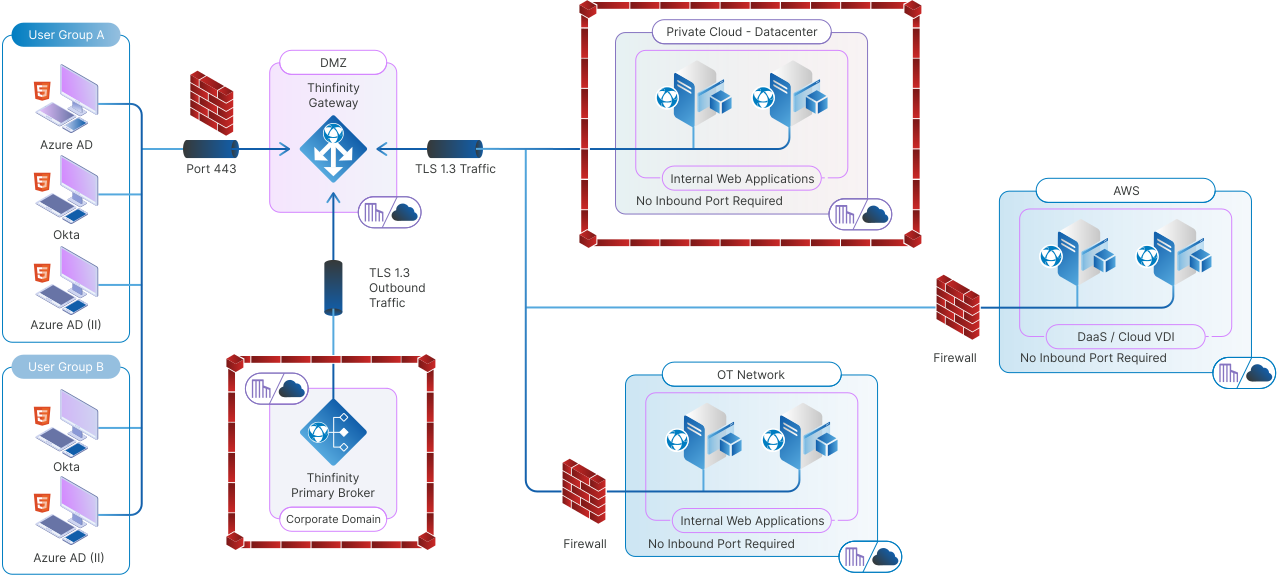
  1.  
  1. Publishing Web Applications Securely: Thinfinity allows IT administrators to easily publish internal web applications, such as intranet sites, CRMs, or ERP systems, through the Web Application Gateway. This eliminates the need for users to establish a VPN connection, while ensuring the application is securely accessible over SSL/TLS encryption. The WAG ensures that only authenticated users can access the published applications, providing a higher level of security than traditional VPN’s.
  2. No Need for Inbound Ports: Traditional VPN setups often require opening inbound ports on the network firewall, which can expose the organization to external threats. Thinfinity’s WAG, on the other hand, uses outbound connections to securely forward internal applications to remote users, minimizing the network’s exposure and enhancing security.
  3. Cross-Platform Accessibility: Thinfinity’s WAG allows users to access internal web applications from any device or platform via an HTML5 browser. Whether on a desktop, tablet, or smartphone, users can securely access applications without needing to install additional software like a VPN client.
  4. Role-Based Access and Zero Trust: Just as with VPNs, Thinfinity supports role-based access controls. Administrators can define which users or groups have access to specific applications, ensuring that only authorized personnel can view sensitive data. This aligns with the principles of a Zero Trust security model, where every access request is authenticated and authorized individually.
  5. Improved Performance: Unlike VPNs, which can introduce latency due to encryption overhead and routing through the VPN server, Thinfinity’s WAG optimizes the delivery of web applications directly through the browser. This reduces the performance issues often associated with VPNs, providing a faster and more seamless experience for end-users.

The Role of Thinfinity’s Secondary Broker in Secure WAG Connections

One of Thinfinity’s standout features is its Secondary Broker, which plays a pivotal role in securely connecting remote users to internal resources without the need for inbound ports. The Secondary Broker generates a secure connection between the Web Application Gateway and the target network by initiating outbound connections. Here’s how it works:

  •  
  • Outbound-Only Connections: The Secondary Broker establishes connections to the Thinfinity Gateway from within the target network. These reverse connections are initiated as outbound traffic, which is typically allowed by firewalls, removing the need to open risky inbound ports.
  • Seamless Application Access: Once the connection is established, users can access web applications securely through Thinfinity’s WAG, just as they would in a traditional VPN environment, but without the complexity and security risks of inbound connections.
  • Increased Security and Scalability: By decentralizing traffic management, the Secondary Broker supports large-scale deployments and improves performance without compromising security. This feature makes it ideal for distributed environments where different departments or locations require secure access to the same applications.
Graphic How to Securely Access Internal Web Applications Without a VPN

Use Cases for Thinfinity’s Web Application Gateway

Many types of internal web applications benefit from being published via Thinfinity’s WAG:

  • HR Systems and Portals: Remote employees can securely access sensitive HR data without needing a VPN connection, ensuring privacy while streamlining access.
  • Customer Relationship Management (CRM) Tools: CRMs often contain valuable customer data. Thinfinity’s WAG ensures secure access from anywhere while maintaining compliance with security policies.
  • Enterprise Resource Planning (ERP) Systems: Thinfinity’s WAG enables secure, remote access to ERP systems without the need for complex VPN setups.
  • Custom Web-Based Business Applications: Many companies have proprietary web applications that are crucial for daily operations but need to be accessed securely by remote users. Thinfinity’s WAG simplifies this access.

Conclusion

Thinfinity’s Web Application Gateway offers a powerful, modern solution for businesses looking to securely publish internal web applications without the hassle of VPNs or ADCs. By utilizing outbound SSL connections and role-based access, it simplifies access while maintaining the highest levels of security. Whether it’s for HR systems, CRMs, or custom web-based applications, Thinfinity provides an effective way to streamline remote access, ensuring a smooth experience for users across any device.

As businesses continue to prioritize security and efficiency, Thinfinity’s approach stands out as a clear path forward—enhancing performance while reducing complexity. If you’re ready to take the next step in securing your internal web applications, setting up a Web Application Gateway is the perfect starting point. Here’s a tutorial to guide you through the process of publishing your first web application in Thinfinity.

About Cybele Software Inc.
We help organizations extend the life and value of their software. Whether they are looking to improve and empower remote work or turn their business-critical legacy apps into modern SaaS, our software enables customers to focus on what’s most important: expanding and evolving their business.

About Version 2 Limited
Version 2 Digital is one of the most dynamic IT companies in Asia. The company distributes a wide range of IT products across various areas including cyber security, cloud, data protection, end points, infrastructures, system monitoring, storage, networking, business productivity and communication products.

Through an extensive network of channels, point of sales, resellers, and partnership companies, Version 2 offers quality products and services which are highly acclaimed in the market. Its customers cover a wide spectrum which include Global 1000 enterprises, regional listed companies, different vertical industries, public utilities, Government, a vast number of successful SMEs, and consumers in various Asian cities.
